
MineBrush publication
Shulker Box Tooltip 5.4.0: Find Supplies, Preview Boxes & Pack Smarter
Find the right supplies without placing every shulker box. Preview contents, compare counts and inspect full slot layouts with Shulker Box Tooltip 5.4.0 for Java 26.2. Includes Fabric and NeoForge downloads, controls, bundle settings and ender chest tips.
Shulker Box Tooltip lets you check what you packed without placing and opening every shulker box. Hover over a box in an inventory and hold Shift to see its contents. Use a compact summary to find supplies quickly or a full slot-by-slot view to inspect the arrangement. The ordinary preview works on your own client, including when you play on a server.
Useful ways to use the preview
- Choose the right building kit: compare boxes of stone, wood and decoration blocks before leaving your storage room. Compact counts help you see which box contains the materials you need.
- Pack for exploration: check that your travel box has food, rockets, spare tools or building blocks before heading into the Nether or End.
- Sort loot after a trip: identify boxes containing ores, mob drops or spare equipment without placing them all around your base.
- Review a carefully arranged kit: use the full grid when slot placement matters, such as tools on one row and consumables on another.
- Distinguish similar boxes: combine the preview with colored boxes and meaningful names. Color is a useful label, but the preview confirms what is actually inside.
The preview helps you inspect storage; it does not give a shulker box more space or let you freely move items through the tooltip. To rearrange a box, open its normal inventory. For actual inventory sorting, see Inventory Profiles Next.
Download Shulker Box Tooltip 5.4.0 for Minecraft 26.2
These downloads are for Minecraft Java 26.2. Choose Fabric or NeoForge to match your launcher instance. They are not Bedrock add-ons.
Fabric
Install Shulker Box Tooltip and Fabric API together. Use a current Fabric Loader suitable for Minecraft 26.2; the supplied Fabric API requires Loader 0.18.4 or newer. Mod Menu is optional but provides convenient access to the configuration screen.
NeoForge
Use the NeoForge build with a NeoForge installation for Minecraft 26.2. This release does not list a separate required library.
Choose one mod build, not both. For older Minecraft versions, use the author’s version history and match its loader and dependencies. Older Forge files are separate releases, not substitutes for the current NeoForge download.
Install and try your first preview
- Close Minecraft and open the game directory of the launcher instance you use.
- Put the selected mod JAR into its
modsfolder. On Fabric, add Fabric API too. Remove duplicate older copies of the same mod. - Launch the matching profile and open an existing world or join your server. No new world or resource pack is needed.
- Open your inventory, hover over a shulker box containing items and hold left Shift.
- Keep Shift held and add left Alt to inspect the full grid. On a Mac keyboard, Alt is the Option key.
Install it on your own game for the tooltip interface. A server installation is optional and adds synchronization features; installing only on a dedicated server does not give an unmodded client the preview interface. Follow the server’s rules on client mods.
Compact view: find supplies and read totals
Shift opens the default compact preview. Repeated matching items can be grouped into a shorter summary, which is useful when a box contains many stacks of the same building block. A number larger than the normal stack limit represents a preview total; it is not a newly created oversized inventory stack.
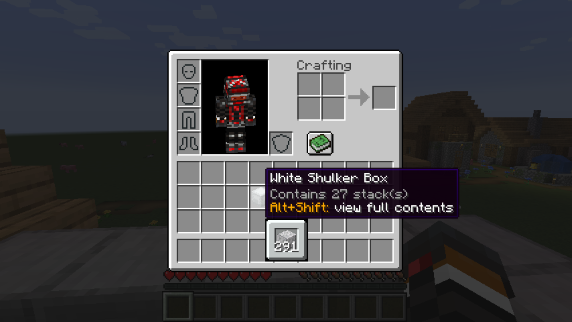
For example, use the compact view to find a box with plenty of stone before a long building session. If you need to distinguish differently enchanted or named items, preserve the setting that separates different item components, or switch to the full view. A summarized icon is not the best way to compare individual pieces of equipment.
Full view: inspect the actual slots
Shift + Alt shows the full contents in their slot positions by default. This is the better choice when you want to check empty space, see where a tool is stored or review a kit arranged by rows. It displays the box’s existing layout and does not rearrange it.
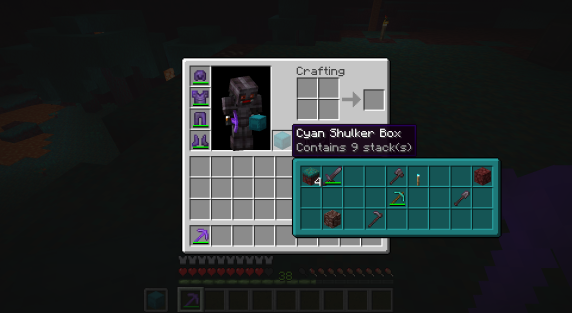
Hold left Ctrl while a preview is open to lock the tooltip. This keeps it available while you move the pointer to inspect it. The Controls category lets you change the preview, full-preview and lock keys if they clash with another mod or your keyboard layout. Follow the displayed key hints if you have changed the defaults.
Make the preview comfortable to read
On Fabric, open Mod Menu, select ShulkerBoxTooltip and use its configuration button. The settings are also stored in config/shulkerboxtooltip.json5 inside the game directory; close the game before editing the file manually. Use the in-game explanations where possible.
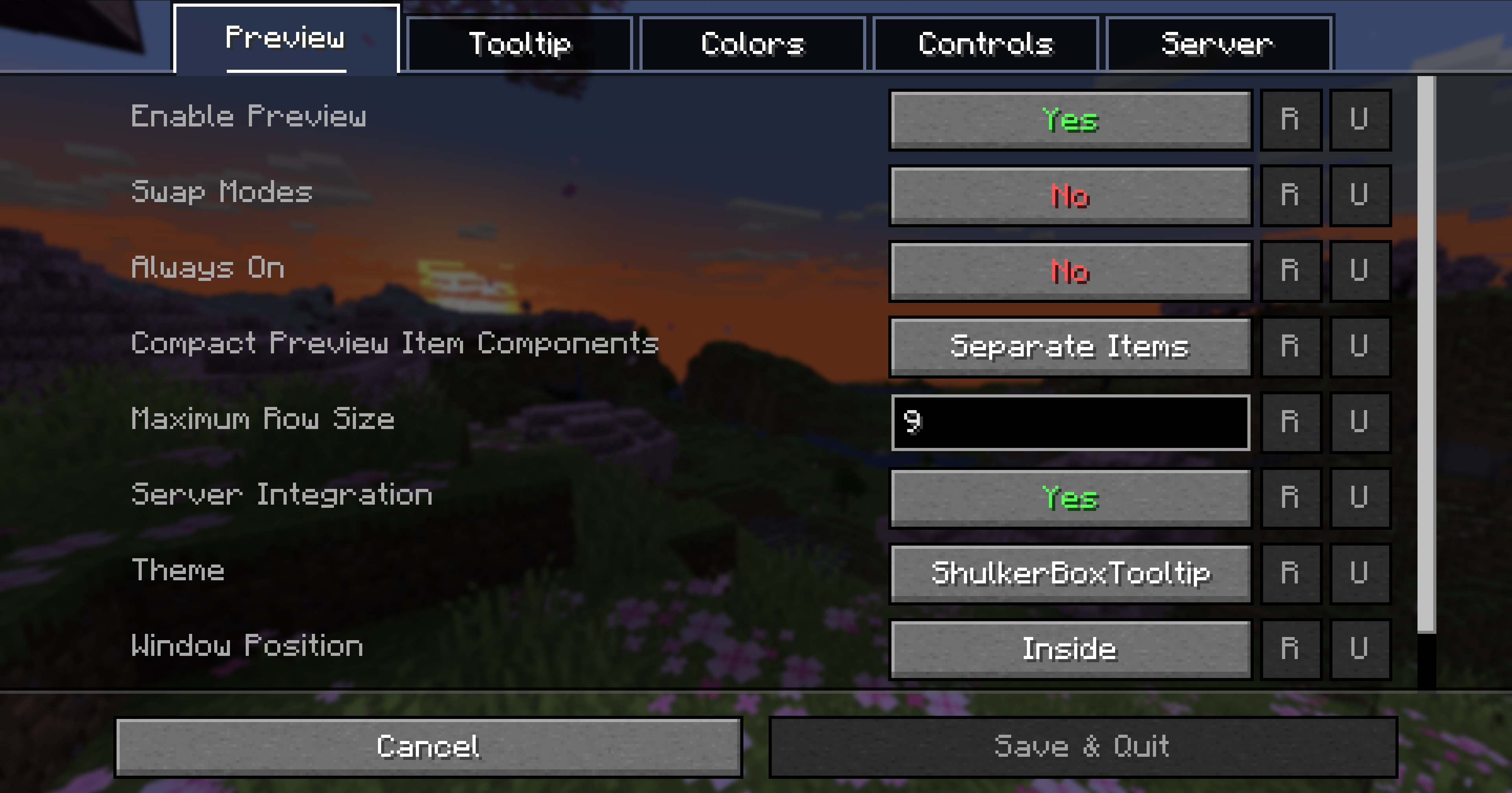
- Always On: display the preview without holding its activation key. Helpful when you frequently compare boxes; turn it off if you prefer smaller tooltips most of the time.
- Swap Modes: make the full view your primary preview when you care more about the layout than a compact summary.
- Compact Preview Item Components: keep differently named, enchanted or otherwise distinct items separate when those differences matter.
- Compact Preview Item Order: sort summary entries by stack size to spot abundant supplies, or preserve preview order for a more familiar arrangement.
- Window Position and Maximum Row Size: adjust a preview that feels too wide or obscures nearby information. Very large GUI scaling can leave little room; lowering Minecraft’s GUI scale can help too.
- Colored Preview Window: retain box colors for quick recognition or disable them for a more uniform look.
- Show Key Hints: keep reminders visible while learning the controls.
Bundles in version 5.4.0
Enhanced bundle previews are disabled by default in 5.4.0. In the bundle theme setting, choose Vanilla+ if you want the enhanced preview. This mode adds preview locking and allows scroll-wheel selection across the contained items without the preview’s usual item-display limit. It also shows the selected item’s tooltip.
This expands how you inspect the bundle, not how much the bundle can hold. Keep the Vanilla bundle theme if you want the mod to leave that part of the interface alone. The release also improves preview positioning near screen edges.
Ender chest preview: fresh data versus remembered contents
The current version can remember your ender chest contents after you open the chest normally. If you see Open your ender chest to enable preview, open it once in that world or server and then try the inventory-item preview again. This fallback uses saved information and may be stale if the contents change elsewhere; reopen the actual chest to refresh it.
When the server also has ShulkerBoxTooltip and integration is enabled, the mod can use server-synchronized contents instead. The server configuration offers Active synchronization when contents change or Passive updates when a preview is opened. Availability depends on the server’s settings. This concerns your own ender chest, not access to another player’s private inventory.
Creative containers and modded storage
The preview can also work with container items that carry their stored inventory data. In Creative, Ctrl + Pick Block can copy a container together with its data; hovering that resulting item can then reveal its contents. A normal empty chest item in Survival does not magically reveal the contents of a chest placed somewhere else.
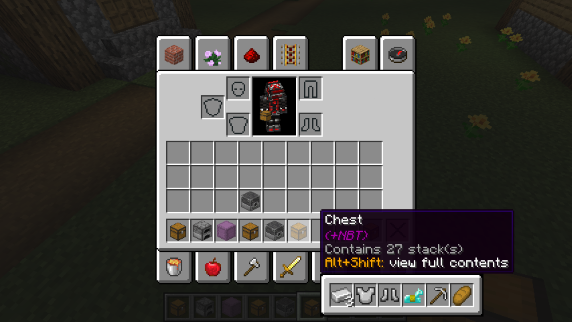
Generic Container Preview can show items using Minecraft’s container data component even without dedicated support. Other modded storage systems may need their own integration, so compatibility is not universal. For map makers, optional loot-table information identifies a stored loot table; it does not reveal a guaranteed list of future randomized loot.
If the preview is missing or misleading
- No preview at all: confirm the mod is in the instance you launched, test with a filled shulker box, check Enable Preview and use the configured key. Fabric needs Fabric API.
- The wrong view opens: check Swap Modes and the current controls. Always On also changes whether you need to hold the preview key.
- Similar items appear combined: select separate item components or inspect the full view, especially for enchanted equipment.
- Ender chest contents look old: open the actual chest to refresh the client cache, or check server integration with the server owner.
- A modded container stays blank: it may store its inventory differently or withhold that data from the client. A preview cannot display data it has not received.
- Duplicate lines clutter the tooltip: a server-side preview datapack may add its own descriptive text. The Hide Shulker Box Lore option can hide that text; enable it only if you are happy to hide the custom lore too.
- A shortcut conflicts: change it in the mod’s Controls category. Controlling can help with Minecraft’s normal key-bind list, but separately managed mod controls may need their own settings screen.
Author and sources
Shulker Box Tooltip is by MisterPeModder and contributors, under the MIT license. Fabric API is maintained by FabricMC and contributors. Downloaded project files and supplied notices are preserved.
Sources: official project and gallery, release notes and files, current source and option descriptions, author’s wiki, and Fabric API. Gameplay images are preserved author examples, not MineBrush test captures. The branded cover is conceptual artwork, not an in-game screenshot.
More for your Java setup.
Spend less time rearranging loot. Inventory Profiles Next sorts chests, moves matching items, locks slots, refills hotbar supplies and switches equipment profiles. Get IPN 2.3.7 for Minecraft Java 26.2 with the right libraries and practical setup steps.
- Minecraft
- Java 26.2
- Loader
- Fabric
- Runtime
- Client
Client inventory tools; needs carried supplies for refill
Java · Mod
Inventory Profiles Next
Spend less time rearranging loot. Inventory Profiles Next sorts chests, moves matching items, locks slots, refills hotbar supplies and switches equipment profiles. Get IPN 2.3.7 for Minecraft Java 26.2 with the right libraries and practical setup steps.
Client inventory tools; needs carried supplies for refill
- Minecraft version
- Java 26.2
- Game edition
- Java Edition
- Loader / platform
- Fabric
- License
- AGPL-3.0-or-later
- Platform family
- Bedrock & Mobile
- Supported devices
- Windows · macOS · Linux
- Install format
- .jar mod file from the creator
- Touch readiness
- Not required
- Resource type
- Mod
- Project version
- 2.3.7
- Last verified at
- Sep 13, 2026
- Secondary guide action
- Setup & fixes
- Compatibility confidence
- Source claimed
- Java mod loader
- Fabric
- Java runtime side
- Client
- Card evidence statement
- Sorting, matching transfers, locked slots and equipment profiles
- Required dependency
- Matching libIPN 6.8.3; Fabric also needs Fabric API and Fabric Language Kotlin
- Card delivery statement
- Loader-specific mod and library downloads
- Card limitation note
- Client inventory tools; needs carried supplies for refill
- Edition applicability
- Java
- Delivery state
- Direct download
- Lifecycle state
- Current
Mod Menu
20.0.2Find installed mods, open supported settings and make a large modpack easier to navigate. Download Mod Menu 20.0.2 for Java 26.2, with search tips, library filters and the required files.
- Minecraft
- Java 26.2
- Loader
- Fabric
- Runtime
- Client
Client menu · no server installation needed
Java · Mod
Mod Menu
Find installed mods, open supported settings and make a large modpack easier to navigate. Download Mod Menu 20.0.2 for Java 26.2, with search tips, library filters and the required files.
Client menu · no server installation needed
- Minecraft version
- Java 26.2
- Game edition
- Java Edition
- Loader / platform
- Fabric
- License
- MIT
- Platform family
- Java & PC
- Supported devices
- Windows · macOS · Linux
- Install format
- JAR files in the instance mods folder
- Touch readiness
- Not required
- Resource type
- Mod
- Project version
- 20.0.2
- Last verified at
- Sep 12, 2026
- Secondary guide action
- Setup & fixes
- Compatibility confidence
- Source claimed
- Java mod loader
- Fabric
- Java runtime side
- Client
- Card evidence statement
- Search installed mods and open supported settings
- Required dependency
- Fabric API and Text Placeholder API for Minecraft 26.2
- Card delivery statement
- Mod Menu and dependencies hosted on MineBrush
- Card limitation note
- Client menu · no server installation needed
- Edition applicability
- Java
- Delivery state
- Direct download
- Lifecycle state
- Current
Controlling
26.2.2Find the shortcut you need, spot conflicting bindings and choose free keys for your modpack. Download Controlling 26.2.2 for Java 26.2 with matching Searchables, and organize your controls without resetting the whole layout.
- Minecraft
- Java 26.2
- Loader
- Fabric
- Runtime
- Client
Client-side controls; separate mod hotkey systems may need their own settings
Java · Mod
Controlling
Find the shortcut you need, spot conflicting bindings and choose free keys for your modpack. Download Controlling 26.2.2 for Java 26.2 with matching Searchables, and organize your controls without resetting the whole layout.
Client-side controls; separate mod hotkey systems may need their own settings
- Minecraft version
- Java 26.2
- Game edition
- Java Edition
- Loader / platform
- Fabric
- License
- MIT
- Platform family
- Java & PC
- Supported devices
- Windows · macOS · Linux
- Install format
- .jar mod file from the creator
- Touch readiness
- Not required
- Resource type
- Mod
- Project version
- 26.2.2
- Last verified at
- Sep 13, 2026
- Secondary guide action
- Setup & fixes
- Compatibility confidence
- Source claimed
- Java mod loader
- Fabric
- Java runtime side
- Client
- Card evidence statement
- Find actions, conflicting bindings and available keys
- Required dependency
- Matching Searchables 1.0.1; Fabric also needs Fabric API
- Card delivery statement
- Native downloads for Fabric and NeoForge
- Card limitation note
- Client-side controls; separate mod hotkey systems may need their own settings
- Edition applicability
- Java
- Delivery state
- Direct download
- Lifecycle state
- Current
Player discussion 0
Questions, discoveries and help from other players.