
MineBrush publication
Mod Menu for Minecraft 26.2: Find Mods, Settings and Updates
Find installed mods, open supported settings and make a large modpack easier to navigate. Download Mod Menu 20.0.2 for Java 26.2, with search tips, library filters and the required files.
Mod Menu gives your installed Minecraft mods a searchable home. Find a mod by name, read what it does, see its version and open its settings when the author provides a configuration screen. It is particularly useful when a modpack contains so many small improvements that you can no longer remember which one controls a feature.
Created by TerraformersMC, Prospector, haykam821, gniftygnome and contributors, it is a client-side utility for Java Edition. It adds a menu, not blocks, mobs or a performance boost. You can use it in single-player or while playing on a server; the server does not need Mod Menu installed.
What you can do with it
- Find the setting behind a feature. Want to change an animation, move an overlay or adjust a visual effect? Search for the responsible mod, select it and use its configuration button. The settings available are supplied by that mod, so the same menu can lead to very different options.
- Learn your way around a new modpack. Browse names, descriptions and author links to discover what is installed. Hide libraries while exploring gameplay additions, then show them when you need to check a dependency.
- Get help for the right version. Select a mod to read its installed version and use its Website or Issues link. This is more useful than guessing from an old download in your browser history.
- Keep a long list manageable. Use search, A–Z sorting and a compact list. Parent and child entries can group related components, so one downloaded JAR does not always correspond to one visible entry.
- Review available updates. The update checker can flag supported mods with newer compatible releases. You can prioritize those entries while keeping your game version and modpack requirements in mind.
A tour of the Mods screen
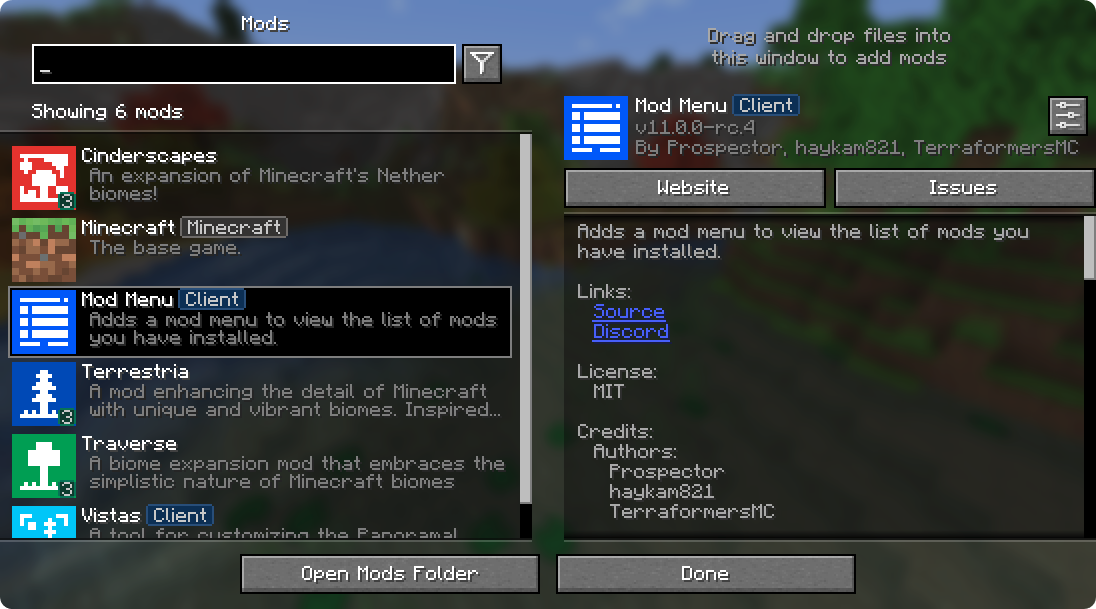
The list tells you about mods loaded in the running instance. Selecting a name reveals its description and version. Badges such as Client and Library help explain its role. A library supports other mods and may have nothing for you to activate or configure directly.
Download Mod Menu for Java 26.2
Mod Menu 20.0.2 is the stable 26.2 release published September 11, 2026. The author lists the same JAR for Fabric and Quilt. Start with the Fabric setup below if you are creating a fresh instance; an existing Quilt pack must also provide compatible loader and dependency versions. This is not a Forge, NeoForge or Bedrock/mobile download.
Mod Menu 20.0.2 · Fabric / Quilt · Java 26.2
The Fabric build requires Fabric Loader 0.19.2 or newer. The creator’s release page lists Fabric API and Text Placeholder API as dependencies; they are provided separately below.
Fabric API · Java 26.2
Shared library for the Fabric setup. If your instance already contains a compatible Fabric API, keep one copy rather than installing a duplicate.
Text Placeholder API · Java 26.2
Supports formatted text used by compatible mods. The author’s 26.2 file is named 3.1.0-beta.1+26.2; that beta suffix is part of the dependency version, not the Mod Menu version. Its release metadata lists Fabric. For a Quilt pack, follow the pack’s dependency guidance instead of treating every Fabric library as automatically compatible.
Staying on an older Minecraft version? These attachments target 26.2. The author also lists Mod Menu 18.0.1 for 26.1–26.1.2; use the official version history to identify the matching older release. The newer 21.0.0-beta.1 targets 26.3-rc-1 and is not an upgrade for a normal 26.2 instance.
Install it and open your first mod settings
- Check the Minecraft version and loader in your launcher. For these downloads, choose a Java 26.2 Fabric instance with Fabric Loader 0.19.2 or newer, or a compatible existing Quilt setup.
- Close Minecraft. Open that instance’s folder through your launcher and put the JARs into its
modsfolder. Keep JARs intact. Replace an older copy of the same mod; do not leave two versions together. - Launch the same modded instance. Look for the Mods button on the title screen. Its position can change with Mod Menu’s display settings or another menu customization mod.
- Open Mods, type a mod’s name and select it. If it supports a configuration screen, click the configuration icon or Configure… button. Make one useful change and apply or save it in that mod’s own screen.
- Return to your world and check the result. If the setting says it needs a restart, restart the game before deciding that it did not work.
For quick access while playing, open Options → Controls → Key Binds, find Open Mod Menu and assign an unused key. Use Open Mods Folder to reach the current instance’s files; this avoids accidentally editing a different launcher profile.
Search and filters that save time
Search can match a mod’s name, ID, description or author. Try a recognizable part of its name first. With English interface text, terms such as config can help find configurable mods and updates can find entries with an available update. These are broad text searches, so descriptions can also produce matches.
Use the filter button beside search to change the list. Libraries: Hidden makes everyday browsing cleaner; Shown helps when checking support mods; With Config keeps configurable libraries accessible without showing every internal component. Clear the search and show libraries before concluding that a dependency is missing. A hidden library is still loaded.
For a large collection, choose List: Compact and sort A–Z. If you prefer the original names used in English guides, Mod Menu’s options can disable localized mod names while leaving the rest of Minecraft in your chosen language. The displayed mod count can include or exclude libraries and child entries; a different count does not by itself mean your files have disappeared.
Why some mods have no configuration button
Mod Menu opens configuration screens that other mods expose. It does not invent settings for every installed mod. Some mods work automatically, some use key bindings, some use Minecraft’s own options and others are configured through files or server settings. A missing button alone does not mean installation failed.
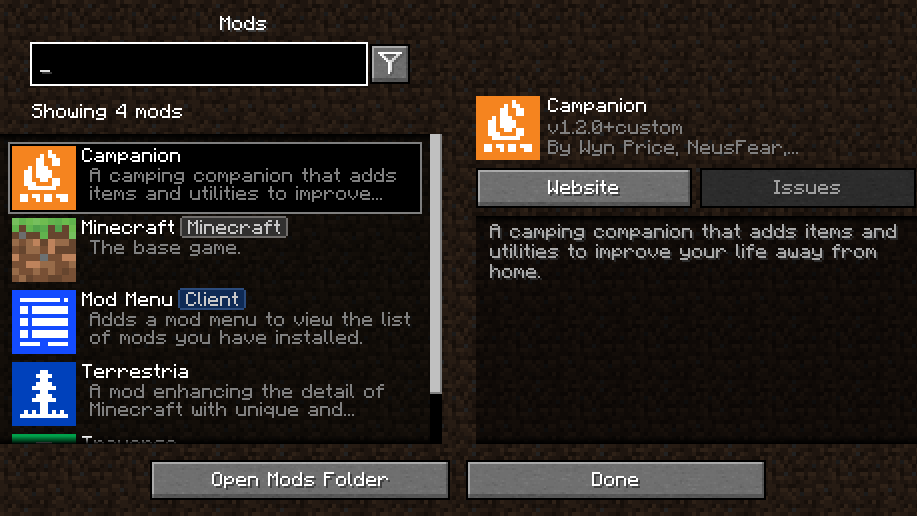
If configuration buttons are missing everywhere, check that Config Buttons is set to Shown. If only one mod fails to open its screen, check that mod’s dependencies and version, then its issue tracker. Mod Menu can also open its own options: select Mod Menu in the list and use its configuration control.
Use update notices without breaking your pack
The update checker supports Modrinth-hosted files and mods with their own update source. In Mod Menu Options, use Update Channel: Release for ordinary play; Release & Beta and All include less settled versions. Sort by Has Update when reviewing the collection.
An update notice is a starting point, not proof that the whole modpack will remain compatible. Open the linked release, read its game version, loader and dependency requirements, and follow a curated pack’s update instructions. Close the game before replacing files and retain your previous working setup. Updating Mod Menu does not update Minecraft or every other mod automatically.
If there is no update marker, a mod may be current, unsupported by the checker or temporarily unreachable. A network or update-check error does not by itself stop an already installed mod from working. You can disable Update Checker or hide its indicator if you prefer to manage updates through your launcher.
Adding mods and resolving common problems
- Drag-and-drop still needs a restart. The Mods screen can accept JAR files dropped into the game window and asks before copying them into the mods folder. It does not load new code into the running world. Restart afterward, and check compatibility and dependencies first.
- No Mods button: confirm that you launched the intended Fabric/Quilt profile, that Mod Menu is in that instance’s mods folder and that its version matches Minecraft. Fabric API alone does not add this menu. A custom title screen may relocate or hide the button; try your assigned Open Mod Menu key.
- A mod is absent from the list: clear search and show libraries. If it is still missing, check the instance folder and loader’s startup message. A JAR intended for NeoForge will not become a Fabric mod because Mod Menu is installed.
- The game stops before reaching the menu: read the loader’s missing-dependency or incompatible-version message. Correct that named component first. Mod Menu cannot repair startup failures from inside a screen the game cannot reach.
- Want to disable a mod? Exit Minecraft and use your launcher’s mod management or move its JAR out of the instance. Hiding an entry in Mod Menu does not disable it. Removing a gameplay or world-generation mod can affect saved worlds, so keep a backup before doing that.
What changed in 20.0.2?
This release adds Uzbek localization and updates Chinese translations. It is a small language update, not a new collection of gameplay features. Players already on 20.0.1 should not expect a new visual mod manager or an FPS increase from this patch.
Authors and sources
Mod Menu is developed by TerraformersMC and the credited contributors under the MIT license. MineBrush provides this player guide, a branded editorial cover and locally hosted original downloads; the mod and original interface screenshots belong to their respective creators.
Sources: official 20.0.2 release and dependencies, official 26.2 source and interface behavior, author screenshot gallery, Fabric API by FabricMC and Text Placeholder API by Patbox. The MineBrush cover is an editorial illustration; the two article screenshots are preserved author images.
More for your Java setup.
Give your Java world a new look without losing your familiar setup. Learn which resource pack to choose, where its ZIP belongs, how to activate it and combine overlays, and how to fix missing textures or version warnings—with illustrated steps for Windows, Mac and Linux.
- Edition
- Java Edition
- Difficulty
- Beginner
- Time
- 8 min read; setup time varies
MineBrush · Guide
Install & Combine Java Resource Packs
Give your Java world a new look without losing your familiar setup. Learn which resource pack to choose, where its ZIP belongs, how to activate it and combine overlays, and how to fix missing textures or version warnings—with illustrated steps for Windows, Mac and Linux.
- Minecraft version
- Choose a pack for your Java version
- Game edition
- Java Edition
- Platform family
- Java & PC
- Supported devices
- Windows · macOS · Linux
- Install format
- Java resource-pack ZIP
- Touch readiness
- Not required
- Resource type
- Guide
- Compatibility confidence
- Not applicable
- Edition applicability
- Java
- Estimated time
- 8 min read; setup time varies
- Guide difficulty
- Beginner
- Delivery state
- No file
- Lifecycle state
- Current
Build your first Fabric setup for Minecraft Java. Download the installer, choose matching mods, find the right folder and check the feature in-game—with illustrated steps, useful examples and fixes for common errors.
- Edition
- Java Edition
- Difficulty
- Beginner
- Time
- 8 min read; setup time varies
MineBrush · Guide
Install Your First Fabric Mods
Build your first Fabric setup for Minecraft Java. Download the installer, choose matching mods, find the right folder and check the feature in-game—with illustrated steps, useful examples and fixes for common errors.
- Minecraft version
- Choose the version your mods support
- Game edition
- Java Edition
- Platform family
- Bedrock & Mobile
- Supported devices
- Windows · macOS · Linux
- Install format
- Universal installer JAR; Java required
- Touch readiness
- Not required
- Resource type
- Guide
- Compatibility confidence
- Not applicable
- Edition applicability
- Java
- Estimated time
- 8 min read; setup time varies
- Guide difficulty
- Beginner
- Delivery state
- Direct download
- Lifecycle state
- Current
Make bundles useful with clear capacity rules, mouse/controller/touch controls and five practical kits. Understand Hardcore, prepare your first days and learn what changed in Java and Bedrock.
- Game released
- Java
- 1.21.2 · Stable
- Bedrock
- 1.21.40 · Stable
Focus Bundle capacity and controls, useful inventory kits, Hardcore survival
Topic Bundles of Bravery
Install Included in the official game update
Back up before updating
Java + Bedrock · Release
Bundles of Bravery
Make bundles useful with clear capacity rules, mouse/controller/touch controls and five practical kits. Understand Hardcore, prepare your first days and learn what changed in Java and Bedrock.
Back up before updating
- Update type
- Major release
- Release channel
- Unknown / not stated
- Official release date
- 2024-10-22
- World safety
- Back up before updating
- Player impact
- Bundle capacity and controls, useful inventory kits, Hardcore survival
- Related major release
- MineBrush three-year release archive
- Platform family
- Cross-edition
- Supported devices
- Java: Windows, macOS, Linux. Bedrock: supported Windows, mobile and console devices.
- Install format
- Included in the official game update
- Touch readiness
- Yes
- Resource type
- Update
- Last verified at
- Sep 17, 2026
- Update state
- historical
- Compatibility confidence
- Source claimed
- Bedrock version/build
- 1.21.40
- Card delivery statement
- Included in the official game update
- Edition applicability
- Java + Bedrock
- Java version/build
- 1.21.2
- Shared update topic
- Bundles of Bravery
- Delivery state
- No file
- Lifecycle state
- Superseded
- Java update channel
- Stable
- Bedrock update channel
- Stable

Distant Horizons
3.2.0-b betaSee distant mountains, coastlines and your own builds beyond normal render distance. Learn useful settings, understand multiplayer and shader support, view six original screenshots and download the right Distant Horizons build for your Minecraft version.
- Minecraft
- Java 26.2 / 26.1.x / 1.21.11 / 1.21.1 / 1.20.1
- Loader
- Fabric
- Runtime
- Client
Beta · measure on your device · back up LOD database
Java · Mod
Distant Horizons
See distant mountains, coastlines and your own builds beyond normal render distance. Learn useful settings, understand multiplayer and shader support, view six original screenshots and download the right Distant Horizons build for your Minecraft version.
Beta · measure on your device · back up LOD database
- Minecraft version
- Java 26.2 / 26.1.x / 1.21.11 / 1.21.1 / 1.20.1
- Game edition
- Java Edition
- Loader / platform
- Fabric
- License
- LGPL-3.0
- Platform family
- Java PC
- Supported devices
- Windows · macOS · Linux
- Install format
- .jar mod file from the creator
- Touch readiness
- Not required
- Resource type
- Mod
- Project version
- 3.2.0-b beta
- Last verified at
- Sep 19, 2026
- Secondary guide action
- Setup & fixes
- Compatibility confidence
- Source claimed
- Java mod loader
- Fabric
- Java runtime side
- Client
- Card evidence statement
- Creator JAR and documentation checked 2026-09-05 · runtime not tested
- Required dependency
- Matching loader; required Fabric API components bundled
- Card delivery statement
- Five version-specific JAR downloads
- Card limitation note
- Beta · measure on your device · back up LOD database
- Edition applicability
- Java
- Delivery state
- Direct download
- Lifecycle state
- Current
Turn decorated pots into food jars, supply caches and breakable rewards. Learn filling, retrieval, simple hopper uses and the bat refresh—with original images and the important Java 1.20.4 item-loss fix.
- Game released
- Java
- 1.20.3 · Stable
- Bedrock
- 1.20.50 · Stable
Focus Decorated pot storage, retrieval and automation; bat appearance; Java 1.20.4 hotfix
Topic Bats & Pots
Back up before updating
Java + Bedrock · Release
Bats & Pots: Storage and Build Ideas
Turn decorated pots into food jars, supply caches and breakable rewards. Learn filling, retrieval, simple hopper uses and the bat refresh—with original images and the important Java 1.20.4 item-loss fix.
Back up before updating
- Update type
- Stable update
- Release channel
- Unknown / not stated
- Official release date
- 2023-12-05
- World safety
- Back up before updating
- Player impact
- Decorated pot storage, retrieval and automation; bat appearance; Java 1.20.4 hotfix
- Related major release
- Trails & Tales
- Platform family
- Bedrock & Mobile
- Supported devices
- Java: Windows, macOS, Linux · Bedrock: supported phones, PCs and consoles
- Touch readiness
- Yes
- Resource type
- Update
- Last verified at
- Sep 16, 2026
- Update state
- historical
- Compatibility confidence
- Source claimed
- Bedrock version/build
- 1.20.50
- Edition applicability
- Java + Bedrock
- Java version/build
- 1.20.3
- Shared update topic
- Bats & Pots
- Delivery state
- No file
- Lifecycle state
- Superseded
- Java update channel
- Stable
- Bedrock update channel
- Stable
Player discussion 0
Questions, discoveries and help from other players.