
MineBrush publication
Everything Continent Bedrock Seed: Map, Routes and Base Ideas
Everything Continent brings varied landscapes into one long-term Bedrock world. Plan regional bases, follow author coordinates to a jungle temple, village and mansion, and explore the original annotated map.
Everything Continent is a Bedrock seed for players who want one world with room for many different adventures. Start a modest camp, collect contrasting building materials, connect regional settlements and work toward bigger expeditions instead of abandoning your world whenever you want a new landscape. Its appeal is variety on a large landmass, not a ready-built adventure map with objectives.
PeasantLord1 shared seed -5207005594169711425 for Bedrock 1.21.73. The author's estimate puts the continent at roughly 3,500 blocks north–south and 3,000 east–west. That is a long-term exploration area, not a promise that every destination is beside spawn. Later releases may place structures differently; the coordinates below are the author's Bedrock locations.
Copy the seed and create your world
Paste this number into the seed field when creating a new world.
Seed: -5207005594169711425. Keep the leading minus and every digit. This is a world-generation number: there is no ZIP or world file to download.
- In Minecraft Bedrock, create a new world and enter the number in its seed field. Use normal world generation without terrain-changing add-ons.
- Choose Survival for an expedition world or Creative for planning settlements. Enable Show Coordinates so you can follow the X and Z destinations.
- After spawning, write down your own position before leaving. The author places spawn in the southern badlands but does not supply an exact spawn coordinate.
- Set up food, basic tools, a bed and a small storage point before crossing the continent. Bring a boat for stretches where the coast or a river offers a useful route.
The source version is 1.21.73; this guide does not establish identical generation on newer builds. If you want to inspect the layout first, create a separate Creative world with the same seed and version. Entering this seed elsewhere does not replace the terrain in an existing world.
Read the author's continent map
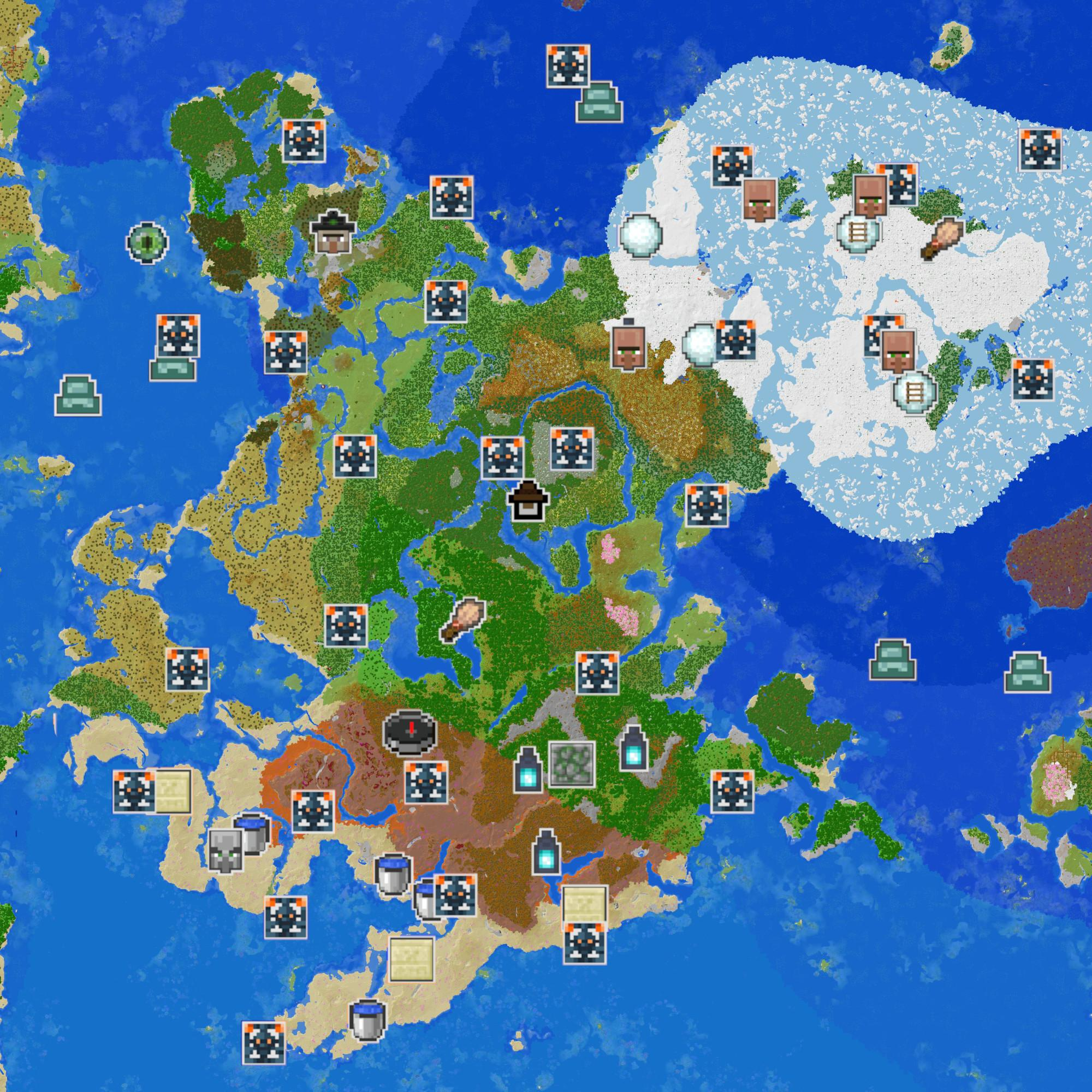
The map is a rendered overview made with uNmINeD, with structure icons added by the author. It is useful for seeing regions together, but it does not show a walkable route or the height of underground destinations. Open the full-size image to distinguish the small icons.
- Compass: the author's spawn-area marker in the southern badlands. It is not the direction your character is currently facing.
- Villager faces: village markers. Use them to think about supply stops or future settlements, then check each location in your own world.
- Soul lanterns: the three ancient cities reported by the author. They are underground; a surface landmark does not reveal an entrance.
- Dark cage-like icons with orange corners: trial chambers. These are different from ancient cities and call for a different expedition.
- Brush icons: trail ruins. Treat them as an archaeology outing rather than expecting a large building above ground.
Ruined portals were deliberately left off this overview to reduce clutter. A missing icon therefore does not mean the feature is absent. For a closer coordinate lookup, use Chunkbase's seed map, enter the exact seed, select Bedrock and the version you are playing, then click a structure icon. Map predictions can differ from the generated world.
Three destinations and what to do there
These X/Z positions come from the source author's replies. No Y height is supplied: approach over the surface and locate the building rather than inventing a teleport height. X increases eastward; Z increases southward. Check both values while travelling.
Jungle temple — X 600, Z 120
Choose this outing if you enjoy exploring a compact structure before committing to a large combat location. Bring food, light, building blocks and tools. Move slowly inside: jungle temples can hide tripwire traps that fire arrows. Look at the floor and walls before advancing instead of sprinting toward a chest.
After exploring, use the building as the centre of a jungle research camp. Add a sheltered path, a supply hut and an observation platform outside; keep the original stonework intact if you want a ruin that still feels discovered. Collecting local plants and materials also gives you a reason to return beyond the first loot trip.
Northern village — X 808, Z -1416
This is a separate northern expedition. From the temple coordinate, the village is 208 blocks east and 1,536 blocks north; those are coordinate differences, not a surveyed walking route. Prepare a return plan and spare food before setting out.
A village can become your northern base: put your own bed and storage in a new building, improve access and lighting, and protect the existing inhabitants before expanding. A warehouse and a marked road back toward your southern base make this a useful supply hub. Do not assume a particular trader, chest reward or village layout from the coordinate alone.
Woodland mansion — X 440, Z 856
Save the mansion for a prepared adventure. Carry armour, a shield, food, spare tools and light; place a recovery chest and bed at a separate safe camp before going inside. Work through the building in manageable sections and mark passages you have cleared so a retreat is easy to follow.
Once secured, it offers a much larger building project than a starter cabin: turn wings into a library, museum, workshop or shared headquarters. Preserve interesting rooms rather than stripping every corridor immediately. The author also reports a pale garden beside the mansion, giving you a nearby contrast for pale-wood paths and gardens. Explore that biome by day first: at night, a natural creaking heart can bring out a creaking.
Choose a project that keeps the world interesting
A continent of regional bases
Build a small outpost each time you reach a landscape you like. Give each one a useful role: a southern expedition store, a forest workshop, a northern supply village and a coastal dock. Keep a common sign style and a short coordinate list in every base. The next journey then starts from a place you already know instead of requiring you to carry everything from spawn.
A building-material collection with a purpose
Collect samples from different regions and make a palette wall at home. Pair warm terracotta with darker timber for one district, then try a pale, colder palette for another. Choose the next expedition from the materials your build needs. Bring back renewable plants where possible so every later building session does not require the same long trip.
A shared world with distinct settlements
For friends, assign regions by the projects people actually want to build: port, mountain retreat, farming village or mansion restoration. Agree on shared roads and which landmarks to preserve. A public storage stop with boats, food and spare beds makes visiting each other's areas easier without forcing everyone to live in one crowded base.
An explorer's atlas
Start with a local route, then gradually map the coastline and connect inland destinations. Record useful landing places and hazards beside the coordinates. The author's overview supplies ideas; your own maps and signs turn those ideas into routes you can repeat. A later offshore trip can investigate the mushroom islands the author mentions without treating them as part of the mainland.
Does it really contain every biome?
No: “Everything Continent” is the source's name, not literal complete biome coverage. The author specifically lists Windswept Gravelly Hills, Flower Forest, Savanna Plateau, Ice Spikes, Sunflower Plains and Jagged Peaks as missing from the continent. Mushroom fields are offshore. Choose this seed for a broad mix of landscapes, not a guaranteed checklist of every biome in walking distance.
Similarly, the crowded map is an invitation to explore, not a guarantee of every entrance, reward or structure in every Minecraft version. This guide gives coordinates only where the author supplied them; the ancient-city and trial-chamber markers do not come with additional invented coordinates.
If your world looks different
- Completely different terrain: check the leading minus, all digits, edition and whether you created a fresh normal world. A shortened number produces a different seed.
- Similar land but a building is missing: confirm the Bedrock version. Java can share broad terrain while placing structures differently, so these Bedrock destinations are not a Java route.
- You reached X/Z but cannot see a structure: check whether you are looking for a surface building or an underground feature. For the three destinations above, search the immediate surrounding terrain; the author did not identify exact doors or Y heights.
- An online map disagrees: select the correct edition and generation version. In an older world, existing chunks retain their earlier generation; a newly generated comparison world is easier to interpret.
For more help, see our seed compatibility guide, route planning guide and coordinate journal guide. If you prefer a shorter list of early destinations, try the Biome Trail Bedrock seed.
Creator and sources
Seed discovery, annotated map and reported locations: PeasantLord1's original Everything Continent post and corrections. Further gameplay context: Mojang's tripwire explanation and Pale Garden introduction, plus Chunkbase map instructions. MineBrush wrote the route suggestions and building ideas; its branded cover is an editorial illustration. The inline map belongs to PeasantLord1.
More for your Bedrock world.
Biome Trail — Plan a Bedrock adventure around a reported portal, village, jungle temple and igloo. Copy the seed, use the coordinate diagram and choose a base-building or exploration project.
- Minecraft
- 1.21+ (exact source patch not stated)
- Seed
-2898061480750634164- Feature
- Portal, village, temple and igloo
Exact source patch is not stated
Bedrock · Seed
Biome Trail
Biome Trail — Plan a Bedrock adventure around a reported portal, village, jungle temple and igloo. Copy the seed, use the coordinate diagram and choose a base-building or exploration project.
Exact source patch is not stated
- Minecraft version
- Bedrock 1.21+ (source report)
- Game edition
- Bedrock Edition
- Key coordinates
- Four nearby stops · full XYZ list in the guide
- Platform family
- Bedrock & Mobile
- Resource type
- Seed
- Seed value
- -2898061480750634164
- Last verified at
- Sep 14, 2026
- Compatibility confidence
- Source claimed
- Bedrock version/build
- 1.21+ (exact source patch not stated)
- Card evidence statement
- Bedrock 1.21+ report by the discoverer
- Card delivery statement
- Copy seed · create a new world
- Card limitation note
- Exact source patch is not stated
- Copy availability
- Copy available
- Java seed feature
- Portal, village, temple and igloo
- Edition applicability
- Bedrock
- Delivery state
- No file
- Lifecycle state
- Current
-2898061480750634164
Missing the village or landscape from a seed post? Match editions, versions and world settings, compare real map examples and understand what changes in an older save.
- Edition
- Cross-edition
- Difficulty
- Beginner
- Time
- Work at your own pace
Compare the place you want, not just the seed number
MineBrush · Guide
Why Your Seed Looks Different
Missing the village or landscape from a seed post? Match editions, versions and world settings, compare real map examples and understand what changes in an older save.
Compare the place you want, not just the seed number
- Minecraft version
- Match the world generation version
- Game edition
- Cross-edition
- Platform family
- Cross-edition
- Supported devices
- Java and Bedrock
- Install format
- Seed comparison and world update guide
- Touch readiness
- Check guide
- Resource type
- Guide
- Compatibility confidence
- Source claimed
- Card evidence statement
- Real map comparison and official update guidance
- Card delivery statement
- Use your own seed or world copy
- Card limitation note
- Compare the place you want, not just the seed number
- Edition applicability
- Java + Bedrock
- Estimated time
- Work at your own pace
- Guide difficulty
- Beginner
- Delivery state
- No file
- Lifecycle state
- Current
Reach a village, new base or cave without losing the way home. Read coordinates, choose a sensible path, mark useful landmarks and use maps or compasses correctly.
- Edition
- Cross-edition
- Difficulty
- Beginner
- Time
- Plan before your trip
Useful waypoints, sensible supplies and a return path
MineBrush · Guide
Find Your Way and Get Home
Reach a village, new base or cave without losing the way home. Read coordinates, choose a sensible path, mark useful landmarks and use maps or compasses correctly.
Useful waypoints, sensible supplies and a return path
- Minecraft version
- Java and Bedrock
- Game edition
- Cross-edition
- Platform family
- Cross-edition
- Supported devices
- Java PCs · Bedrock devices
- Install format
- Coordinates, landmarks and navigation guide
- Touch readiness
- Check guide
- Resource type
- Guide
- Compatibility confidence
- Source claimed
- Card evidence statement
- Official navigation guidance and illustrations
- Card delivery statement
- Plan a route in your own world
- Card limitation note
- Useful waypoints, sensible supplies and a return path
- Edition applicability
- Java + Bedrock
- Estimated time
- Plan before your trip
- Guide difficulty
- Beginner
- Delivery state
- No file
- Lifecycle state
- Current
Save Your Minecraft Places — Keep useful coordinates for your base, caves and portals. Make a simple travel journal, share clear directions with friends and keep your notes available after a death.
- Edition
- Cross-edition
- Difficulty
- Beginner
- Time
- Start before your next outing
Keep home and portal notes accessible outside your inventory
MineBrush · Guide
Save Your Minecraft Places
Save Your Minecraft Places — Keep useful coordinates for your base, caves and portals. Make a simple travel journal, share clear directions with friends and keep your notes available after a death.
Keep home and portal notes accessible outside your inventory
- Minecraft version
- Java and Bedrock — record your world and dimension
- Game edition
- Cross-edition
- Platform family
- Cross-edition
- Supported devices
- Java PC · Bedrock PC, mobile and consoles
- Install format
- In-page guide and note template
- Touch readiness
- Check guide
- Resource type
- Guide
- Compatibility confidence
- Source claimed
- Card evidence statement
- Coordinate examples and book controls explained
- Card delivery statement
- Read the guide and copy the note template
- Card limitation note
- Keep home and portal notes accessible outside your inventory
- Edition applicability
- Java + Bedrock
- Estimated time
- Start before your next outing
- Guide difficulty
- Beginner
- Delivery state
- No file
- Lifecycle state
- Current
Player discussion 0
Questions, discoveries and help from other players.