
MineBrush publication
Biome Trail Bedrock Seed: Portal, Village, Temple and Igloo Adventures
Biome Trail — Plan a Bedrock adventure around a reported portal, village, jungle temple and igloo. Copy the seed, use the coordinate diagram and choose a base-building or exploration project.
Biomes to build in, landmarks to explore and a reason to leave your first shelter: this Bedrock seed gives you a set of player-reported destinations around spawn. Discoverer AffectionateLuck7052 describes cherry and snowy mountain scenery, with a ruined portal, jungle temple, savanna village and igloo nearby.
The seed is -2898061480750634164. The source labels it Bedrock/EE 1.21+ but does not identify an exact patch. MineBrush has not generated this world in-game, so matching structures in later versions are not confirmed. The plan below turns the author's coordinates into useful exploration goals; the two Mojang screenshots explain structures and are not pictures of this particular seed.
Copy the seed and start a world
Paste this number into the seed field when creating a new world.
- In Minecraft Bedrock, choose Play → Create New → Create New World.
- Find the Seed field in the world-creation options and enter
-2898061480750634164. Keep the leading minus sign and all 19 digits. - Use a normal world rather than a flat world or a Marketplace template. For the closest comparison, leave experiments off and avoid generation-changing add-ons.
- Enable Show Coordinates. In an existing Bedrock world, Mojang's guide places this under Settings → Game → World Options; menus can vary by release.
- Create the world, write down your starting position and make a small shelter before heading to the first landmark.
No download is required: a seed is entered during world creation. It does not import a built map, items or someone else's progress. On a touchscreen or controller, paste if your device offers that option; otherwise enter the number carefully and check both ends before creating the world.
Where to go
All positions below come from the discoverer's report and use X, Y, Z in the Overworld. X and Z locate the destination horizontally; Y is its reported height. Approach through the landscape instead of treating a coordinate as a guaranteed safe teleport point.
- Reported spawn:
0, 164, 1. Record where your own world actually places you. - Ruined portal:
199, 97, 104— a future repair project. - Savanna village:
285, 108, 146— a possible base for the surrounding trips. - Jungle temple:
203, 83, 247— an exploration stop once you have basic equipment. - Igloo:
76, 111, -269— a separate outing toward negative Z.
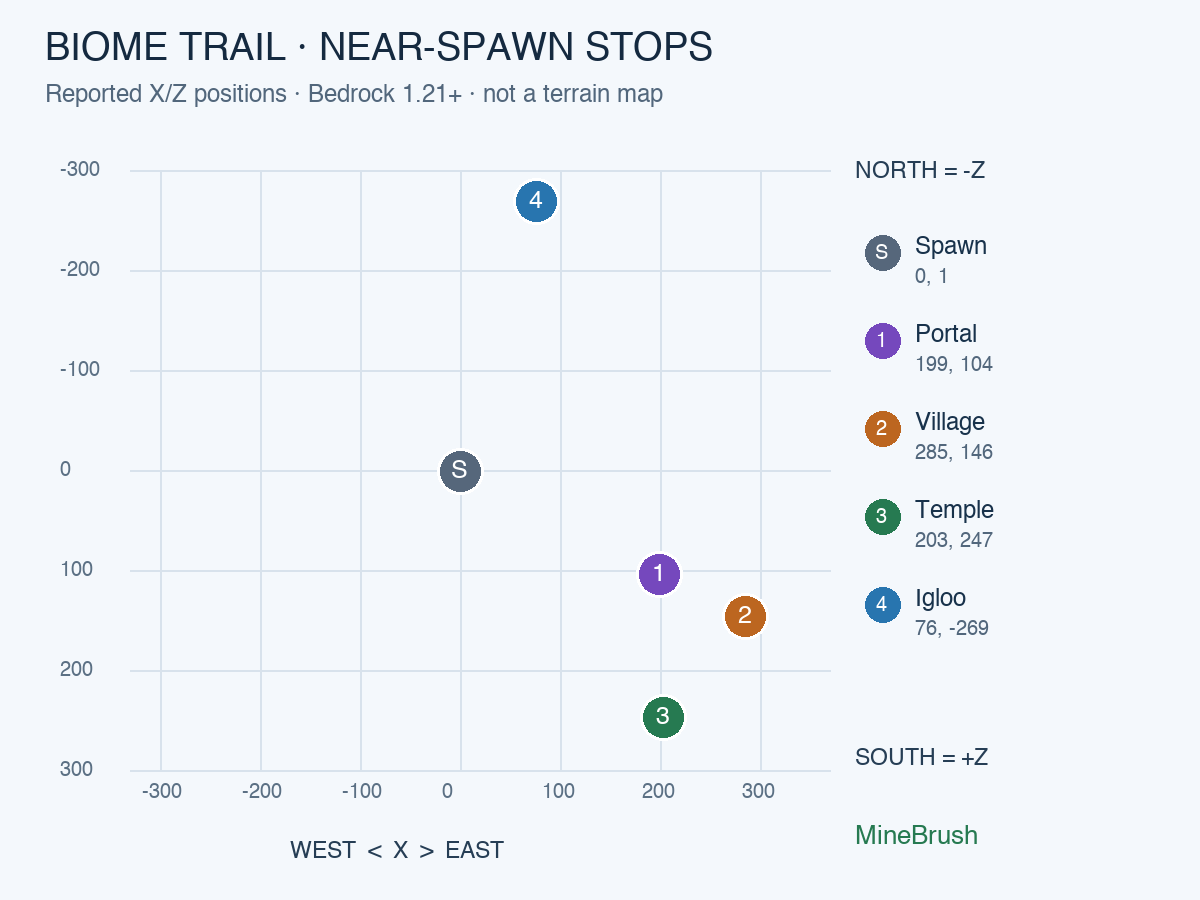
The portal, village and temple form one group on the positive-X, positive-Z side. The igloo is on the other side of spawn along Z. This makes two shorter outings more practical than carrying everything through one long first-day tour.
A first-session plan
- Get established. Gather wood and stone, prepare food and mark a return point. The reported spawn is high, so look for a gradual descent rather than stepping off a cliff.
- Scout the positive-X/Z group. Aim toward the portal, then the village. Make detours for steep ground, water or dense trees.
- Choose a home before clearing the temple. A small camp near the village gives you somewhere to leave spare tools and collected supplies.
- Explore the temple as its own job. Go in with food, lighting and a way to deal with traps; return to camp afterward.
- Visit the igloo on another outing. Restock, head toward X 76 and Z -269, and note your return route through the snow.
This is a suggested order from the coordinate layout, not a measured path. If terrain makes a different stop easier, change the order. Take signs or place recognisable markers at turns, and keep your home coordinates in a note you can check after getting lost.
Make the ruined portal useful
At the reported portal position, look for the damaged obsidian frame and surrounding Nether blocks. You can keep it as a landmark, restore its surroundings, or prepare it for a later Nether trip.
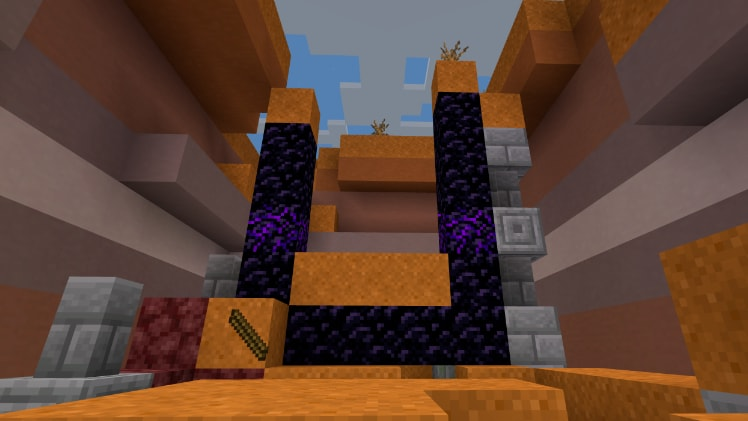
Repair the opening with regular obsidian and clear obstructing blocks before lighting it with flint and steel. Purple-veined crying obsidian is a different block and cannot replace the required regular obsidian in an active frame. Inspect the actual frame before deciding how much material to bring; nearby loot is not a guarantee that everything needed will be supplied.
You do not have to activate it immediately. First build a safe approach and storage nearby. Turning the ruin into a small gateway outpost gives the location a purpose even before you are ready for the Nether.
Village base or jungle expedition?
For a village base, start with lighting, safe paths and a storage room. Keep villagers away from exposed night-time routes, and expand the settlement gradually. A savanna-inspired workshop, a bridge or a signposted road toward the portal can make the area feel connected.
For the temple, slow down inside. Watch for tripwire and dispensers before crossing narrow passages. Shears can cut tripwire without triggering it, as Mojang's string guide explains. Inspect the lever puzzle if you enjoy working it out; avoid rushing directly toward a chest without looking at the floor and walls.
After exploring, you can preserve the temple as an archaeological landmark and build your camp nearby. Use paths and lighting to connect it to your other stops instead of immediately stripping every interesting block. Specific chest contents and trades are not promised by the seed report.
What to check at the igloo
An igloo can be a useful cold-weather stop with a bed and basic work blocks. Look beneath its carpet: some igloos have a trapdoor leading down to a basement, while others do not. The discoverer supplies an igloo coordinate, but does not confirm a basement here.
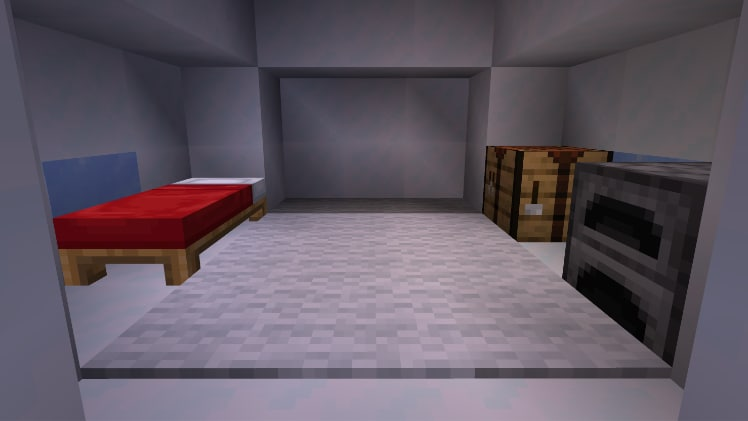
If you find a basement, inspect it before opening the enclosure. The usual basement setup introduces curing a zombie villager with Weakness and a regular golden apple. If there is no basement, you can still make the igloo a snow-trail rest stop; the missing trapdoor does not make the shelter useless.
Longer projects after the first trips
- A network of small bases: one main village home, a portal outpost and a snowy refuge. Mark each position and connect the easiest routes first.
- A materials-and-colours tour: explore the reported biome transitions, bring back useful saplings and compare palettes before choosing a permanent build style.
- A co-op expedition board: give each landmark its own sign, supplies chest and shared task. One player can improve paths while another gathers materials.
- A landmark-preservation world: keep the temple and portal ruins recognisable, then build your additions around them.
The spawner and distant mineshaft
The same post reports a mob spawner at -280, 101, 186. It describes this as being in a village, but that position is on the opposite X side from the listed savanna village. Treat it as a separate lead; do not assume it belongs to the same settlement or has a particular mob type.
For the mineshaft, use the author's corrected position: -1106, 21, -2240. The original post body still shows an older position; the author's later comment gives this replacement. It is about 2,500 blocks horizontally from X 0, Z 0, so save it for a longer expedition with food, spare tools and a return plan. Y 21 is underground: locate an entrance or make a controlled staircase rather than digging straight down.
If your world does not match
- Check the number first: the minus sign and final digits matter. A missing minus creates a different world.
- Check the edition and version: the source says Bedrock/EE 1.21+ without an exact patch. That label does not establish every later Bedrock release or Java compatibility.
- Use a fresh normal world: existing chunks, templates and world-generation add-ons can change the comparison.
- Read X and Z carefully: the igloo has negative Z; the secondary spawner has negative X. Y is height, not the third horizontal direction.
- Separate scenery from structures: similar-looking terrain does not prove that a building or basement is in the same place in another release.
Sources and credits
Seed and structure coordinates: AffectionateLuck7052's original report; corrected mineshaft: the author's follow-up. The available source is text-only. MineBrush supplies the coordinate diagram and suggested activities; the cover is an editorial illustration.
Official player guidance and illustrative screenshots: Mojang's exploration guide, ruined portals, igloos, string and tripwire, and crying obsidian.
More for your Bedrock world.

Everything Continent brings varied landscapes into one long-term Bedrock world. Plan regional bases, follow author coordinates to a jungle temple, village and mansion, and explore the original annotated map.
- Minecraft
- 1.21.73
- Seed
-5207005594169711425- Feature
- Regional bases, temple, village and mansion
Varied mainland biomes; mushroom islands offshore
Bedrock · Seed
Everything Continent
Everything Continent brings varied landscapes into one long-term Bedrock world. Plan regional bases, follow author coordinates to a jungle temple, village and mansion, and explore the original annotated map.
Varied mainland biomes; mushroom islands offshore
- Minecraft version
- Bedrock 1.21.73
- Game edition
- Bedrock Edition
- Key coordinates
- Jungle temple: X 600, Z 120; Mansion: X 440, Z 856; Village: X 808, Z -1416. Y not supplied.
- Platform family
- Bedrock & Mobile
- Resource type
- Seed
- Seed value
- -5207005594169711425
- Last verified at
- Sep 14, 2026
- Compatibility confidence
- Source claimed
- Bedrock version/build
- 1.21.73
- Card evidence statement
- Author map and coordinates for Bedrock 1.21.73
- Card delivery statement
- Copy the seed into a new Bedrock world
- Card limitation note
- Varied mainland biomes; mushroom islands offshore
- Copy availability
- Copy available
- Java seed feature
- Regional bases, temple, village and mansion
- Edition applicability
- Bedrock
- Delivery state
- No file
- Lifecycle state
- Current
-5207005594169711425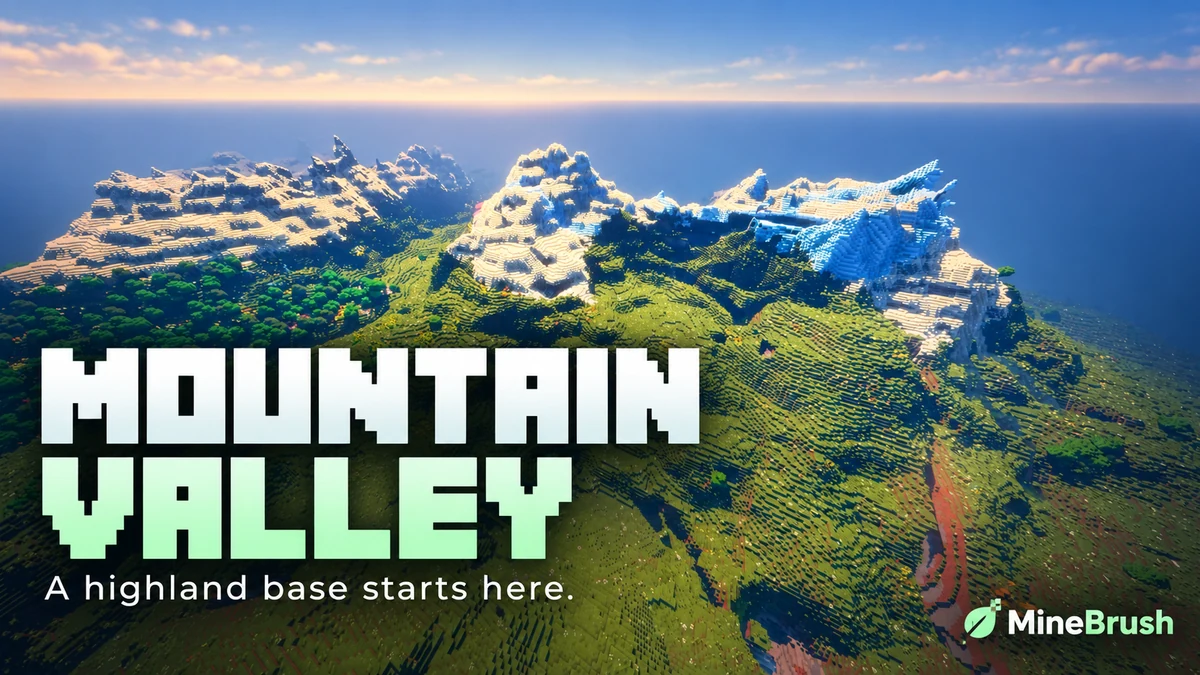
Mountain Range Village — Plan a highland base around a snowy mountain landscape. Copy the Java 1.21.11 seed, see the author's original image and follow the coordinates to the reported village area.
- Minecraft
- 1.21.11
- Seed
61925845031280000- Feature
- Mountain landscape and reported village
Destination away from spawn; source image uses Bliss shaders
Java · Seed
Mountain Range Village
Mountain Range Village — Plan a highland base around a snowy mountain landscape. Copy the Java 1.21.11 seed, see the author's original image and follow the coordinates to the reported village area.
Destination away from spawn; source image uses Bliss shaders
- Minecraft version
- 1.21.11
- Game edition
- Java Edition
- Loader / platform
- Not applicable
- License
- Seed shared by its discoverer; image credited to OkBreadfruit3797
- Key coordinates
- Mountain village · X -1939, Y 199, Z -857 · Overworld
- Platform family
- Java & PC
- Supported devices
- Minecraft Java Edition on Windows, macOS and Linux
- Install format
- Enter the seed in Create New World
- Touch readiness
- Not required
- Resource type
- Seed
- Seed value
- 61925845031280000
- Last verified at
- Sep 14, 2026
- Compatibility confidence
- Source claimed
- Card evidence statement
- Java 1.21.11 report by the discoverer
- Card delivery statement
- Copy seed · create a new world
- Card limitation note
- Destination away from spawn; source image uses Bliss shaders
- Copy availability
- Copy available
- Java seed feature
- Mountain landscape and reported village
- Edition applicability
- Java
- Delivery state
- No file
- Lifecycle state
- Current
61925845031280000
Share a Minecraft Seed — Help friends find the same place: copy the seed, match Java or Bedrock and the version, read XYZ coordinates and describe a useful route with screenshots.
- Edition
- Cross-edition
- Difficulty
- Beginner
- Time
- A short check
A seed recreates terrain, not your builds
MineBrush · Guide
Share a Minecraft Seed
Share a Minecraft Seed — Help friends find the same place: copy the seed, match Java or Bedrock and the version, read XYZ coordinates and describe a useful route with screenshots.
A seed recreates terrain, not your builds
- Minecraft version
- Java and Bedrock; match your world version
- Game edition
- Cross-edition
- Platform family
- Cross-edition
- Supported devices
- PC, console and mobile
- Install format
- No installation needed
- Touch readiness
- Not required
- Resource type
- Guide
- Compatibility confidence
- Not applicable
- Card evidence statement
- Find the seed and read coordinates
- Card delivery statement
- Versions, directions and screenshots
- Card limitation note
- A seed recreates terrain, not your builds
- Edition applicability
- Java + Bedrock
- Estimated time
- A short check
- Guide difficulty
- Beginner
- Delivery state
- No file
- Lifecycle state
- Current

Understand Minecraft 26, tell normal releases from test builds, and choose the right version for friends, servers and mods. Clear Java and Bedrock examples without the technical clutter.
- Topic
- Choosing your Minecraft version
- Scope
- None
- Evidence
- Official Minecraft sources · checked 9 Sep 2026
A shared “26” prefix never proves cross-edition compatibility.
MineBrush · News
Minecraft Versions Made Simple
Understand Minecraft 26, tell normal releases from test builds, and choose the right version for friends, servers and mods. Clear Java and Bedrock examples without the technical clutter.
A shared “26” prefix never proves cross-edition compatibility.
- Compatibility confidence
- Source claimed
- Card evidence statement
- Official policy and indexes checked 9 Sep 2026; client display NOT_OBSERVED.
- Card delivery statement
- Choose a version for everyday play or testing
- Card limitation note
- A shared “26” prefix never proves cross-edition compatibility.
- Edition applicability
- Java + Bedrock
- News topic
- Choosing your Minecraft version
- Public news evidence label
- Official Minecraft sources · checked 9 Sep 2026
- Delivery state
- No file
- Lifecycle state
- Current
- News evidence type
- Official Minecraft source
Player discussion 0
Questions, discoveries and help from other players.