
MineBrush publication
How to Share a Minecraft Seed: Versions, Coordinates and Clear Routes
Share a Minecraft Seed — Help friends find the same place: copy the seed, match Java or Bedrock and the version, read XYZ coordinates and describe a useful route with screenshots.
Found a great village, a mountain valley or a place for your next base? Share the seed together with the version, coordinates and a short route, and your friends have a much better chance of finding the same place. This guide shows what to send, where to find it and what to check when their world looks different.
A seed recreates world generation; it does not copy your buildings, inventory or progress. Share a world save if you want someone to receive the castle you built. Share the seed if you want them to start their own adventure in the same kind of landscape, using the matching game version and generation settings.
What to send with your discovery
- The seed: copy the whole value, including a leading minus sign.
- Edition and version: Java or Bedrock, plus the exact version you used.
- The place: name the dimension and give X, Y and Z coordinates.
- Why visit: explain what makes it useful, such as room for a base, a cave entrance or a convenient village.
- How to reach it: give a clear starting point and a few useful landmarks.
- A screenshot: show the destination and, if possible, its coordinate readout.
If you changed world generation with a preset, data pack, mod or add-on, include that too. A plain seed number cannot reproduce those changes on its own.
Find and copy the seed
Java Edition
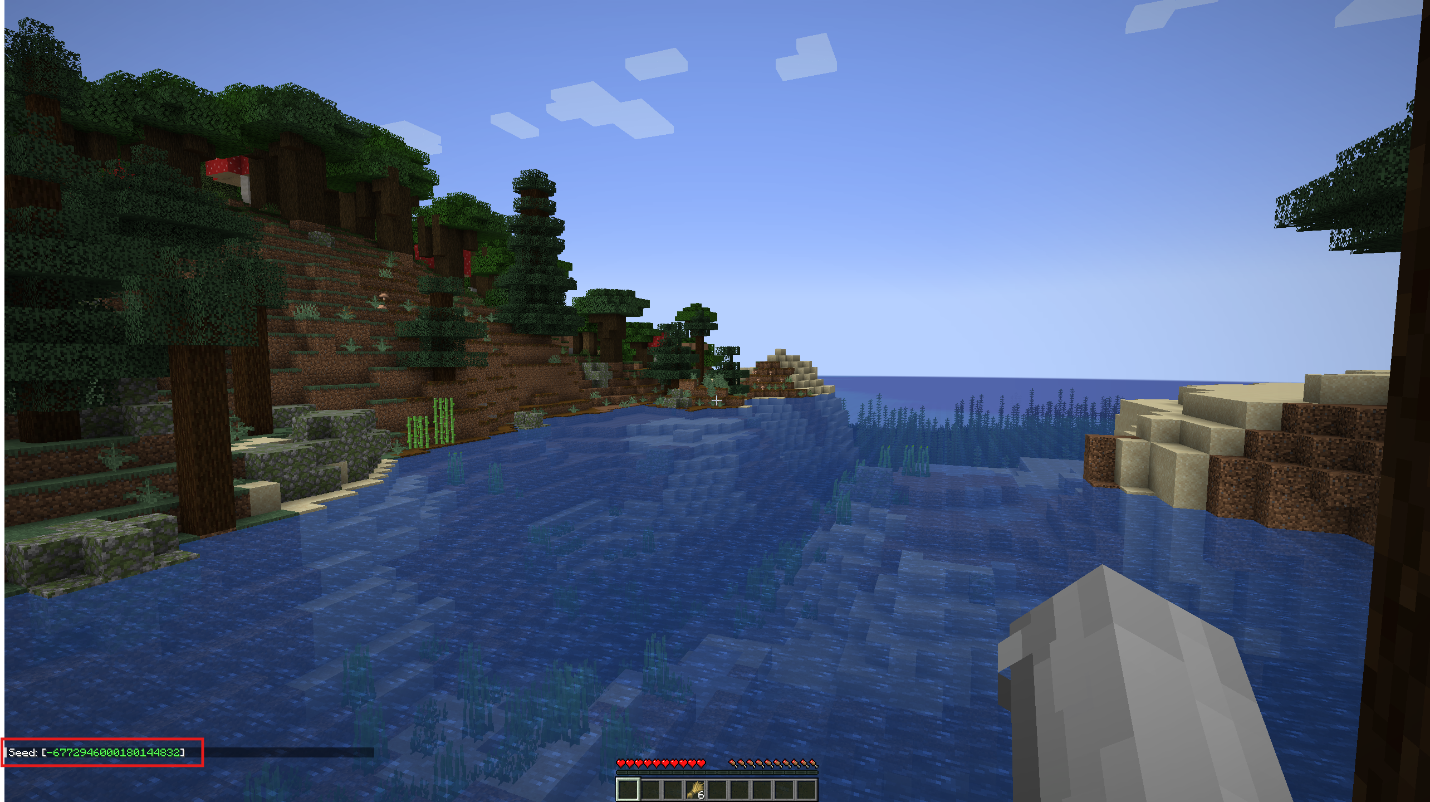
In your single-player world, open chat, enter /seed and copy the number that appears. In multiplayer, the command can require operator permission; ask the owner to provide it if you cannot use it. Do not confuse the coordinates on F3 with the world seed: they describe where you are, not how the world was generated.
Bedrock Edition
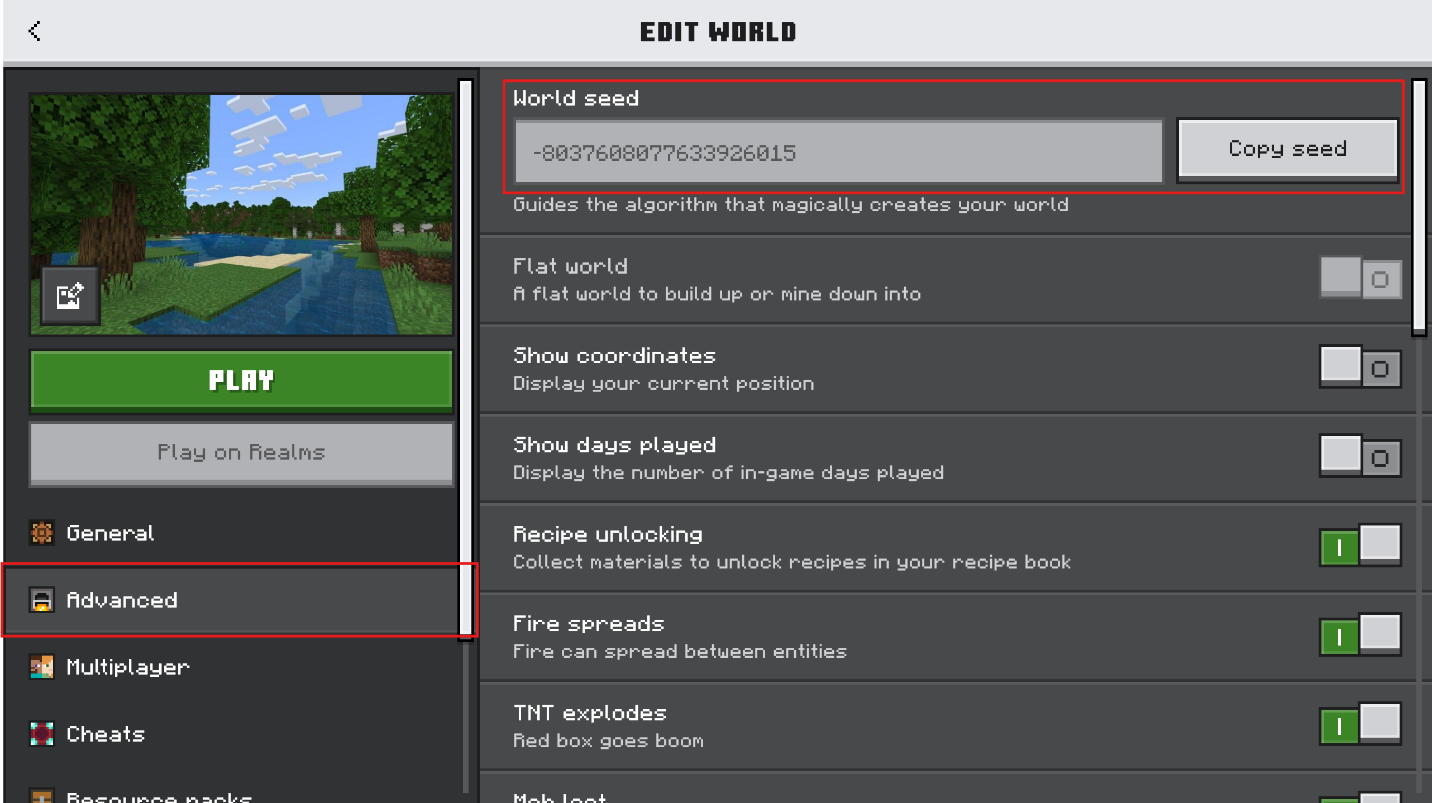
From your local worlds list, use the pencil/edit button next to the world and find World seed. The newer Edit World interface places it under Advanced and offers Copy seed; older interfaces place the seed in the Game settings. Copy it rather than typing a long number from memory.
For a Bedrock Realm, the owner can download a local copy of the active world, then inspect that copy’s settings. If you are just a member, ask the owner for the seed. You do not need to reset or replace the Realm to share its number.
When sending the seed, keep it as plain text without commas, spaces between digits or rounding. If you originally entered a word as the seed, sharing the value the game now displays avoids ambiguity. A screenshot alone is inconvenient for someone who wants to copy the number.
Match the edition, version and world settings
Write the complete game version instead of “latest”. Your friend might read the message after another update. If you are using a Java snapshot or Bedrock Preview/Beta, say so. A standard release and a preview are different starting points even when their names look similar.
For a newly created world, match the edition and version, world type and anything that changes generation. If structures were disabled, a village recommendation will not work as expected. A Flat or Large Biomes world, or one generated with a mod, needs its corresponding settings.
Do not assume a village or structure will occupy the same coordinates in Java and Bedrock. The editions share many terrain-generation features, but that does not make every detail identical. If you have only visited the place in Java, describe it as a Java discovery. A Bedrock player can check it separately.
An older world that has been upgraded may contain areas created under older generation rules. Starting a brand-new world on the current version can therefore produce a different result. Keep the original creation version if you know it; if you do not, explain that the discovery came from an upgraded world.
Show coordinates and read the right numbers
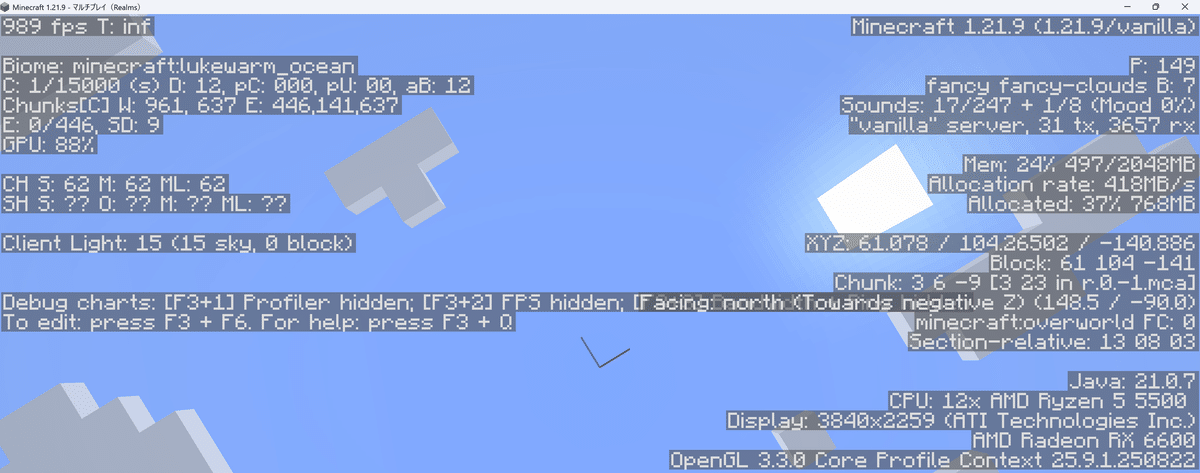
Java: press F3, or Fn + F3 on a keyboard that uses the function row for system controls. Look for the player’s position and block coordinates. Since Java 1.21.9, F3 + F6 opens Debug Options, where you can enable the information you need and choose whether it is always visible. A missing or moved coordinate line does not necessarily mean your game needs a mod.
Bedrock: enable Show coordinates in the world settings. Depending on the interface, look under Advanced or Game. The readout remains visible during play. If you are a guest and cannot change the setting, ask the world owner to enable it.
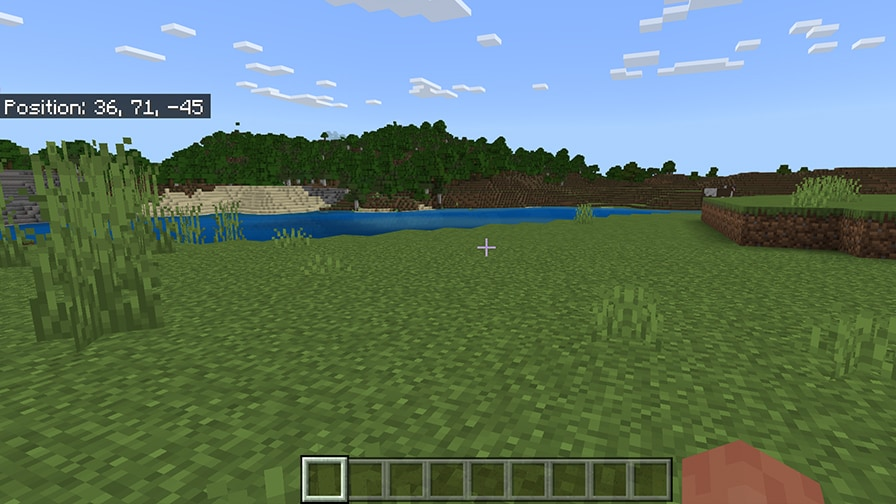
- X: east–west position. Moving east increases X; moving west decreases it.
- Y: height. Include it for caves, mountain ledges, underground rooms and entrances on different levels.
- Z: north–south position. Moving south increases Z; moving north decreases it.
Keep negative signs and the order X, Y, Z. In the example above, 36, 71, -45 is not the same place as -36, 71, 45. For a block location in Java, copy the whole-number Block values instead of rounding the decimal XYZ line. A coordinate such as X=0, Z=0 is the world’s coordinate origin, not a promise that every player spawns on that exact block.
Always name the dimension: Overworld, Nether or End. The same numbers in different dimensions lead to different places. A seed-map tool’s markers are leads to investigate; check the location in your own matching world before recommending it as a confirmed find.
Describe a route a player can follow
Start from a useful reference point: the coordinates where you first appeared, a village gate or an existing base. A player who has slept in a bed may respawn somewhere else, so “walk from spawn” can be less clear than an actual starting coordinate.
Keep each step to one decision. For example, describe following a river to its bend, crossing at a shallow bank, then entering the valley from the east. Add coordinates at a confusing fork and at the destination. These are examples of useful directions, not a claim about a particular seed.
For a survival route, mention obstacles that change what someone should bring: a boat for an ocean crossing, food for a long journey or blocks for a steep climb. If you reached a location by Creative flight or teleporting, say that and avoid presenting it as an easy walking route. A cave entrance and the underground room can each need their own coordinates.
Explain the reason to go there. “A wide meadow with water access for a starter base” helps a builder make a decision; “a village with a nearby cave entrance” gives a survival player a starting plan. Separate the natural features from any paths, buildings or decorations you added yourself.
A short message you can copy
Seed: [paste the value]
Edition and version: [Java or Bedrock + version]
World settings: [default, or list generation changes]
Place: [what it is and why visit]
Dimension and coordinates: [Overworld/Nether/End; X, Y, Z]
Route: [starting point and useful turns]
Screenshot: [show the destination]
If the discovery came from someone else, add their name and the original link. A good screenshot shows enough of the surroundings to recognise the approach. Keep coordinates visible in one image, then add a clearer scenic view if that helps explain the place. State when shaders or a resource pack change the look.
If your friend gets a different result
- Check the seed text: especially the minus sign, missing digits and whether a new random seed was used accidentally.
- Check Java versus Bedrock and the full version: similar version names do not prove matching structure locations.
- Check the dimension and coordinate order: read X, Y and Z, including signs. A cave can be below the right surface position.
- Check generation settings: presets, structures and world-generation additions must match.
- Check the age of the world: the photographed area may have been generated before an update.
- Check what is natural: a seed will not reproduce the bridge, farm or castle a player built there.
When a mismatch is resolved, update the shared message with the working edition, version or corrected coordinates. Keep a screenshot of the place you actually mean, so the next player can tell when they have arrived.
Sources and image credits
Practical sharing and route advice by MineBrush. Coordinate basics and Bedrock illustration: Mojang’s exploration guide. Configurable F3 information: official Java 1.21.9 release notes. Generation changes and edition context: Bedrock 1.18.30 notes and Seed Picker FAQ. Java F3 image: maaku’s Java 1.21.9 walkthrough. Seed-field and command images: Dror Haberman / CurseForge’s Realm-seed guide. The cover is an original MineBrush editorial illustration, not a preview of a downloadable world.
More from MineBrush.
VeinMiner
2.12.1 / datapack 1.3.5Mine connected ore with one block break, or configure groups for logs and other materials. Download VeinMiner for Java 26.2, choose Fabric, NeoForge, Paper or the vanilla datapack, and learn how to activate it and control tool wear.
- Minecraft
- 26.2
- Loader
- Fabric
- Runtime
- Server
Choose one platform · server rules apply
Java · Mod
VeinMiner
Mine connected ore with one block break, or configure groups for logs and other materials. Download VeinMiner for Java 26.2, choose Fabric, NeoForge, Paper or the vanilla datapack, and learn how to activate it and control tool wear.
Choose one platform · server rules apply
- Minecraft version
- 26.2
- Game edition
- Java Edition
- Loader / platform
- Fabric
- License
- AGPL-3.0-only
- Platform family
- Bedrock & Mobile
- Supported devices
- Windows · macOS · Linux
- Install format
- .jar mod or plugin / .zip datapack
- Touch readiness
- Not required
- Resource type
- Mod
- Project version
- 2.12.1 / datapack 1.3.5
- Last verified at
- Sep 5, 2026
- Secondary guide action
- Setup & fixes
- Compatibility confidence
- Source claimed
- Java mod loader
- Fabric
- Java runtime side
- Server
- Card evidence statement
- Four creator files checked 2026-09-05 · runtime not tested
- Required dependency
- Fabric: Fabric API + Kotlin; NeoForge: KotlinLangForge
- Card delivery statement
- Hosted mod, plugin and datapack files
- Card limitation note
- Choose one platform · server rules apply
- Edition applicability
- Java
- Delivery state
- Direct download
- Lifecycle state
- Current
Xaero’s World Map
1.46.0Keep a map of the places you explore and find your way back to bases, villages and portals. Download Xaero’s World Map 1.46.0 for Java 26.2, choose Fabric, Forge or NeoForge, and learn how to install it and preserve explored terrain.
- Minecraft
- Java 26.2
- Loader
- Fabric
- Runtime
- Client
Optional Xaero’s Minimap integration; server rules apply.
Java · Mod
Xaero’s World Map
Keep a map of the places you explore and find your way back to bases, villages and portals. Download Xaero’s World Map 1.46.0 for Java 26.2, choose Fabric, Forge or NeoForge, and learn how to install it and preserve explored terrain.
Optional Xaero’s Minimap integration; server rules apply.
- Minecraft version
- Java 26.2
- Game edition
- Java Edition
- Loader / platform
- Fabric
- License
- All Rights Reserved
- Platform family
- Java & PC
- Supported devices
- Windows · macOS · Linux
- Install format
- Place the matching JAR in the game instance’s mods folder
- Touch readiness
- Not required
- Resource type
- Mod
- Project version
- 1.46.0
- Last verified at
- Sep 5, 2026
- Secondary guide action
- Setup & fixes
- Compatibility confidence
- Source claimed
- Java mod loader
- Fabric
- Java runtime side
- Client
- Card evidence statement
- Explore, revisit locations and preserve your recorded terrain.
- Required dependency
- Fabric API for Fabric; XaeroLib included
- Card delivery statement
- Fabric, Forge and NeoForge downloads on MineBrush
- Card limitation note
- Optional Xaero’s Minimap integration; server rules apply.
- Edition applicability
- Java
- Delivery state
- Direct download
- Lifecycle state
- Current
Player discussion 0
Questions, discoveries and help from other players.