
MineBrush publication
AmbientSounds 6.3.6: Explore, Build & Shape Your Soundscape
Bring forests, beaches and caves to life with changing environmental sound. Download AmbientSounds 6.3.6 for Java 26.2 on Fabric or NeoForge, get the matching libraries, and learn how to shape the ambience for exploring and building.
AmbientSounds makes familiar places feel more alive through environmental sound. Forest birds, coastal ambience, wind and underground layers give exploration a changing background. The mix responds to your surroundings instead of playing one identical loop everywhere. It is a client-side Minecraft Java mod: you hear the added ambience on your own installation, including when joining a server.
Choose it for a more atmospheric survival world, a relaxed building session or a walk through your favourite landscape. It does not add visible birds, new biomes, blocks or a music soundtrack. A bird call is part of the soundscape, not a promise that a catchable animal is nearby.
Where it makes a difference
- Explore forests: bird ambience and nighttime owl sounds give a woodland journey a different character from an open plain. Nearby vegetation and environmental conditions help decide which layers play.
- Build a coastal retreat: supported warm beaches have shore ambience and occasional seagull calls. This is background atmosphere for a dock or beach house; the mod does not create an ocean or decorate the build.
- Go underground: cave, lush-cave and deep-dark regions provide their own ambience. Keep the mix quiet enough to hear actual mobs and other important game sounds.
- Enjoy a long building session: reduce the overall ambience to a gentle background, or lower a repetitive region or individual sound while keeping the rest of the world lively.
- Explore a world-generation modpack: AmbientSounds supports modded environments through its detection rules. An unfamiliar biome or custom fluid can still need a matching rule; support is not a guarantee for every mod combination.
The same place can sound different after nightfall, rain or a move indoors. Several environmental layers may overlap, and some sounds have pauses. Give a location a little time instead of expecting every listed sound to play immediately.
Download AmbientSounds 6.3.6 for Minecraft 26.2
Choose one loader group. The Fabric and NeoForge files are alternatives. Both need the matching CreativeCore library; Fabric also needs Fabric API. These are the player installation JARs.
Fabric
Use Fabric Loader 0.19.3 or newer for Minecraft 26.2 and install all three files below.
NeoForge
Use NeoForge for Minecraft 26.2, version 26.2.0.6-beta or newer, and install these two files. Fabric API is not required on this route.
For another game version, consult the author’s version history and match CreativeCore too. The project has older Forge releases, but no Forge 26.2 package is offered here. A higher mod version number for an older Minecraft release is not a replacement for the 26.2 file.
Install and hear your first soundscape
- Close Minecraft and open the game folder of the launcher instance you actually play.
- Place the files from your loader group into its
modsfolder. Replace older copies of the same mods instead of keeping duplicate versions. - Launch that instance and enter a world. The built-in sound engine starts automatically; there is no item to craft and no separate sound pack required for the default ambience.
- Walk through an outdoor area, then visit a different environment such as a beach or cave. Let each soundscape settle. Headphones can make quieter details easier to notice.
- Open chat and enter
/cmdclientconfig, chooseambientsounds, then opengeneral. Adjustvolumeand save.
You do not need to install AmbientSounds on the server to hear your own client’s ambience. Other players need their own installation if they want the same feature.
Find the settings you actually need
The configuration separates general controls, dimensions, regions and sound categories. Start with overall volume, then adjust only the part of the mix that bothers you. A useful starting suggestion is roughly half of the default ambience volume, followed by listening at your usual game volume.
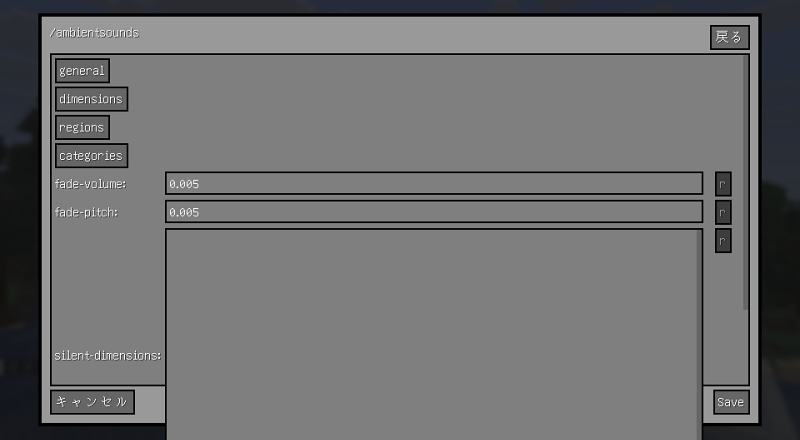
Turn down the ambience without muting the game
In general, volume controls AmbientSounds as a whole. Lower this first if nature sounds overwhelm building, conversation or survival cues. Keep ordinary game sounds audible rather than lowering Minecraft’s master volume to compensate.
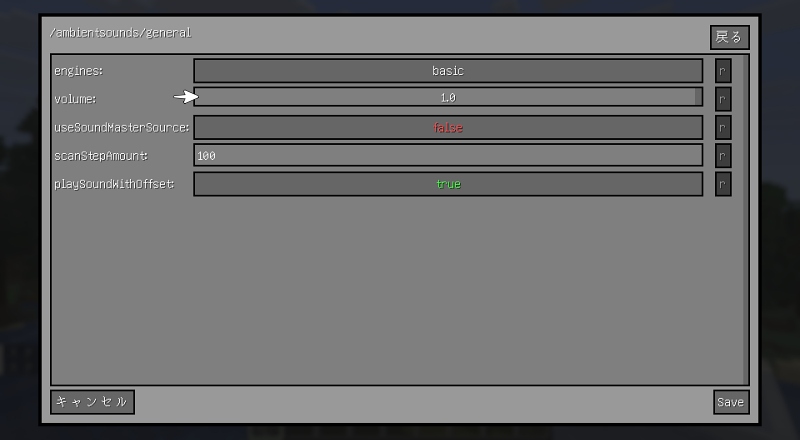
Reduce one place or one recurring sound
Use dimensions when you want to change the ambience of an entire dimension. Use regions for an environment such as a beach or cave, then inspect its individual sound settings when only one layer is annoying. Region and individual-sound volume settings can be lowered to zero; you do not have to silence all ambience.
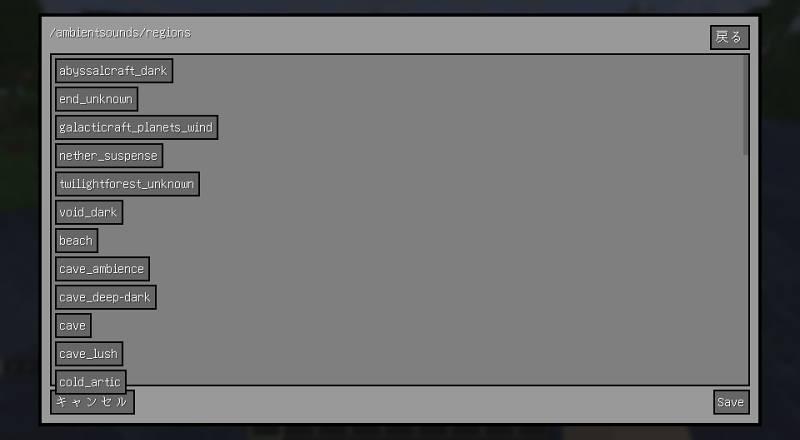
If you cannot identify a sound, enter /ambient-debug while it plays. The overlay names active sounds, helping you find the relevant region or layer to turn down. Enter the command again to hide it when finished. Leave scan and transition controls at their defaults unless you are deliberately tuning an engine.
Listen before deciding
A screenshot can explain the controls, but it cannot demonstrate the audio. The demonstration linked by the author is a better way to hear the intended atmosphere. It is a project demonstration, not a MineBrush test of the exact 26.2 download.
Combine it with other additions
Presence Footsteps focuses on the sounds of walking across different surfaces. AmbientSounds provides the surrounding environmental layers. They fill different roles; balance their individual volumes if the combined mix becomes busy.
Sound Physics Remastered changes acoustic effects such as reverberation and sound obstruction. It is optional, and an extra acoustics mod can change how the mix is heard. If the result becomes muffled or crowded, adjust one mod at a time.
Resource packs can modify the built-in AmbientSounds engine or supply a custom one. This is useful for a themed adventure or a carefully curated modpack. Follow that pack’s instructions and game-version requirements; normal texture packs do not automatically provide a new sound engine. Creating your own engine involves resource-pack files and JSON, so use the author’s engine guide for that optional next step.
Quick fixes and useful limits
- The game will not start: check the Minecraft version, loader and matching CreativeCore file. Fabric additionally needs Fabric API. A NeoForge library cannot replace the Fabric library.
- No added ambience: check general volume, the relevant region and Minecraft sound levels. If ordinary game sounds also fail, check the selected output device. If only AmbientSounds is silent, use the active-sound overlay and try the built-in engine without a custom sound pack.
- One location sounds wrong: environment detection considers more than the biome name, including surrounding blocks and enclosure. Move outdoors or to another nearby area to compare. A modded biome or fluid may need a compatibility rule rather than a louder volume setting.
- Outdoor sounds remain inside a house: check openings and the building materials recognized by the sound engine. Do not expect this ambience system to model every wall as perfect real-world soundproofing.
- The soundscape feels too busy: lower AmbientSounds first, then the specific region or layer. Check whether another mod or pack adds similar ambience.
- You want to remove it: close the game and remove the AmbientSounds JAR. Keep CreativeCore and Fabric API if other installed mods still need them; deleting your world is unnecessary.
Author and sources
AmbientSounds is by CreativeMD, AriaFreeze and contributors. The project and supplied 6.3.6 archives identify the license as LGPL-3.0-only. CreativeCore is maintained by CreativeMD and contributors; Fabric API is maintained by FabricMC and contributors. Original project files and author notices are retained.
Sources: official project and demonstration, release history, source and built-in sound definitions, engine documentation, CreativeCore and Fabric API. The MineBrush cover is a conceptual illustration; its scenery and drawn sound waves are not graphics added by this mod.
More for your Java setup.
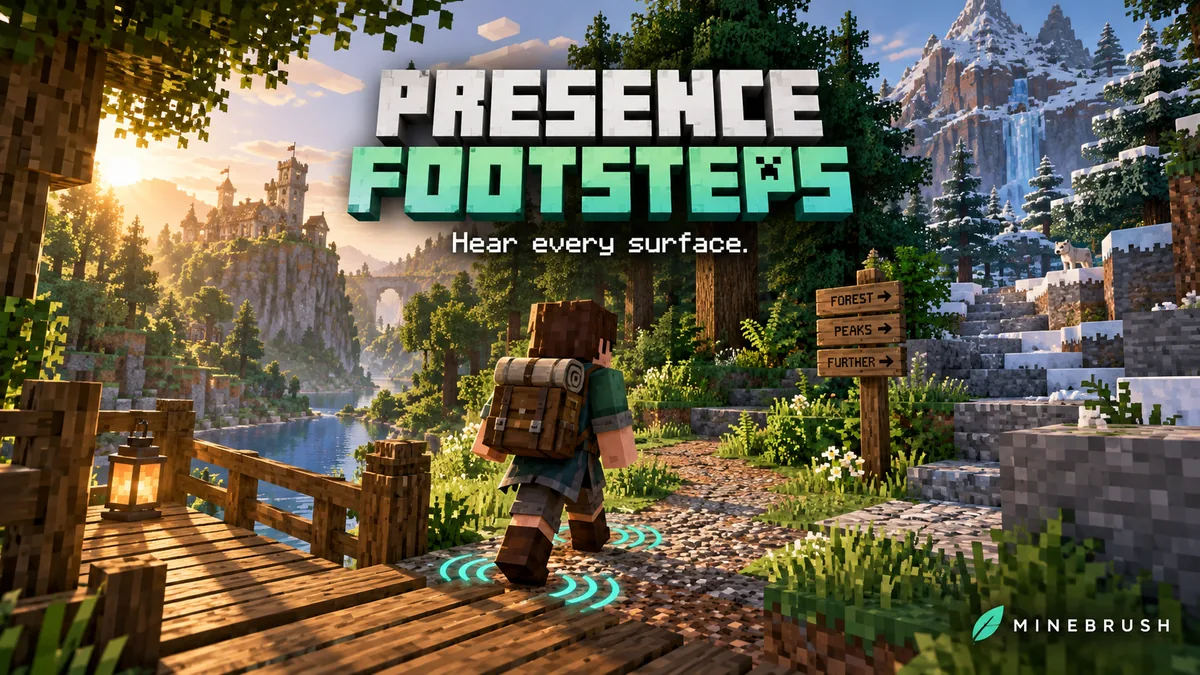
Presence Footsteps
1.13.3+26.2Make wooden paths creak, gravel crunch and foliage rustle as you explore. Presence Footsteps adds material-aware movement sounds for Minecraft Java 26.2, with useful volume controls, optional sound packs and the required downloads.
- Minecraft
- Java 26.2
- Loader
- Fabric
- Runtime
- Client
Client sound mod; does not add visible footprints
Java · Mod
Presence Footsteps
Make wooden paths creak, gravel crunch and foliage rustle as you explore. Presence Footsteps adds material-aware movement sounds for Minecraft Java 26.2, with useful volume controls, optional sound packs and the required downloads.
Client sound mod; does not add visible footprints
- Minecraft version
- Java 26.2
- Game edition
- Java Edition
- Loader / platform
- Fabric
- License
- PolyForm Shield 1.0 (project license)
- Platform family
- Java & PC
- Supported devices
- Windows · macOS · Linux
- Install format
- .jar mod file from the creator
- Touch readiness
- Not required
- Resource type
- Mod
- Project version
- 1.13.3+26.2
- Last verified at
- Sep 13, 2026
- Secondary guide action
- Setup & fixes
- Compatibility confidence
- Source claimed
- Java mod loader
- Fabric
- Java runtime side
- Client
- Card evidence statement
- Material-based footsteps, foliage and wet-surface sounds
- Required dependency
- Fabric API for 26.2; Kirin included; Mine Little Pony optional
- Card delivery statement
- Mod and required Fabric API downloads
- Card limitation note
- Client sound mod; does not add visible footprints
- Edition applicability
- Java
- Delivery state
- Direct download
- Lifecycle state
- Current

Sound Physics Remastered
1.5.1 BetaGive caves an echo and hear sounds become muffled behind walls. Download Sound Physics Remastered for Java 26.2, with practical sound settings, exploration ideas and optional voice-chat integration.
- Minecraft
- Java 26.2
- Loader
- Fabric
- Runtime
- Client
26.2 Beta; server support needed for distance controls
Java · Mod
Sound Physics Remastered
Give caves an echo and hear sounds become muffled behind walls. Download Sound Physics Remastered for Java 26.2, with practical sound settings, exploration ideas and optional voice-chat integration.
26.2 Beta; server support needed for distance controls
- Minecraft version
- Java 26.2
- Game edition
- Java Edition
- Loader / platform
- Fabric
- License
- GPL-3.0-only
- Platform family
- Java & PC
- Supported devices
- Windows · macOS · Linux
- Install format
- .jar mod file from the creator
- Touch readiness
- Not required
- Resource type
- Mod
- Project version
- 1.5.1 Beta
- Last verified at
- Sep 13, 2026
- Secondary guide action
- Setup & fixes
- Compatibility confidence
- Source claimed
- Java mod loader
- Fabric
- Java runtime side
- Client
- Card evidence statement
- Cave echoes, sound through walls and optional voice-chat acoustics
- Required dependency
- None; optional Cloth Config for settings
- Card delivery statement
- Local downloads for Fabric, Quilt, Forge and NeoForge
- Card limitation note
- 26.2 Beta; server support needed for distance controls
- Edition applicability
- Java
- Delivery state
- Direct download
- Lifecycle state
- Current

Mod Menu
20.0.2Find installed mods, open supported settings and make a large modpack easier to navigate. Download Mod Menu 20.0.2 for Java 26.2, with search tips, library filters and the required files.
- Minecraft
- Java 26.2
- Loader
- Fabric
- Runtime
- Client
Client menu · no server installation needed
Java · Mod
Mod Menu
Find installed mods, open supported settings and make a large modpack easier to navigate. Download Mod Menu 20.0.2 for Java 26.2, with search tips, library filters and the required files.
Client menu · no server installation needed
- Minecraft version
- Java 26.2
- Game edition
- Java Edition
- Loader / platform
- Fabric
- License
- MIT
- Platform family
- Java & PC
- Supported devices
- Windows · macOS · Linux
- Install format
- JAR files in the instance mods folder
- Touch readiness
- Not required
- Resource type
- Mod
- Project version
- 20.0.2
- Last verified at
- Sep 12, 2026
- Secondary guide action
- Setup & fixes
- Compatibility confidence
- Source claimed
- Java mod loader
- Fabric
- Java runtime side
- Client
- Card evidence statement
- Search installed mods and open supported settings
- Required dependency
- Fabric API and Text Placeholder API for Minecraft 26.2
- Card delivery statement
- Mod Menu and dependencies hosted on MineBrush
- Card limitation note
- Client menu · no server installation needed
- Edition applicability
- Java
- Delivery state
- Direct download
- Lifecycle state
- Current
Player discussion 0
Questions, discoveries and help from other players.