
MineBrush publication
Language Reload 1.7.7: Languages, Item Search & Downloads
Play in your preferred language and still find the items named in an English guide. Language Reload adds fast switching, language fallbacks and multilingual item search for Minecraft Java 26.2, with practical controls and required downloads.

Language Reload makes it easier to play Minecraft in the languages you actually use. Switch the interface without reloading every resource pack, find a language with a search box, and search for items using more than one selected language. You can also keep a preferred language first and use another as a fallback where a translation is missing.
It is particularly useful when you play in your native language but follow English building tutorials, share a game profile with someone who prefers another language, or use mods with incomplete translations. It changes your client’s language tools; it does not automatically translate player chat or invent translations for a mod.
Useful ways to play with Language Reload
- Follow an English tutorial without changing your whole interface: keep your preferred language selected, add English, and search for the English item name in the creative inventory or recipe book.
- Find a block whose local name you do not remember: try the name you know in any selected language. You do not have to switch back and forth before each search.
- Use a partially translated modpack: put your preferred language above a language with more complete translations. Missing entries can then fall back to that language instead of requiring you to abandon your preferred interface.
- Compare names while learning: switch between two language setups to see familiar menus and item names in another language. It is a way to explore existing translations, not a vocabulary course or simultaneous dual subtitles.
- Work on a translation pack: reload language files after editing text without requesting a complete resource reload every time.
Download Language Reload for Minecraft Java 26.2
Language Reload 1.7.7+26.2 is listed for Fabric and Quilt and runs on the client. The straightforward installation below uses Fabric Loader 0.19.0 or newer with Fabric API for 26.2. Fabric API is required; Mod Menu is optional.
Use one copy of each required mod in the same game instance. If your modpack already includes a compatible Fabric API, do not add a duplicate. The listed Quilt support does not make these Forge or NeoForge files. For another Minecraft version, select a matching release from the author’s version history.
Install and choose your languages
- Close Minecraft. Open the game folder of your Fabric 26.2 launcher instance.
- Put Language Reload and Fabric API into its
modsfolder, replacing older copies of the same mods. - Launch that instance and open Minecraft’s Language menu from Options or the title-screen language button.
- Use the search box to find a language. Add it to the selected list and arrange your preferred language above its fallbacks using the list controls.
- Confirm with Done. Open the creative inventory or recipe book and try searching with an item name from one of the selected languages.
You do not need to install the mod on a dedicated server. Language selection is personal to your client, so your friends can keep their own interface languages. It does not change a server’s chat translation system or the text that other players type.
Language order: preferred language first, fallbacks below
The selected list is a priority order. A translation supplied by a language higher in the list overrides the same entry from languages below. If the higher language has no translation for an entry, a lower language can supply it.
For example, you might put Spanish first and English below it. Existing Spanish translations take priority; English is available for missing entries. Adding English does not make every label bilingual or display both names beside each other. It also cannot fill a missing translation unless one of your installed language resources actually provides it.
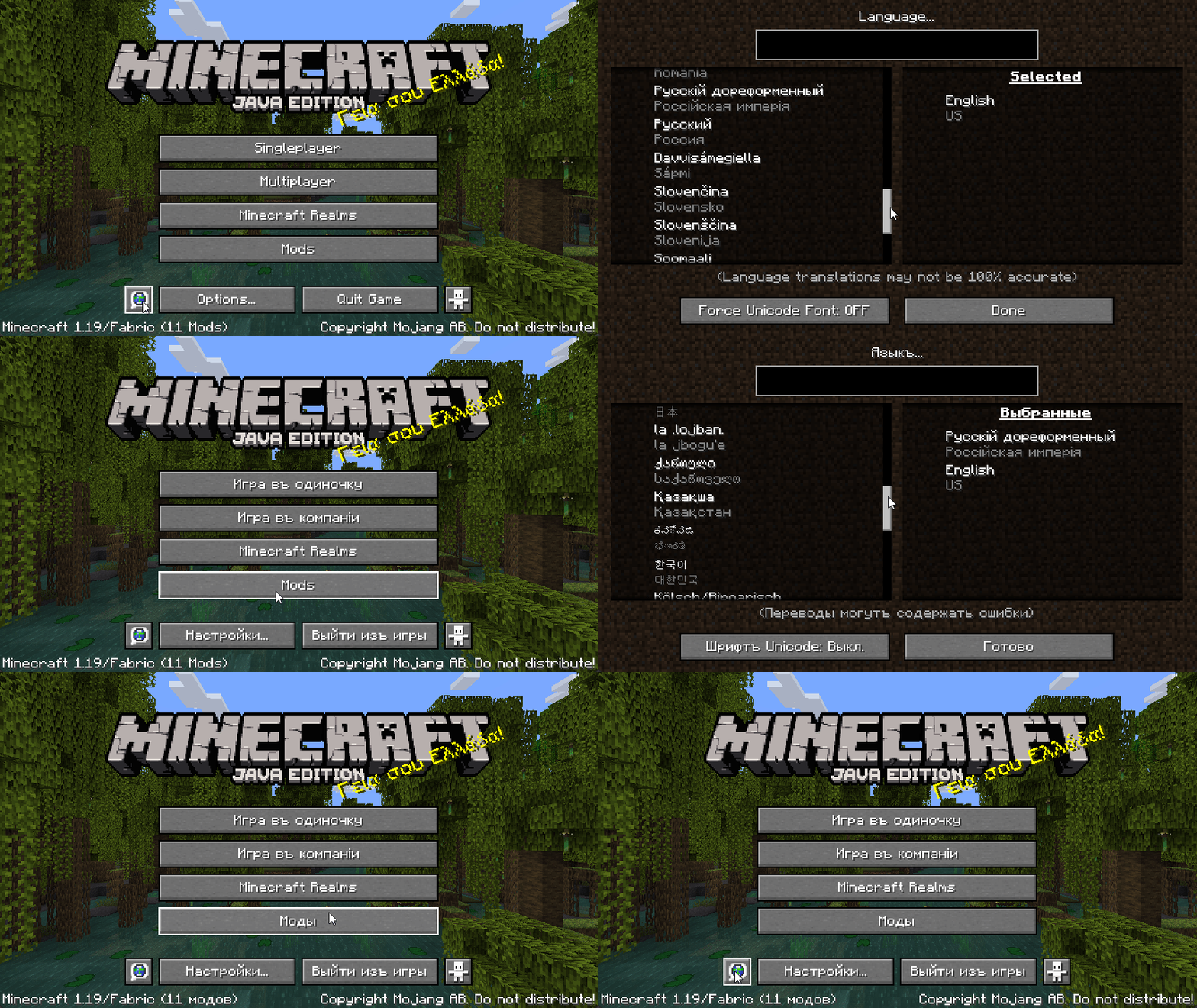
Keep English as a fallback for ordinary play unless you have a specific reason to remove it. The mod’s optional removable-default-language setting is useful for translation work, but removing fallback coverage can expose untranslated keys.
Search the language list
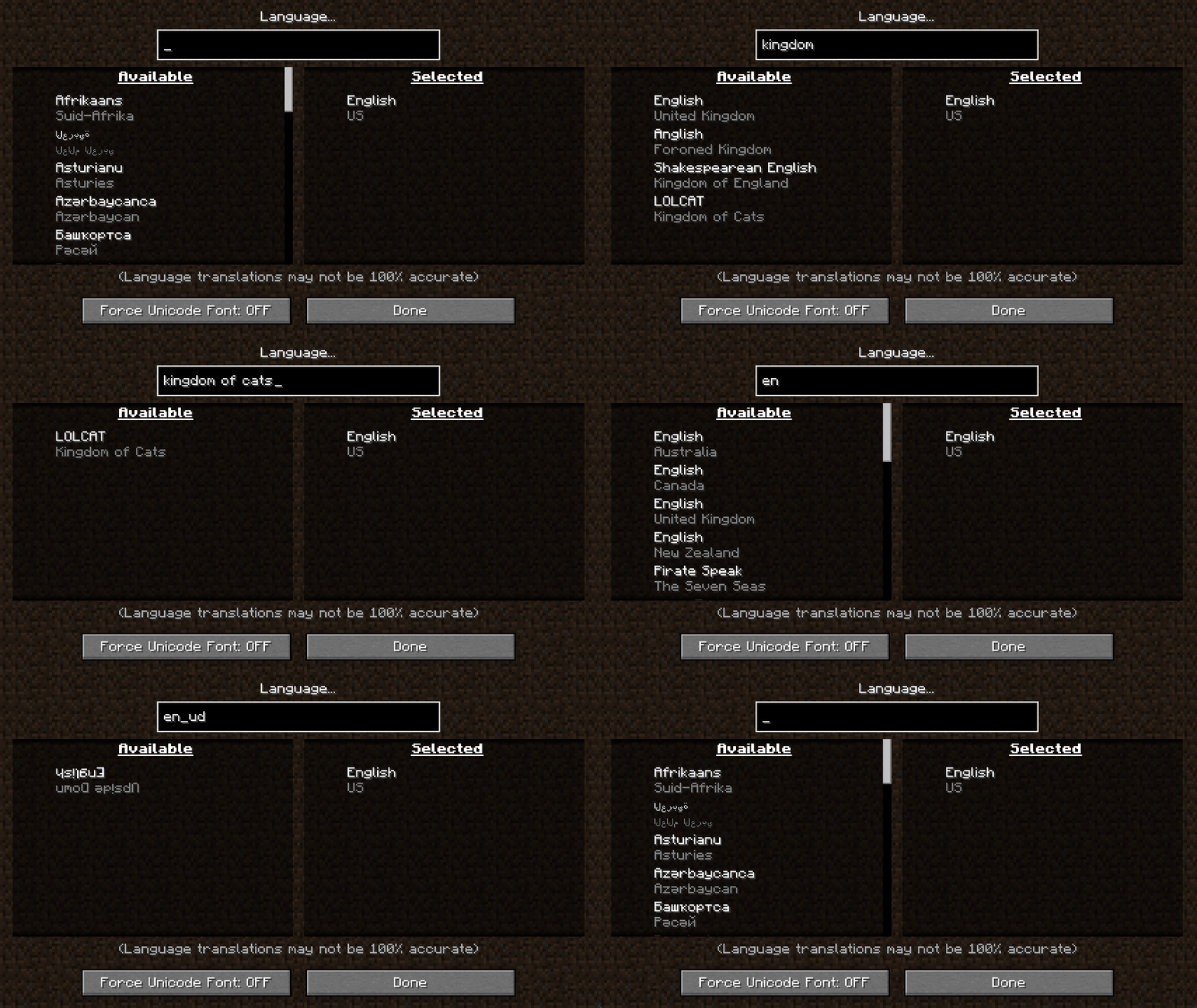
The search box saves scrolling through the complete list. Type a language or region name to narrow the available entries, then select the entry you want. This is separate from item search: the box in the Language menu chooses languages; inventory and recipe-book search find items.
Search for items in multiple languages
Multilingual item search is enabled by default. It works in the creative inventory and the recipe book using the languages you selected. For example, English can remain in the selected list while a different language controls most of the interface; an English search term can still find the item.
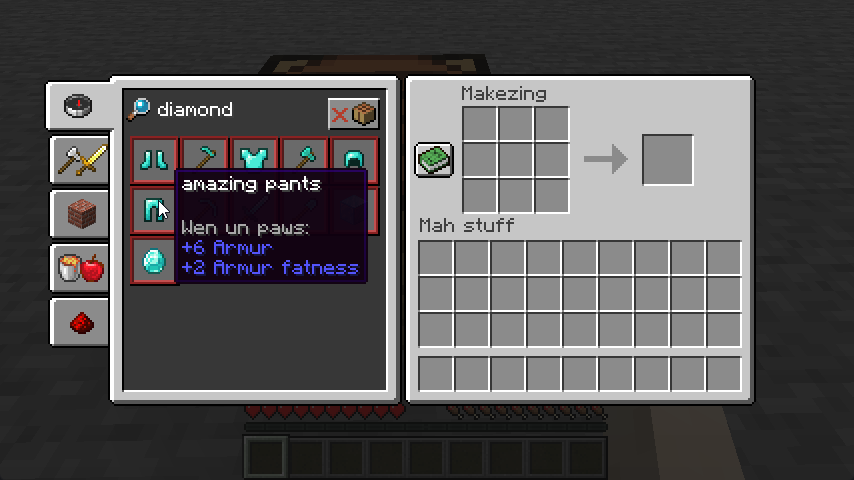
This does not unlock unknown survival recipes or turn your normal inventory into a universal item catalogue. The recipe book still follows Minecraft’s usual recipe availability. Search boxes supplied by other mods are separate features; do not assume every third-party item browser uses Language Reload’s multilingual search.
Shortcuts for reloading and switching
| Shortcut | Use it for |
|---|---|
| F3 + J | Reload language resources, useful after changing translation text. |
| Shift + F3 + J | Switch back to the previous language setup, including its fallbacks. |
To use quick switching, first apply one language setup, then apply another through the Language menu. The shortcut swaps between the current and previous setups; it is not a command that cycles through every installed language. If no valid previous setup exists, choose another language in the menu first.
The shortcuts above use the default keys. Check Controls if you have changed key bindings. On a keyboard that uses function keys for brightness or desktop actions, you may also need its function-key modifier to send F3 to Minecraft.
Optional settings
With Mod Menu, open Language Reload’s configuration from the mod list. The useful options are:
- Multilingual Item Search: keep it enabled to search in your selected languages. Turn it off if you prefer searches to follow the ordinary language behavior.
- Removable Default Language: leave the default language fixed for normal play. Allowing its removal is mainly useful when checking translation coverage.
Without Mod Menu, settings are stored in config/languagereload.json in your instance folder. Close Minecraft and keep a copy before editing it manually, then relaunch. Use the in-game language list for routine language ordering rather than editing saved language history by hand.
Automatic language detection only applies when Minecraft has no saved lang: entry in options.txt. It is not supposed to keep replacing a language you have already chosen.
What it speeds up—and what it does not
Language Reload avoids a full resource-pack reload when changing languages. This is useful if language switching otherwise makes you wait for a large pack to reload. It is not a general FPS booster, a shader optimizer or a tool that makes every resource reload disappear.
Use the language-only reload for translation text. Texture, model or other resource-pack changes can still require Minecraft’s normal full resource reload. A missing font glyph also needs a font that supports that character; selecting another fallback language is not a substitute for the required font.
If something does not work
- Minecraft will not launch: check that the game version, loader, Language Reload and Fabric API all belong to the same instance. Remove duplicate versions and read the missing-dependency message.
- An English item name finds nothing: check that English is selected, multilingual search is enabled, and you are using creative inventory or recipe-book search. Confirm that the relevant recipe is available if using the survival recipe book.
- Part of the interface uses the wrong language: check the order of selected languages and whether the preferred translation actually exists. Literal text from servers, player chat or mods may not be translated through Minecraft’s language system.
- The switch shortcut does nothing: establish a second language setup first, check key bindings and make sure the keyboard is sending the function key to the game.
- A problem appears only with another menu or language mod: try the combination in a separate profile and report the Minecraft/mod versions and reproduction steps to the developer’s issue tracker.
Author and sources
Language Reload is by Jerozgen and contributors, under the MIT license. Version 1.7.7+26.2 was published June 19, 2026 (UTC). The required Fabric API download prepared for this guide is 0.160.0+26.2, published September 7, 2026 (UTC), by FabricMC and contributors.
Sources: official project and releases, author’s gallery, source code and settings, author’s CurseForge page, and Fabric API. The screenshots demonstrate older interfaces and are dated in their captions. The MineBrush cover is a conceptual illustration; the mod does not add books, buildings or automatic conversations between languages.
More for your Java setup.
Mod Menu
20.0.2Find installed mods, open supported settings and make a large modpack easier to navigate. Download Mod Menu 20.0.2 for Java 26.2, with search tips, library filters and the required files.
- Minecraft
- Java 26.2
- Loader
- Fabric
- Runtime
- Client
Client menu · no server installation needed
Java · Mod
Mod Menu
Find installed mods, open supported settings and make a large modpack easier to navigate. Download Mod Menu 20.0.2 for Java 26.2, with search tips, library filters and the required files.
Client menu · no server installation needed
- Minecraft version
- Java 26.2
- Game edition
- Java Edition
- Loader / platform
- Fabric
- License
- MIT
- Platform family
- Java & PC
- Supported devices
- Windows · macOS · Linux
- Install format
- JAR files in the instance mods folder
- Touch readiness
- Not required
- Resource type
- Mod
- Project version
- 20.0.2
- Last verified at
- Sep 12, 2026
- Secondary guide action
- Setup & fixes
- Compatibility confidence
- Source claimed
- Java mod loader
- Fabric
- Java runtime side
- Client
- Card evidence statement
- Search installed mods and open supported settings
- Required dependency
- Fabric API and Text Placeholder API for Minecraft 26.2
- Card delivery statement
- Mod Menu and dependencies hosted on MineBrush
- Card limitation note
- Client menu · no server installation needed
- Edition applicability
- Java
- Delivery state
- Direct download
- Lifecycle state
- Current
Mouse Tweaks
2.31Move stacks with a drag, gather matching items and transfer small amounts with the mouse wheel. Download Mouse Tweaks for Java 26.2 with practical chest, crafting and touchpad tips.
- Minecraft
- Java 26.2
- Loader
- Fabric
- Runtime
- Client
Client inventory shortcuts; no automatic sorting
Java · Mod
Mouse Tweaks
Move stacks with a drag, gather matching items and transfer small amounts with the mouse wheel. Download Mouse Tweaks for Java 26.2 with practical chest, crafting and touchpad tips.
Client inventory shortcuts; no automatic sorting
- Minecraft version
- Java 26.2
- Game edition
- Java Edition
- Loader / platform
- Fabric
- License
- BSD-3-Clause
- Platform family
- Java & PC
- Supported devices
- Windows · macOS · Linux
- Install format
- One loader-specific Mouse Tweaks JAR in mods; Fabric also needs Fabric API
- Touch readiness
- Not required
- Resource type
- Mod
- Project version
- 2.31
- Last verified at
- Sep 13, 2026
- Secondary guide action
- Setup & fixes
- Compatibility confidence
- Source claimed
- Java mod loader
- Fabric
- Java runtime side
- Client
- Card evidence statement
- Drag stacks, gather matching items and scroll to transfer
- Required dependency
- Fabric API on Fabric; no additional library on Forge or NeoForge
- Card delivery statement
- Local Fabric, Forge and NeoForge files; Fabric API included
- Card limitation note
- Client inventory shortcuts; no automatic sorting
- Edition applicability
- Java
- Delivery state
- Direct download
- Lifecycle state
- Current

Chat Heads
1.2.8Recognize friends in a busy Minecraft chat by their skin portraits. Download Chat Heads for Java 26.2, choose a layout and learn useful settings for shadows, hats and server nicknames.
- Minecraft
- Java 26.2
- Loader
- Fabric
- Runtime
- Client
Server chat formatting can require detection or nickname settings
Java · Mod
Chat Heads
Recognize friends in a busy Minecraft chat by their skin portraits. Download Chat Heads for Java 26.2, choose a layout and learn useful settings for shadows, hats and server nicknames.
Server chat formatting can require detection or nickname settings
- Minecraft version
- Java 26.2
- Game edition
- Java Edition
- Loader / platform
- Fabric
- License
- MPL-2.0
- Platform family
- Java & PC
- Supported devices
- Windows · macOS · Linux
- Install format
- .jar mod file from the creator
- Touch readiness
- Not required
- Resource type
- Mod
- Project version
- 1.2.8
- Last verified at
- Sep 13, 2026
- Secondary guide action
- Setup & fixes
- Compatibility confidence
- Source claimed
- Java mod loader
- Fabric
- Java runtime side
- Client
- Card evidence statement
- Recognize friends by their skins; customize head placement and appearance
- Required dependency
- None for defaults; Cloth Config and Mod Menu for Fabric settings
- Card delivery statement
- Fabric / NeoForge files hosted on MineBrush
- Card limitation note
- Server chat formatting can require detection or nickname settings
- Edition applicability
- Java
- Delivery state
- Direct download
- Lifecycle state
- Current
BadOptimizations
2.4.1Reduce unnecessary background work while keeping your Minecraft world looking familiar. Download BadOptimizations for Java 26.2 on Fabric or NeoForge, learn when it can help, and find practical settings plus the author’s before-and-after screenshots.
- Minecraft
- Java 26.2
- Loader
- Fabric
- Runtime
- Client
Results vary by setup; client-side only
Java · Mod
BadOptimizations
Reduce unnecessary background work while keeping your Minecraft world looking familiar. Download BadOptimizations for Java 26.2 on Fabric or NeoForge, learn when it can help, and find practical settings plus the author’s before-and-after screenshots.
Results vary by setup; client-side only
- Minecraft version
- Java 26.2
- Game edition
- Java Edition
- Loader / platform
- Fabric
- License
- MIT
- Platform family
- Bedrock & Mobile
- Supported devices
- Windows · macOS · Linux
- Install format
- .jar mod file from the creator
- Touch readiness
- Not required
- Resource type
- Mod
- Project version
- 2.4.1
- Last verified at
- Sep 13, 2026
- Secondary guide action
- Setup & fixes
- Compatibility confidence
- Source claimed
- Java mod loader
- Fabric
- Java runtime side
- Client
- Card evidence statement
- Reduce unnecessary client work without changing how you play
- Required dependency
- No extra libraries; matching Fabric or NeoForge loader
- Card delivery statement
- Download on MineBrush · separate Fabric and NeoForge files
- Card limitation note
- Results vary by setup; client-side only
- Edition applicability
- Java
- Delivery state
- Direct download
- Lifecycle state
- Current
Player discussion 0
Questions, discoveries and help from other players.