
MineBrush publication
Mouse Tweaks 2.31: Faster Inventory Controls & Downloads
Move stacks with a drag, gather matching items and transfer small amounts with the mouse wheel. Download Mouse Tweaks for Java 26.2 with practical chest, crafting and touchpad tips.
Mouse Tweaks makes the inventory jobs you repeat every session take fewer clicks. Drag across several stacks to move them, gather matching items with a held mouse button, or use the wheel to transfer a few pieces instead of a whole stack. It is especially useful after mining, while organizing storage and when preparing building materials.
This is YaLTeR’s Mouse Tweaks 2.31 for Minecraft Java 26.2. Choose Fabric, Forge or NeoForge below. It works on your client, using familiar mouse buttons and Shift; there is no separate activation key and no server installation. It does not add storage space, new items or an automatic sorting system.
Which gesture should you use?
- Empty several slots after a mining trip: with nothing held on the cursor, hold Shift and the left mouse button, then sweep over the stacks you want to put away.
- Gather matching building blocks: begin a held left-click on one stack, then drag across other compatible stacks to collect them.
- Move just a few items: hover a stack and scroll. In the default direction, down sends items to the other inventory; up brings matching items back.
- Repeat a crafting pattern: hold a stack on the cursor, then right-drag over the ingredient slots. Revisiting a slot adds another item.
“Held on the cursor” means a stack attached to your pointer inside the inventory. It does not mean the block or tool selected in your hotbar. That distinction matters for the two left-drag modes.
Download Mouse Tweaks for your loader
Install only one Mouse Tweaks JAR. The three builds below all target Java 26.2. Fabric also needs Fabric API; Forge and NeoForge do not need that library for this mod.
Fabric · mod plus required API
Use Fabric Loader 0.19.3 or newer and the Java 25 runtime appropriate for Minecraft 26.2.
NeoForge · mod only
Forge · mod only
Use the matching Forge or NeoForge installation for Java 26.2. Forge and NeoForge are separate choices, even though their names are similar. Older Minecraft releases need their own builds from the author’s version history. These Java JARs do not install on Bedrock/mobile.
Install it and try your first transfer
- Close Minecraft and open the game folder of the launcher instance you actually play.
- Put the chosen Mouse Tweaks file in
mods. For Fabric, also add the API above unless a compatible copy is already present. Replace an older Mouse Tweaks JAR rather than keeping two versions. - Launch that loader profile. Open a chest with space available and put away anything currently attached to your cursor.
- Hold Shift, press and keep holding the left mouse button on a stack in your inventory, and drag over two or three other stacks. Release the button when you have moved what you need.
Start with ordinary building blocks so the result is easy to follow. The gesture uses the container’s usual quick-move behaviour; in a chest this moves items between the chest and your inventory. A machine or another mod’s screen may choose a different destination.
Unload a chest or inventory in one sweep
Shift + left-drag with an empty cursor is the everyday shortcut for bulk movement. Unlike picking matching items, this can move different item types along the path you draw. Sweep over the blocks you want to store and avoid your tools, food or other supplies you want to keep.
Use it in either direction: unload cobblestone and ores after mining, or collect several prepared material stacks from a chest before building. It does not choose categories for you or organize the destination automatically. If the chest fills up, the remaining items cannot be transferred there.
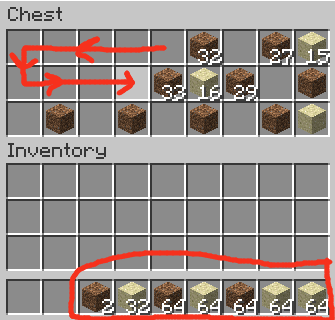
Collect only matching items
Start with an empty cursor. Press and hold the left button on a stack to pick it up, then keep the button down as you move over other stacks of that item. Compatible items join the carried stack up to its normal limit. Other item types are left alone.
For example, gather scattered sand before making glass, or combine small piles of stone before leaving a storage room. This is handy when matching stacks are separated by unrelated items and you do not want a broad Shift-drag to move everything.
Holding Shift during the matching-item drag quick-moves matching stacks instead of simply collecting them on the cursor. Follow only the slots you want. Two items with different data may not stack together even when their icons look similar; the mod respects normal stack compatibility.
If left-drag starts distributing a stack across empty slots instead, check how you began: picking up a stack, releasing, and then starting a new drag with it already on the cursor invokes vanilla’s distribution gesture. Begin the Mouse Tweaks pickup gesture with an empty cursor and keep the initial click held.
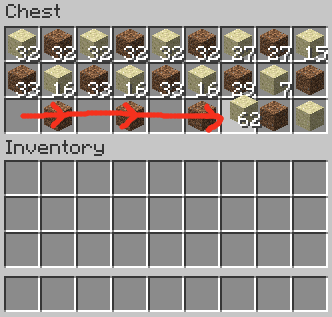
Use the wheel for small, controlled amounts
Hover an item stack while a chest or another supported container is open. By default, scroll down to push items away from the hovered inventory, or scroll up to pull matching items into it. You do not need to pick up the stack first.
This is useful when you need a few more blocks for a roof edge, want to leave some supplies behind, or need a small amount of an ingredient. Use short wheel movements and watch the count. Fast or smooth scrolling can send multiple scroll steps, so a long swipe is not necessarily one item.
If the direction feels backwards, change Scroll Direction. Normal means down to push/up to pull; Inverted reverses that. Inventory Position Aware makes up and down correspond to the relative position of the inventories. With a chest above your inventory, scrolling up over your own stack sends it toward the chest; scrolling down over the chest brings it toward you. An inverted position-aware mode is also available.
On macOS or a sensitive touchpad, try Scroll Scaling → Always Move One Item (macOS Compatibility). It reduces each delivered scroll event to one item instead of scaling the amount with the event’s size. A long gesture can still produce several events. For precise transfers, use short gestures rather than a sweeping swipe.
Fill a crafting pattern with right-drag
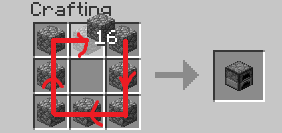
Pick up your ingredient stack, then hold the right mouse button and move across the slots of your recipe. Mouse Tweaks can place another item each time you leave and revisit a compatible slot during the drag. It also works over a slot that already contains matching ingredients, provided there is space.
For example, trace the eight outer slots of a crafting table with cobblestone for a furnace recipe. Another pass adds another layer of ingredients. You still choose the pattern and take the crafted result yourself; the mod does not discover recipes or craft an entire plan automatically.
If you overshoot a slot, correct the ingredient count before taking the output. Prefer vanilla’s once-per-slot right-drag behaviour? Turn off RMB Tweak while keeping the other features enabled.
Keep the gestures you like
On Fabric, the optional Mod Menu provides a settings button for Mouse Tweaks. The mod has its own configuration screen; no additional configuration library is required for it.
You can also close the game and edit config/MouseTweaks.cfg in the active instance. The four main switches use 1 for on and 0 for off:
RMBTweak: repeatable right-drag placement.LMBTweakWithItem: collect or quick-move matching items.LMBTweakWithoutItem: Shift-drag multiple stacks with an empty cursor.WheelTweak: wheel transfers.
All four start enabled. A comfortable minimal setup is to keep Shift-drag and wheel transfer, then turn off right-drag if it changes a crafting habit you prefer. You do not have to uninstall the mod to disable one gesture.
WheelScrollDirection uses 0 for normal, 1 for inverted, 2 for position-aware and 3 for inverted position-aware. ScrollItemScaling=1 enables the one-item-per-event mode. WheelSearchOrder chooses which matching stack is searched first when pulling: 1 searches last-to-first, while 0 searches first-to-last. Leave the search order at its default unless you have a reason to change where items are taken from.
Fix common problems
- Nothing changes: check that you launched the modded instance containing the JAR. On Fabric, verify Fabric API and Loader 0.19.3+. Try a normal survival chest with a few blocks.
- Shift-drag moves unwanted items: with an empty cursor it quick-moves every eligible stack you cross. Use the matching-item gesture or a narrower path instead.
- The wheel moves too much or feels reversed: adjust Scroll Scaling and Scroll Direction separately. One changes the amount; the other changes where it goes.
- It works in a chest but not a mod’s screen: custom containers can disable gestures or handle input differently. Keep that screen’s normal controls; behaviour in one container is not a guarantee for every inventory mod.
- Two inventory mods respond to the same drag: disable the overlapping gesture in one of them, then retry. Turning off a single Mouse Tweaks switch is often enough to keep the shortcuts you want.
- Items appear to move and then return on a server: wait for the server to catch up and try a normal click. Mouse Tweaks does not grant access to protected slots or bypass server inventory rules.
To restore defaults, close Minecraft, keep a backup of MouseTweaks.cfg, then remove that configuration file and launch again. To uninstall, remove the Mouse Tweaks JAR with the game closed; keep Fabric API if other mods need it. Your worlds do not depend on new blocks from this mod.
Release and sources
The Java 26.2 Fabric and NeoForge builds of 2.31 were released June 16, 2026; the Forge build followed June 18. Their release note states that they were updated for Minecraft 26.2.
Mouse Tweaks is created by Ivan Molodetskikh (YaLTeR) and contributors, under BSD-3-Clause. Sources: official gesture guide, Fabric release, NeoForge release, Forge release, source and configuration implementation, creator’s CurseForge page, and Fabric API. The hosted JARs retain their original contents and notices. The MineBrush cover is an editorial illustration; the smaller annotated inventory images are the author’s original demonstrations.
More for your Java setup.

Understand Minecraft 26, tell normal releases from test builds, and choose the right version for friends, servers and mods. Clear Java and Bedrock examples without the technical clutter.
- Topic
- Choosing your Minecraft version
- Scope
- None
- Evidence
- Official Minecraft sources · checked 9 Sep 2026
A shared “26” prefix never proves cross-edition compatibility.
MineBrush · News
Minecraft Versions Made Simple
Understand Minecraft 26, tell normal releases from test builds, and choose the right version for friends, servers and mods. Clear Java and Bedrock examples without the technical clutter.
A shared “26” prefix never proves cross-edition compatibility.
- Compatibility confidence
- Source claimed
- Card evidence statement
- Official policy and indexes checked 9 Sep 2026; client display NOT_OBSERVED.
- Card delivery statement
- Choose a version for everyday play or testing
- Card limitation note
- A shared “26” prefix never proves cross-edition compatibility.
- Edition applicability
- Java + Bedrock
- News topic
- Choosing your Minecraft version
- Public news evidence label
- Official Minecraft sources · checked 9 Sep 2026
- Delivery state
- No file
- Lifecycle state
- Current
- News evidence type
- Official Minecraft source

WorldEdit Bedrock
0.11.0-beta.5 / 0.10.4Copy builds, replace materials and shape terrain with WorldEdit for Bedrock. Learn the wand, clipboard, brushes and undo, then choose the right download for a normal world, Windows Editor or dedicated server.
- Minecraft
- 26.10 minimum (beta); 1.21.130 (stable)
- Components
- Paired
- Package
- .mcaddon for worlds; .zip for dedicated servers
Beta APIs required. Start in a copied world.
Bedrock · Add-on
WorldEdit Bedrock
Copy builds, replace materials and shape terrain with WorldEdit for Bedrock. Learn the wand, clipboard, brushes and undo, then choose the right download for a normal world, Windows Editor or dedicated server.
Beta APIs required. Start in a copied world.
- Minecraft version
- 26.10 minimum (beta); 1.21.130 (stable)
- Game edition
- Bedrock Edition
- Loader / platform
- Bedrock
- License
- GPL-3.0-or-later
- Platform family
- Bedrock & Mobile
- Supported devices
- Windows · Android · iOS/iPadOS
- Install format
- .mcaddon for worlds; .zip for dedicated servers
- Touch readiness
- Check guide
- Resource type
- Add-on
- Project version
- 0.11.0-beta.5 / 0.10.4
- Last verified at
- Sep 15, 2026
- Compatibility confidence
- Source claimed
- Bedrock add-on packs
- Paired
- Bedrock add-on import route
- Import the normal .mcaddon; activate both packs and Beta APIs.
- Required experiments
- Required
- Card evidence statement
- Select, copy, replace and shape your builds
- Card delivery statement
- Normal add-on, Windows Editor and server packages
- Card limitation note
- Beta APIs required. Start in a copied world.
- Edition applicability
- Bedrock
- Delivery state
- Direct download
- Lifecycle state
- Current
Tom's Simple Storage
2.11.3 Fabric / 2.11.2 NeoForgeFind supplies across your chests, craft from shared storage and fetch blocks while building. Set up Tom's Simple Storage for Java 26.2, organise materials with filters and choose the right Fabric or NeoForge download.
- Minecraft
- Java 26.2
- Loader
- Fabric
- Runtime
- Both
Choose Fabric or NeoForge; install on client and server
Java · Mod
Tom's Simple Storage
Find supplies across your chests, craft from shared storage and fetch blocks while building. Set up Tom's Simple Storage for Java 26.2, organise materials with filters and choose the right Fabric or NeoForge download.
Choose Fabric or NeoForge; install on client and server
- Minecraft version
- Java 26.2
- Game edition
- Java Edition
- Loader / platform
- Fabric
- License
- MIT
- Platform family
- Java & PC
- Supported devices
- Windows · macOS · Linux
- Install format
- JAR in the client and server mods folders
- Touch readiness
- Not required
- Resource type
- Mod
- Project version
- 2.11.3 Fabric / 2.11.2 NeoForge
- Last verified at
- Sep 15, 2026
- Secondary guide action
- Setup & fixes
- Compatibility confidence
- Source claimed
- Java mod loader
- Fabric
- Java runtime side
- Both
- Required dependency
- Fabric API for Fabric; none extra for NeoForge
- Card delivery statement
- Search shared storage, craft from supplies and add wireless access
- Card limitation note
- Choose Fabric or NeoForge; install on client and server
- Edition applicability
- Java
- Delivery state
- Direct download
- Lifecycle state
- Current
Mekanism
10.7.19.85Build your first powered workshop, process more resources and automate the busywork. Download Mekanism for Java 1.21.1 NeoForge, choose optional modules, and learn the path from steel to factories and advanced gear.
- Minecraft
- Java 1.21.1
- Loader
- NeoForge
- Runtime
- Both
Start with Core + Generators for a workshop with its own power supply
Java · Mod
Mekanism
Build your first powered workshop, process more resources and automate the busywork. Download Mekanism for Java 1.21.1 NeoForge, choose optional modules, and learn the path from steel to factories and advanced gear.
Start with Core + Generators for a workshop with its own power supply
- Minecraft version
- Java 1.21.1
- Game edition
- Java Edition
- Loader / platform
- NeoForge
- License
- MIT
- Platform family
- Java PC
- Supported devices
- Windows · macOS · Linux
- Install format
- JAR files in the client and server mods folders
- Touch readiness
- Not required
- Resource type
- Mod
- Project version
- 10.7.19.85
- Last verified at
- Sep 15, 2026
- Secondary guide action
- Setup & fixes
- Compatibility confidence
- Source claimed
- Java mod loader
- NeoForge
- Java runtime side
- Both
- Card evidence statement
- Powered workshops, resource processing, automation and advanced equipment
- Required dependency
- NeoForge; optional modules require matching Mekanism Core
- Card delivery statement
- Core plus optional Generators, Tools and Additions
- Card limitation note
- Start with Core + Generators for a workshop with its own power supply
- Edition applicability
- Java
- Delivery state
- Direct download
- Lifecycle state
- Current
Player discussion 0
Questions, discoveries and help from other players.