
MineBrush publication
BadOptimizations 2.4.1: Benefits, Settings & Downloads
Reduce unnecessary background work while keeping your Minecraft world looking familiar. Download BadOptimizations for Java 26.2 on Fabric or NeoForge, learn when it can help, and find practical settings plus the author’s before-and-after screenshots.
BadOptimizations helps Minecraft do less unnecessary work in the background. It trims small tasks involved in lighting, particles, notifications and other client systems. The aim is to leave more processing time for the game you are actually playing, without asking you to turn off every visual effect.
This is an install-and-play performance mod. It adds no blocks, tools or special movement abilities, and you do not need a hotkey to activate it. Its usefulness depends on what is limiting your PC: expect an extra optimization to try in a matching modded profile, not a guaranteed cure for every kind of lag.
When is it useful?
- Your survival profile already has the basics covered: after choosing sensible graphics settings and a rendering mod such as Sodium, BadOptimizations targets additional small sources of client work.
- You want to preserve the look of a build: its normal approach is to avoid redundant calculations, rather than remove decorations or replace your resource pack. You can try it while keeping the same visual settings.
- You play a larger modpack: it provides another potential source of headroom, with individual options that can be disabled if a particular mod combination causes a problem. Check whether the pack already includes it before adding a second copy.
- You join multiplayer servers: it runs on your own client. The server and your friends do not need it just because you install it, subject to the server’s mod rules.
If your main problem is high ping, slow server-side farms or a GPU overwhelmed by a demanding shader, address that cause too. A client optimization cannot speed up a remote server or remove the cost of every shader effect.
Download BadOptimizations for Minecraft Java 26.2
Version 2.4.1 has separate Fabric and NeoForge downloads for Minecraft 26.2. Choose one file for the loader in your launcher profile. Both are client-side and need no additional mod libraries. The Fabric version requires Fabric Loader 0.18.4 or newer; Fabric API is not required by this mod.
The NeoForge download’s filename ends in -forge.jar. This is the author’s filename for the NeoForge release, not an instruction to use Forge for 26.2. Do not install both files, and do not use them in Bedrock or an older Java version. For an older game profile, find its matching entry in the author’s version history.
Install it and start playing
- Close Minecraft and open the game folder of the 26.2 Fabric or NeoForge instance you actually use. Modpack launchers often keep separate folders for each instance.
- Put the matching downloaded JAR into that instance’s
modsfolder. Replace an older BadOptimizations copy instead of keeping two. - Launch that same profile and open a world or join your usual permitted server.
- Play normally with the default settings. There is no resource pack to enable or command to run.
Install it on your PC, not in a dedicated server’s mods folder. It works for single-player clients as well as multiplayer clients. If you use Mod Menu on Fabric, the installed-mod list is a convenient way to find it; Mod Menu itself is optional.
What does it actually change?
| Part of the game | What changes | For the player |
|---|---|---|
| Lighting | Reuses the lightmap when the inputs affecting brightness have not changed. | Aims to avoid repeated work while preserving the lighting you expect. Brightness changes and effects still need to be reflected. |
| Particles and pop-up notifications | Skips manager work when there are no particles or notifications to process. | It does not simply hide particles or advancement/recipe notifications to raise FPS. |
| Inactive debug systems | Avoids processing certain specialized debug renderers when there is no relevant data. | You do not have to disable the ordinary F3 screen to benefit. |
| Entities and block entities | Caches access to their renderers. | Reduces repeated lookups; it is not a setting for deleting mobs or making chests invisible. |
| Field of view and tutorial work | Skips redundant FOV calculations when the FOV effect scale is zero, and tutorial ticking outside demo mode. | Some savings apply only when their specific conditions are met. |
Older guides can describe different optimizations. In 26.2, the old sky-color cache and lightmap time-interval setting are no longer active tuning options. Turning up values copied from an older guide will not unlock extra performance from those settings.
How much faster will it be? Author screenshots explained
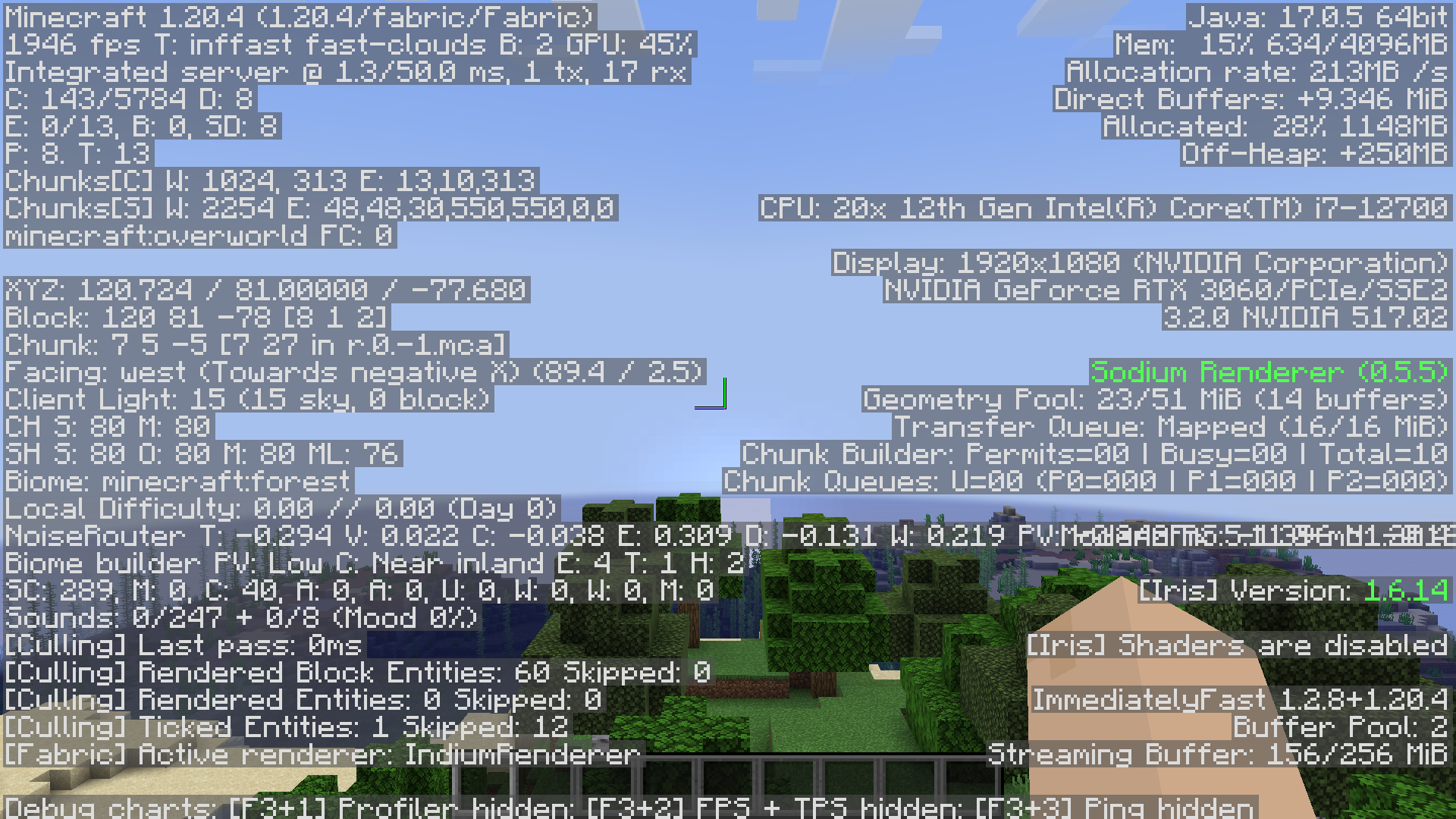
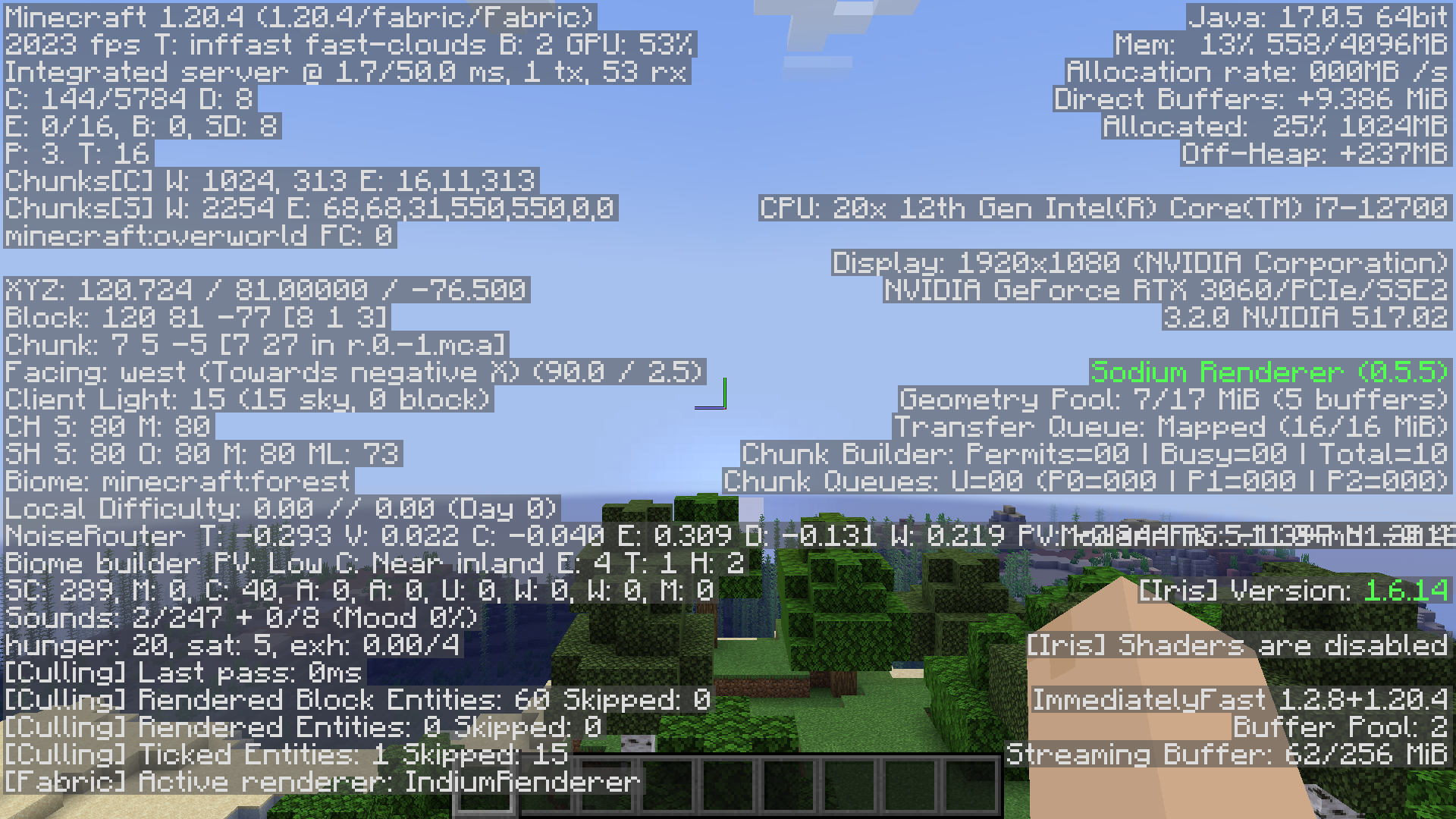
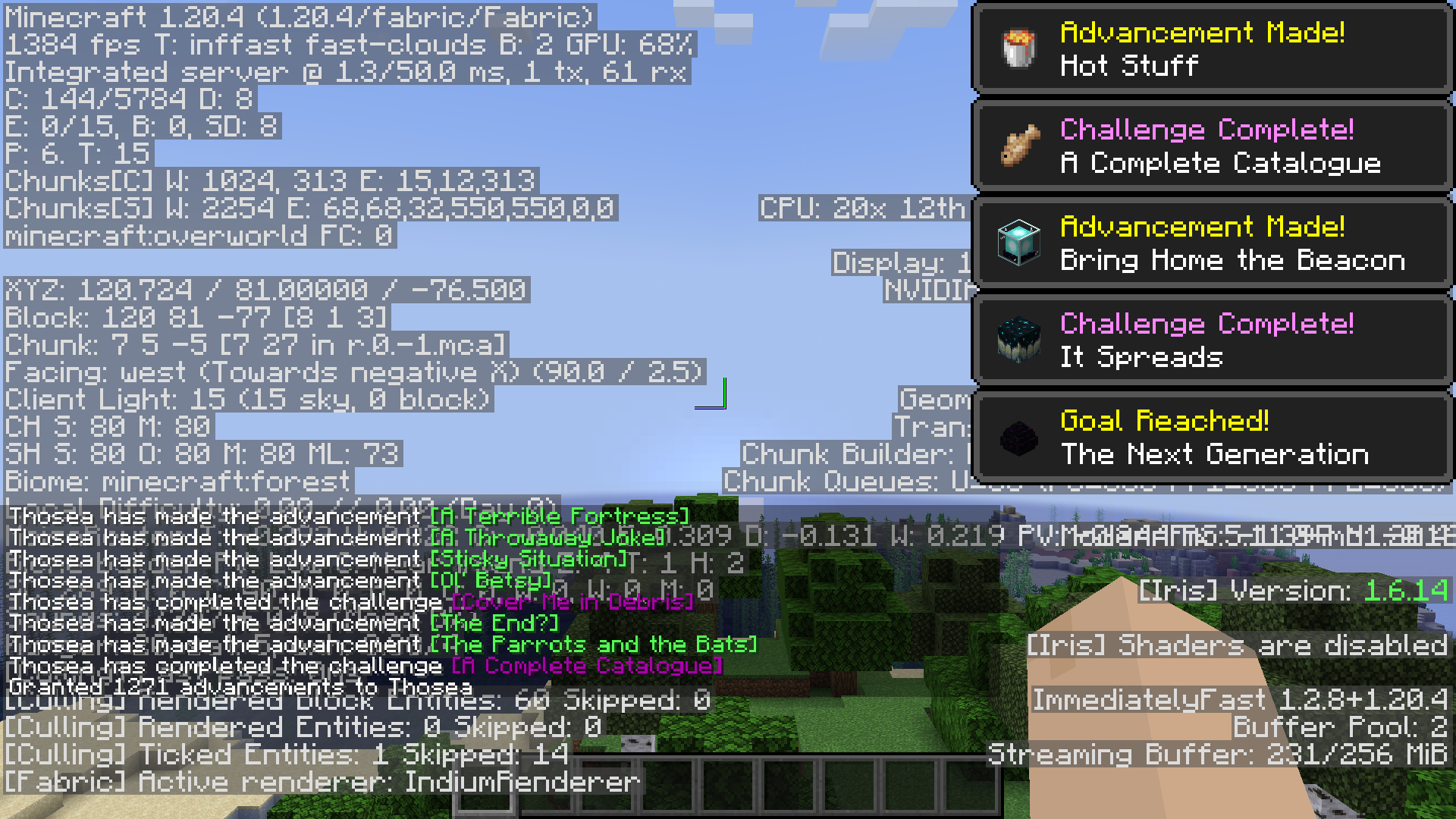
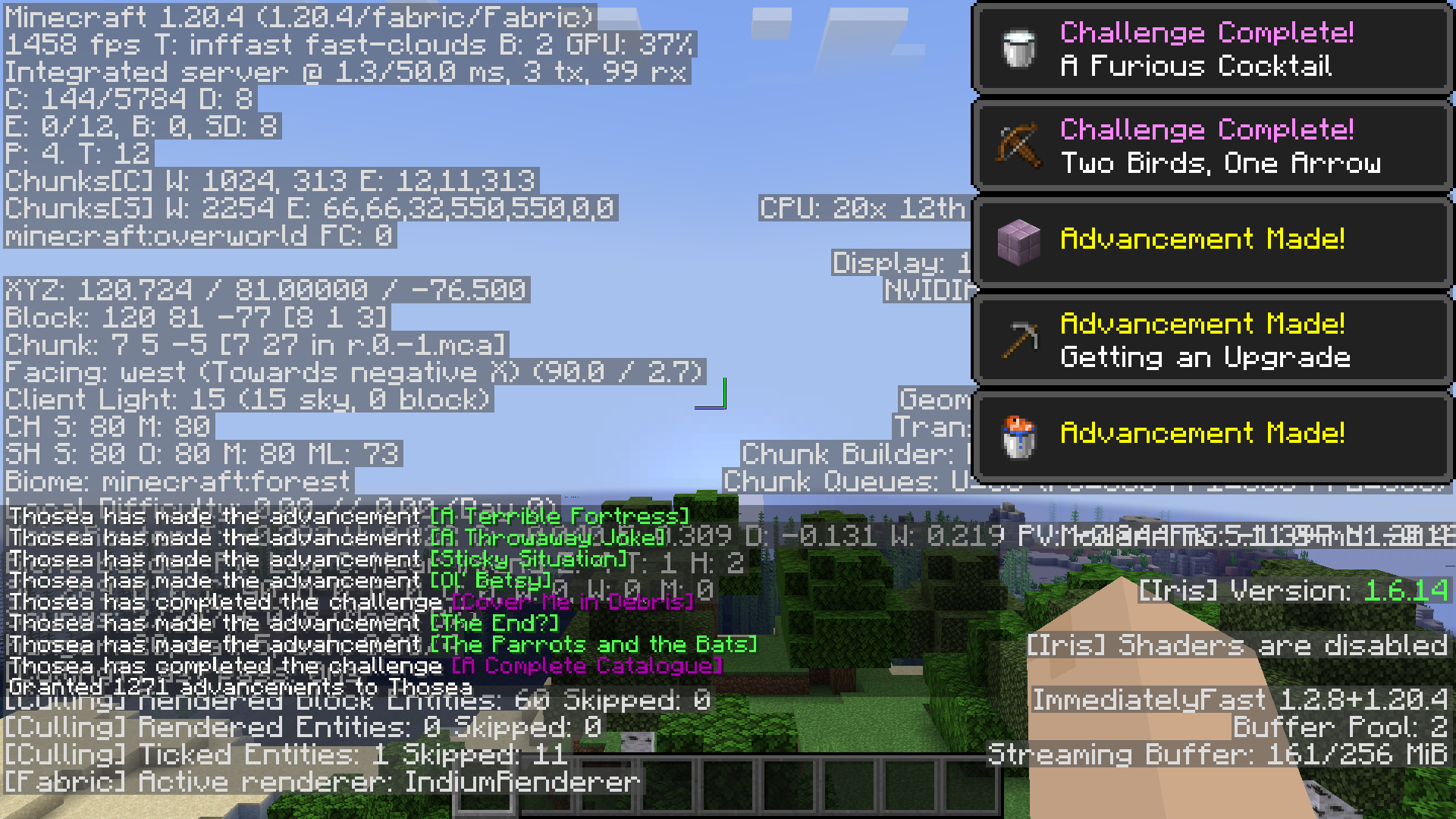
The official page includes a historical comparison made with Minecraft 1.20.4, Fabulously Optimized, an RTX 3060, an Intel i7-12700 and 4 GB allocated RAM. The screenshots show the same scene with the F3 overlay, including the FPS counter at the top left. They are useful examples of the author’s comparison, not a benchmark of the current 26.2 release.
Without pop-up notifications, the author reports roughly 1926–1955 FPS before and 2008–2023 after. With notifications, the reported ranges are 1351–1384 and 1414–1458. These unusually high uncapped figures belong to that specific setup; a modest PC should not expect the same FPS or the same numerical increase.
How to tell whether it helps your own game
Use a familiar world and repeat a short route: walk through your base, look across the same landscape and open the same busy area. Keep render distance, shaders, resolution and other mods unchanged. Let the world finish loading before comparing, and pay attention to smooth camera movement and recurring stutters as well as the FPS counter.
If VSync or a frame limit already holds the game at your target, the displayed FPS may stay the same. That alone does not prove nothing changed, but it also is not evidence of a benefit. Keep the mod if the experience is stable and useful for your setup; you do not need to collect performance mods just because a benchmark elsewhere looks impressive.
Settings: where to find them and what to change
Launch once to generate config/badoptimizations.txt inside your instance folder. Open it in a plain-text editor. On Fabric, the BadOptimizations configuration button in Mod Menu opens this file rather than a screen full of in-game sliders. Restart Minecraft after every settings change.
Start with the defaults. If you need to adjust something, save a copy of the file and change one relevant option at a time:
- Lighting stops updating correctly: try setting
enable_lightmap_cachingtofalse, restart and revisit the same scene. - A mob-adding mod crashes or models misbehave: the author suggests trying
enable_entity_renderer_caching: falsefirst. A problem with block-entity rendering has a separateenable_block_entity_renderer_cachingoption. - A notification or particle behaves incorrectly after installation: temporarily disable
enable_toast_optimizationsorenable_particle_manager_optimization, respectively, to see whether that option is involved. - You only want to hide the mod’s debug-screen entry: use
show_f3_text. On 26.2, the entry is offered through the F3 customizer; this option is not an FPS boost.
These are ways to isolate a problem, not claims that the current mod normally breaks those features. Leave ignore_mod_incompatibilities and ignore_mod_cache_hooks set to false: they allow compatibility protections and lighting-update hooks to work. Forcing them on can re-enable an optimization another mod needs disabled. Leave log_config enabled if you plan to report an issue, and do not edit config_version.
Using it with Sodium, shaders and other mods
BadOptimizations is a supplement to a performance setup, not a complete replacement for a renderer such as Sodium. The author’s older comparison already used Fabulously Optimized and shows Sodium in F3. That demonstrates the historical combination shown, not guaranteed compatibility with every current modpack or shader.
Match every mod to your Minecraft version and loader. Start with your working profile, add BadOptimizations alone, and check the scenes you care about. If you rely on dynamic lighting, custom entity models or a large content mod, look at those features after installation. Its compatibility system can automatically disable selected optimizations when another mod declares a conflict; that is normal protection, not a reason to force everything on.
If the game will not start or looks wrong
- Check the Minecraft version and loader, and remove duplicate BadOptimizations JARs. Remember that the 26.2 NeoForge file is named
-forge.jar. - If the issue started with this mod, close Minecraft, temporarily move its JAR out of
modsand restart the same profile. - If that restores normal play, try the relevant single setting above or look for a matching update. Restore a setting that does not help instead of leaving unrelated options disabled.
- If you need the developer’s help, include the Minecraft, loader and mod versions, relevant other mods, the error or screenshot, and what makes the problem occur. Share the game log with personal information removed via the official issue tracker.
Removing BadOptimizations does not remove any blocks or items from your world because it adds none. Keep your normal world backups when changing a modpack, and do not delete unrelated configuration folders to troubleshoot this one mod.
Author, release and sources
BadOptimizations is by Thosea and contributors, under the MIT license. The 26.2 Fabric and NeoForge files for 2.4.1 were published June 16, 2026 (UTC). Earlier combined-loader files should not be confused with these separate downloads.
Sources: official description and author comparisons, Fabric 26.2 release, NeoForge 26.2 release, author’s CurseForge page, 26.2 settings reference, and creator’s source code. The hosted JARs retain the author’s original contents. The branded MineBrush cover is a conceptual illustration; the mod does not add the scenery or glowing trails shown there.
More for your Java setup.
Sodium
0.9.1Make Minecraft Java feel smoother with Sodium. Download the Fabric or NeoForge version for Java 26.2, follow the installation steps, and find help with shaders, resource packs and startup problems.
- Minecraft
- Java 26.2
- Loader
- Fabric
- Runtime
- Client
Java 26.2 · choose Fabric or NeoForge
Java · Mod
Sodium
Make Minecraft Java feel smoother with Sodium. Download the Fabric or NeoForge version for Java 26.2, follow the installation steps, and find help with shaders, resource packs and startup problems.
Java 26.2 · choose Fabric or NeoForge
- Minecraft version
- Java 26.2
- Game edition
- Java Edition
- Loader / platform
- Fabric
- License
- Polyform Shield 1.0.0
- Platform family
- Bedrock & Mobile
- Supported devices
- Windows · macOS · Linux
- Install format
- .jar mod file from the creator
- Touch readiness
- Not required
- Resource type
- Mod
- Project version
- 0.9.1
- Last verified at
- Sep 19, 2026
- Secondary guide action
- Setup & fixes
- Compatibility confidence
- Source claimed
- Java mod loader
- Fabric
- Java runtime side
- Client
- Card evidence statement
- Compatibility information from CaffeineMC
- Card delivery statement
- Download from MineBrush · 2 loader versions
- Card limitation note
- Java 26.2 · choose Fabric or NeoForge
- Edition applicability
- Java
- Delivery state
- Direct download
- Lifecycle state
- Current
ImmediatelyFast
1.16.4Help Minecraft draw map walls, text and busy interfaces more efficiently. Download ImmediatelyFast 1.16.4 for Java 26.2, choose Fabric/Quilt or NeoForge, and learn where it helps and how to use it.
- Minecraft
- Java 26.2
- Loader
- Fabric
- Runtime
- Client
Client only · works with default settings
Java · Mod
ImmediatelyFast
Help Minecraft draw map walls, text and busy interfaces more efficiently. Download ImmediatelyFast 1.16.4 for Java 26.2, choose Fabric/Quilt or NeoForge, and learn where it helps and how to use it.
Client only · works with default settings
- Minecraft version
- Java 26.2
- Game edition
- Java Edition
- Loader / platform
- Fabric
- License
- LGPL-3.0-or-later
- Platform family
- Java & PC
- Supported devices
- Windows · macOS · Linux
- Install format
- .jar mod file from the creator
- Touch readiness
- Not required
- Resource type
- Mod
- Project version
- 1.16.4
- Last verified at
- Sep 12, 2026
- Secondary guide action
- Setup & fixes
- Compatibility confidence
- Source claimed
- Java mod loader
- Fabric
- Java runtime side
- Client
- Card evidence statement
- Automatic optimizations for maps, text and interface rendering
- Required dependency
- No separate library required; use the matching loader
- Card delivery statement
- Fabric / Quilt or NeoForge · choose one matching file
- Card limitation note
- Client only · works with default settings
- Edition applicability
- Java
- Delivery state
- Direct download
- Lifecycle state
- Current

Mod Menu
20.0.2Find installed mods, open supported settings and make a large modpack easier to navigate. Download Mod Menu 20.0.2 for Java 26.2, with search tips, library filters and the required files.
- Minecraft
- Java 26.2
- Loader
- Fabric
- Runtime
- Client
Client menu · no server installation needed
Java · Mod
Mod Menu
Find installed mods, open supported settings and make a large modpack easier to navigate. Download Mod Menu 20.0.2 for Java 26.2, with search tips, library filters and the required files.
Client menu · no server installation needed
- Minecraft version
- Java 26.2
- Game edition
- Java Edition
- Loader / platform
- Fabric
- License
- MIT
- Platform family
- Java & PC
- Supported devices
- Windows · macOS · Linux
- Install format
- JAR files in the instance mods folder
- Touch readiness
- Not required
- Resource type
- Mod
- Project version
- 20.0.2
- Last verified at
- Sep 12, 2026
- Secondary guide action
- Setup & fixes
- Compatibility confidence
- Source claimed
- Java mod loader
- Fabric
- Java runtime side
- Client
- Card evidence statement
- Search installed mods and open supported settings
- Required dependency
- Fabric API and Text Placeholder API for Minecraft 26.2
- Card delivery statement
- Mod Menu and dependencies hosted on MineBrush
- Card limitation note
- Client menu · no server installation needed
- Edition applicability
- Java
- Delivery state
- Direct download
- Lifecycle state
- Current
Krypton
0.3.1Reduce networking overhead in a Fabric multiplayer setup. Download Krypton for Java 26.2 and learn where to install it, when it can help and how to separate server lag from low FPS or a poor connection.
- Minecraft
- Java 26.2
- Loader
- Fabric
- Runtime
- Both
Benefits depend on network workload; does not fix a poor internet connection
Java · Mod
Krypton
Reduce networking overhead in a Fabric multiplayer setup. Download Krypton for Java 26.2 and learn where to install it, when it can help and how to separate server lag from low FPS or a poor connection.
Benefits depend on network workload; does not fix a poor internet connection
- Minecraft version
- Java 26.2
- Game edition
- Java Edition
- Loader / platform
- Fabric
- License
- LGPL-3.0-only
- Platform family
- Bedrock & Mobile
- Supported devices
- Windows · macOS · Linux
- Install format
- .jar mod file from the creator
- Touch readiness
- Not required
- Resource type
- Mod
- Project version
- 0.3.1
- Last verified at
- Sep 13, 2026
- Secondary guide action
- Setup & fixes
- Compatibility confidence
- Source claimed
- Java mod loader
- Fabric
- Java runtime side
- Both
- Card evidence statement
- Reduce networking overhead; practical client and server setup
- Required dependency
- Fabric Loader 0.18.4+; no extra mod libraries
- Card delivery statement
- Fabric JAR hosted on MineBrush; client or server
- Card limitation note
- Benefits depend on network workload; does not fix a poor internet connection
- Edition applicability
- Java
- Delivery state
- Direct download
- Lifecycle state
- Current
Player discussion 0
Questions, discoveries and help from other players.