
MineBrush publication
Krypton 0.3.1 for Minecraft 26.2: Multiplayer Guide & Download
Reduce networking overhead in a Fabric multiplayer setup. Download Krypton for Java 26.2 and learn where to install it, when it can help and how to separate server lag from low FPS or a poor connection.
Krypton reduces some of the work Minecraft does when sending and receiving game data. It is most useful as part of a Fabric multiplayer setup, especially on a server handling several players. If networking is using a meaningful share of the processor, reducing that overhead can leave more room for the rest of the game.
This is a background optimization mod: it adds no blocks, menus, key bindings or visual effects. You install it in the appropriate game or server profile and keep playing normally. It does not promise a particular FPS increase or turn a distant server into a low-ping one.
When Krypton is worth considering
- A shared survival server: friends exploring, building and moving between areas generate a continuous flow of updates. Krypton can reduce the cost of handling that traffic when installed on the Fabric server.
- A server getting busier: if performance worsens as more people join, networking may be one contributor. Krypton is a candidate to try alongside sensible view and simulation distances; it will not remove the cost of every farm, mob or chunk.
- A multiplayer client profile: installing it on your PC optimizes the client side of the connection. The author explains that the larger opportunity is usually on the server, so a small or unnoticeable client benefit is possible.
- A LAN world with friends: the host can use the mod in their Fabric profile. Joining players can use it independently, subject to the requirements of any other mods in the world.
For a mostly single-player graphics problem, start with the actual bottleneck. A low frame rate while looking at a complex build calls for rendering and graphics changes; Krypton’s main focus is networking.
Download Krypton for Minecraft Java 26.2
Krypton 0.3.1 is the current official Fabric release for Java 26.2. Use Fabric Loader 0.18.4 or newer. It needs no additional mod libraries: Fabric API, Cloth Config and Mod Menu are not required by this JAR.
The same file supports a client or Fabric server. Install one copy in each profile where you want it to run; you do not need separate client and server downloads. For older Minecraft versions, choose a matching release in the author’s version history. The 26.2 file is not the file to use for 1.20.1 or 1.21.4.
This page covers astei/tuxed’s Fabric mod. Projects with similar names, including unofficial Forge/NeoForge ports and other clients, have their own releases and compatibility. Do not put this Fabric JAR into a Forge, NeoForge or Bedrock installation.
Where should you install it?
| Your situation | What to do |
|---|---|
| You join somebody else’s server | Put Krypton in your own Fabric profile. This changes your client; it does not install anything on their server. |
| You run a Fabric server | Put it in the server’s mods folder and restart the server. Players do not need Krypton just because the server uses it. |
| You control both ends | You may install it on both. Either side can use Krypton independently. |
| You run Paper or a vanilla server | This is not a plugin or a standalone server program. It needs Fabric to load. |
Krypton is designed to preserve compatibility with normal Minecraft connections. That does not override a public server’s rules about client modifications; check those rules before adding it to a profile used there.
Install on your PC
- Close Minecraft and select the launcher instance running Fabric for Java 26.2.
- Open that instance’s game folder and place
krypton-0.3.1.jarinmods. Replace an older Krypton copy rather than keeping two versions. - Launch the Fabric profile and join your usual permitted server.
- Play normally. There is no activation button, resource pack to enable or “best settings” menu to find.
If you already use Mod Menu, its installed-mod list can help confirm which version is present. You do not need to install it solely to make Krypton work.
Install on a Fabric server
- Stop the server cleanly. Keep a backup of the world and existing configuration before changing a working setup.
- Check that the server actually starts with Fabric for Minecraft 26.2. A hosting panel labelled “Minecraft server” does not necessarily mean Fabric.
- Put the same Krypton JAR in the server’s
modsfolder, replacing an older copy. - Start the server and check that it loads without errors. Join and try ordinary actions such as moving, opening containers and travelling with friends.
Players can continue using compatible clients without Krypton. Other gameplay mods may still require matching client installations; Krypton does not change their requirements. On a host you do not control, ask the server owner to install it.
Understand the improvement you are looking for
Krypton makes parts of network data handling more efficient and reduces some CPU and temporary-memory work. The developer particularly targets server use and Linux, although the mod is intended to run on other supported Minecraft platforms as well. The exact benefit depends on the operating system, workload and other mods.
Three different problems often get called “lag”:
- Low FPS: your view stutters while the world and connection may otherwise be healthy. Lower demanding graphics settings or consider Sodium.
- A struggling server: several players see delayed block breaks, slow mobs or late interactions together. Krypton can help the networking part of server load, but expensive world simulation needs attention too.
- Connection delay: one player has unstable Wi-Fi, packet loss or a long route to the server. Krypton does not fix a weak wireless signal, increase your internet plan’s speed or remove geographical distance.
These are useful clues, not a diagnosis from symptoms alone. For example, delayed block breaks can come from either server load or the connection.
Check whether it helps your setup
Compare the same world and roughly the same number of players before and after installing it. Try a normal busy session rather than judging the mod from an empty server or one screenshot of the FPS counter.
For a server you manage, watch the hosting panel’s CPU use and the server’s tick-time information if available. A standard 20-tick-per-second world has about 50 milliseconds per tick; sustained work above that budget can slow the simulation. Lower tick times can provide useful headroom even when the server was already holding 20 TPS.
As a player, pay attention to whether ordinary interactions remain responsive and the connection stays stable. A server that was already running comfortably may feel unchanged. Keep useful results in perspective: changing player count, generating new terrain or running different farms makes comparisons less reliable.
Combine it with the right performance mods
The author specifically aims for compatibility with Fabric API, Lithium and Sodium. They address different needs: Sodium focuses on rendering, Lithium on game logic, and Krypton on networking. Use releases that match the same Minecraft version; none of those mods is a required dependency of Krypton.
Be more careful with mods that also alter connections, packet handling or remote LAN hosting. The developer’s tracker contains an open report about an e4mc 6.0.0+ conflict. This is a specific compatibility report, not a claim that every e4mc/Krypton combination fails. If that is your setup and joining stops working, isolate the combination before adding more networking mods.
If joining fails or you are disconnected
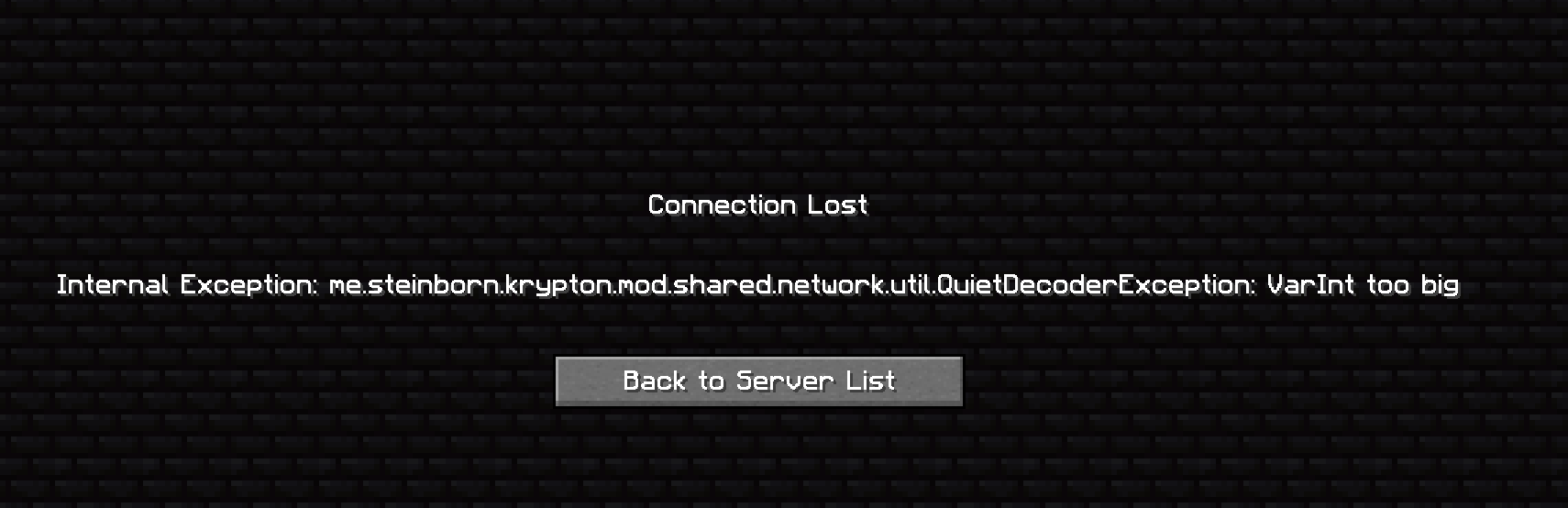
“Connection Lost” is the symptom; the following error text is the useful clue. For example, a community report includes “VarInt too big”. Keep the full message when asking for help instead of reporting only that the game disconnected.
- Check the basics: correct Minecraft version, Fabric loader and one Krypton JAR in the profile actually being launched.
- Identify what changed: if the problem started after adding Krypton or another networking mod, note that combination and its versions.
- Try without Krypton: close the client or stop the server, temporarily remove its JAR and restart the same setup. Change one component at a time so the result is useful.
- For a server you manage: compare a client-side problem with a server-side one. Removing Krypton from your PC does not remove the server’s copy.
- If you need help: include the complete error, Minecraft/Fabric/Krypton versions, relevant mod list and whether Krypton is on the client, server or both. Remove personal addresses or tokens before sharing logs.
Do not change account authentication or unrelated server settings to work around a networking error. If removing Krypton restores reliable play and no compatible update resolves the conflict, leave it out of that setup.
Release, author and sources
Krypton is by Andrew Steinborn, known as astei/tuxed, and contributors. Version 0.3.1 was released July 14, 2026 (UTC) to add Minecraft 26.2 support. The project is listed under LGPL-3.0-only; the hosted archive retains its original contents and license notices.
Sources: official project description, 0.3.1 release, creator’s repository, client/server explanation, author’s FAQ, and the linked compatibility reports. The FAQ contains older implementation details, so this guide uses current release requirements for installation. The MineBrush cover is a conceptual illustration: Krypton does not add glowing paths or change the appearance of the world.
More for your Java setup.
Sodium
0.9.1Make Minecraft Java feel smoother with Sodium. Download the Fabric or NeoForge version for Java 26.2, follow the installation steps, and find help with shaders, resource packs and startup problems.
- Minecraft
- Java 26.2
- Loader
- Fabric
- Runtime
- Client
Java 26.2 · choose Fabric or NeoForge
Java · Mod
Sodium
Make Minecraft Java feel smoother with Sodium. Download the Fabric or NeoForge version for Java 26.2, follow the installation steps, and find help with shaders, resource packs and startup problems.
Java 26.2 · choose Fabric or NeoForge
- Minecraft version
- Java 26.2
- Game edition
- Java Edition
- Loader / platform
- Fabric
- License
- Polyform Shield 1.0.0
- Platform family
- Bedrock & Mobile
- Supported devices
- Windows · macOS · Linux
- Install format
- .jar mod file from the creator
- Touch readiness
- Not required
- Resource type
- Mod
- Project version
- 0.9.1
- Last verified at
- Sep 19, 2026
- Secondary guide action
- Setup & fixes
- Compatibility confidence
- Source claimed
- Java mod loader
- Fabric
- Java runtime side
- Client
- Card evidence statement
- Compatibility information from CaffeineMC
- Card delivery statement
- Download from MineBrush · 2 loader versions
- Card limitation note
- Java 26.2 · choose Fabric or NeoForge
- Edition applicability
- Java
- Delivery state
- Direct download
- Lifecycle state
- Current

Lithium
0.25.3Help busy Minecraft Java worlds and servers run more smoothly with Lithium. Download the matching Fabric/Quilt or NeoForge file for Java 26.2, follow the installation steps and learn which kinds of lag it can help.
- Minecraft
- Java 26.2
- Loader
- Fabric
- Runtime
- Both
Java 26.2 · single-player and servers
Java · Mod
Lithium
Help busy Minecraft Java worlds and servers run more smoothly with Lithium. Download the matching Fabric/Quilt or NeoForge file for Java 26.2, follow the installation steps and learn which kinds of lag it can help.
Java 26.2 · single-player and servers
- Minecraft version
- Java 26.2
- Game edition
- Java Edition
- Loader / platform
- Fabric
- License
- LGPL-3.0-only
- Platform family
- Bedrock & Mobile
- Supported devices
- Windows · macOS · Linux
- Install format
- .jar mod file from the creator
- Touch readiness
- Not required
- Resource type
- Mod
- Project version
- 0.25.3
- Last verified at
- Sep 5, 2026
- Secondary guide action
- Setup & fixes
- Compatibility confidence
- Source claimed
- Java mod loader
- Fabric
- Java runtime side
- Both
- Card evidence statement
- Optimizes mob behavior and world updates
- Card delivery statement
- Download from MineBrush · choose your loader
- Card limitation note
- Java 26.2 · single-player and servers
- Edition applicability
- Java
- Delivery state
- Direct download
- Lifecycle state
- Current
FerriteCore
9.0.0Reduce Minecraft Java memory use with FerriteCore. Download the Fabric or NeoForge version for Java 26.1–26.2, install it in your game or server and find practical fixes for common compatibility problems.
- Minecraft
- Java 26.1–26.2
- Loader
- Fabric
- Runtime
- Both
Java 26.1–26.2 · Fabric or NeoForge
Java · Mod
FerriteCore
Reduce Minecraft Java memory use with FerriteCore. Download the Fabric or NeoForge version for Java 26.1–26.2, install it in your game or server and find practical fixes for common compatibility problems.
Java 26.1–26.2 · Fabric or NeoForge
- Minecraft version
- Java 26.1–26.2
- Game edition
- Java Edition
- Loader / platform
- Fabric
- License
- MIT
- Platform family
- Bedrock & Mobile
- Supported devices
- Windows · macOS · Linux
- Install format
- .jar mod file from the creator
- Touch readiness
- Not required
- Resource type
- Mod
- Project version
- 9.0.0
- Last verified at
- Sep 5, 2026
- Secondary guide action
- Setup & fixes
- Compatibility confidence
- Source claimed
- Java mod loader
- Fabric
- Java runtime side
- Both
- Card evidence statement
- Reduces memory used by game data
- Card delivery statement
- Download from MineBrush · choose your loader
- Card limitation note
- Java 26.1–26.2 · Fabric or NeoForge
- Edition applicability
- Java
- Delivery state
- Direct download
- Lifecycle state
- Current

Mod Menu
20.0.2Find installed mods, open supported settings and make a large modpack easier to navigate. Download Mod Menu 20.0.2 for Java 26.2, with search tips, library filters and the required files.
- Minecraft
- Java 26.2
- Loader
- Fabric
- Runtime
- Client
Client menu · no server installation needed
Java · Mod
Mod Menu
Find installed mods, open supported settings and make a large modpack easier to navigate. Download Mod Menu 20.0.2 for Java 26.2, with search tips, library filters and the required files.
Client menu · no server installation needed
- Minecraft version
- Java 26.2
- Game edition
- Java Edition
- Loader / platform
- Fabric
- License
- MIT
- Platform family
- Java & PC
- Supported devices
- Windows · macOS · Linux
- Install format
- JAR files in the instance mods folder
- Touch readiness
- Not required
- Resource type
- Mod
- Project version
- 20.0.2
- Last verified at
- Sep 12, 2026
- Secondary guide action
- Setup & fixes
- Compatibility confidence
- Source claimed
- Java mod loader
- Fabric
- Java runtime side
- Client
- Card evidence statement
- Search installed mods and open supported settings
- Required dependency
- Fabric API and Text Placeholder API for Minecraft 26.2
- Card delivery statement
- Mod Menu and dependencies hosted on MineBrush
- Card limitation note
- Client menu · no server installation needed
- Edition applicability
- Java
- Delivery state
- Direct download
- Lifecycle state
- Current
Player discussion 0
Questions, discoveries and help from other players.