
MineBrush publication
Minecraft Server Profiles: What to Know Before You Join
Understand a Minecraft server before moving in: edition and join details, claims, PvP, world resets, costs and community hours. See a clear example profile, official connection screenshots and the questions that protect your time and builds.
A useful Minecraft server profile tells you what will happen after you join. Can you play from your device? Will your house survive the next season? Can strangers take your items? Is the server busy when you are online? Those answers matter more than a long feature list or a spectacular spawn screenshot.
Use this guide to read a server listing, ask the right questions and understand common terms. If you run a server, the example below shows how to turn your settings and rules into a description new players can actually use.
Connection details · Your world and progress · Example profile · Useful screenshots · First session
First, can you and your friends join?
Look for edition, supported game versions and the connection address together. “PC server” is not enough: Windows players may use Java or Bedrock, and those editions do not normally share a server. A crossplay server should give a separate, explicit joining route for each edition.
Some communities use Geyser to let Bedrock players connect to a Java server. That is a feature the server provides, not something every Java address automatically supports. Ask about the devices your group actually uses instead of assuming a “crossplay” label guarantees identical controls or access on every platform.
- Java: copy the address into Multiplayer → Add Server, give the entry a name, save it and choose Join Server. Include a port after the address if the operator supplies one.
- Bedrock: use Play → Servers. Where Add Server is available, enter the supplied address and port in their separate fields. Featured servers have their own join buttons.
- Required setup: a modded server should name its modpack and version. A whitelist means you need approval before joining. A Realm uses an invitation, so do not expect a public server address.
Console joining options differ from PC and mobile. If your screen has no Add Server option, ask for the operator's supported console route; changing random fields in your network settings is not a substitute for clear instructions.
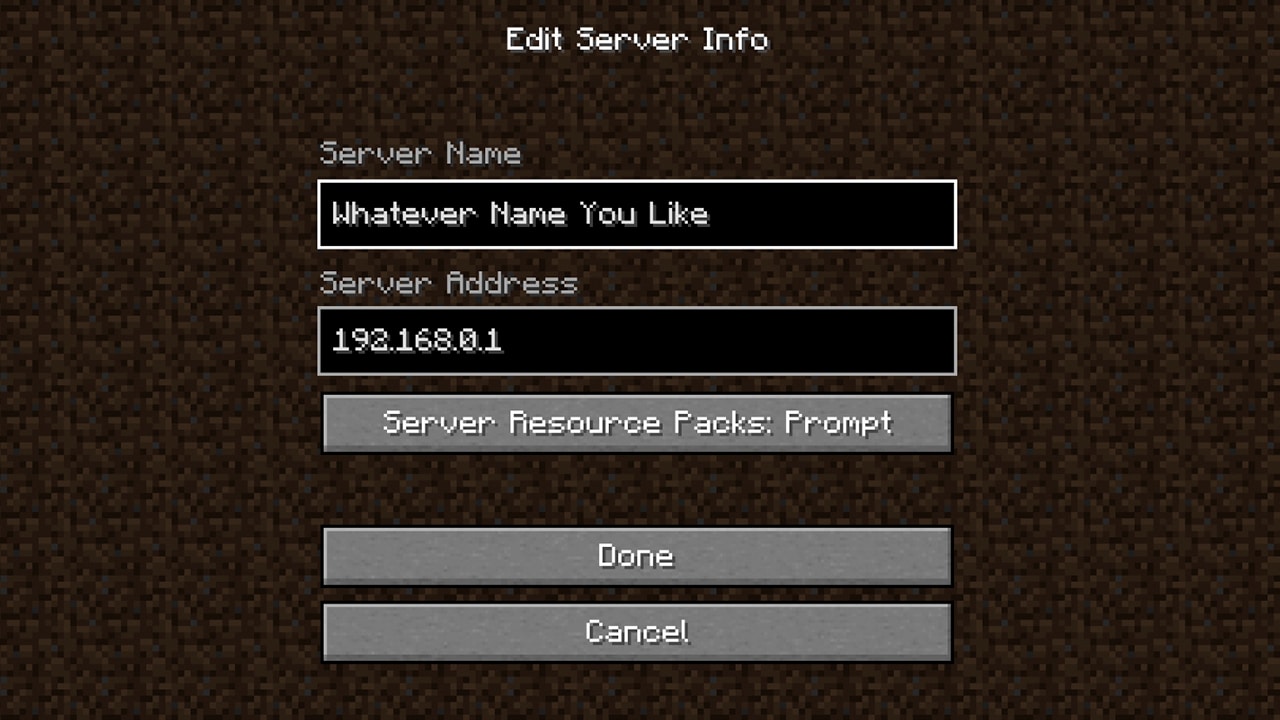
Find out what happens to your builds and progress
Survival, vanilla and “SMP” need an explanation
SMP means survival multiplayer, but it does not tell you whether the server has an economy, teleportation, land protection or changed recipes. “Vanilla” may describe the general feel while extra server features still exist. Look for the actual changes that affect your plans.
For a relaxed town with friends, ask whether you can build together, share storage and protect a plot. For a redstone project, ask about farm limits and disabled mechanics. For competitive survival, ask where combat is allowed and what you lose on death. The same server can be great for one plan and frustrating for another.
Claims are protection, but read the details
A claim is an area managed by a server's protection system. The useful questions are who can build, open containers, use doors or interact with animals there. Ask how to add a trusted friend and whether inactive claims expire. A server that bans griefing still needs a clear way to report damage and explain what staff can restore.
Do not test another player's protection by taking items or breaking blocks. Ask staff to demonstrate the system on a permitted test area, or follow the server's own tutorial using your plot and a trusted friend.
Know exactly what resets
A reset or wipe can mean several different things: a mining world is refreshed, the economy restarts, or the entire survival map is replaced. “New season soon” is too vague if you are about to spend a month building a castle.
- Does the main building world reset, or only a separate resource world?
- Do inventories, money, ranks, claims and quest progress carry over?
- How much notice is given, and where is the announcement posted?
- Will players be able to download the old world, if that is something you care about?
An honest “no reset is scheduled; future changes will be announced” is more useful than an unsupported “your builds are safe forever.” Keep the distinction between a current plan and a permanent promise.
Read the rules that affect your style of play
Before you settle in, check PvP, stealing, griefing, traps, farms and allowed client mods. “Friendly community” does not answer any of these. A minimap permitted on one server may be restricted on another; a rule against automation may cover the farm you intended to build.
Ask what happens after death. Do items drop normally, does a grave hold them, or is keep-inventory enabled? These are server-specific choices. Do not risk valuable gear based on the behavior of your single-player world.
Look for a staff contact and a practical reporting route. A useful rule page says where to report a damaged build or harassment and what information helps staff locate the problem. Keep private account information out of public chat, and never send your Microsoft password to an operator.
Check whether the community fits your schedule
“100 players online” can refer to a whole network rather than the survival world you want to join. Ask which game mode the number describes and whether people are active during your usual evening or weekend hours.
A good profile names the main chat language, typical event times with a time zone, and whether voice chat is optional. If you play on a phone without a microphone, a group that expects voice communication for every activity may not be a comfortable match.
Also ask what joining costs and what the store changes. Separate optional cosmetics from required entry fees or features you need to play with friends. Read the server's own terms before buying; do not assume a rank transfers between game modes or survives a reset.
What a clear server profile looks like
This is a fictional example, not a live server recommendation. It shows the level of detail worth looking for. An operator should replace each statement with their real current policy.
Willow Harbour — cooperative survival for builders
Who it suits: players who enjoy shared towns, trading and small community projects. English chat; voice chat is optional. Weekend building events start at 18:00 UTC.
Joining: the join page lists the currently accepted Java releases and a separate Bedrock address and port. No client modpack is required. New players complete a short whitelist application before their first visit.
Build protection: claim a home plot using the spawn tutorial. You choose which friends may build and open storage. The rules page explains inactive-claim removal.
Progress: the main building world has no reset scheduled. The separate resource world resets monthly; do not build permanent bases there. The announcement page lists the next resource reset.
Combat and death: PvP is restricted to the arena. Normal survival death rules apply outside it. Stealing, traps aimed at other players and griefing are prohibited.
Costs and help: joining is free; the optional store sells cosmetics. Use the linked support form for a lost claim or damaged build. Staff availability and response hours are listed on the rules page.
Notice the practical result: a builder knows where to settle, a Bedrock friend knows to use different connection details, and a new player knows how to get help. None of those answers needs a server hardware specification.
Which screenshots actually help a new player?
A beautiful spawn image establishes atmosphere. To explain everyday play, a profile should also show places and menus a newcomer will use:
- The spawn route: where to find the tutorial, survival exit or game selector.
- A normal player area: the kind of homes and terrain you can actually build in, not only an administrator's showcase.
- A useful feature: a claim boundary, town menu or shop interface with a caption explaining what the player does there.
- A current join screen: when it clarifies a platform-specific connection step.
Label promotional renders and heavily shaded showcase shots. They can be attractive, but they should not imply that the same lighting, structures or features appear for every new player. Replace screenshots after major changes, and leave private chat or account details out of public images.
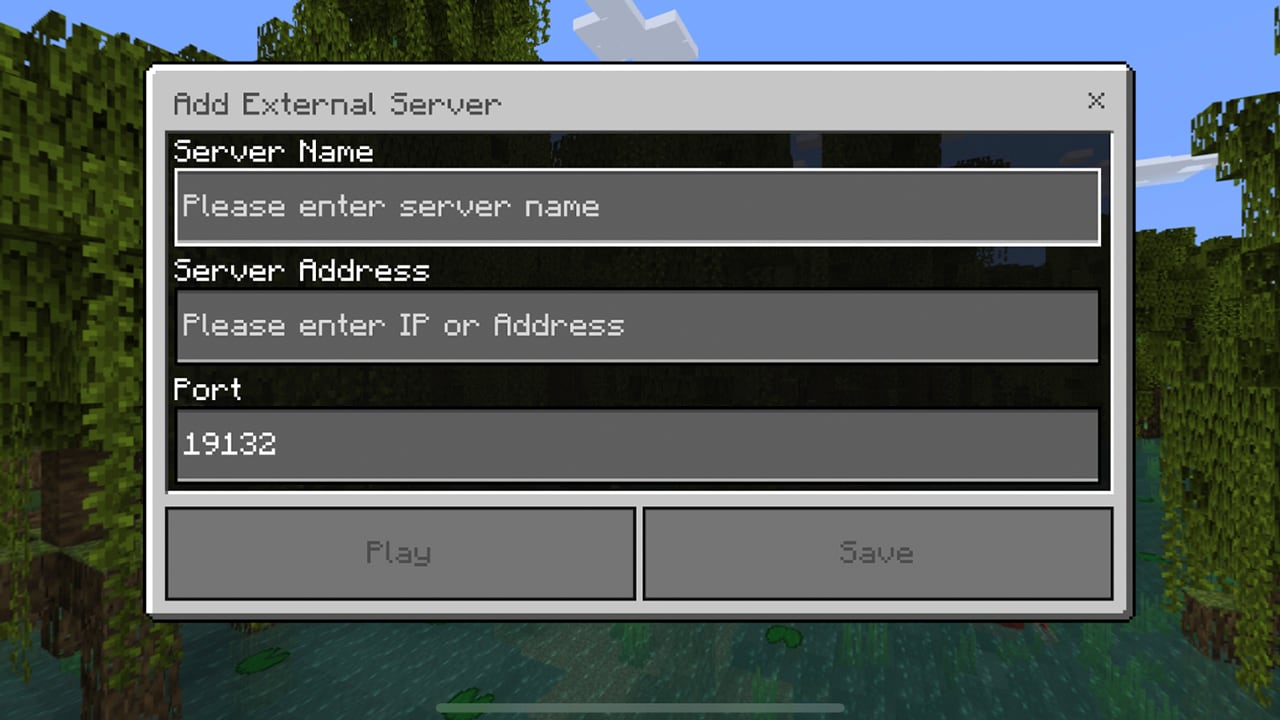
Use your first visit to check the description
- Start at spawn. Find the rules, joining tutorial and route into the game mode you wanted.
- Try a small project. Build a starter shelter or complete a beginner task before committing to a huge base.
- Check the features you need. Confirm protection, shared access for friends and any important farm rules.
- Visit at your usual play time. See whether the community and connection feel comfortable then.
- Ask about missing information. Save the official rules and support links so you can find them again.
A useful question is specific: “We want to build a town together. Can we share a claim, and will that world reset this season?” It is much easier to answer than “Is this a good server?”
For operators: write the answers players keep asking
Put joining details first, then explain the first session, protections, resets and rules. Link the actual modpack if one is required, and name its version. Give both editions their own instructions if you offer crossplay. Add a dated update when an address, supported version, rule or season changes.
Use screenshots from your server to demonstrate real features. Avoid filling the profile with awards, vague uptime claims or a long plugin inventory that never explains what players can do. Before publishing, ask a newcomer to use only the profile to find the right game version, join route and support contact; missing answers become your next edits.
Sources and further reading
Mojang's Official Minecraft Server List announcement explains why server purpose, contact information and community management details matter. A listing is not a guarantee of safety. See the official server overview, Java and Bedrock joining guide, and Geyser's crossplay explanation.
This guide and the fictional profile example are by MineBrush Editorial. The two menu images come from Minecraft's official guide. The MineBrush cover is an editorial illustration, not a photograph of a listed server.
More from MineBrush.
CubeCraft offers EggWars teamwork, quick SkyWars fights, unpredictable Lucky Islands and lasting Skyblock projects. Choose the right Java or Bedrock route, invite friends and start with a clear plan.
- Edition
- Java + Bedrock
- Modes
- Minigames
- Region
- None
Choose the same edition as your friends
Minecraft · Server
CubeCraft
CubeCraft offers EggWars teamwork, quick SkyWars fights, unpredictable Lucky Islands and lasting Skyblock projects. Choose the right Java or Bedrock route, invite friends and start with a clear plan.
Choose the same edition as your friends
- Minecraft version
- Java 1.21.8+ · Bedrock 1.21.120+
- Game edition
- Cross-edition
- Loader / platform
- Not applicable
- License
- CubeCraft rules and terms
- Server address
- play.cubecraft.net
- Server modes
- Minigames
- Platform family
- Cross-edition
- Supported devices
- Java on PC/Mac; Bedrock on Windows, mobile and consoles
- Install format
- Java server address or Bedrock Featured Servers
- Touch readiness
- Not required
- Resource type
- Server
- Last verified at
- Sep 14, 2026
- Compatibility confidence
- Source claimed
- Card evidence statement
- Official CubeCraft guides and game updates
- Card delivery statement
- Join Java or Bedrock using the guide
- Card limitation note
- Choose the same edition as your friends
- Edition applicability
- Java + Bedrock
- Bedrock address copy availability
- Copy unavailable
- Java address copy availability
- Copy available
- Java server address
play.cubecraft.net- Delivery state
- No file
- Lifecycle state
- Current
Find a Minecraft server you will want to return to. Compare survival, minigames, Skyblock, creative and modded play; choose for your friends' devices, understand player counts and ping, and make your first session a useful trial.
- Edition
- Cross-edition
- Difficulty
- Beginner
- Time
- 8 min read
Check support for every friend’s edition and device.
MineBrush · Guide
Find Your Minecraft Server
Find a Minecraft server you will want to return to. Compare survival, minigames, Skyblock, creative and modded play; choose for your friends' devices, understand player counts and ping, and make your first session a useful trial.
Check support for every friend’s edition and device.
- Minecraft version
- Java & Bedrock — match your server’s supported version
- Game edition
- Cross-edition
- Platform family
- Cross-edition
- Supported devices
- Java PC and Bedrock devices; joining routes vary
- Install format
- Read online — no download required
- Touch readiness
- Not required
- Resource type
- Guide
- Compatibility confidence
- Not applicable
- Card evidence statement
- Choose your play style, bring your friends and try a small first goal.
- Card delivery statement
- Survival · minigames · Skyblock · creative · modded
- Card limitation note
- Check support for every friend’s edition and device.
- Edition applicability
- Java + Bedrock
- Tested environment
- Java and Bedrock multiplayer choices
- Estimated time
- 8 min read
- Guide difficulty
- Beginner
- Delivery state
- No file
- Lifecycle state
- Current

Understand Minecraft 26, tell normal releases from test builds, and choose the right version for friends, servers and mods. Clear Java and Bedrock examples without the technical clutter.
- Topic
- Choosing your Minecraft version
- Scope
- None
- Evidence
- Official Minecraft sources · checked 9 Sep 2026
A shared “26” prefix never proves cross-edition compatibility.
MineBrush · News
Minecraft Versions Made Simple
Understand Minecraft 26, tell normal releases from test builds, and choose the right version for friends, servers and mods. Clear Java and Bedrock examples without the technical clutter.
A shared “26” prefix never proves cross-edition compatibility.
- Compatibility confidence
- Source claimed
- Card evidence statement
- Official policy and indexes checked 9 Sep 2026; client display NOT_OBSERVED.
- Card delivery statement
- Choose a version for everyday play or testing
- Card limitation note
- A shared “26” prefix never proves cross-edition compatibility.
- Edition applicability
- Java + Bedrock
- News topic
- Choosing your Minecraft version
- Public news evidence label
- Official Minecraft sources · checked 9 Sep 2026
- Delivery state
- No file
- Lifecycle state
- Current
- News evidence type
- Official Minecraft source
Hypixel brings Bed Wars, Build Battle, SkyWars and long-term SkyBlock progression to Java players. Copy the official address, choose a mode, join friends and use the right version and server pack.
- Edition
- Java
- Modes
- Minigames
- Region
- None
SkyBlock: modern Java and required server resource pack
Minecraft · Server
Hypixel
Hypixel brings Bed Wars, Build Battle, SkyWars and long-term SkyBlock progression to Java players. Copy the official address, choose a mode, join friends and use the right version and server pack.
SkyBlock: modern Java and required server resource pack
- Minecraft version
- Java; SkyBlock recommends 26.2
- Game edition
- Java Edition
- Loader / platform
- Not applicable
- License
- Hypixel server rules and terms
- Server address
- mc.hypixel.net
- Server modes
- Minigames
- Platform family
- Java & PC
- Supported devices
- Minecraft Java Edition on PC and Mac
- Install format
- Join using the server address
- Touch readiness
- Not required
- Resource type
- Server
- Last verified at
- Sep 14, 2026
- Compatibility confidence
- Source claimed
- Card evidence statement
- Official join guide and current SkyBlock announcement
- Card delivery statement
- Copy mc.hypixel.net and join in Java Edition
- Card limitation note
- SkyBlock: modern Java and required server resource pack
- Edition applicability
- Java
- Bedrock address copy availability
- Copy unavailable
- Java address copy availability
- Copy available
- Java server address
mc.hypixel.net- Delivery state
- No file
- Lifecycle state
- Current
Player discussion 0
Questions, discoveries and help from other players.