
MineBrush publication
Seed 117335354143: Java Villages and What to Expect in Bedrock
Explore seed 117335354143 with the right expectations: its village showcase is for Java 1.21. See the creator’s screenshot and coordinates, learn what differs in Bedrock, and plan a survival home without following misleading cross-edition directions.
Seed 117335354143 is worth a look if you enjoy turning a village area into a survival home—but the edition matters. The published village showcases are for Java. If you found this page while looking for a Bedrock seed, do not start a long journey expecting those buildings at the same coordinates.
Copy the seed: 117335354143. It is a positive number, with no minus sign. A seed creates a world; there is no map archive or add-on to install.
What you can expect in Java and Bedrock
Akirby80’s July 2024 collection identifies this as a Java 1.21 triple-village seed. The collection describes shared terrain in Bedrock but warns that its structure locations are Java-specific, apart from trial chambers. That is not a promise that the village screenshot below will appear in your Bedrock world.
Shockbyte’s August 2024 video uses the same seed and supplies village, trial chamber, mineshaft and zombie-spawner coordinates. Its caption includes #minecraftjava; it does not establish a specific Bedrock release. The old Bedrock village claim on this page has therefore been corrected.
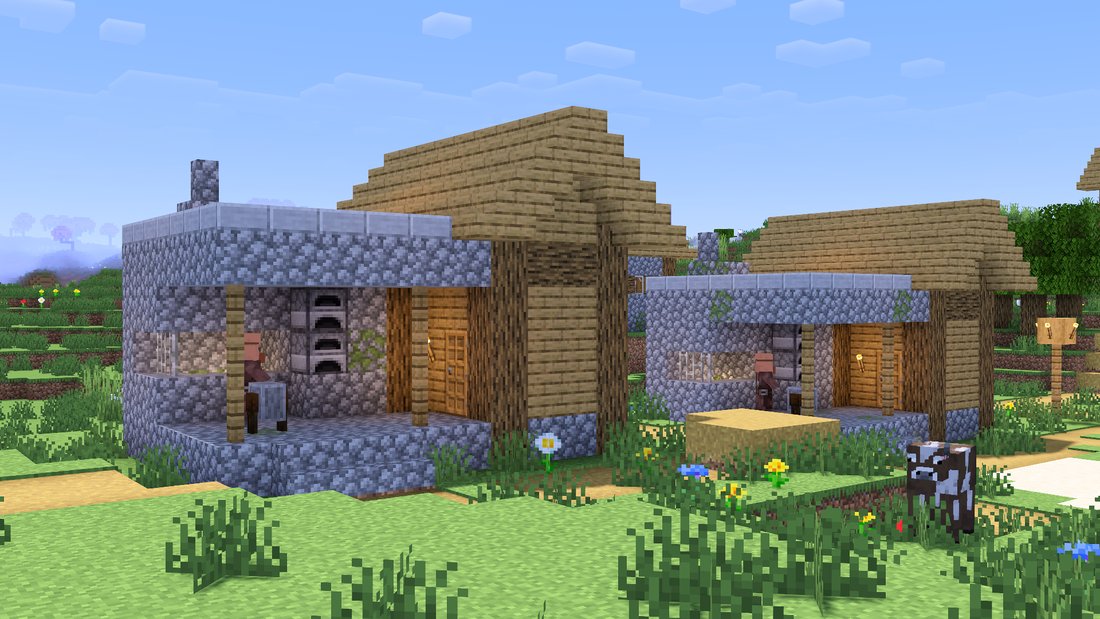
Choose it for Java 1.21 if you want to explore the creator’s village showcase. In Bedrock, treat it as a landscape to preview before choosing it for a long-term world. We have not independently reproduced its structures in a current Bedrock build or Java 26.x, so neither is labelled as tested here.
Java village coordinates from the creator
Akirby80 lists these three locations for the Java 1.21 showcase. Keep the signs: a negative X means the opposite direction from a positive X.
- Village 1: X −25, Y 71, Z 35.
- Village 2: X −100, Y 74, Z 50.
- Village 3: X 95, Y 63, Z −150.
Use those positions to orient yourself, then walk around the area before placing your base. Choose a spot with a safe path to the village, room to expand and a clear route back. A nearby player-built house is often easier to organise than taking over a villager’s bed and work area.
Shockbyte supplies a different set of sightseeing points: villages X 91, Z 100; trial chamber X 37, Z 89; mineshaft X 163, Z 76; zombie spawner X 141, Z 258. These are the video’s reported coordinates, not independently verified Bedrock destinations. No Y level is supplied. An X/Z position above an underground structure is not an entrance, and it is not a safe teleport destination by itself.
Try the seed before committing to a survival world
- Pick the edition and version first. Use Java 1.21 to compare with the dated Java showcase. For Bedrock, note the version you actually have rather than assuming a video from 2024 describes the current release.
- Create a fresh world with the seed. Enter
117335354143in the world-creation seed field. Avoid a custom template or world-generation add-on when comparing the natural layout. - Make a separate Creative preview if you want to scout. Name it clearly, for example “117335354143 — preview”, so it cannot be confused with the Survival world you intend to keep.
- Explore what matters to your play style. Look for usable building ground, wood, food, a way into caves and a route between places you want to visit. A screenshot’s attractive angle is only one part of a good starting area.
- Start your real Survival world separately. Use the same seed, edition, version and relevant world settings. Keep cheats off if Bedrock achievements matter to you.
Minecraft’s official command guide notes that enabling cheats permanently disables achievements for that Bedrock world, even if you later turn cheats off. Keep command-based scouting in the separate preview; do not toggle cheats in your achievement world just to check a video’s coordinates.
Find useful places in your own Bedrock world
Turn on Show Coordinates in world settings to keep track of your position. X and Z are the two horizontal directions; Y is height. Write down the actual places you find instead of copying the Java village list into a Bedrock route.
In a separate preview with commands enabled, Bedrock’s /locate structure command can find a structure in the current dimension. For a trial chamber, the documented form is:
/locate structure minecraft:trial_chambers
Run it in the Overworld and read the result for that generated world. Use the game’s command suggestions if your installed release offers different identifiers. A locate result helps find the structure; it does not make the old video’s other coordinates correct. Do not dig straight down to an underground target: make a controlled descent with a return route.
If your goal is simply a pleasant building site, you do not need commands at all. Explore around spawn, mark a potential home, and check its surroundings during daylight. If the local layout is not what you wanted, choose another seed before investing hours in the base.
Turn a village area into a useful survival project
A village restoration world: build your home just outside the settlement, improve lighting and paths, then add fields and storage. Preserve villagers’ access to homes and workstations while making the area easier for you to navigate.
A small co-op settlement: give each player a plot around a shared storehouse. Mark the village route and place a noticeboard for cave entrances and discoveries. This makes a short group server feel organised without needing a giant base on the first evening.
An exploration base: keep a bed, spare food and replacement tools at home before heading underground. Record the return route as carefully as the destination. Split a large trip into a scouting visit and a prepared return rather than carrying all your materials into an unfamiliar cave.
A building challenge: connect the places you actually find with bridges, roads or a riverside path. In Bedrock, let your generated landscape determine the project; there is no need to imitate Java buildings that are absent.
These are MineBrush play ideas, not claims about guaranteed loot, villagers or resources at the listed points.
If the world looks different
- Terrain resembles the picture but villages are missing: first check Java versus Bedrock. Similar terrain does not make all structures identical.
- Everything looks different: recheck every digit, the edition, version and world-generation settings. Make sure you opened the new seed world rather than an older save.
- You updated an existing world: already explored terrain is not rebuilt into a fresh seed showcase. Use a new preview to compare generation.
- You reached X/Z but found no underground structure: the video omitted height and does not establish your build. Check your own world rather than tunnelling blindly.
- A friend sees another layout: compare edition and version first. Sharing only a seed number is not enough to explain a structure mismatch.
Sources and credit: Akirby80’s Java 1.21 showcase and screenshot; Shockbyte’s dated seed video; Minecraft’s commands and achievement guidance; official Bedrock locate reference. The cover is a MineBrush editorial illustration, not a screenshot or a map of this seed.
More for your Bedrock world.
Biome Trail — Plan a Bedrock adventure around a reported portal, village, jungle temple and igloo. Copy the seed, use the coordinate diagram and choose a base-building or exploration project.
- Minecraft
- 1.21+ (exact source patch not stated)
- Seed
-2898061480750634164- Feature
- Portal, village, temple and igloo
Exact source patch is not stated
Bedrock · Seed
Biome Trail
Biome Trail — Plan a Bedrock adventure around a reported portal, village, jungle temple and igloo. Copy the seed, use the coordinate diagram and choose a base-building or exploration project.
Exact source patch is not stated
- Minecraft version
- Bedrock 1.21+ (source report)
- Game edition
- Bedrock Edition
- Key coordinates
- Four nearby stops · full XYZ list in the guide
- Platform family
- Bedrock & Mobile
- Resource type
- Seed
- Seed value
- -2898061480750634164
- Last verified at
- Sep 14, 2026
- Compatibility confidence
- Source claimed
- Bedrock version/build
- 1.21+ (exact source patch not stated)
- Card evidence statement
- Bedrock 1.21+ report by the discoverer
- Card delivery statement
- Copy seed · create a new world
- Card limitation note
- Exact source patch is not stated
- Copy availability
- Copy available
- Java seed feature
- Portal, village, temple and igloo
- Edition applicability
- Bedrock
- Delivery state
- No file
- Lifecycle state
- Current
-2898061480750634164
Understand Minecraft 26, tell normal releases from test builds, and choose the right version for friends, servers and mods. Clear Java and Bedrock examples without the technical clutter.
- Topic
- Choosing your Minecraft version
- Scope
- None
- Evidence
- Official Minecraft sources · checked 9 Sep 2026
A shared “26” prefix never proves cross-edition compatibility.
MineBrush · News
Minecraft Versions Made Simple
Understand Minecraft 26, tell normal releases from test builds, and choose the right version for friends, servers and mods. Clear Java and Bedrock examples without the technical clutter.
A shared “26” prefix never proves cross-edition compatibility.
- Compatibility confidence
- Source claimed
- Card evidence statement
- Official policy and indexes checked 9 Sep 2026; client display NOT_OBSERVED.
- Card delivery statement
- Choose a version for everyday play or testing
- Card limitation note
- A shared “26” prefix never proves cross-edition compatibility.
- Edition applicability
- Java + Bedrock
- News topic
- Choosing your Minecraft version
- Public news evidence label
- Official Minecraft sources · checked 9 Sep 2026
- Delivery state
- No file
- Lifecycle state
- Current
- News evidence type
- Official Minecraft source
Share a Minecraft Seed — Help friends find the same place: copy the seed, match Java or Bedrock and the version, read XYZ coordinates and describe a useful route with screenshots.
- Edition
- Cross-edition
- Difficulty
- Beginner
- Time
- A short check
A seed recreates terrain, not your builds
MineBrush · Guide
Share a Minecraft Seed
Share a Minecraft Seed — Help friends find the same place: copy the seed, match Java or Bedrock and the version, read XYZ coordinates and describe a useful route with screenshots.
A seed recreates terrain, not your builds
- Minecraft version
- Java and Bedrock; match your world version
- Game edition
- Cross-edition
- Platform family
- Cross-edition
- Supported devices
- PC, console and mobile
- Install format
- No installation needed
- Touch readiness
- Not required
- Resource type
- Guide
- Compatibility confidence
- Not applicable
- Card evidence statement
- Find the seed and read coordinates
- Card delivery statement
- Versions, directions and screenshots
- Card limitation note
- A seed recreates terrain, not your builds
- Edition applicability
- Java + Bedrock
- Estimated time
- A short check
- Guide difficulty
- Beginner
- Delivery state
- No file
- Lifecycle state
- Current
Everything Continent brings varied landscapes into one long-term Bedrock world. Plan regional bases, follow author coordinates to a jungle temple, village and mansion, and explore the original annotated map.
- Minecraft
- 1.21.73
- Seed
-5207005594169711425- Feature
- Regional bases, temple, village and mansion
Varied mainland biomes; mushroom islands offshore
Bedrock · Seed
Everything Continent
Everything Continent brings varied landscapes into one long-term Bedrock world. Plan regional bases, follow author coordinates to a jungle temple, village and mansion, and explore the original annotated map.
Varied mainland biomes; mushroom islands offshore
- Minecraft version
- Bedrock 1.21.73
- Game edition
- Bedrock Edition
- Key coordinates
- Jungle temple: X 600, Z 120; Mansion: X 440, Z 856; Village: X 808, Z -1416. Y not supplied.
- Platform family
- Bedrock & Mobile
- Resource type
- Seed
- Seed value
- -5207005594169711425
- Last verified at
- Sep 14, 2026
- Compatibility confidence
- Source claimed
- Bedrock version/build
- 1.21.73
- Card evidence statement
- Author map and coordinates for Bedrock 1.21.73
- Card delivery statement
- Copy the seed into a new Bedrock world
- Card limitation note
- Varied mainland biomes; mushroom islands offshore
- Copy availability
- Copy available
- Java seed feature
- Regional bases, temple, village and mansion
- Edition applicability
- Bedrock
- Delivery state
- No file
- Lifecycle state
- Current
-5207005594169711425Player discussion 0
Questions, discoveries and help from other players.