
MineBrush publication
Lantern Keeper Pumpkin Minecraft Skin (Classic)
A pumpkin-headed Halloween guide in a teal coat. Download Lantern Keeper as a Classic PNG, inspect all four sides and import it into Java or supported Bedrock editions.
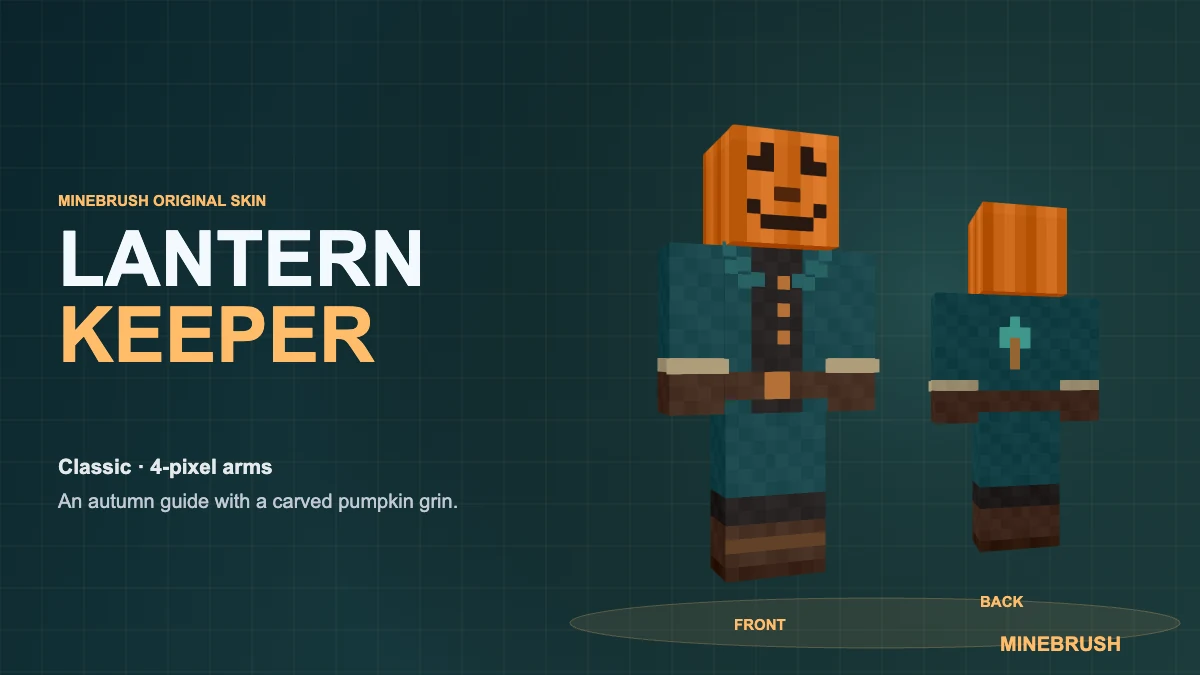
A pumpkin-headed guide for your Halloween village. Lantern Keeper wears a deep teal coat, pale cuffs and sturdy brown boots beneath a carved jack-o’-lantern grin. Download the original MineBrush skin as a PNG and select the Classic / Wide model with four-pixel arms.
Quick choice: Classic arms · 64 × 64 PNG · Java Edition and Bedrock on Windows/mobile with custom-skin import.
Meet the keeper of the lantern trail
Imagine a village where the last lantern never goes out. This is the character who checks the woodland path after everyone else has gone home: a little eerie at the gate, reassuring when you are lost. The long teal coat gives the familiar pumpkin head a travelling caretaker’s personality instead of another orange costume.
Make that story your own. Lead friends through a lantern-lit maze, welcome visitors to an autumn market or use the keeper as the host of a Halloween build tour. For a video introduction, start beside a village gate and turn to show the back of the coat before setting off down the path.
See the skin from every side
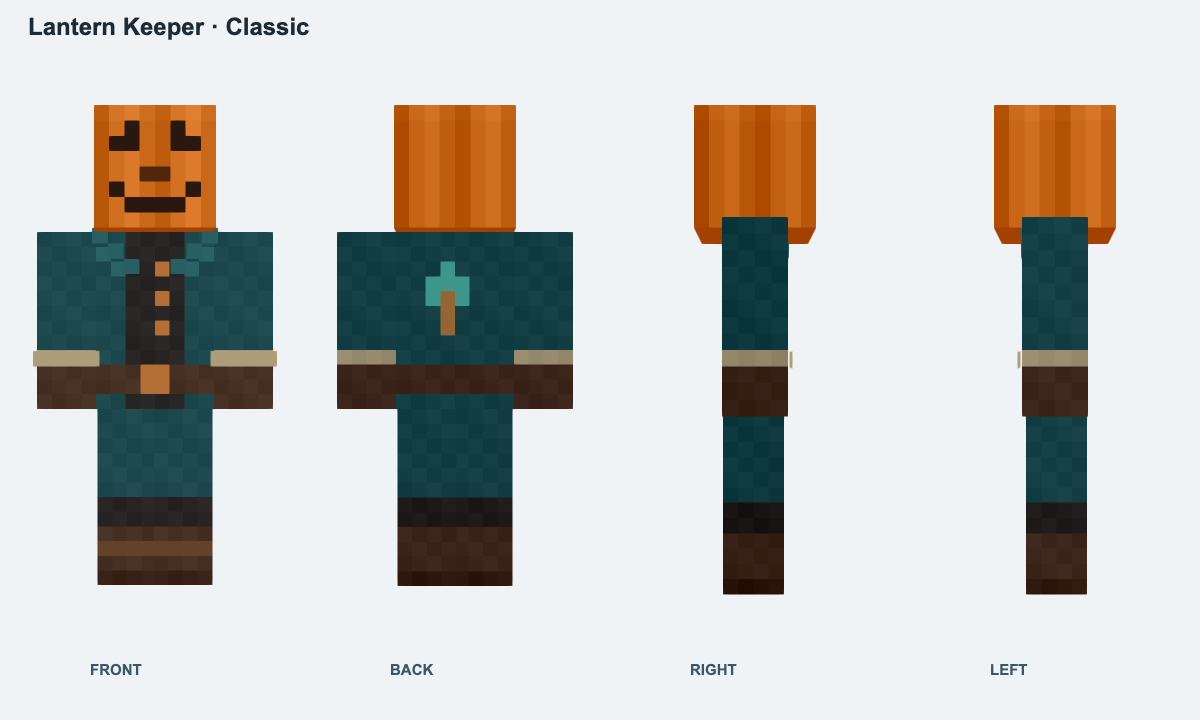
Download the PNG
The download is the small skin texture itself, ready to import. There is no archive to unpack. Save the PNG file rather than the large cover or character preview, and keep its original dimensions.
Wear it in Minecraft
- Java Edition: open Minecraft Launcher → Java Edition → Skins → New Skin. Choose Classic / Wide, browse to the PNG, then select Save & Use.
- Bedrock on Windows or mobile: open Dressing Room → Classic Skins, find the owned/imported skin option and choose the PNG. Select the wide-armed silhouette when prompted.
Bedrock’s “Classic Skins” menu contains imported skins; the separate arm choice still matters. Console editions do not offer the same local PNG import route. Keep the file if you want to import it on another device.
Make the pumpkin look work
- For screenshots: use third-person view and a softly lit pumpkin patch or woodland path. In Java, the usual perspective key is F5.
- For a group: give the keeper the guide’s role while friends choose their own village characters. A held lantern or other item comes from your game, not this PNG.
- If the sleeves look wrong: check that Classic / Wide is selected. If the costume looks plain, check the outer skin-layer settings and whether equipped armour is covering it.
The pumpkin face is painted texture, so it does not emit light. Lantern Keeper changes your appearance without adding abilities or changing your worlds. For more import help, use our skin import and appearance checklist, or browse the MineBrush skin collection for your next character.
More from MineBrush.
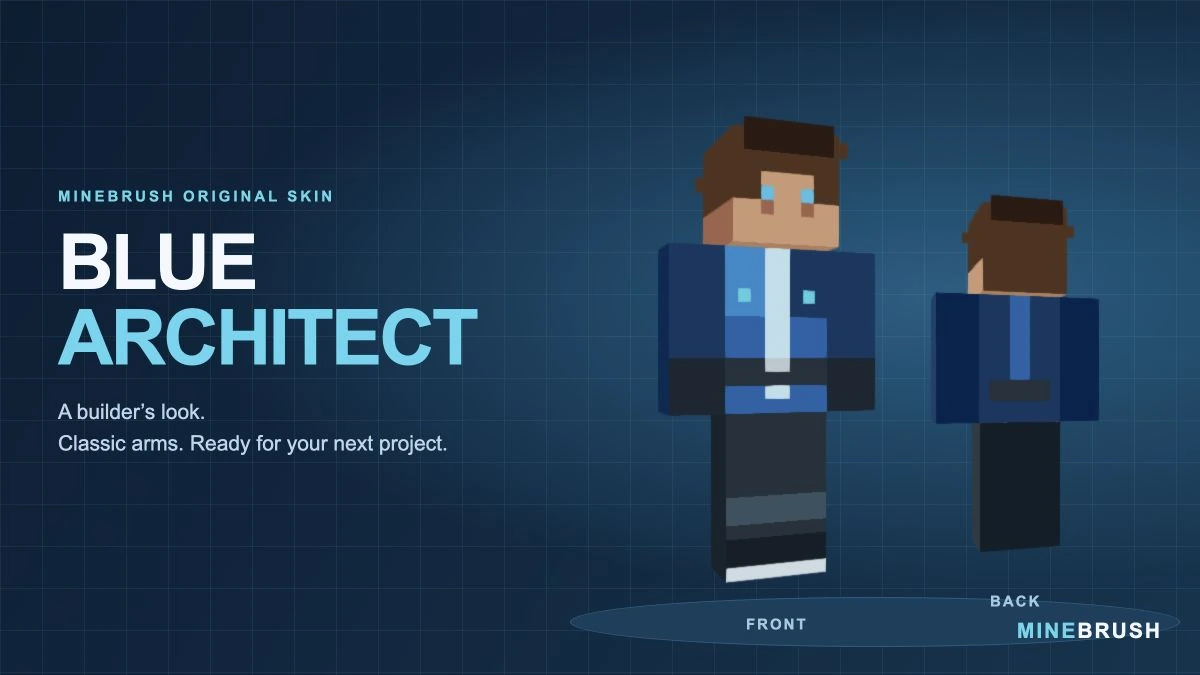
A blue workshop outfit for builders and survival projects. Inspect the real skin from three angles, download its PNG in a ZIP and follow the Classic/Wide import steps.
- Model
- Classic (4 px arms)
- Texture
- 64×64 PNG
- Import
- Java Launcher; supported Bedrock Classic Skin import
Extract the PNG, then choose Classic / Wide
Minecraft · Skin
Blue Architect
A blue workshop outfit for builders and survival projects. Inspect the real skin from three angles, download its PNG in a ZIP and follow the Classic/Wide import steps.
Extract the PNG, then choose Classic / Wide
- Minecraft version
- Classic / Wide skin import
- Game edition
- Cross-edition
- Loader / platform
- Not applicable
- License
- Original MineBrush design
- Skin model
- Classic (4 px arms)
- Platform family
- Cross-edition
- Supported devices
- Java Launcher; Bedrock local skin import on supported devices
- Install format
- ZIP containing a 64×64 PNG
- Touch readiness
- Not required
- Resource type
- Skin
- Last verified at
- Sep 14, 2026
- Compatibility confidence
- Source claimed
- Card evidence statement
- Model preview from the original PNG; no independent gameplay test
- Skin texture resolution
- 64×64 PNG
- Skin PNG validation
- Original 64×64 PNG; choose Classic / Wide
- Skin import scope
- Java Launcher; supported Bedrock Classic Skin import
- Skin preview status
- Model views from the downloadable skin
- Card delivery statement
- PNG inside ZIP · Classic / Wide
- Card limitation note
- Extract the PNG, then choose Classic / Wide
- Edition applicability
- Java + Bedrock
- Delivery state
- Direct download
- Lifecycle state
- Current
- Skin import route
- Java Launcher upload
- Skin texture
- 64x64 PNG validated
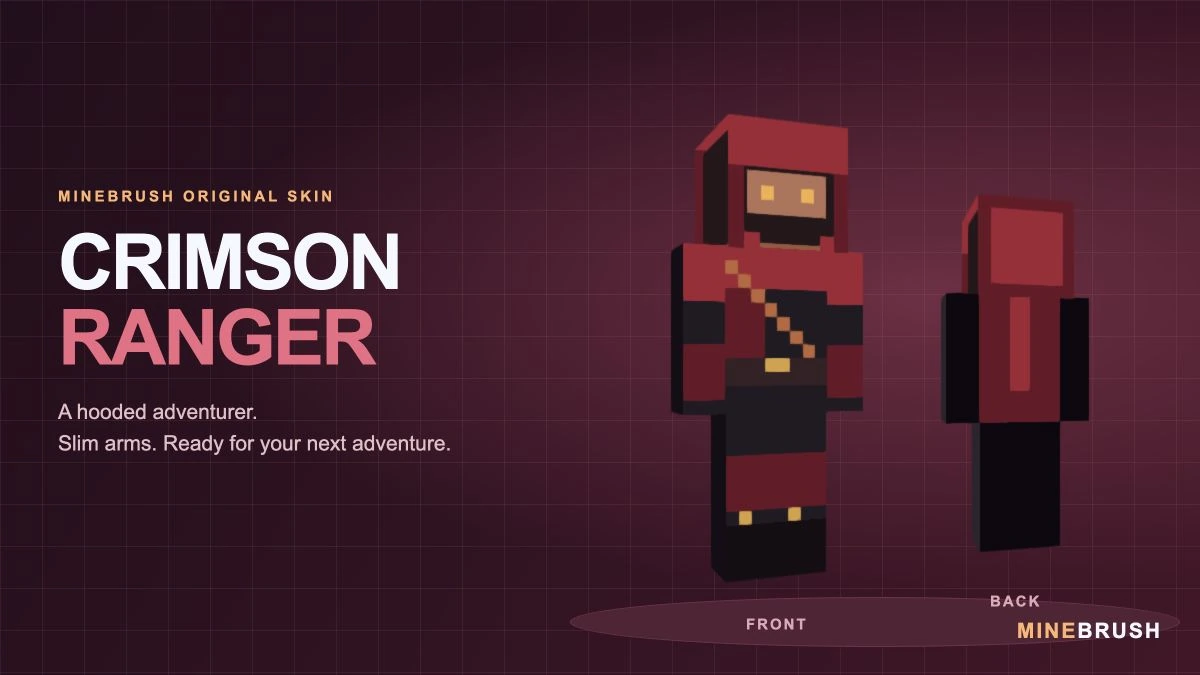
A crimson-hooded adventurer with a diagonal strap and gold accents. See the real Slim-model skin, download its PNG in a ZIP and follow the correct import steps.
- Model
- Slim (3 px arms)
- Texture
- 64×64 PNG
- Import
- Java Launcher; supported Bedrock Classic Skin import
Extract the PNG, then choose Slim / Narrow
Minecraft · Skin
Crimson Ranger
A crimson-hooded adventurer with a diagonal strap and gold accents. See the real Slim-model skin, download its PNG in a ZIP and follow the correct import steps.
Extract the PNG, then choose Slim / Narrow
- Minecraft version
- Slim / Narrow skin import
- Game edition
- Cross-edition
- Loader / platform
- Not applicable
- License
- Original MineBrush design
- Skin model
- Slim (3 px arms)
- Platform family
- Cross-edition
- Supported devices
- Java Launcher; Bedrock local skin import on supported devices
- Install format
- ZIP containing a 64×64 PNG
- Touch readiness
- Not required
- Resource type
- Skin
- Last verified at
- Sep 14, 2026
- Compatibility confidence
- Source claimed
- Card evidence statement
- Model preview from the original PNG; no independent gameplay test
- Skin texture resolution
- 64×64 PNG
- Skin PNG validation
- Original 64×64 PNG; choose Slim / Narrow
- Skin import scope
- Java Launcher; supported Bedrock Classic Skin import
- Skin preview status
- Model views from the downloadable skin
- Card delivery statement
- PNG inside ZIP · Slim / Narrow
- Card limitation note
- Extract the PNG, then choose Slim / Narrow
- Edition applicability
- Java + Bedrock
- Delivery state
- Direct download
- Lifecycle state
- Current
- Skin import route
- Java Launcher upload
- Skin texture
- 64x64 PNG validated
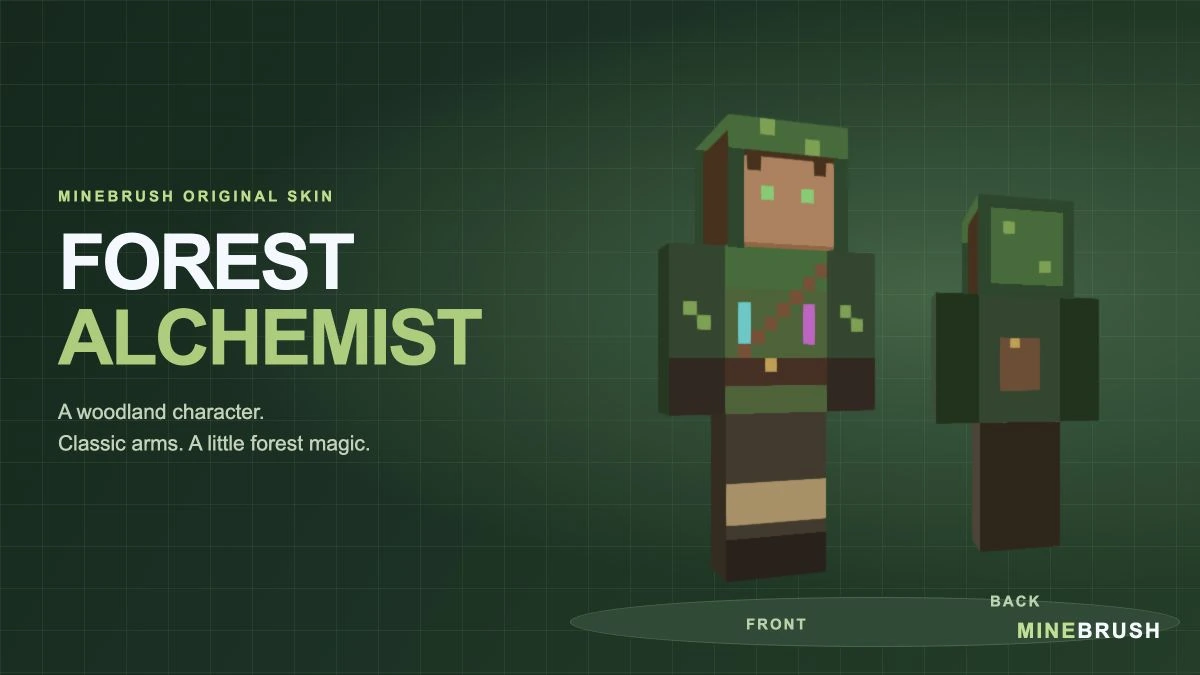
A woodland alchemist with a green hood, painted potion vials and a back satchel. See the real skin, compare the hood layer and download the Classic/Wide PNG in a ZIP.
- Model
- Classic (4 px arms)
- Texture
- 64×64 PNG
- Import
- Java Launcher; supported Bedrock Classic Skin import
Choose Classic / Wide; show the Hat layer for the complete hood
Minecraft · Skin
Forest Alchemist
A woodland alchemist with a green hood, painted potion vials and a back satchel. See the real skin, compare the hood layer and download the Classic/Wide PNG in a ZIP.
Choose Classic / Wide; show the Hat layer for the complete hood
- Minecraft version
- Classic / Wide skin import
- Game edition
- Cross-edition
- Loader / platform
- Not applicable
- License
- Original MineBrush design
- Skin model
- Classic (4 px arms)
- Platform family
- Cross-edition
- Supported devices
- Java Launcher; Bedrock local skin import on supported devices
- Install format
- ZIP containing a 64×64 PNG
- Touch readiness
- Not required
- Resource type
- Skin
- Last verified at
- Sep 14, 2026
- Compatibility confidence
- Source claimed
- Card evidence statement
- Model preview from the original PNG; no independent gameplay test
- Skin texture resolution
- 64×64 PNG
- Skin PNG validation
- Original 64×64 PNG; choose Classic / Wide
- Skin import scope
- Java Launcher; supported Bedrock Classic Skin import
- Skin preview status
- Model views from the downloadable skin
- Card delivery statement
- PNG inside ZIP · Classic / Wide
- Card limitation note
- Choose Classic / Wide; show the Hat layer for the complete hood
- Edition applicability
- Java + Bedrock
- Delivery state
- Direct download
- Lifecycle state
- Current
- Skin import route
- Java Launcher upload
- Skin texture
- 64x64 PNG validated
Player discussion 0
Questions, discoveries and help from other players.