
MineBrush publication
Insanity Shader 1.650 for Minecraft Java 1.7.10–1.21.3: Horror Lighting
Give forests, night travel and horror builds a darker atmosphere with Insanity Shader 1.650 for Java 1.7.10–1.21.3. See the visual trade-offs, install with a matching shader loader and tune fog, colour and visibility.
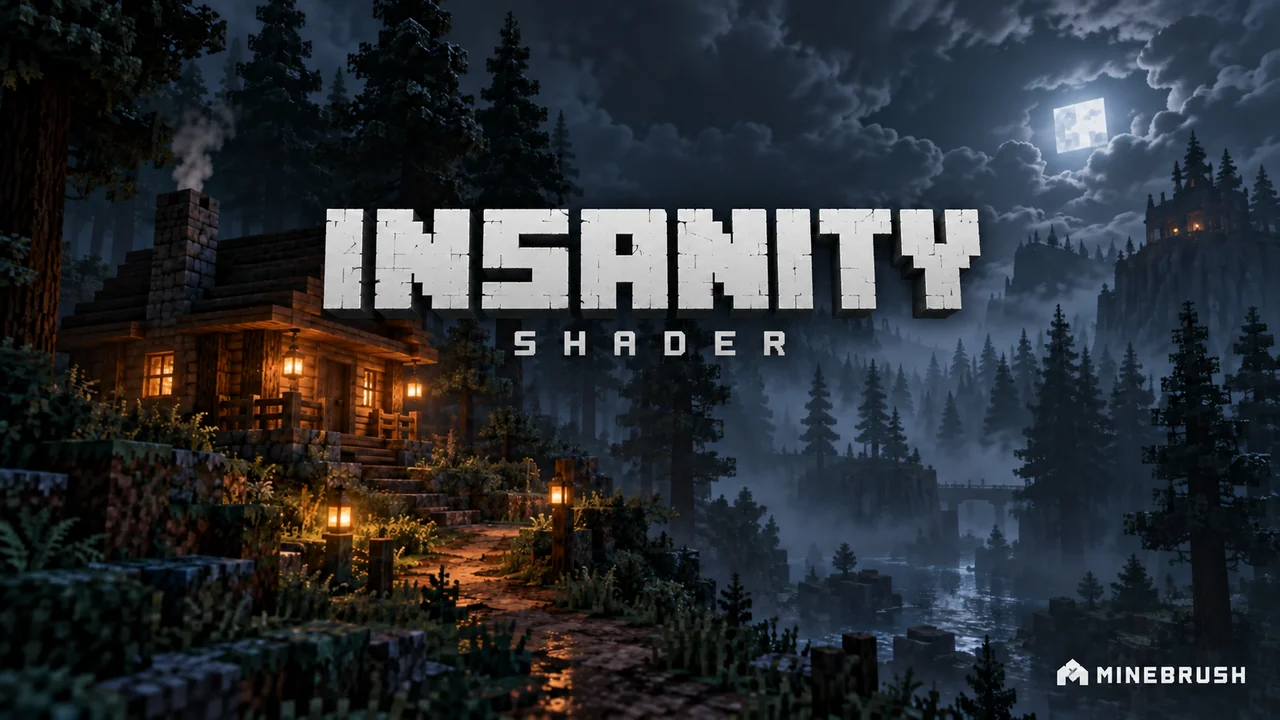
Insanity Shader turns familiar Minecraft landscapes into something more unsettling: forests disappear into fog, clouds feel heavy, and a torch-lit path stands out against a much darker night. It suits horror maps, gloomy builds and survival worlds where atmosphere matters more than bright, crystal-clear views.
Start here: version 1.650 is a Java shader pack. Its project page lists Minecraft 1.7.10–1.21.3, with Iris recommended and OptiFine also supported. Your shader loader must separately support the exact Minecraft version you play. This is not a Bedrock pack, a monster mod or a complete horror adventure.
What changes when you turn it on?
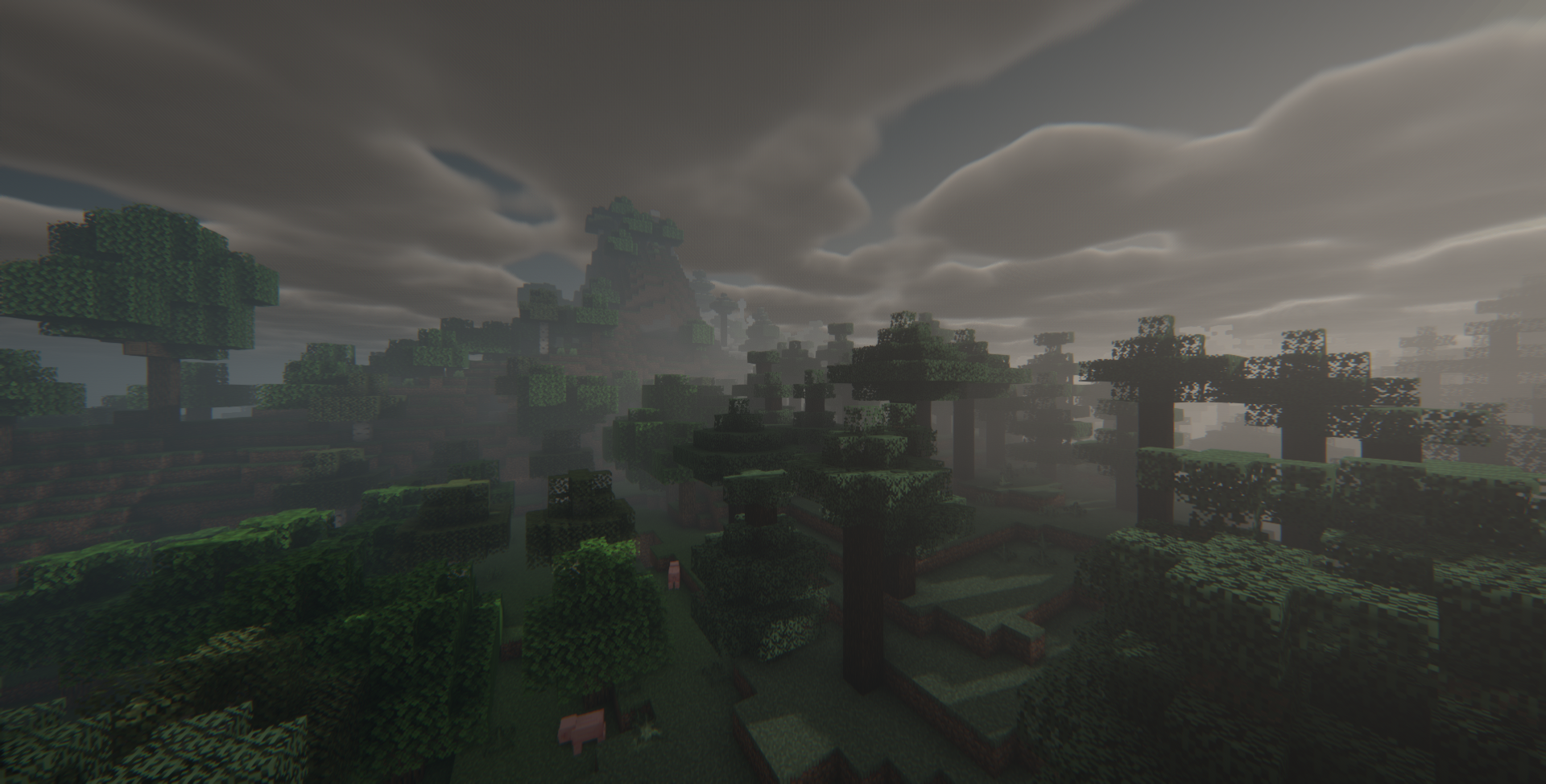
- Forests and distant terrain: fog and muted lighting make the world feel less open and predictable.
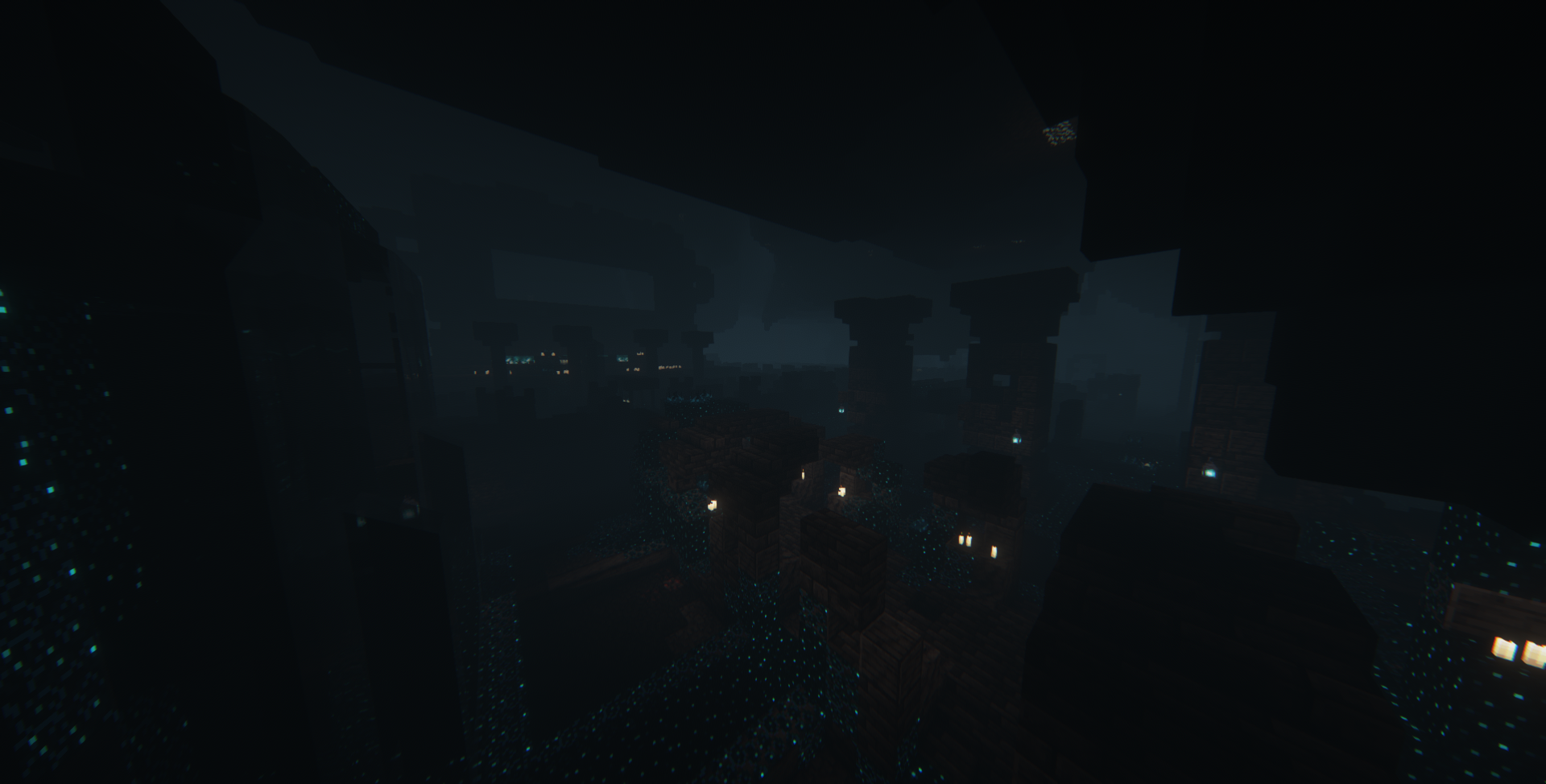
- Night travel: darkness makes nearby light sources visually important. Check that you can still read the path before using it in a survival session.
- Weather: rain, clouds and weather-dependent fog reinforce the gloomy look.
- The Nether and End: the shader also changes the atmosphere of these dimensions; it is not limited to Overworld skies.
Three ways to use Insanity in your world
| Your goal | Try this | Watch for |
|---|---|---|
| A haunted village or abandoned base | Build a route between small pools of lantern light, with a silhouette visible beyond the next corner. | Keep doors and essential signs readable; darkness should build tension, not hide the route completely. |
| A horror map playthrough | Check the map's own visual requirements first, then compare one room with the shader on and off. | A map may depend on particular lighting or a required resource pack. |
| Moody screenshots | Place a lit subject in the foreground and use trees, towers or cliffs as darker background shapes. | A dramatic still image can be too dark for regular movement and combat. |
The shader changes how the scene looks. It does not make monsters smarter, add quests or alter the world's actual block lighting. The creator's Fear Nightfall modpack is a separate download with its own gameplay.
Download Insanity Shader 1.650
Use this shader-pack ZIP with a compatible Iris or OptiFine installation. Version 1.650 fixes an Iris 1.7 loading issue on Minecraft 1.21.
Install it as a shader ZIP
- Choose your Minecraft version first. Use a matching Iris installation, or a compatible OptiFine profile. Do not combine the two in one profile.
- Start that profile once. Open its video settings and find the shader-pack screen. If there is no shader selector, the game is not running a working shader loader.
- Open the shader-pack folder from that screen. This selects the correct instance when you use a launcher with several separate installations.
- Place the Insanity ZIP in
shaderpacks. Keep it zipped. It does not go inmods, and opening it as a Bedrock import will not work. - Select Insanity and apply. Visit a familiar outdoor area and a darker room before starting an important trip.
To switch back: select the loader's disabled/off shader option. You do not need to delete your world or uninstall its gameplay mods.
Adjust atmosphere without losing the path
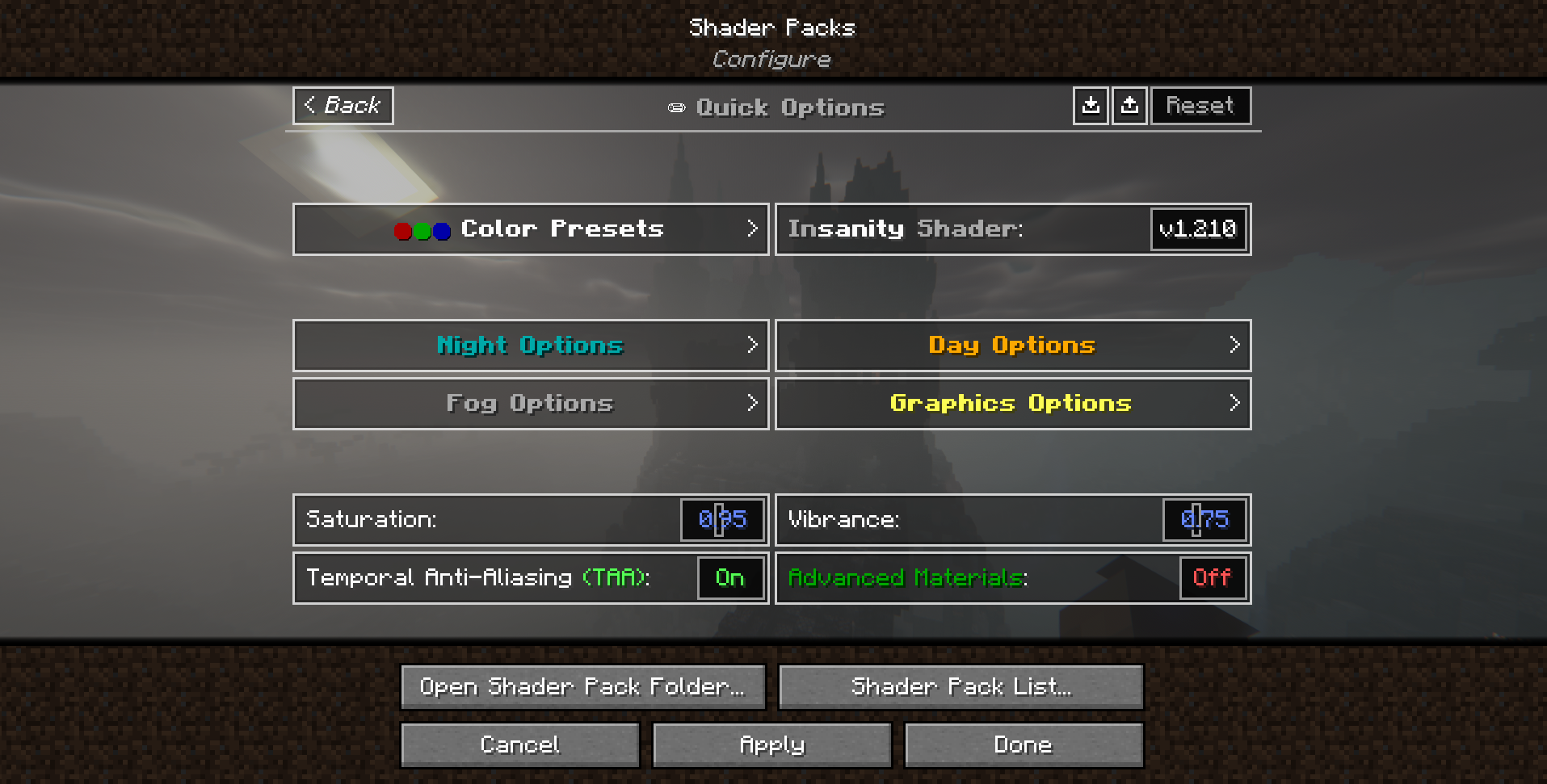
In 1.650, the main shader settings screen has Night Time, Day Time, Fog & Atmospherics and Shadows, Reflections, Lighting. Start with the group matching your problem. The older menu illustration below is from v1.210; the current labels are listed in the table after it.
| What you want to change | Where to look in 1.650 | How to judge the result |
|---|---|---|
| Night visibility | Night Time → Night Intensity, Night Ambient or Darkness | Change one control, apply, then walk the same lantern-lit route. Make sure you can still see a doorway and a drop in the path. |
| Heavy fog | Fog & Atmospherics → Fog Settings | Adjust the fog for the dimension you are in: Overworld, Nether and End have separate controls. Compare the same distant landmark. |
| Muted colours | Saturation and Vibrance on the main screen | Compare a familiar build with different coloured blocks. Avoid changing both controls at once. |
| PBR materials | Reflective Surfaces on the main screen; more controls under Advanced Options | Use a compatible PBR resource pack. The shader cannot invent material maps missing from the pack. |
The creator's general instructions call the material switch Advanced Materials; the English menu in this 1.650 ZIP labels that option Reflective Surfaces.
Choose a quality profile for the session
Try Balanced first. If movement is choppy, compare Performance or Best Performance in the same scene. Quality adds ambient occlusion and light shafts; Cinematic increases shadow quality and distance further. Reserve the heavier profiles for a machine and scene that can handle them, or for a screenshot rather than a long survival session.
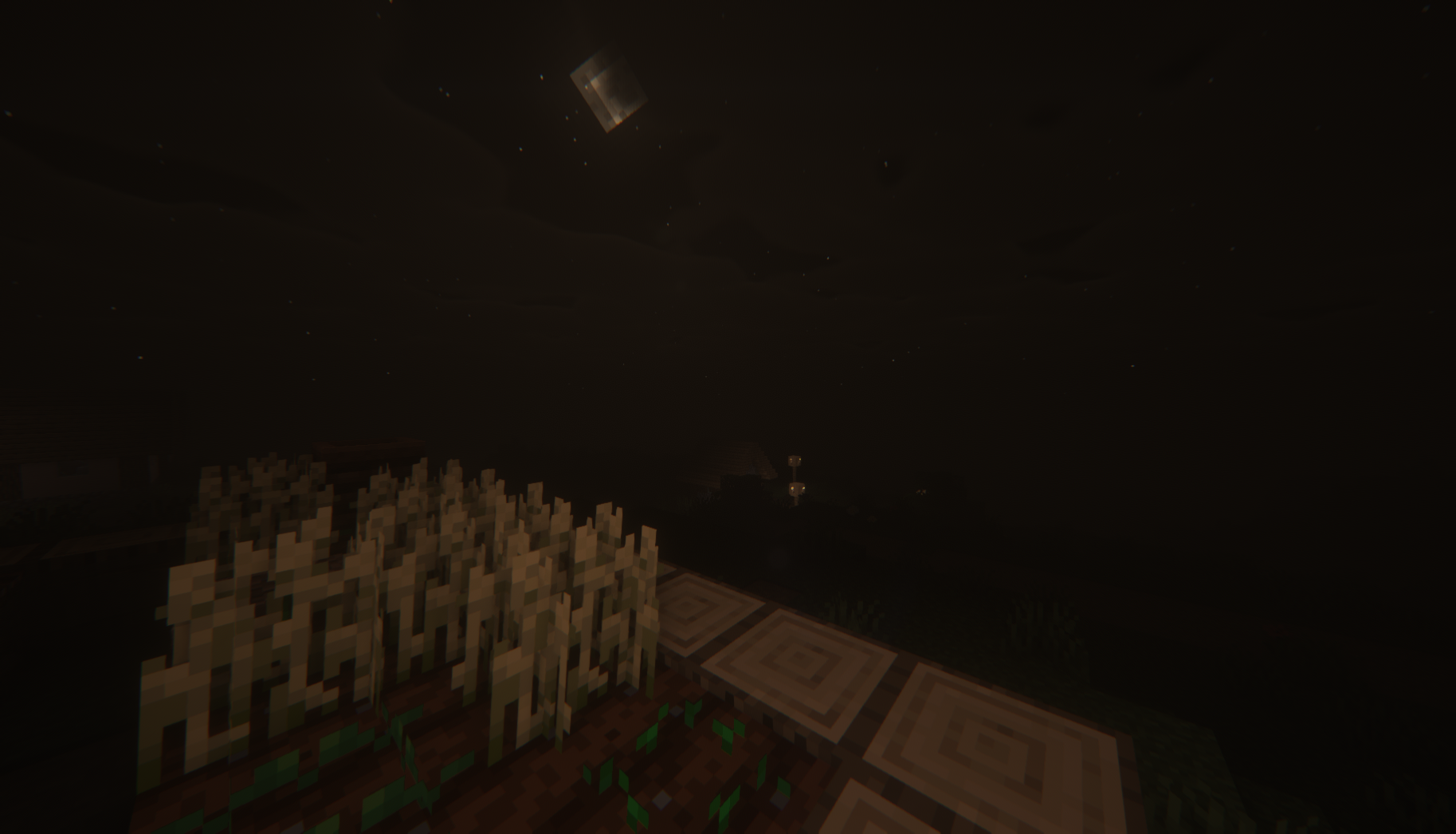
If it runs slowly or looks broken
| Problem | Useful next step |
|---|---|
| The pack does not appear | Use the shader screen's folder button and check that the ZIP is inside this instance's shaderpacks folder, not another launcher's folder. |
| The shader fails to compile or the screen turns black | Disable it, confirm the loader matches your game, and try a clean profile without another shader loader. A project compatibility range alone does not prove every loader combination works. |
| Movement becomes choppy | Compare the same scene with shaders off, then try a lower shader quality profile or graphics options and a shorter render distance. Change one setting at a time. |
| Only your view changes on a server | That is expected: this is a client-side visual pack. Other players choose their own shader settings. |
There is no dependable universal FPS figure for Insanity. Your GPU, resolution, shader options and scene all matter. Judge it in the places you actually play, including rain and a busy base, rather than only an empty landscape.
More for your Java setup.

Find the Bedrock update that matters to your world or device. Explore stable releases, practical game-drop guides, platform-specific fixes and a separate Beta/Preview archive.
- Coverage
- 2023–2026
- Edition
- Bedrock Edition
- Versions
- Bedrock 1.20.30–26.51
Bedrock · Update history
Bedrock Update History
Find the Bedrock update that matters to your world or device. Explore stable releases, practical game-drop guides, platform-specific fixes and a separate Beta/Preview archive.
Back up before updating
- Minecraft version
- Bedrock 1.20.30–26.51
- Game edition
- Bedrock Edition
- Update type
- Unknown / not stated
- Release channel
- Bedrock Edition
- World safety
- Back up before updating
- Player impact
- Find a useful release, platform fix or practical game-drop guide
- Platform family
- Bedrock & Mobile
- Supported devices
- Windows, consoles and mobile; patch availability varies
- Touch readiness
- Yes
- Last verified at
- Sep 17, 2026
- Update state
- current
- Compatibility confidence
- Source claimed
- Card delivery statement
- Player guides and official release notes
- Edition applicability
- Bedrock
- Bedrock enrollment route
- Preview app
- Delivery state
- No file
- Lifecycle state
- Current
- History coverage
- 2023–2026
Find what changed in Minecraft Java from 2023 to 2026, choose your next survival project and follow practical update guides. Stable releases and test builds are clearly separated.
- Coverage
- 2023–2026
- Edition
- Java Edition
- Versions
- Java 1.20.2–26.3
Java · Update history
Java Update History
Find what changed in Minecraft Java from 2023 to 2026, choose your next survival project and follow practical update guides. Stable releases and test builds are clearly separated.
Back up before updating
- Minecraft version
- Java 1.20.2–26.3
- Game edition
- Java Edition
- Update type
- Unknown / not stated
- Release channel
- Java Edition
- World safety
- Back up before updating
- Player impact
- Find a feature, choose a project and check the right release
- Platform family
- Java PC
- Last verified at
- Sep 17, 2026
- Update state
- current
- Compatibility confidence
- Source claimed
- Card delivery statement
- Player guides and official release notes
- Edition applicability
- Java
- Delivery state
- No file
- Lifecycle state
- Current
- History coverage
- 2023–2026

Find trial chambers, beat the breeze, match keys to vaults and prepare for ominous trials. Learn mace and wind-charge tricks, build your first crafter and put copper, tuff and dungeon rewards to use.
- Game released
- Java
- 1.21 · Stable
- Bedrock
- 1.21 · Stable
Focus Trial chambers, vault rewards, mace combat, wind charges and automatic crafting
Topic Tricky Trials
Install Included in the official game update
Back up before updating
Java + Bedrock · Release
Tricky Trials
Find trial chambers, beat the breeze, match keys to vaults and prepare for ominous trials. Learn mace and wind-charge tricks, build your first crafter and put copper, tuff and dungeon rewards to use.
Back up before updating
- Update type
- Major release
- Release channel
- Unknown / not stated
- Official release date
- 2024-06-13
- World safety
- Back up before updating
- Player impact
- Trial chambers, vault rewards, mace combat, wind charges and automatic crafting
- Platform family
- Cross-edition
- Supported devices
- Java: Windows, macOS, Linux. Bedrock: supported Windows, mobile and console devices.
- Install format
- Included in the official game update
- Touch readiness
- Not required
- Resource type
- Update
- Last verified at
- Sep 18, 2026
- Update state
- historical
- Compatibility confidence
- Source claimed
- Bedrock version/build
- 1.21
- Card delivery statement
- Included in the official game update
- Edition applicability
- Java + Bedrock
- Java version/build
- 1.21
- Shared update topic
- Tricky Trials
- Delivery state
- No file
- Lifecycle state
- Superseded
- Java update channel
- Stable
- Bedrock update channel
- Stable
Explore Dappled Forest, follow abandoned-camp maps and sleep on straw beds without moving your home spawn. Learn what Wilderness Bound adds in Java 26.3 and Bedrock 26.50, with camping steps, building ideas and official images.
- Game released
- Java
- 26.3 · Stable
- Bedrock
- 26.50 · Stable
Focus Exploration, camping and building
Topic Camps, maps and building
Back up before updating
Java + Bedrock · Release
Wilderness Bound
Explore Dappled Forest, follow abandoned-camp maps and sleep on straw beds without moving your home spawn. Learn what Wilderness Bound adds in Java 26.3 and Bedrock 26.50, with camping steps, building ideas and official images.
Back up before updating
- Update type
- Major release
- Release channel
- Java & Bedrock
- Official release date
- 2026-09-15
- World safety
- Back up before updating
- Player impact
- Exploration, camping and building
- Platform family
- Cross-edition
- Touch readiness
- Yes
- Resource type
- Update
- Last verified at
- Sep 18, 2026
- Update state
- current
- Compatibility confidence
- Source claimed
- Bedrock version/build
- 26.50
- Edition applicability
- Java + Bedrock
- Java version/build
- 26.3
- Shared update topic
- Camps, maps and building
- Delivery state
- No file
- Lifecycle state
- Current
- Java update channel
- Stable
- Bedrock update channel
- Stable
Player discussion 0
Questions, discoveries and help from other players.