
MineBrush publication
AppleSkin 3.0.10: Understand Your Food, Hunger and Healing in Minecraft 26.2
Choose food with a better idea of what it will do. AppleSkin shows hunger, saturation and held-food previews in Minecraft Java. Compare meals before an adventure, understand the extra HUD indicators and download the Fabric or NeoForge build for 26.2.
AppleSkin helps you choose food before you eat it. It adds useful information to food tooltips and the hunger bar, so you can compare what is in your inventory, see how a held meal could refill you and understand the hidden reserve that keeps hunger from dropping straight away. It shows Minecraft's food mechanics; it does not add recipes, make food stronger or feed your character automatically.
Where AppleSkin makes survival easier to understand
- Before a mining trip: compare the food you already have and pack something that suits a long session away from the farm. Consider how much you can carry and replace, not only the biggest tooltip value.
- After a fight: look at the held-food and estimated health previews while you recover somewhere safe. They help explain what eating may do; they are not a reason to remain exposed to another attack.
- When learning a food mod: inspect an unfamiliar edible item's tooltip rather than guessing from its name or icon. Other mods can change food behaviour, so check their descriptions for effects beyond ordinary hunger restoration.
- When food seems to disappear quickly: watch the saturation reserve and exhaustion indicator during your usual activity. A full-looking hunger bar does not tell the whole story.
- When choosing what to farm: compare accessible meals and decide which you want to keep in regular supply. AppleSkin makes the information visible; it does not require a particular “best food”.
Read the food tooltip
Open your inventory and hover over an edible item. The extra food icons show its hunger and saturation values. Compare two foods you can actually obtain in your world, then decide whether you need a small top-up or a meal for a longer outing.

With the default Fabric 26.2 configuration, food values appear automatically. If your modpack changed that setting, try holding Shift while hovering. AppleSkin's tooltip settings can make this information always visible or show it only when requested.
Understand hunger, saturation and exhaustion
- Hunger: the familiar food bar. Eating restores it up to its limit.
- Saturation: an additional food reserve. It is used before your visible hunger starts being spent, which is why two foods with similar hunger restoration can feel different during play.
- Exhaustion: the progress towards spending that reserve or hunger. Activities and healing can contribute to it; the underlay lets you see the process instead of treating every drop in the food bar as a mystery.
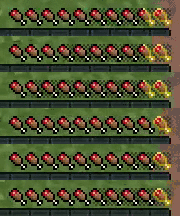
Use these displays to compare the meals and activities in your own setup. Server rules and other food-related mods may affect the result. You do not need to memorise a formula or keep the debug screen open to benefit from AppleSkin.
Preview a meal without eating it
Select a food in your hotbar and look at the hunger bar. The extra preview shows the hunger and saturation that food could restore. Switch between two foods to compare their effect at your current state, then eat normally with the Use control when you decide.

A practical first try: stand somewhere safe in Survival, hover over two foods, then hold each in turn. Notice the difference between the tooltip's food values and what your current bars have room to receive. After eating, watch the normal bars and saturation overlay. AppleSkin needs no crafted item or activation hotkey.
What the heart preview means
The extra heart display is an estimate of possible health restoration, not instant healing granted by the mod. The current source accounts for food, saturation, exhaustion, natural-regeneration settings and applicable regeneration effects. Further activity or damage can change what happens while you recover.

If your health is already full, there may be no useful healing preview to show. If a server or mod changes food and regeneration, follow that setup's rules rather than expecting an unmodified single-player result.
Download AppleSkin for Java 26.2
Choose one AppleSkin file for your loader. Both builds below are version 3.0.10, released for Minecraft 26.2 on June 18, 2026. The release notes describe the update as support for 26.2. The Fabric route also needs Fabric API; NeoForge does not use Fabric API.
Fabric — AppleSkin 3.0.10 for Minecraft 26.2
NeoForge — AppleSkin 3.0.10 for Minecraft 26.2
Fabric API 0.160.0 for Minecraft 26.2 — required for the Fabric route
Fabric API is a supporting library, not a second AppleSkin build. Use Fabric Loader 0.18.4 or newer with the supplied API. These files are for Java 26.2; do not put them into a Bedrock world or a different Minecraft version. The creator's release history lists other game versions and loaders.
Install and start using it
- Close Minecraft and open the game folder for the launcher instance you actually play.
- Use a Fabric or NeoForge profile for Minecraft 26.2. Keep the launcher's appropriate Java runtime.
- Put the matching AppleSkin JAR into that instance's mods folder. For Fabric, also put the supplied Fabric API JAR there.
- Keep only one AppleSkin build in the instance; remove an older duplicate before launching.
- Start the profile and open a Survival world. Hover over a food, then select it in the hotbar to see the relevant displays.
Do not unzip the JAR or place it in resourcepacks. A modpack may already contain AppleSkin, so check the installed mod list before adding another copy. Your existing world does not need to be recreated to use this information display.
Playing on a server
AppleSkin is mostly a client-side display, but the author says accurate saturation and exhaustion require server support. Installing the client alone does not make an unmodified remote server send all of that information. If the overlay behaves differently online, ask the server owner whether compatible AppleSkin support is installed.
The project links separate server plugins for some server setups. Those are choices for the server administrator; players should not install a server plugin into their local mods folder. You can still use the available food information, but do not assume every remote value is synchronised.
Make the display comfortable
The Fabric version's settings let you hide individual overlays, make tooltip information optional, disable off-hand food previews and adjust the maximum opacity of flashing indicators. For a quieter HUD, keep food tooltips and turn off the overlays you do not use.
If your setup provides an AppleSkin configuration screen, use it. The Fabric source also stores settings in config/appleskin.json5 after launch; close the game before editing that file and keep a copy. Optional configuration-screen integrations are not required for the default food displays. NeoForge's configuration route can differ, so do not copy a Fabric configuration file into it.
Quick fixes
- No extra tooltip: check that AppleSkin is loaded in this instance, hover over actual food and try Shift. Check whether tooltip display was disabled.
- No held-food preview: select an edible item in Survival and check the relevant overlay setting. Also check the off-hand option if that is where you are holding it.
- Online saturation looks wrong: check server support before repeatedly reinstalling the client.
- Icons overlap another HUD: try your normal GUI scale with the other hunger/HUD modification temporarily disabled in a separate instance. Keep the combination that leaves the bars readable.
- Food behaves differently from its usual values: check food mods and server rules. AppleSkin does not rebalance those mechanics.
- The game will not launch: match Java 26.2 and the loader, remove duplicate or wrong-loader files and install Fabric API on Fabric. The API supplied here needs Fabric Loader 0.18.4+.
Author and sources
AppleSkin is by squeek502 and contributors, published under the Unlicense. Fabric API is maintained by FabricMC and contributors. Original JARs and their included notices are preserved.
Sources: AppleSkin project and author demonstrations, author's Fabric 26.2 source and configuration, health-estimate implementation, Fabric API and AppleSkin issue tracker.
The MineBrush cover is an original illustration. The tooltip and animations are the creator's demonstration crops, preserved with their originals; their capture version is not specified. The trip-planning examples are MineBrush editorial suggestions.
More for your Java setup.
Spend less time rearranging loot. Inventory Profiles Next sorts chests, moves matching items, locks slots, refills hotbar supplies and switches equipment profiles. Get IPN 2.3.7 for Minecraft Java 26.2 with the right libraries and practical setup steps.
- Minecraft
- Java 26.2
- Loader
- Fabric
- Runtime
- Client
Client inventory tools; needs carried supplies for refill
Java · Mod
Inventory Profiles Next
Spend less time rearranging loot. Inventory Profiles Next sorts chests, moves matching items, locks slots, refills hotbar supplies and switches equipment profiles. Get IPN 2.3.7 for Minecraft Java 26.2 with the right libraries and practical setup steps.
Client inventory tools; needs carried supplies for refill
- Minecraft version
- Java 26.2
- Game edition
- Java Edition
- Loader / platform
- Fabric
- License
- AGPL-3.0-or-later
- Platform family
- Bedrock & Mobile
- Supported devices
- Windows · macOS · Linux
- Install format
- .jar mod file from the creator
- Touch readiness
- Not required
- Resource type
- Mod
- Project version
- 2.3.7
- Last verified at
- Sep 13, 2026
- Secondary guide action
- Setup & fixes
- Compatibility confidence
- Source claimed
- Java mod loader
- Fabric
- Java runtime side
- Client
- Card evidence statement
- Sorting, matching transfers, locked slots and equipment profiles
- Required dependency
- Matching libIPN 6.8.3; Fabric also needs Fabric API and Fabric Language Kotlin
- Card delivery statement
- Loader-specific mod and library downloads
- Card limitation note
- Client inventory tools; needs carried supplies for refill
- Edition applicability
- Java
- Delivery state
- Direct download
- Lifecycle state
- Current
Clumps
26.2.1Collect experience more smoothly around busy farms. Clumps combines nearby XP orbs and picks them up on contact. Download Clumps 26.2.1 for Java 26.2, choose Fabric or NeoForge, and learn how it works with servers and Mending.
- Minecraft
- Java 26.2
- Loader
- Fabric
- Runtime
- Server
Install where the world runs; does not multiply XP
Java · Mod
Clumps
Collect experience more smoothly around busy farms. Clumps combines nearby XP orbs and picks them up on contact. Download Clumps 26.2.1 for Java 26.2, choose Fabric or NeoForge, and learn how it works with servers and Mending.
Install where the world runs; does not multiply XP
- Minecraft version
- Java 26.2
- Game edition
- Java Edition
- Loader / platform
- Fabric
- License
- MIT
- Platform family
- Bedrock & Mobile
- Supported devices
- Windows · macOS · Linux
- Install format
- .jar mod file from the creator
- Touch readiness
- Not required
- Resource type
- Mod
- Project version
- 26.2.1
- Last verified at
- Sep 13, 2026
- Secondary guide action
- Setup & fixes
- Compatibility confidence
- Source claimed
- Java mod loader
- Fabric
- Java runtime side
- Server
- Card evidence statement
- Combine nearby XP orbs and collect on contact
- Required dependency
- Fabric: Fabric API; NeoForge: no separate library
- Card delivery statement
- Clumps for Fabric or NeoForge; matching Fabric API supplied
- Card limitation note
- Install where the world runs; does not multiply XP
- Edition applicability
- Java
- Delivery state
- Direct download
- Lifecycle state
- Current

Save Your Minecraft Places — Keep useful coordinates for your base, caves and portals. Make a simple travel journal, share clear directions with friends and keep your notes available after a death.
- Edition
- Cross-edition
- Difficulty
- Beginner
- Time
- Start before your next outing
Keep home and portal notes accessible outside your inventory
MineBrush · Guide
Save Your Minecraft Places
Save Your Minecraft Places — Keep useful coordinates for your base, caves and portals. Make a simple travel journal, share clear directions with friends and keep your notes available after a death.
Keep home and portal notes accessible outside your inventory
- Minecraft version
- Java and Bedrock — record your world and dimension
- Game edition
- Cross-edition
- Platform family
- Cross-edition
- Supported devices
- Java PC · Bedrock PC, mobile and consoles
- Install format
- In-page guide and note template
- Touch readiness
- Check guide
- Resource type
- Guide
- Compatibility confidence
- Source claimed
- Card evidence statement
- Coordinate examples and book controls explained
- Card delivery statement
- Read the guide and copy the note template
- Card limitation note
- Keep home and portal notes accessible outside your inventory
- Edition applicability
- Java + Bedrock
- Estimated time
- Start before your next outing
- Guide difficulty
- Beginner
- Delivery state
- No file
- Lifecycle state
- Current
Player discussion 0
Questions, discoveries and help from other players.