
MineBrush publication
Low on Fire: Clearer View, Comparison and Download
Keep a clearer view while burning without shrinking fire in the world. Download Low On Fire 26.2 for Java 1.20–26.2, see the author's comparison and enable the ZIP with no extra mods.
Low on Fire keeps flames near the bottom of your screen when your character is burning. You can see more of the path, nearby mobs and other players instead of looking through a large fire overlay. Its distinguishing feature is that fire placed in the world keeps its normal appearance.
The download here is Low On Fire 26.2 by Haikis, released June 19, 2026. The current file is listed for Minecraft Java releases from 1.20 through 26.2. It is a normal resource-pack ZIP: no OptiFine, Fabric, Forge or extra mod is required.
Where the clearer view helps
- Survival exploration: after catching fire, you can better see your escape route, nearby water or a safe place to stop. You still need to deal with the burning effect.
- Nether trips: the smaller overlay makes terrain easier to read during an encounter with fire. It does not make lava safe or provide Fire Resistance.
- Combat: when a fire attack sets you alight, less of your opponent and the surrounding terrain is obscured. Use it on servers that allow visibility resource packs.
- Keeping a familiar world: enjoy a lower first-person overlay without making ordinary ground fires look unnaturally short.
The pack changes visibility, not game rules. Fire damage, burn duration, attack strength and movement remain the same. A clearer screen does not mean your character has stopped burning; continue watching your health and responding to the danger.
See the difference
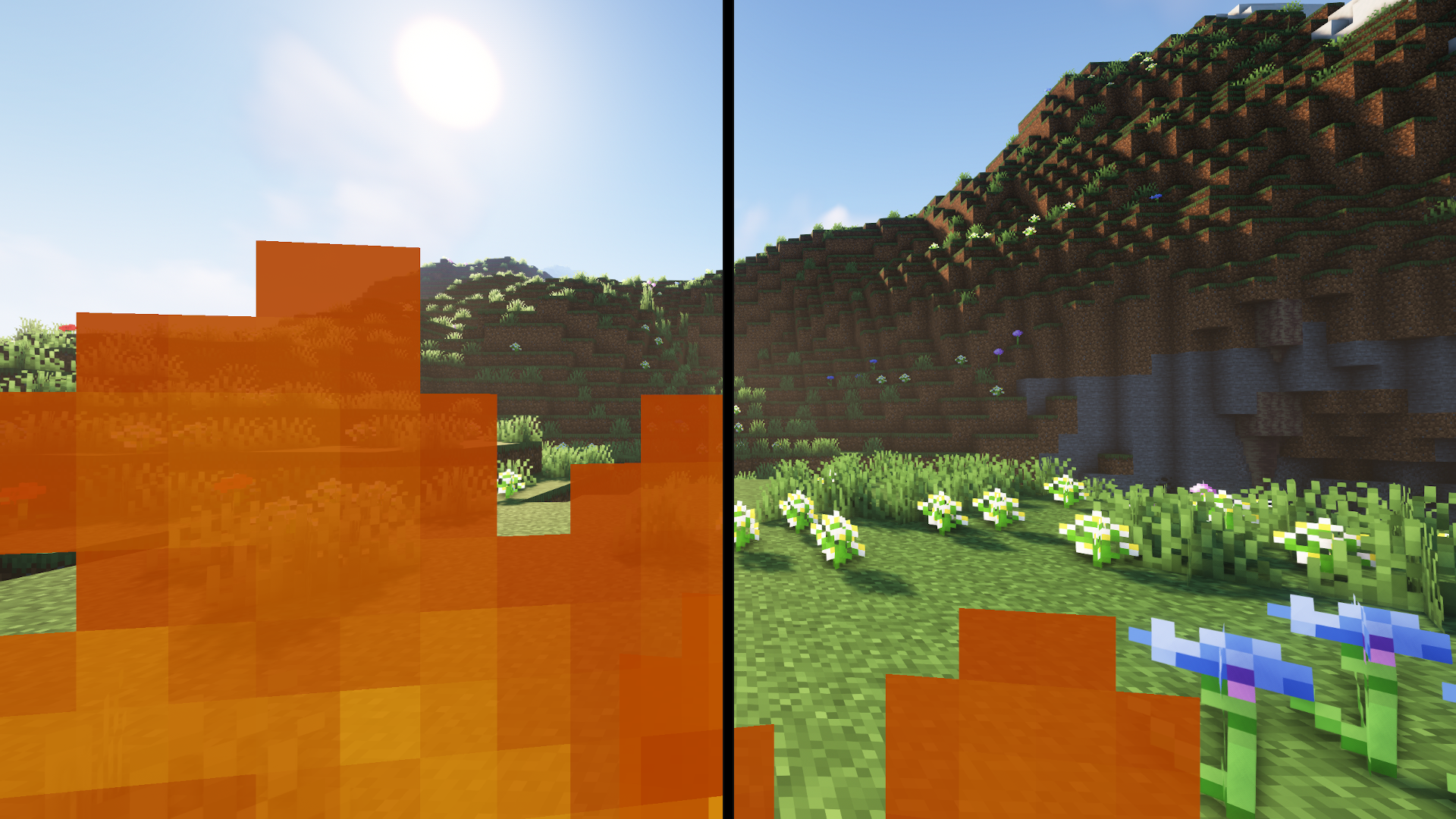
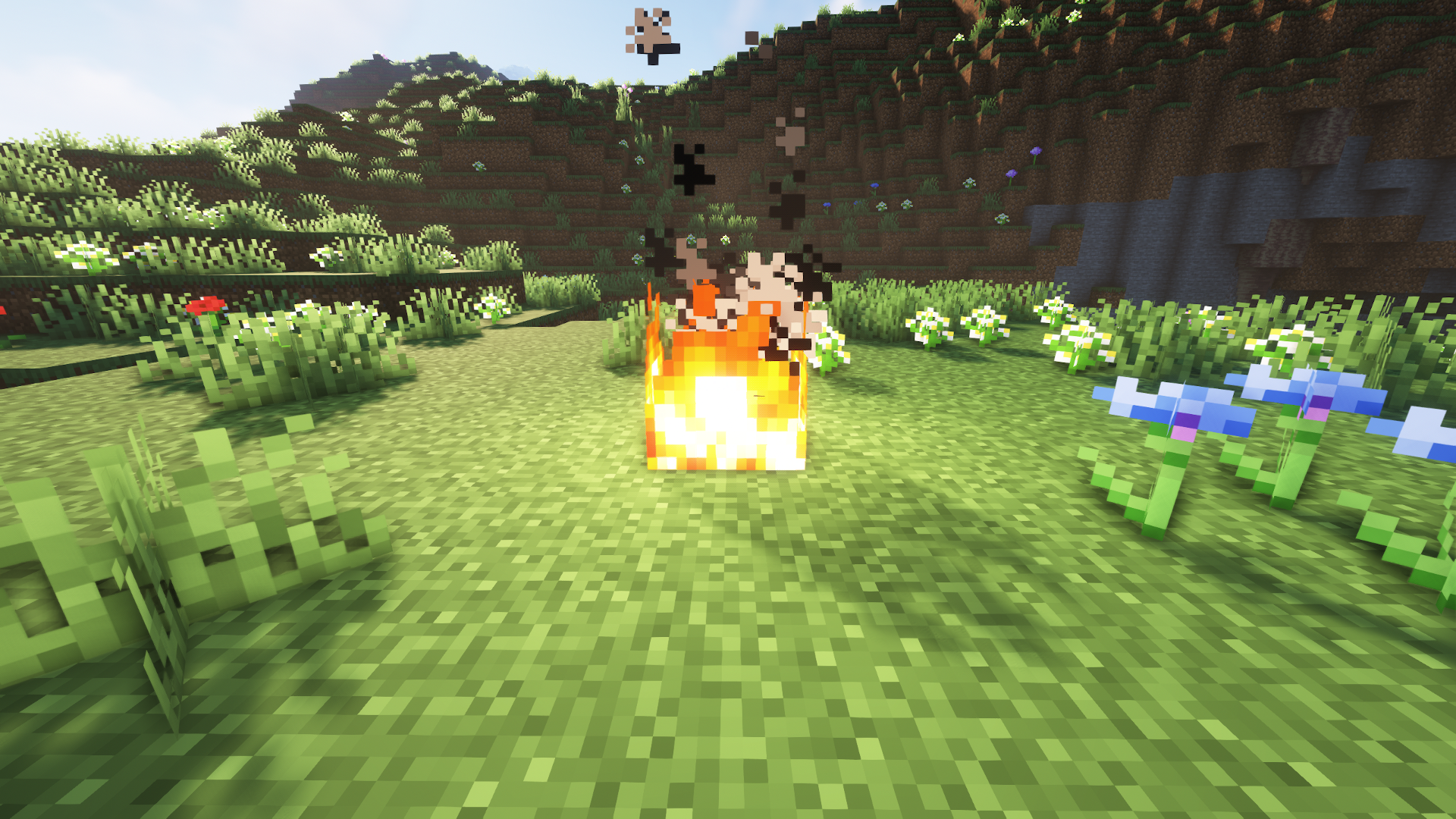
Download Low On Fire 26.2
Use this ZIP for the listed Java 1.20–26.2 releases. Keep it compressed and enable it through Minecraft's Resource Packs menu.
The pack's version number is 26.2, but the author lists this same file for several earlier Java releases too. The project description still mentions older version limits; the current release listing provides the compatibility for this download. For Java older than 1.20, choose a suitable file from the author's version history. This ZIP is not a Bedrock or mobile Bedrock add-on.
Install and activate it
- Launch the Minecraft instance you actually play. Open Options → Resource Packs → Open Pack Folder.
- Copy the downloaded ZIP into that folder. Do not extract it or place it in
mods. - Return to Resource Packs. If the pack is not visible yet, close and reopen the screen.
- Move Low on Fire from Available to Selected. Put it above any other pack that changes fire textures or fire models.
- Press Done and wait for resources to reload. The change is active without a command or keybind.
Nothing obvious changes while your character is not burning. The lowered overlay appears in first person when the burning effect is visible. To compare it without risking your main survival equipment, use a separate test world or an appropriate practice session. You do not need to set a valuable world on fire just to confirm the pack is selected.
Using it alongside your usual texture pack
Keep your main texture pack enabled and place Low on Fire above it if you want this pack's fire behavior to take priority. Minecraft uses the higher-priority resource when packs replace the same asset. A lower position can let another fire replacement override the effect.
This also means the fire appearance can differ from the custom flames in a large themed pack: Low on Fire supplies its own relevant fire resources to preserve the normal ground-fire presentation. Choose which look matters more to you, or compare with only the default resources and Low on Fire enabled before building your final pack order.
No shader is needed. If a shader or another visual mod changes the effect, compare with that component disabled before assuming the ZIP failed to load. The author screenshots show the intended distinction between the overlay and world fire, not a guarantee for every shader combination.
Useful things to know before playing
- The overlay is reduced, not completely removed. A small flame effect remains, as shown in the comparison.
- There is no height slider. This download applies a fixed resource-pack effect. Enable or disable it in Resource Packs.
- It works on your client. A server does not need to install it, and enabling it does not change another player's screen.
- It is not an FPS pack. Choose it for visibility rather than expecting a performance boost.
- It does not extinguish you. Fire protection and ways of putting out fire remain part of normal gameplay.
If the fire still covers the screen
- Check Selected: having the ZIP in the folder is not enough; it must be enabled.
- Check your instance: launchers can keep separate resourcepacks folders for different modpacks.
- Check priority: move Low on Fire above other fire-changing packs, then press Done to reload.
- Compare the correct effect: ordinary ground fire should remain normal. Look at the first-person burning overlay, not only at a burning block.
- Check visual conflicts: try default resources plus Low on Fire, with shaders temporarily off. Restore other packs one at a time to find what overrides it.
- Check the game version: use a release listed for your Java version. Do not rename the ZIP or edit its compatibility metadata to force another branch.
Update or remove it
For a manual update, replace the older ZIP in the same instance's resourcepacks folder and check that the new copy is selected. Avoid leaving several indistinguishable copies enabled. A launcher that manages resource packs can handle the update through its own instance controls.
To restore the usual overlay, move Low on Fire out of Selected and press Done. You can then delete the ZIP. Your world and inventory are not part of this resource pack and are not removed with it.
Author and sources
Low on Fire is created by Haikis. MineBrush hosts the original release file and provides this player guide. The comparison images are the author's originals with optimized display copies; the branded cover is a MineBrush editorial illustration.
- Official project description
- Low On Fire 26.2 release and compatibility
- Author screenshots
- Older versions
More for your Java setup.
Give Minecraft Java forests fuller, bushier foliage with Motschen's Better Leaves. Download version 9.5, install the ZIP without a mod loader, see original creator screenshots, and fix conflicts with other texture packs.
- Minecraft
- Java 1.20–26.2 according to current release listing
- Scope
- Blocks
- Runtime
- Vanilla
Java 1.20–26.2 · bushier leaves
Java · Pack
Better Leaves
Give Minecraft Java forests fuller, bushier foliage with Motschen's Better Leaves. Download version 9.5, install the ZIP without a mod loader, see original creator screenshots, and fix conflicts with other texture packs.
Java 1.20–26.2 · bushier leaves
- Minecraft version
- Java 1.20–26.2 according to current release listing
- Game edition
- Java Edition
- Loader / platform
- Vanilla
- License
- MIT for project/release; imported/custom input assets retain their own rights
- Visual resolution
- Not stated by creator
- Platform family
- Bedrock & Mobile
- Supported devices
- Windows · macOS · Linux
- Install format
- .zip resource pack from the creator
- Touch readiness
- Not required
- Resource type
- Resource Pack
- Project version
- 9.5
- Last verified at
- Sep 6, 2026
- Compatibility confidence
- Source claimed
- Resource-pack scope
- Blocks
- Required runtime
- Vanilla
- Pack load order
- Above base
- Resource-pack preview mode
- Single cover
- Resource-pack setup guide
- Available
- Card evidence statement
- Original screenshots from the developer
- Card delivery statement
- Download from MineBrush · resource-pack ZIP
- Card limitation note
- Java 1.20–26.2 · bushier leaves
- Edition applicability
- Java
- Delivery state
- Direct download
- Lifecycle state
- Current
Fresh Moves
3.1.1 betaGive your character livelier movement with Fresh Moves 3.1.1 beta. Choose body animation with or without expressive eyes, download the ZIP and Fabric 1.21.4 dependencies, and learn the skin settings.
- Minecraft
- Java 1.21.3–1.21.4
- Scope
- Entities
- Runtime
- Multiple dependencies
Requires EMF + ETF; animated eyes need a prepared skin; beta
Java · Pack
Fresh Moves
Give your character livelier movement with Fresh Moves 3.1.1 beta. Choose body animation with or without expressive eyes, download the ZIP and Fabric 1.21.4 dependencies, and learn the skin settings.
Requires EMF + ETF; animated eyes need a prepared skin; beta
- Minecraft version
- Java 1.21.3–1.21.4
- Game edition
- Java Edition
- Loader / platform
- Not applicable
- License
- CC BY-NC-SA 4.0 project label; verify redistribution terms before mirroring or derivatives
- Visual resolution
- Player models and animations
- Platform family
- Java & PC
- Supported devices
- Windows · macOS · Linux
- Install format
- ZIP → resourcepacks; EMF + ETF JARs → mods
- Touch readiness
- Not required
- Resource type
- Resource Pack
- Project version
- 3.1.1 beta
- Last verified at
- Sep 13, 2026
- Compatibility confidence
- Source claimed
- Resource-pack scope
- Entities
- Required runtime
- Multiple dependencies
- Pack load order
- Top
- Resource-pack preview mode
- Single cover
- Resource-pack setup guide
- Available
- Card evidence statement
- Livelier player movement and optional expressive eyes
- Card delivery statement
- Two ZIP variants and Fabric 1.21.4 dependencies
- Card limitation note
- Requires EMF + ETF; animated eyes need a prepared skin; beta
- Edition applicability
- Java
- Delivery state
- Direct download
- Lifecycle state
- Current
Player discussion 0
Questions, discoveries and help from other players.