
MineBrush publication
Model Gap Fix: Cleaner Items, Settings and Downloads
Reduce distracting seams on held tools and detailed block models. Download Model Gap Fix for Fabric 1.21.10 with its required library, understand the settings and Mac behavior, and see when newer Minecraft versions already include a fix.
Model Gap Fix makes small breaks in item and block textures less distracting. If you can see a thin line of sky through a tool, or bright seams along the edges of a detailed block model, this small client mod may help. It changes how model faces meet their textures. It does not add equipment, change crafting or make a sword more powerful: the benefit is a cleaner view of the things you already use.
The download here is Model Gap Fix 1.21.10-1.12 for Minecraft Java 1.21.10 with Fabric, plus its required Fabric API. The mod file was released on October 14, 2025 and remains the latest listed release when checked on September 13, 2026. It is not a Minecraft 26.2 or Bedrock download.
When is it worth installing?
- Your held tools have distracting seams. Mining with a pickaxe or exploring with a sword puts the same item close to the camera for long periods. A tiny transparent line is easier to notice there than on a distant object.
- You build with detailed block models. Resource packs and decorative blocks can have several narrow faces meeting at an edge. Model Gap Fix targets the texture-related gaps that can appear between those faces.
- You prefer a tidy vanilla-style view. The mod works in the background without adding a HUD, keybind or gameplay system. You can keep your existing world and usual way of playing.
- You take close-up pictures of builds or equipment. Cleaner edges can help a composition when the original problem is visible. This is not a shader, an anti-aliasing setting or a way to increase texture resolution.
If you do not see this problem, there may be little reason to add the mod. It is a visual correction, not a general performance upgrade. A pack with deliberately transparent pixels, missing model parts or overlapping geometry can need a different fix.
What the gap looks like
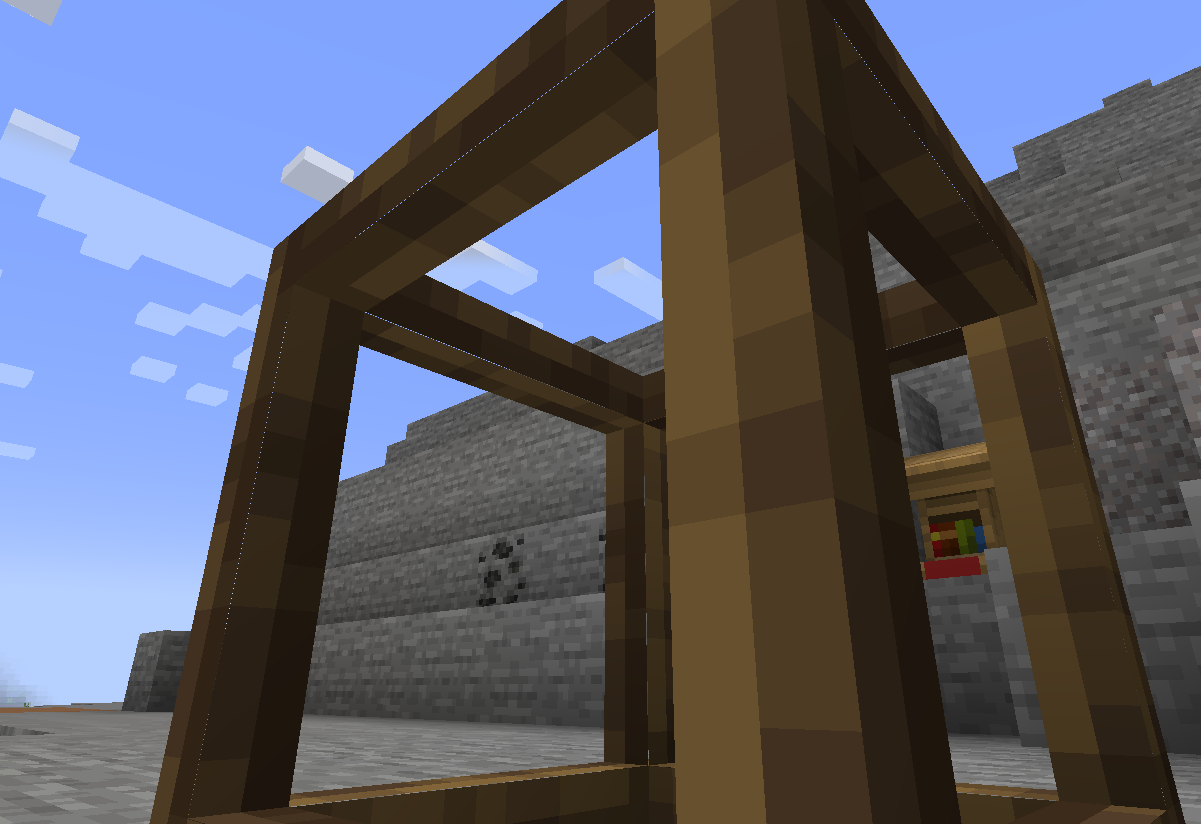
A model is made from faces that meet along edges. Minecraft normally pulls the texture slightly inward to avoid sampling a neighboring texture. Removing that adjustment can close the visible seams, but on some systems it can expose unwanted colors at texture edges instead. That trade-off explains why the same settings are not ideal for every computer.
Do newer Minecraft versions still need it?
Mojang lists the original model-gap bug as fixed in snapshot 25w44a. That snapshot came after Minecraft 1.21.10. If you play a newer release, first inspect the item in that version with normal resources instead of trying to force this older JAR to load. The official Model Gap Fix release list does not provide a 26.2 file.
For a modpack that remains on 1.21.10, the supplied file is still relevant. Other historical Fabric, Forge and NeoForge branches exist, but they are separate downloads for their listed game versions. A similar mod version number does not make those files interchangeable.
Download for Fabric 1.21.10
Install the mod and Fabric API together. Use Fabric Loader 0.17.0 or newer and Java 21 for the files below. If your instance already has a compatible Fabric API, keep one copy rather than adding another.
Required library: Fabric API 0.138.4 for Minecraft 1.21.10. This is a separate supporting file, not an alternative version of Model Gap Fix.
The mod is client-only. Install it on the computer where you play; a multiplayer server and your friends do not need it to change your view. No separate Moonlight library is required by this release. Do not combine it with Slotify: the supplied mod explicitly declares that conflict.
Install it and start playing
- Close Minecraft. In your launcher, open the game folder for the Fabric 1.21.10 instance you actually use.
- Put the Model Gap Fix JAR and, if needed, the matching Fabric API JAR into its
modsfolder. Keep both as JAR files; do not unpack them or place them inresourcepacks. - Remove an older duplicate Model Gap Fix file. Check that Slotify is absent.
- Launch that profile and open your usual world. Hold the item or look at the model that had the seam.
- Play normally. There is no activation key, command, recipe or new-world requirement.
Use the same resource pack and view when deciding whether you like the result. Look along the item's outline as you move the camera, then check nearby blocks for newly visible edge colors. You do not need a performance benchmark or a special test world to make that everyday decision.
Useful settings when a small line remains
Start with the defaults. If they already look good, leave them alone. For this Fabric release, the dependable way to change settings is the generated config/modelfix-client.json file inside the instance folder. Launch once to create it, then close the game before editing. Keep a copy of the original file and use a plain-text editor.
On Windows and Linux, use the default section. On macOS, use mac_os; changing only the other section will not adjust the active settings on a Mac.
item_quads_expansion: slightly enlarges the small surfaces forming an item. It defaults to0. The author's setting description suggests0.002or0.008as values to try if a gap remains. Start with the smaller change, and keep the lowest value that helps. Larger values can add work with high-resolution item textures.item_quads_indent: moves the item's side surfaces toward its center. The supplied Fabric default is0.0001; the Mac default is0.0099. Make only small changes if needed. This is an item setting, not a universal control for every seam between placed blocks.- Mac-only
shrink_ratio_multiplier: defaults to1, keeping Minecraft's protection against neighboring texture colors leaking into an edge. Setting it to0gives the non-Mac behavior, but can bring those artifacts back. Keep the default unless you are comparing a specific problem and can restore it.
Change one value, save the JSON without altering its punctuation, and restart Minecraft. Inspect the same item before making another change. If an outline becomes thicker, distorted or slower to display, restore the previous setting. The goal is an unobtrusive correction, not the largest numbers.
A missing configuration button does not mean the fix is inactive. Although the source contains optional configuration-screen integration, this particular release does not register a Mod Menu entry point. Do not add unrelated configuration libraries just to chase a button; the generated settings file remains available.
macOS, resource packs and shaders
On macOS, the mod deliberately uses a more cautious default. Its main texture adjustment stays protected against the edge-color problem reported on some Macs, while the item adjustment can still reduce gaps. You may therefore see a smaller improvement, especially on blocks. That is not a reason to keep reinstalling the same file.
Resource packs can change both an item's texture and its shape. If only one pack causes a problem, briefly switch to default resources and inspect the same item. If it looks correct there, check for an update or guidance from the pack's author. Model Gap Fix does not repair missing texture files or create geometry a custom model never had.
Shaders and renderer mods can introduce another layer of differences. If a line appears only with a shader enabled, compare with the shader disabled first. Keep the smallest working combination instead of installing several mods that all alter the same item edges. The project has historical reports involving animated or emissive items; those reports do not prove that every current combination fails, but they are a reason to compare performance if a resource pack behaves worse after a settings change.
Quick answers to common problems
- Minecraft refuses to start: check for the wrong game version, missing Fabric API, an outdated Fabric Loader, duplicate JARs or Slotify. These downloads are for Fabric 1.21.10.
- Purple-and-black textures or whole missing faces: inspect the resource pack or content mod. That is different from a thin gap between otherwise visible faces.
- New colored lines appear on blocks: restore the default settings. If they appeared only after installing Model Gap Fix, remove it and compare; its rendering trade-off may not suit your setup.
- FPS drops while showing detailed or animated items: restore
item_quads_expansionto0if you increased it, then compare with the pack or mod disabled. Do not expect this mod to raise FPS. - The config stops loading after an edit: close Minecraft and restore your saved copy. Alternatively, rename the edited config as a backup so the next launch can generate defaults.
- Only tiny lines remain: compare the default settings and the small item adjustments above. Some pack, shader or model problems are outside the mod's scope.
Updating or removing the mod
Close Minecraft before replacing the JAR. Match any replacement to the Minecraft version and loader of that instance, and keep your last working file if a modpack depends on a particular setup. Do not install both versions together.
To remove it, take the Model Gap Fix JAR out of mods and relaunch. It adds no world blocks or items that you must remove from a build. Keep Fabric API if other mods use it. Removing a visual mod does not change your world's Minecraft version.
Author and sources
Model Gap Fix is created by MehVahdJukaar and published under GPL-3.0-only. Fabric API is by FabricMC under Apache-2.0. MineBrush hosts the original release files and provides this player guide. The branded cover is an editorial illustration; the image inside the guide is the author's historical example of the problem.
- Official Fabric 1.21.10 release · Other supported versions
- Author's explanation, limitations and gallery
- Version-specific source and settings · Issue tracker
- Fabric API 0.138.4 for 1.21.10
- Mojang's later built-in model-gap fix
More for your Java setup.
Mod Menu
20.0.2Find installed mods, open supported settings and make a large modpack easier to navigate. Download Mod Menu 20.0.2 for Java 26.2, with search tips, library filters and the required files.
- Minecraft
- Java 26.2
- Loader
- Fabric
- Runtime
- Client
Client menu · no server installation needed
Java · Mod
Mod Menu
Find installed mods, open supported settings and make a large modpack easier to navigate. Download Mod Menu 20.0.2 for Java 26.2, with search tips, library filters and the required files.
Client menu · no server installation needed
- Minecraft version
- Java 26.2
- Game edition
- Java Edition
- Loader / platform
- Fabric
- License
- MIT
- Platform family
- Java & PC
- Supported devices
- Windows · macOS · Linux
- Install format
- JAR files in the instance mods folder
- Touch readiness
- Not required
- Resource type
- Mod
- Project version
- 20.0.2
- Last verified at
- Sep 12, 2026
- Secondary guide action
- Setup & fixes
- Compatibility confidence
- Source claimed
- Java mod loader
- Fabric
- Java runtime side
- Client
- Card evidence statement
- Search installed mods and open supported settings
- Required dependency
- Fabric API and Text Placeholder API for Minecraft 26.2
- Card delivery statement
- Mod Menu and dependencies hosted on MineBrush
- Card limitation note
- Client menu · no server installation needed
- Edition applicability
- Java
- Delivery state
- Direct download
- Lifecycle state
- Current
Embeddium
1.0.15Make detailed worlds and modded bases smoother to render. Download Embeddium for NeoForge 1.21.1 or Forge/NeoForge 1.20.1, then tune render distance, visual quality and chunk updates with clear player-focused advice.
- Minecraft
- Java 1.21.1
- Loader
- NeoForge
- Runtime
- Client
Client only; shader support needs a separate compatible integration.
Java · Mod
Embeddium
Make detailed worlds and modded bases smoother to render. Download Embeddium for NeoForge 1.21.1 or Forge/NeoForge 1.20.1, then tune render distance, visual quality and chunk updates with clear player-focused advice.
Client only; shader support needs a separate compatible integration.
- Minecraft version
- Java 1.21.1
- Game edition
- Java Edition
- Loader / platform
- NeoForge
- License
- LGPL-3.0-only
- Platform family
- Java & PC
- Supported devices
- Windows · macOS · Linux
- Install format
- .jar mod file from the creator
- Touch readiness
- Not required
- Resource type
- Mod
- Project version
- 1.0.15
- Last verified at
- Sep 13, 2026
- Secondary guide action
- Setup & fixes
- Compatibility confidence
- Source claimed
- Java mod loader
- NeoForge
- Java runtime side
- Client
- Card evidence statement
- Smoother terrain rendering, practical video settings and modded-model compatibility.
- Required dependency
- NeoForge 21.1.15+ for 1.21.1; no extra library; older 1.20.1 file also available
- Card delivery statement
- Original JARs for NeoForge 1.21.1 and Forge/NeoForge 1.20.1
- Card limitation note
- Client only; shader support needs a separate compatible integration.
- Edition applicability
- Java
- Delivery state
- Direct download
- Lifecycle state
- Current
Player discussion 0
Questions, discoveries and help from other players.