
MineBrush publication
Debugify for Minecraft 26.2: Everyday Bug Fixes and How to Use Them
Keep your hotbar selection after respawning, avoid Mending interrupting mining and fix other everyday Minecraft bugs. Download Debugify for Java 26.2, learn which fixes run on your client or server, and choose individual fixes in its settings.
Debugify fixes specific Minecraft bugs that can interrupt otherwise ordinary play. It helps with small annoyances such as your hotbar selection resetting after respawning, mining progress resetting when Mending repairs a tool, or a stray letter appearing when you open chat on Linux. It also includes world-side fixes for mobs, structures and other game behavior. The mod works in the background; there is no new item to craft or ability to unlock.
Useful fixes you may notice while playing
These examples are included in the Minecraft 26.2 release. Each fix has an MC number so you can find its setting. You do not need to memorize the numbers or read the entire bug tracker to use the mod.
- Keep your selected hotbar slot after a respawn or leaving the End. If you keep your sword, food or building blocks in a particular slot, the selection should not unexpectedly jump to the first slot. Look for MC-143474, which also covers MC-12062.
- Mine with a Mending pickaxe without repair resetting the break progress. MC-176559 addresses the interruption that can happen when collected experience repairs your tool while you are mining. It does not make the pickaxe mine faster than its normal speed.
- See armor displays correctly. MC-197260 addresses armor stands and their armor becoming too dark when the stand’s head is inside a solid block. It is useful for decorative armor displays and compact interiors.
- Use chat more comfortably on Linux. MC-122477 prevents opening chat from sometimes inserting the opening key, such as an unwanted “t,” into your message.
- Use familiar controls on macOS. MC-59810 addresses Ctrl-click being treated as a right click when trying to break blocks while sprinting. Platform-specific fixes only apply on the relevant operating system.
- Grow large spruce or jungle trees beside other blocks. The gameplay fix MC-8187 addresses a 2×2 sapling arrangement failing because of adjacent blocks on its north or west side. Normal growth requirements, including enough space above, still apply.
- Mirror structures without separating double chests. MC-134110 is useful to map makers and builders placing mirrored structures. It corrects chest orientation during that operation; it does not repair every structure-placement problem.
- Save structures in launcher instances with unusual directory names. MC-268617 addresses valid paths being rejected by structure-block saving, including some Modrinth and Linux Flatpak launcher paths.
Client fixes improve your own interface and visuals. The sapling and structure examples involve the world itself, so a remote server needs the corresponding world-side fixes. Debugify is not a general crash repair tool, a content expansion or a guaranteed FPS boost. It only addresses the bugs implemented by the selected release.
Download Debugify for Minecraft Java 26.2
Debugify 26.2.0.0 is the Fabric release for Minecraft 26.2. Install it together with Fabric API. Debugify needs Fabric Loader 0.19 or newer; use Java 25 or newer for this game version. If you also install the optional Mod Menu 20.0.2 below, use Fabric Loader 0.19.2 or newer for the complete setup.
Required files
Fabric API supplies the resource-loading component Debugify needs. You only need one matching copy of Fabric API in your instance, even if several mods use it.
Optional: configure individual fixes in a menu
Add both YACL and Mod Menu on your game client if you want a graphical settings screen. Debugify can apply its default fixes without these two optional downloads. A dedicated server can be configured through its JSON file instead.
All four files above are for Java 26.2 with Fabric. Older Forge or Quilt releases in the author’s version history are not substitutes for this build. This is not a Bedrock add-on. For a fuller introduction to the Mods screen, see Mod Menu.
Install and use it in your world
- Close Minecraft. Open the game directory of the Fabric instance you actually use, then its
modsfolder. For a dedicated Fabric server, stop the server and use its ownmodsfolder. - Add Debugify and Fabric API. Remove an older duplicate Debugify JAR. If you want the settings menu, add YACL and Mod Menu to the client too.
- Start the matching Fabric profile and open your world. Existing worlds are supported; no resource-pack activation or new-world creation is required.
- Play normally. If a particular annoyance matters to you, find the matching fix in the settings and check whether it is enabled and available.
Single-player: your game runs the world as well as the client, so it can use both groups of fixes. Multiplayer: installing Debugify on your computer does not apply world-side changes to somebody else’s server. The server owner installs it for those fixes; each player installs it for their own client fixes.
Choose the fixes you want
- With YACL and Mod Menu installed, open Mods, select Debugify and open its configuration screen.
- Choose the relevant environment: Client for local fixes, or Main for common/world-side fixes. The current screen groups them into Basic Fixes and Gameplay Fixes.
- Find the MC number for the behavior you want to change and read its description. Toggle that individual fix rather than turning unrelated options on and off.
- Save the change and restart Minecraft. Individual fix switches require a restart. Restart a dedicated server after changing its configuration file too.
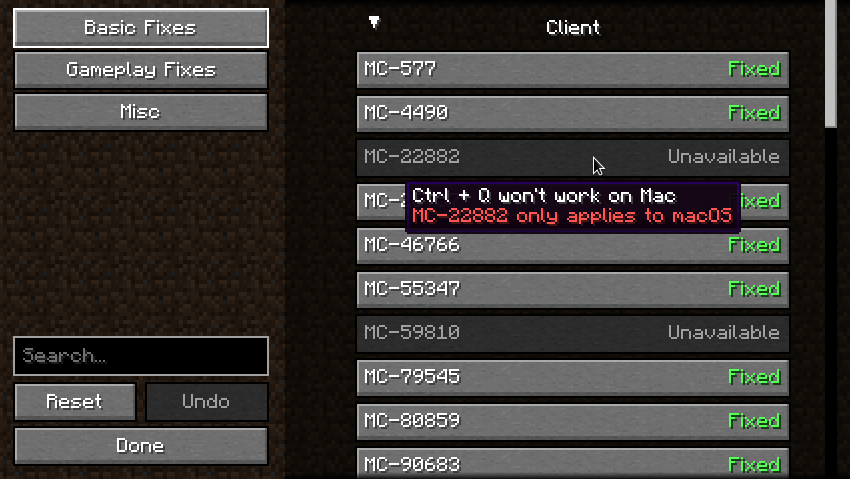
Fixed and Not fixed are the mod’s labels for an enabled or disabled option, not a test of your current world. Unavailable can mean the fix is for another operating system, overlaps an installed mod or could not load. Read the explanation next to that option; enabling every visible entry is not the goal.
Without the menu, close the game or stop the server and open config/debugify.json inside that instance. Keep a copy before editing, change the existing MC-numbered setting from true to false to disable it, and preserve valid JSON punctuation. Restart afterward. Editing the client’s file does not change a remote server’s settings.
Gameplay changes and multiplayer
Basic Fixes target ordinary bugs, while Gameplay Fixes can affect how a mechanic behaves. The separate Enable In Multiplayer option defaults to off. Keep it that way on public servers unless their rules allow the relevant changes; a permitted single-player adjustment is not automatically permitted in competitive play.
For example, MC-231097 changes how item-use slowdown ends when the used item is dropped. The mod’s own explanation warns that some strict anti-cheat systems can object to the packet order. That makes it a setting to understand, not a switch to enable blindly.
Even a bug fix can matter to a technical build or challenge route. The current dragon movement fix MC-272431 changes behavior involved in zero- and one-cycle dragon strategies. If you rely on such a strategy, review that specific fix and the rules of your challenge before changing your setup. Keep a world backup before altering behavior that an important build depends on.
Useful settings for a modpack
The Default to Disabled option under Misc lets a pack maintainer leave newly introduced fixes off until they choose to enable them. It is useful when several people need the same predictable configuration. It is not an instruction for every player to disable Debugify, and it does not replace reviewing the settings already in the pack.
Debugify includes fixes that overlap some small, single-purpose mods. The author does not treat all such mods as hard conflicts: a separate mod may provide additional features you want. Check the current fix list and any in-menu incompatibility message before removing something. Old descriptions mentioning tooltip clipping or Mac Ctrl+Q refer to fixes Minecraft has since incorporated; they should not be your reason to add the 26.2 build.
If something does not work
- No configuration button or a YACL message: install the matching YACL and Mod Menu files above on the client. Mod Menu alone does not provide Debugify’s settings interface.
- Missing resource-loader component at startup: add the matching Fabric API JAR. Also check the loader minimum: 0.19 for Debugify, or 0.19.2 when using the supplied Mod Menu.
- A changed fix seems to do nothing: restart, confirm you edited the correct launcher instance, then check the required side. World-side fixes need to run where the world is hosted.
- A fix is unavailable: inspect its explanation for an operating-system restriction or conflicting mod. A disabled platform-specific option on another OS is normal.
- A problem starts after enabling one option: turn that option back off, restart and check the same situation again. Keep the rest of your configuration unchanged so the cause remains clear.
- Debugify reports a YOSBR configuration problem: place
debugify.jsondirectly in the instance’sconfigfolder, not insideconfig/yosbr.
For a reproducible bug, use the official issue tracker with your game version, Debugify version, affected fix and relevant log. A bug absent from the current list is not something Debugify promises to fix.
Authors and sources
Debugify is developed by isXander and contributors. MineBrush provides this player guide and hosts the original files. The supplied Debugify JAR declares LGPL-3.0-or-later. Fabric API is by FabricMC; YACL is by isXander and contributors; Mod Menu is by TerraformersMC and contributors. The MineBrush cover is an editorial illustration, not a screenshot of items added by Debugify.
- Official Debugify description and original configuration image
- Debugify 26.2.0.0 release
- Current patched-bug list, including fixes now handled by vanilla
- Official source code and configuration behavior
- Fabric API · YACL · Mod Menu
More for your Java setup.

Mod Menu
20.0.2Find installed mods, open supported settings and make a large modpack easier to navigate. Download Mod Menu 20.0.2 for Java 26.2, with search tips, library filters and the required files.
- Minecraft
- Java 26.2
- Loader
- Fabric
- Runtime
- Client
Client menu · no server installation needed
Java · Mod
Mod Menu
Find installed mods, open supported settings and make a large modpack easier to navigate. Download Mod Menu 20.0.2 for Java 26.2, with search tips, library filters and the required files.
Client menu · no server installation needed
- Minecraft version
- Java 26.2
- Game edition
- Java Edition
- Loader / platform
- Fabric
- License
- MIT
- Platform family
- Java & PC
- Supported devices
- Windows · macOS · Linux
- Install format
- JAR files in the instance mods folder
- Touch readiness
- Not required
- Resource type
- Mod
- Project version
- 20.0.2
- Last verified at
- Sep 12, 2026
- Secondary guide action
- Setup & fixes
- Compatibility confidence
- Source claimed
- Java mod loader
- Fabric
- Java runtime side
- Client
- Card evidence statement
- Search installed mods and open supported settings
- Required dependency
- Fabric API and Text Placeholder API for Minecraft 26.2
- Card delivery statement
- Mod Menu and dependencies hosted on MineBrush
- Card limitation note
- Client menu · no server installation needed
- Edition applicability
- Java
- Delivery state
- Direct download
- Lifecycle state
- Current
Clumps
26.2.1Collect experience more smoothly around busy farms. Clumps combines nearby XP orbs and picks them up on contact. Download Clumps 26.2.1 for Java 26.2, choose Fabric or NeoForge, and learn how it works with servers and Mending.
- Minecraft
- Java 26.2
- Loader
- Fabric
- Runtime
- Server
Install where the world runs; does not multiply XP
Java · Mod
Clumps
Collect experience more smoothly around busy farms. Clumps combines nearby XP orbs and picks them up on contact. Download Clumps 26.2.1 for Java 26.2, choose Fabric or NeoForge, and learn how it works with servers and Mending.
Install where the world runs; does not multiply XP
- Minecraft version
- Java 26.2
- Game edition
- Java Edition
- Loader / platform
- Fabric
- License
- MIT
- Platform family
- Bedrock & Mobile
- Supported devices
- Windows · macOS · Linux
- Install format
- .jar mod file from the creator
- Touch readiness
- Not required
- Resource type
- Mod
- Project version
- 26.2.1
- Last verified at
- Sep 13, 2026
- Secondary guide action
- Setup & fixes
- Compatibility confidence
- Source claimed
- Java mod loader
- Fabric
- Java runtime side
- Server
- Card evidence statement
- Combine nearby XP orbs and collect on contact
- Required dependency
- Fabric: Fabric API; NeoForge: no separate library
- Card delivery statement
- Clumps for Fabric or NeoForge; matching Fabric API supplied
- Card limitation note
- Install where the world runs; does not multiply XP
- Edition applicability
- Java
- Delivery state
- Direct download
- Lifecycle state
- Current

C2ME
0.4.2-alpha.0.52Spend less time waiting for new terrain. C2ME uses more CPU cores for chunk generation and loading in single-player and on Fabric servers. Learn when it helps, how to use it with your world, and download the Minecraft 26.2 alpha build.
- Minecraft
- Java 26.2
- Loader
- Fabric
- Runtime
- Server
Alpha release; back up your world. Works where the world runs.
Java · Mod
C2ME
Spend less time waiting for new terrain. C2ME uses more CPU cores for chunk generation and loading in single-player and on Fabric servers. Learn when it helps, how to use it with your world, and download the Minecraft 26.2 alpha build.
Alpha release; back up your world. Works where the world runs.
- Minecraft version
- Java 26.2
- Game edition
- Java Edition
- Loader / platform
- Fabric
- License
- MIT
- Platform family
- Java & PC
- Supported devices
- Windows · macOS · Linux
- Install format
- .jar mod file from the creator
- Touch readiness
- Not required
- Resource type
- Mod
- Project version
- 0.4.2-alpha.0.52
- Last verified at
- Sep 13, 2026
- Secondary guide action
- Setup & fixes
- Compatibility confidence
- Source claimed
- Java mod loader
- Fabric
- Java runtime side
- Server
- Card evidence statement
- Parallel chunk generation and loading for exploration and servers
- Required dependency
- Fabric Loader 0.18.3+; Java 25+; bundled modules included
- Card delivery statement
- Download for Fabric · Minecraft 26.2
- Card limitation note
- Alpha release; back up your world. Works where the world runs.
- Edition applicability
- Java
- Delivery state
- Direct download
- Lifecycle state
- Current
Player discussion 0
Questions, discoveries and help from other players.