
MineBrush publication
C2ME for Minecraft 26.2: Faster Chunk Loading and Exploration
Spend less time waiting for new terrain. C2ME uses more CPU cores for chunk generation and loading in single-player and on Fabric servers. Learn when it helps, how to use it with your world, and download the Minecraft 26.2 alpha build.
C2ME helps Minecraft prepare and load terrain using more of your processor’s cores. Its main benefit is less waiting for chunks when exploring new areas or when several players travel in different directions. It works on the world side: your single-player game or a Fabric server. Installing it only on your own computer cannot speed up a remote server’s world generation.
When C2ME can make a difference
- Exploring with an elytra: generating unfamiliar terrain can struggle to keep up with fast travel. C2ME gives that work more opportunities to run in parallel, although your CPU, storage and world generator still determine the result.
- Starting a fresh survival world: visiting new biomes and searching for structures creates more terrain. C2ME accelerates the underlying chunk work; it does not add biomes, structures or a map that locates them.
- Playing with friends: a server may need to prepare several different regions at once when players split up. Install C2ME on the Fabric server where that work happens. Players do not need C2ME just to join it.
- Preparing a world before an event: C2ME can complement a separate pregeneration tool such as Chunky. The tool chooses and generates the area; C2ME improves parts of the chunk pipeline. C2ME alone does not automatically pregenerate a chosen radius.
If your problem is low FPS while standing in an already loaded base, heavy shaders, slow internet or a farm full of ticking mobs, C2ME may not address the main cause. Its focus is chunk generation, loading and disk-related work—not a promised FPS multiplier. For a complementary approach to simulation performance, see Lithium.
Download C2ME for Minecraft Java 26.2
Version 0.4.2-alpha.0.52, released September 12, 2026, for Fabric and Minecraft 26.2. Use Fabric Loader 0.18.3 or newer and Java 25 or newer. The mod’s own modules and supporting libraries are included in the JAR; do not unpack them. This release does not require a separate Fabric API download, although other mods in your instance may need it.
This is an alpha release. The author asks players to back up their worlds. Try a copy of an important world first, particularly with a large modpack. Choose files for your exact Minecraft version in the official version history; a newer snapshot or release-candidate file is not a replacement for the 26.2 download above. C2ME’s NeoForge edition is a separate project, not this Fabric JAR.
Install it and start playing
- Choose where the world runs. For single-player, open the game directory of your Fabric launcher instance. For multiplayer, stop your Fabric server and open its server directory.
- Back up the world. Keep the copy outside the active world folder. With a valuable existing save, first run a duplicate world with the same modpack.
- Put the downloaded JAR in the
modsfolder. Remove an older duplicate C2ME JAR, but keep the other mods your world needs. - Start Minecraft or the server with the matching version. You do not need a new world, a resource pack or an in-game activation command.
- Leave the default settings for your first session. Travel into an unexplored area and also revisit your existing base. Check that terrain loads, the world saves and you can reopen it normally before returning to your main save.
C2ME works in the background. There is no tool to craft or button to hold while flying. In single-player it optimizes the integrated server inside your game; on a dedicated server it belongs in the server’s mod folder, not a plugins folder.
Settings: start simple, then adjust only what you need
The configuration file is config/c2me.toml. Start with its defaults. If you decide to tune it, close the game or stop the server, keep a copy of the file and follow the comments for your installed version. Change one setting at a time so you can undo an unhelpful change.
More worker threads are not always better. Your game still needs CPU time for rendering and simulation, and a small hosted server may have limited memory or shared processor time. Increasing parallel work cannot make a slow disk or an overloaded host unlimited. If fast exploration still causes pauses, try a more modest view distance before copying somebody else’s thread count or memory settings.
The project also offers a separate experimental OpenCL component. Downloading the standard C2ME file here does not automatically enable GPU-accelerated world generation.
What the author’s performance images show
These original charts show chunks generated per second, not frames per second. They come from the author’s August 14, 2026 Minecraft 26.2 test using Terratonic and Terralith. The blue line is C2ME, red is Paper and green is vanilla. Click either image to open its original full-size version.
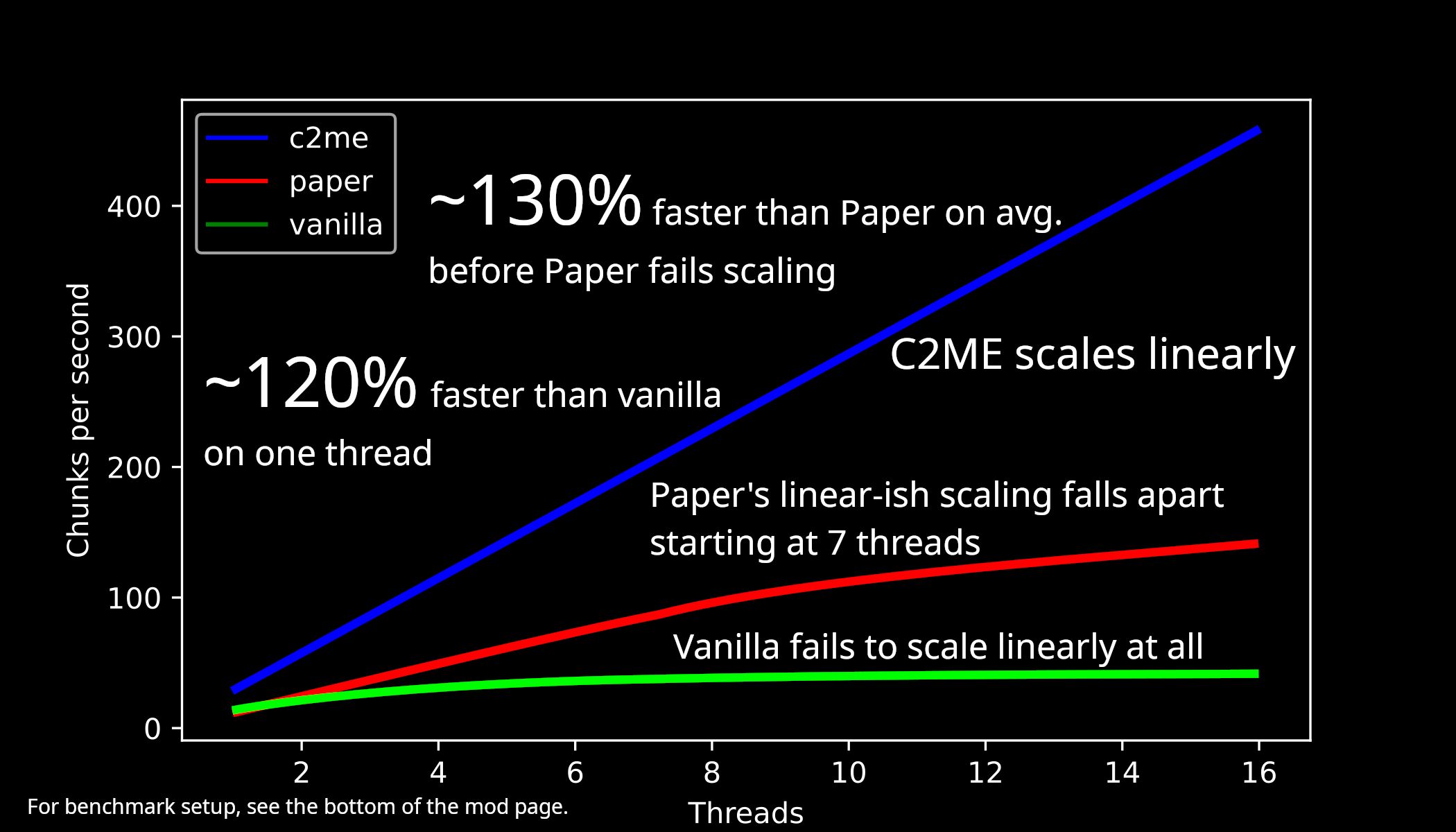
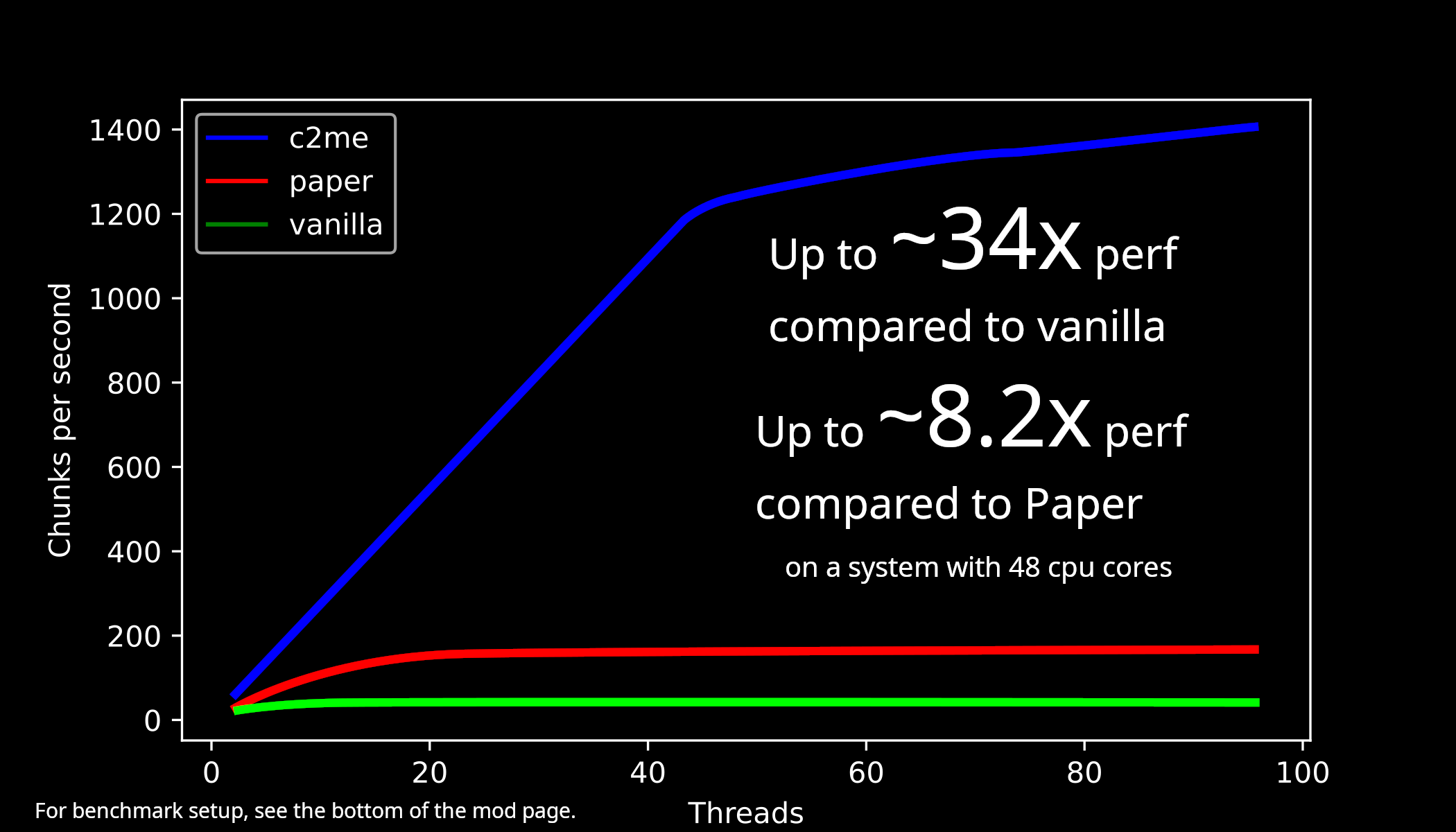
The test used a 48-core Xeon server, memory-backed storage and several other optimization mods, including Lithium and ScalableLux. It measured C2ME alpha.0.41, an earlier build than the alpha.0.52 file offered here. Treat the charts as results for that complete setup. Your own exploration speed depends on hardware, world generation and the rest of your pack. The author’s project page includes the full test conditions.
Compatibility with your world and modpack
C2ME aims to preserve vanilla behavior by default. It is not a terrain replacement, and you can use an existing world. The author supports vanilla-style world-generation datapacks; custom modded generators can need extra checking because they may not expect world-generation work to run concurrently. No single compatibility statement covers every modpack.
The supplied release declares conflicts with Dynamic View (dynview), Better Chunk Loading, Tic Tacs and OptiFabric. Avoid those combinations. The author recommends Lithium and ScalableLux as optional companions; they are not required libraries for this download. Match every companion to your Minecraft version and loader.
Common questions and useful fixes
Why does the server still show empty terrain ahead?
First check that C2ME is installed on the server, not just your client. Very fast travel, demanding terrain mods, limited hosting resources or slow storage can still outpace generation. A lower view distance or pregenerating the area with a separate tool may be more useful than increasing thread counts.
Why did my FPS barely change?
Chunk preparation and drawing the scene are different jobs. If the terrain is already loaded and your graphics are the bottleneck, C2ME has less work to improve. Reduce demanding visual settings or consider a rendering-focused mod suitable for your pack.
Minecraft will not start after adding it
Check Minecraft 26.2, Fabric Loader 0.18.3+, Java 25+ and duplicate C2ME files first. Read the launcher’s first relevant error for the incompatible mod or missing requirement. Check the four declared conflicts above before adding extra libraries at random.
What if my world behaves incorrectly after the update?
Stop using the affected save, keep its log and return to your pre-update backup with the previous working mod setup. If reporting a bug, include your Minecraft and C2ME versions, mod list and what you were doing in the official issue tracker. Restoring a backup returns the world to when that copy was made.
Does C2ME work on Bedrock or a Paper server?
This download is for Minecraft Java with Fabric. It is not a Bedrock add-on or a Bukkit/Paper plugin. The Paper line in the benchmark is a comparison, not an installation target.
Authors and sources
C2ME is developed by ishland, RelativityMC and contributors and distributed under the MIT license. MineBrush provides this player guide and hosts the original download; credit for the mod and benchmark images belongs to their creators. The branded cover is a MineBrush editorial illustration, not an in-game screenshot or performance result.
- Official description, compatibility notes and benchmark images
- C2ME alpha.0.52 for Minecraft 26.2: release and download
- Official source code and project documentation
More for your Java setup.
Lithium
0.25.3Help busy Minecraft Java worlds and servers run more smoothly with Lithium. Download the matching Fabric/Quilt or NeoForge file for Java 26.2, follow the installation steps and learn which kinds of lag it can help.
- Minecraft
- Java 26.2
- Loader
- Fabric
- Runtime
- Both
Java 26.2 · single-player and servers
Java · Mod
Lithium
Help busy Minecraft Java worlds and servers run more smoothly with Lithium. Download the matching Fabric/Quilt or NeoForge file for Java 26.2, follow the installation steps and learn which kinds of lag it can help.
Java 26.2 · single-player and servers
- Minecraft version
- Java 26.2
- Game edition
- Java Edition
- Loader / platform
- Fabric
- License
- LGPL-3.0-only
- Platform family
- Bedrock & Mobile
- Supported devices
- Windows · macOS · Linux
- Install format
- .jar mod file from the creator
- Touch readiness
- Not required
- Resource type
- Mod
- Project version
- 0.25.3
- Last verified at
- Sep 5, 2026
- Secondary guide action
- Setup & fixes
- Compatibility confidence
- Source claimed
- Java mod loader
- Fabric
- Java runtime side
- Both
- Card evidence statement
- Optimizes mob behavior and world updates
- Card delivery statement
- Download from MineBrush · choose your loader
- Card limitation note
- Java 26.2 · single-player and servers
- Edition applicability
- Java
- Delivery state
- Direct download
- Lifecycle state
- Current
Krypton
0.3.1Reduce networking overhead in a Fabric multiplayer setup. Download Krypton for Java 26.2 and learn where to install it, when it can help and how to separate server lag from low FPS or a poor connection.
- Minecraft
- Java 26.2
- Loader
- Fabric
- Runtime
- Both
Benefits depend on network workload; does not fix a poor internet connection
Java · Mod
Krypton
Reduce networking overhead in a Fabric multiplayer setup. Download Krypton for Java 26.2 and learn where to install it, when it can help and how to separate server lag from low FPS or a poor connection.
Benefits depend on network workload; does not fix a poor internet connection
- Minecraft version
- Java 26.2
- Game edition
- Java Edition
- Loader / platform
- Fabric
- License
- LGPL-3.0-only
- Platform family
- Bedrock & Mobile
- Supported devices
- Windows · macOS · Linux
- Install format
- .jar mod file from the creator
- Touch readiness
- Not required
- Resource type
- Mod
- Project version
- 0.3.1
- Last verified at
- Sep 13, 2026
- Secondary guide action
- Setup & fixes
- Compatibility confidence
- Source claimed
- Java mod loader
- Fabric
- Java runtime side
- Both
- Card evidence statement
- Reduce networking overhead; practical client and server setup
- Required dependency
- Fabric Loader 0.18.4+; no extra mod libraries
- Card delivery statement
- Fabric JAR hosted on MineBrush; client or server
- Card limitation note
- Benefits depend on network workload; does not fix a poor internet connection
- Edition applicability
- Java
- Delivery state
- Direct download
- Lifecycle state
- Current
Clumps
26.2.1Collect experience more smoothly around busy farms. Clumps combines nearby XP orbs and picks them up on contact. Download Clumps 26.2.1 for Java 26.2, choose Fabric or NeoForge, and learn how it works with servers and Mending.
- Minecraft
- Java 26.2
- Loader
- Fabric
- Runtime
- Server
Install where the world runs; does not multiply XP
Java · Mod
Clumps
Collect experience more smoothly around busy farms. Clumps combines nearby XP orbs and picks them up on contact. Download Clumps 26.2.1 for Java 26.2, choose Fabric or NeoForge, and learn how it works with servers and Mending.
Install where the world runs; does not multiply XP
- Minecraft version
- Java 26.2
- Game edition
- Java Edition
- Loader / platform
- Fabric
- License
- MIT
- Platform family
- Bedrock & Mobile
- Supported devices
- Windows · macOS · Linux
- Install format
- .jar mod file from the creator
- Touch readiness
- Not required
- Resource type
- Mod
- Project version
- 26.2.1
- Last verified at
- Sep 13, 2026
- Secondary guide action
- Setup & fixes
- Compatibility confidence
- Source claimed
- Java mod loader
- Fabric
- Java runtime side
- Server
- Card evidence statement
- Combine nearby XP orbs and collect on contact
- Required dependency
- Fabric: Fabric API; NeoForge: no separate library
- Card delivery statement
- Clumps for Fabric or NeoForge; matching Fabric API supplied
- Card limitation note
- Install where the world runs; does not multiply XP
- Edition applicability
- Java
- Delivery state
- Direct download
- Lifecycle state
- Current
Player discussion 0
Questions, discoveries and help from other players.