
MineBrush publication
Sound Physics Remastered: Echoes, Muffled Sounds and Immersive Exploration
Give caves an echo and hear sounds become muffled behind walls. Download Sound Physics Remastered for Java 26.2, with practical sound settings, exploration ideas and optional voice-chat integration.

Sound Physics Remastered makes Minecraft’s surroundings part of what you hear. Sounds can echo in enclosed spaces, become muffled behind blocks and change as you move away. A cave, a small room and an open field no longer have to sound alike.
It is an atmospheric Java mod by Max Henkel and contributors, based on earlier Sound Physics work. It changes sound processing rather than adding a collection of new sound effects, mobs or blocks. The downloads here are 1.5.1 for Minecraft Java 26.2, marked Beta by the author, with separate Fabric/Quilt, Forge and NeoForge builds.
What you can use it for
- Cave exploration: echoes give enclosed passages more atmosphere, while intervening blocks can muffle nearby creatures. Use sound as a clue alongside what you see; it is not an exact mob locator through walls.
- Castles, tunnels and indoor builds: walk from an open courtyard into a hall or underground room to hear how enclosure changes familiar sounds. This adds character to a build without requiring new decorative blocks.
- Adventure and horror worlds: distant or obstructed sounds can feel less direct, and enclosed areas can feel more imposing. Map makers can try ordinary bells, footsteps and note blocks in different spaces; the listener needs the mod to hear its processing.
- Playing with friends: optional Simple Voice Chat integration applies the acoustic effects to supported voice chat. Talking across a room or through a wall can become part of the atmosphere.
If you prefer very clear, familiar competitive audio, strong reverberation may be distracting. You can reduce the effect or disable the mod’s processing in its settings without removing your other mods.
Download for Minecraft Java 26.2
Choose one Sound Physics file for your loader. The Fabric file also covers Quilt. Forge and NeoForge are separate choices, not interchangeable names. These 26.2 beta files do not work as Bedrock/mobile add-ons or as builds for older Minecraft versions.
No additional library is required for the basic sound effects. Fabric API is not a dependency of this release. On Fabric, use Fabric Loader 0.19.3 or newer; the 26.2 game profile uses Java 25. Keep your loader and game version matched.
Optional settings screen: Cloth Config provides a convenient configuration interface. Add only the matching file if your profile does not already contain a compatible copy.
On Fabric, optional Mod Menu gives you the mods list from which to open configuration. A Forge Cloth Config build for 26.2 is not provided here; do not substitute its NeoForge file. You can use the mod without this optional interface.
For a different Minecraft release, use the author’s version history and select your exact game version and loader.
Install it and hear the difference
- Close Minecraft and open the game folder of the launcher profile you actually play.
- Put the single matching Sound Physics JAR into
mods. Replace an older copy; do not leave several versions installed. - Add the optional matching Cloth Config file if you want its settings interface, then launch the modded profile.
- Enter a world and try a familiar sound in an open area, then inside a cave or room. A bell or note block is useful because you can play it again.
- Try listening from the other side of a wall or doorway. Start with ordinary settings before changing how strong the echo or muffling is.
There is no item to craft and no activation key required for normal use. With Enable Sound Physics on, it processes supported sounds while you play. Minecraft’s usual sound-category sliders still control what you hear; a muted Blocks category is not fixed by turning up reverb.
Set the sound to suit your world
Open the mod’s configuration through your mods list when the optional interface is installed. Without it, close the game and edit config/sound_physics_remastered/soundphysics.properties in that profile after its first launch. Keep a copy before changing the file, and follow the comments next to each option.
- Reverb Gain: controls the strength of the reflected sound. Lower it if a busy base becomes too echoey; raise it gradually if you want a more pronounced enclosed-space atmosphere.
- Reverb Brightness: changes the higher-frequency character of the echo. This is useful when reflections sound too sharp or too dull, rather than simply too loud.
- Block Absorption: controls how strongly sound is absorbed through blocks. Reduce it if walls make useful sounds excessively muffled; increase it if you want stronger separation between spaces.
- Default Block Reflectivity: affects how long reverberation lasts. Lower values shorten the tail; higher values lengthen it. Start with Reverb Gain if you only want less echo volume.
- Underwater Filter: adjusts underwater filtering. Change this if you like the land acoustics but find submerged audio too heavily filtered.
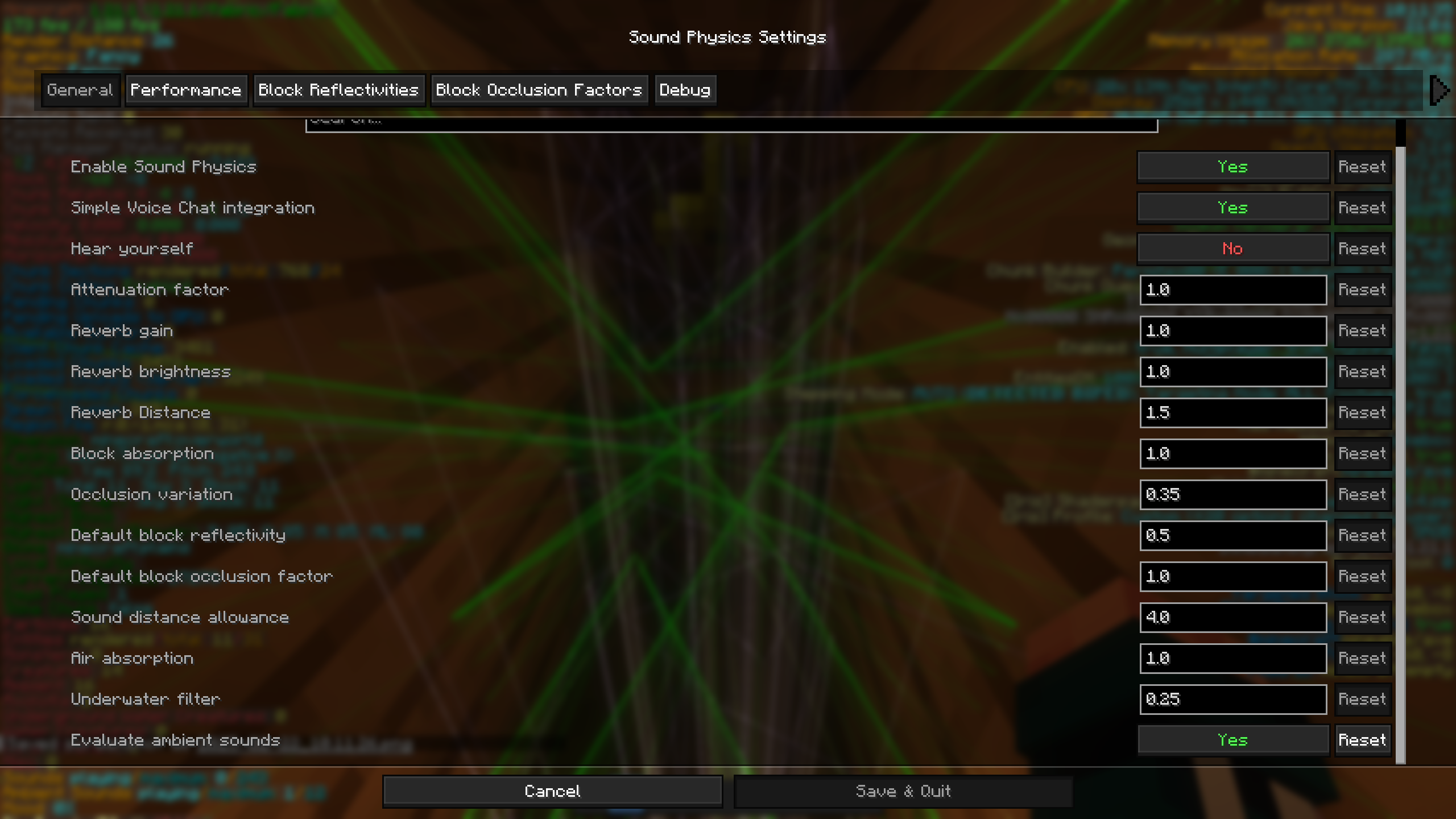
A practical starting point: for relaxed exploration, leave normal settings in place and adjust Reverb Gain to taste. For a crowded base, reduce echo first so overlapping sounds stay readable. For an adventure map, listen in the rooms players will actually visit before increasing absorption or reflectivity. Change one setting at a time so you can hear which adjustment helped.
Single-player, servers and voice chat
Install the mod on your client to hear its main effects. Friends do not automatically hear them just because you installed it. A normal server does not need a copy merely for your client’s reverb and muffling.
Two distance controls have an extra requirement: Attenuation Factor and Sound Distance Allowance require single-player or installation on the server to take effect as described by the mod. A client slider alone cannot make a remote server send sounds from outside its usual range. Lowering attenuation makes distant sounds louder; extending sound distance can also mean processing more sounds.
Simple Voice Chat is optional and must already be set up for voice communication. Sound Physics supplies the acoustic integration, not the voice connection. The current mod requires a compatible Simple Voice Chat API 2.6.0 or newer when that integration is present. Check the Simple Voice Chat Integration option if game sounds change but voices do not.
Hear Yourself lets you hear your own processed voice. It is an optional effect, not something you need to enable for friends’ voices to work. Leave it off if hearing yourself back is distracting.
Keep performance comfortable
Sound simulation is extra work, especially around many simultaneous sounds. If stutters appear near a busy farm or a room full of sound sources, try reducing Environment Evaluation Ray Count and then Environment Evaluation Ray Bounces. These controls trade the detail of acoustic calculations for lighter processing; they are not FPS boosters when no sound-related bottleneck exists.
Update Moving Sounds re-evaluates long-running sounds as circumstances change. More frequent updates cost more work. If you enabled it and performance suffered, turn it back off or increase Sound Update Interval. Leave debug rendering off during normal play.
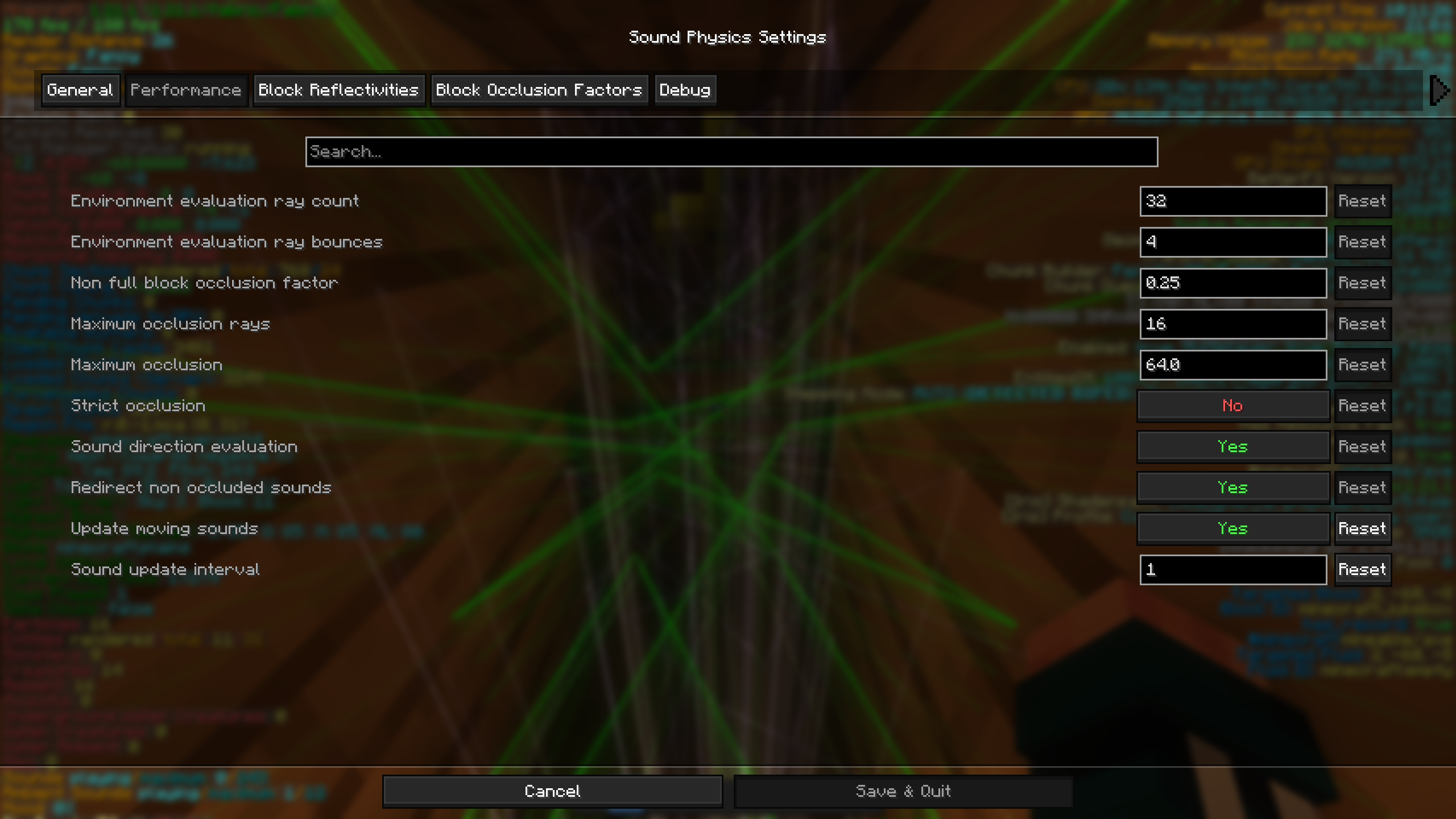
Music discs need care: in the linked historical report, the maintainer explained that jukebox processing was disabled by default because of its limitations. Do not enable extra processing for long music tracks expecting flawless results; return those options to their normal values if a disc sounds inconsistent.
If the result is not what you expected
- No audible change: check that the mod loaded, Enable Sound Physics is on and the relevant Minecraft sound category is audible. Try an enclosed room as well as open ground. Temporarily disable another audio-processing mod to check for overlap.
- Too much echo: lower Reverb Gain. If the tail is still too long, try lowering reflectivity rather than turning down every game sound.
- Sounds disappear behind walls: reduce Block Absorption or restore the original configuration. Strong occlusion can be a setting choice rather than a broken file.
- Lag around many sound sources: reduce ray count/bounces and undo aggressive moving-sound updates. Compare the same area with processing disabled to see whether sound simulation is involved.
- The game refuses to launch: check Minecraft version and loader, remove duplicate JARs and the older original mod with ID
soundphysics, which this release declares incompatible. An outdated voice-chat integration can also cause a dependency conflict. - The settings button is missing: confirm the optional interface libraries match your loader. The main mod does not need them to process sound; use its configuration file if necessary.
To remove it, close Minecraft and remove the Sound Physics JAR from that profile. Keep Cloth Config and Mod Menu if other mods use them. It adds no world blocks that you need to remove from a save.
Release, authors and sources
1.5.1 for Minecraft 26.2 was released June 18, 2026 as Beta. Its release note says it updates the mod to 26.2; it does not announce a new collection of sound effects. The project is maintained by Max Henkel, with credits to Sonic Ether, vlad2305m, Saint and other contributors, under GPL-3.0-only. Cloth Config is by shedaniel under LGPLv3. Hosted files retain their original contents and notices.
Sources: official project, Fabric/Quilt release, NeoForge release, Forge release, source code and configuration, creator’s CurseForge page, and Cloth Config. The MineBrush cover is an editorial illustration. The two historical community screenshots show settings, not an audio demonstration or a capture of the current release.
More for your Java setup.

Understand Minecraft 26, tell normal releases from test builds, and choose the right version for friends, servers and mods. Clear Java and Bedrock examples without the technical clutter.
- Topic
- Choosing your Minecraft version
- Scope
- None
- Evidence
- Official Minecraft sources · checked 9 Sep 2026
A shared “26” prefix never proves cross-edition compatibility.
MineBrush · News
Minecraft Versions Made Simple
Understand Minecraft 26, tell normal releases from test builds, and choose the right version for friends, servers and mods. Clear Java and Bedrock examples without the technical clutter.
A shared “26” prefix never proves cross-edition compatibility.
- Compatibility confidence
- Source claimed
- Card evidence statement
- Official policy and indexes checked 9 Sep 2026; client display NOT_OBSERVED.
- Card delivery statement
- Choose a version for everyday play or testing
- Card limitation note
- A shared “26” prefix never proves cross-edition compatibility.
- Edition applicability
- Java + Bedrock
- News topic
- Choosing your Minecraft version
- Public news evidence label
- Official Minecraft sources · checked 9 Sep 2026
- Delivery state
- No file
- Lifecycle state
- Current
- News evidence type
- Official Minecraft source
Cut your Minecraft player out of a recorded scene for intros, overlays and thumbnails. Download EntityMask 1.0 for Java 1.20–1.21.8, see the author's real mask previews, and learn how to align two recordings and keep the player with an inverted luma matte.
- Format
- Workflow
- Path
- Replay → normal recording + mask → video editor
- Output
- Player cutout for an intro, title effect or thumbnail
Version 1.0 beta; Java 26.x support is not listed.
MineBrush · Creator
EntityMask 1.0
Cut your Minecraft player out of a recorded scene for intros, overlays and thumbnails. Download EntityMask 1.0 for Java 1.20–1.21.8, see the author's real mask previews, and learn how to align two recordings and keep the player with an inverted luma matte.
Version 1.0 beta; Java 26.x support is not listed.
- Minecraft version
- Java 1.20–1.21.8
- Game edition
- Java Edition
- Loader / platform
- Not applicable
- License
- MIT
- Creator resource format
- Workflow
- Platform family
- Java & PC
- Supported devices
- Minecraft Java on desktop
- Install format
- ZIP → shaderpacks
- Touch readiness
- Not required
- Resource type
- Shader
- Last verified at
- Sep 18, 2026
- Compatibility confidence
- Source claimed
- Card evidence statement
- Record matching color and mask clips; combine them in your editor.
- Card delivery statement
- Shader ZIP · Iris or OptiFine required
- Card limitation note
- Version 1.0 beta; Java 26.x support is not listed.
- Edition applicability
- Java
- Tested environment
- Java with Iris or OptiFine; replay recorder and matte-capable video editor
- Example artifact path
- Replay → normal recording + mask → video editor
- Creator output
- Player cutout for an intro, title effect or thumbnail
- Estimated time
- 8 min read; recording time varies
- Guide difficulty
- Intermediate
- Delivery state
- Direct download
- Lifecycle state
- Current

Falling Leaves
2.0.7Bring movement to forest paths, gardens and tree-lined builds. Tune falling leaves, wind and conifer particles, keep the effect comfortable, and download the Fabric files for Java 26.2.
- Minecraft
- Java 26.1–26.2
- Loader
- Fabric
- Runtime
- Client
Client-side effect; attached libraries target Java 26.2
Java · Mod
Falling Leaves
Bring movement to forest paths, gardens and tree-lined builds. Tune falling leaves, wind and conifer particles, keep the effect comfortable, and download the Fabric files for Java 26.2.
Client-side effect; attached libraries target Java 26.2
- Minecraft version
- Java 26.1–26.2
- Game edition
- Java Edition
- Loader / platform
- Fabric
- License
- MIT
- Platform family
- Java & PC
- Supported devices
- Windows · macOS · Linux
- Install format
- JAR files in the Fabric client mods folder
- Touch readiness
- Not required
- Resource type
- Mod
- Project version
- 2.0.7
- Last verified at
- Sep 15, 2026
- Secondary guide action
- Setup & fixes
- Compatibility confidence
- Source claimed
- Java mod loader
- Fabric
- Java runtime side
- Client
- Required dependency
- Fabric API and Cloth Config
- Card delivery statement
- Tune leaf particles, wind and individual trees
- Card limitation note
- Client-side effect; attached libraries target Java 26.2
- Edition applicability
- Java
- Delivery state
- Direct download
- Lifecycle state
- Current

Hypixel brings Bed Wars, Build Battle, SkyWars and long-term SkyBlock progression to Java players. Copy the official address, choose a mode, join friends and use the right version and server pack.
- Edition
- Java
- Modes
- Minigames
- Region
- None
SkyBlock: modern Java and required server resource pack
Minecraft · Server
Hypixel
Hypixel brings Bed Wars, Build Battle, SkyWars and long-term SkyBlock progression to Java players. Copy the official address, choose a mode, join friends and use the right version and server pack.
SkyBlock: modern Java and required server resource pack
- Minecraft version
- Java; SkyBlock recommends 26.2
- Game edition
- Java Edition
- Loader / platform
- Not applicable
- License
- Hypixel server rules and terms
- Server address
- mc.hypixel.net
- Server modes
- Minigames
- Platform family
- Java & PC
- Supported devices
- Minecraft Java Edition on PC and Mac
- Install format
- Join using the server address
- Touch readiness
- Not required
- Resource type
- Server
- Last verified at
- Sep 14, 2026
- Compatibility confidence
- Source claimed
- Card evidence statement
- Official join guide and current SkyBlock announcement
- Card delivery statement
- Copy mc.hypixel.net and join in Java Edition
- Card limitation note
- SkyBlock: modern Java and required server resource pack
- Edition applicability
- Java
- Bedrock address copy availability
- Copy unavailable
- Java address copy availability
- Copy available
- Java server address
mc.hypixel.net- Delivery state
- No file
- Lifecycle state
- Current
Player discussion 0
Questions, discoveries and help from other players.