
MineBrush publication
Dynamic FPS: Quieter Background Play, Sound and Battery Settings
Reduce background rendering and quiet Minecraft when you switch windows, take a break or use battery power. Download Dynamic FPS 3.11.9 for Java 26.2 with practical state, sound and battery settings.
Dynamic FPS reduces the work Minecraft does when you are not actively watching or controlling it. It can lower the frame rate when you switch to another window, minimize the game, leave it idle or play on battery. Separate sound settings let you quiet the background game without changing how it sounds when you return.
This is a client-side mod by juliand665, LostLuma and contributors. Its main benefit is less unnecessary background rendering, with the potential for lower power use, heat and fan noise. It does not promise a higher frame rate during normal active play or a fixed number of extra battery hours.
When it is useful
- Following a building guide or looking up a recipe. Switch to your browser and let Minecraft render fewer frames while you read. When you return, the game resumes its normal active behavior.
- Keeping Minecraft on a second monitor. Use a modest background frame rate so you can still follow the scene. You may want the Hovered state to be smoother when you move the pointer over that window.
- Taking a break on a laptop. An idle timeout can reduce rendering even if Minecraft remains the focused window. A separate battery profile lets you choose a lower frame-rate target when unplugged.
- Working while the game remains open. Reduce music and ambient noise in the background while retaining sound categories you want to hear. These settings are separate from your normal Minecraft volume choices.
- Recording or streaming. The same background limit can also make a captured game look choppy when you switch to streaming software. Raise the relevant state’s target or temporarily disable Dynamic FPS when smooth background footage matters.
Understand the different states
Unfocused means another window has your keyboard focus. Hovered covers a game window under the pointer while it is not the active window. Invisible applies when the window is not visible to the window system, such as when minimized. A window merely covered by another application may still be treated as unfocused, depending on the desktop environment.
Idle is different: Minecraft can still be focused, but you have not supplied input for the configured timeout. On Battery is a power-related profile and can limit the game even while you are actively playing. If FPS suddenly drops after unplugging, check this profile before assuming a rendering problem.
Download Dynamic FPS 3.11.9 for Java 26.2
The two Dynamic FPS files below were released June 16, 2026. Install one matching mod file. Fabric also requires Fabric API; the NeoForge file does not. Cloth Config is optional for automatic operation but needed for the in-game settings screen.
Dynamic FPS · Fabric / Quilt · Minecraft 26.2
The author lists this JAR for Fabric and Quilt. Its Fabric metadata requires Fabric Loader 0.18.4 or newer. For a new Fabric setup, also install the matching Fabric API below. Existing Quilt packs should use their compatible library setup.
Fabric API · required for the Fabric setup
If a compatible Fabric API already exists in your instance, keep one copy. This is a dependency, not an alternative Dynamic FPS file.
Dynamic FPS · NeoForge · Minecraft 26.2
Use this file instead of the Fabric/Quilt build on NeoForge. No Fabric API is required for this route.
Cloth Config · Fabric · optional settings screen
For the Fabric configuration screen, install this library and Mod Menu. Follow the Mod Menu guide’s own dependency instructions as well.
Cloth Config · NeoForge · optional settings screen
This is the NeoForge library. Both Cloth Config releases use the same original filename, so choose by the loader label, not by the name alone. Install only the version appropriate for your instance.
These Java JARs do not install into Bedrock or mobile Minecraft. If your modpack uses an older game version or Forge, find the matching release in the official version history; the hosted mod choices above target Java 26.2.
Install it and check the first result
- Close Minecraft and open the game directory of the exact launcher instance you use. Add the matching Dynamic FPS JAR to
mods, with Fabric API when required. Replace an older Dynamic FPS copy rather than keeping both. - If you want to change settings in-game, add the matching Cloth Config library. On Fabric, add Mod Menu to open the configuration; on NeoForge, use the mod’s configuration entry in the Mods screen.
- Launch the same modded profile. Dynamic FPS works automatically; there is no resource pack, item or server plugin to activate.
- Stand somewhere safe, switch to another application, then return to Minecraft. Background rendering may look deliberately slow, while the active game should return promptly to its normal behavior.
- Open the settings and adjust one state at a time. Save your changes before comparing them.
A server does not pause because your client renders fewer frames. Other players, mobs and server events continue, and the server may still apply its AFK rules. Dynamic FPS is not a protection against damage or disconnection. In single-player, Minecraft’s normal pause behavior remains relevant; reducing FPS itself is not the same as pausing the world.
Practical starting settings
The values below are suggested starting points, not measured best settings for every computer. Keep the Graphics Options setting at Default initially so you can judge the effect of the frame cap alone.
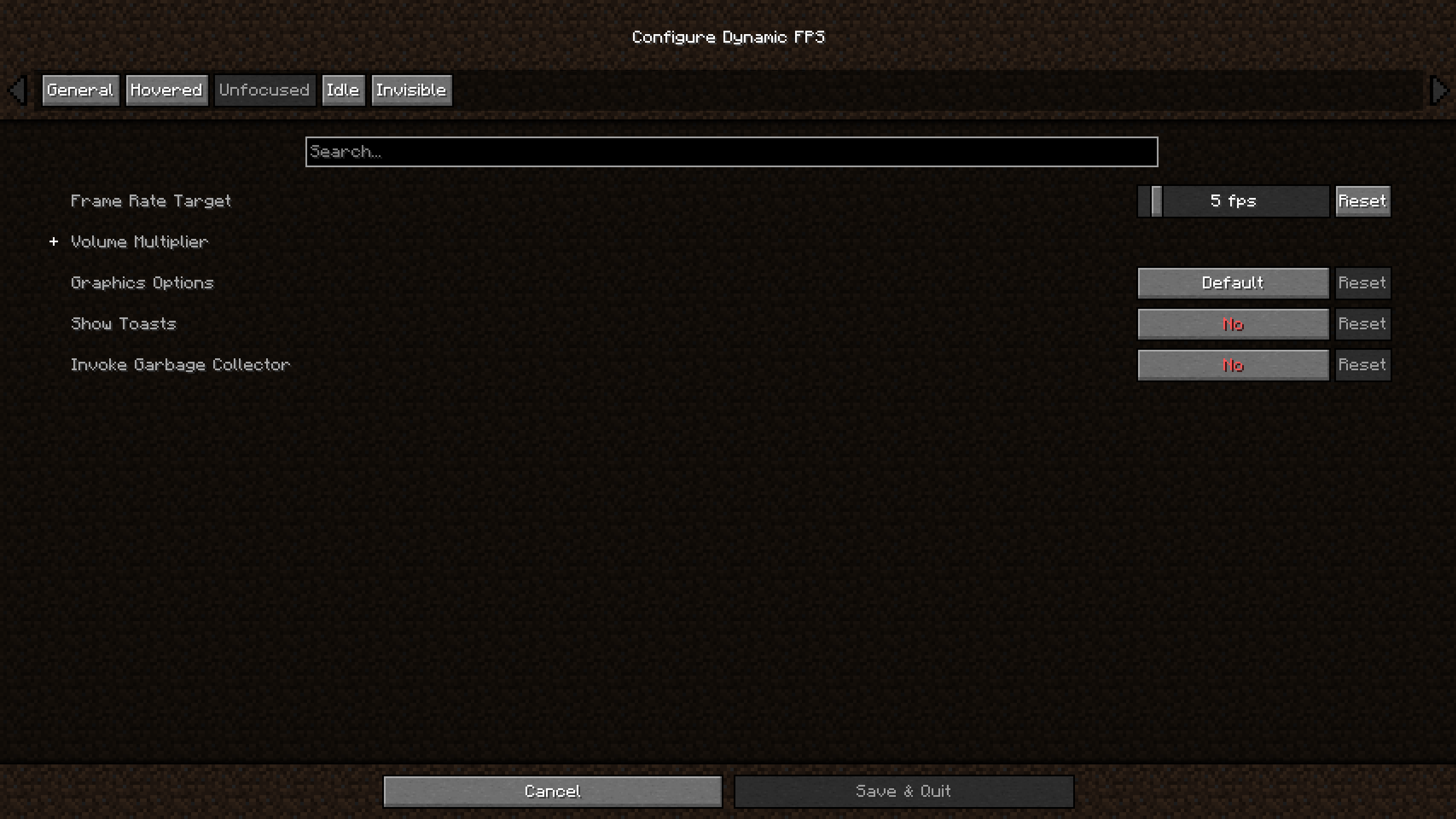
- Reading in another window: try an Unfocused target around 5–15 FPS. Lower it if you do not watch the game; increase it if a slow background image is distracting.
- Watching a second screen: try 30 FPS for Unfocused or Hovered. This trades some savings for a more useful moving view.
- Minimized game: a very low Invisible target, such as 1 FPS, is reasonable when there is no picture to watch. Check that your own window manager actually activates this state.
- Short breaks: choose an Idle Timeout of a few minutes. If you often read chat or watch a scene without moving, use a longer timeout to avoid unwanted throttling.
- Unplugged laptop: start with a target you can comfortably play at, such as 30 or 60 FPS, rather than reusing a 1 FPS minimized-window setting.
The Idle Condition labels deserve attention. None means there is no extra condition: the mod may enter Idle after the timeout. While on battery restricts its idle behavior to battery use. Vanilla disables Dynamic FPS’s own idling and uses Minecraft’s setting instead.
Leave Uncap Menu FPS off if your goal is a quieter main menu. Ignore Initial Click can prevent an accidental in-game action when you click an unfocused game window to return to it. Graphics Options such as Minimal are more disruptive—the setting warns that the world reloads—so they are not the first adjustment to make.
Quiet the game without losing useful sounds
Each state has its own Volume Multiplier. You can reduce the overall level or expand the categories and lower music, weather or other sounds separately. If you want to retain warning sounds, keep their categories audible and avoid muting the master multiplier completely.
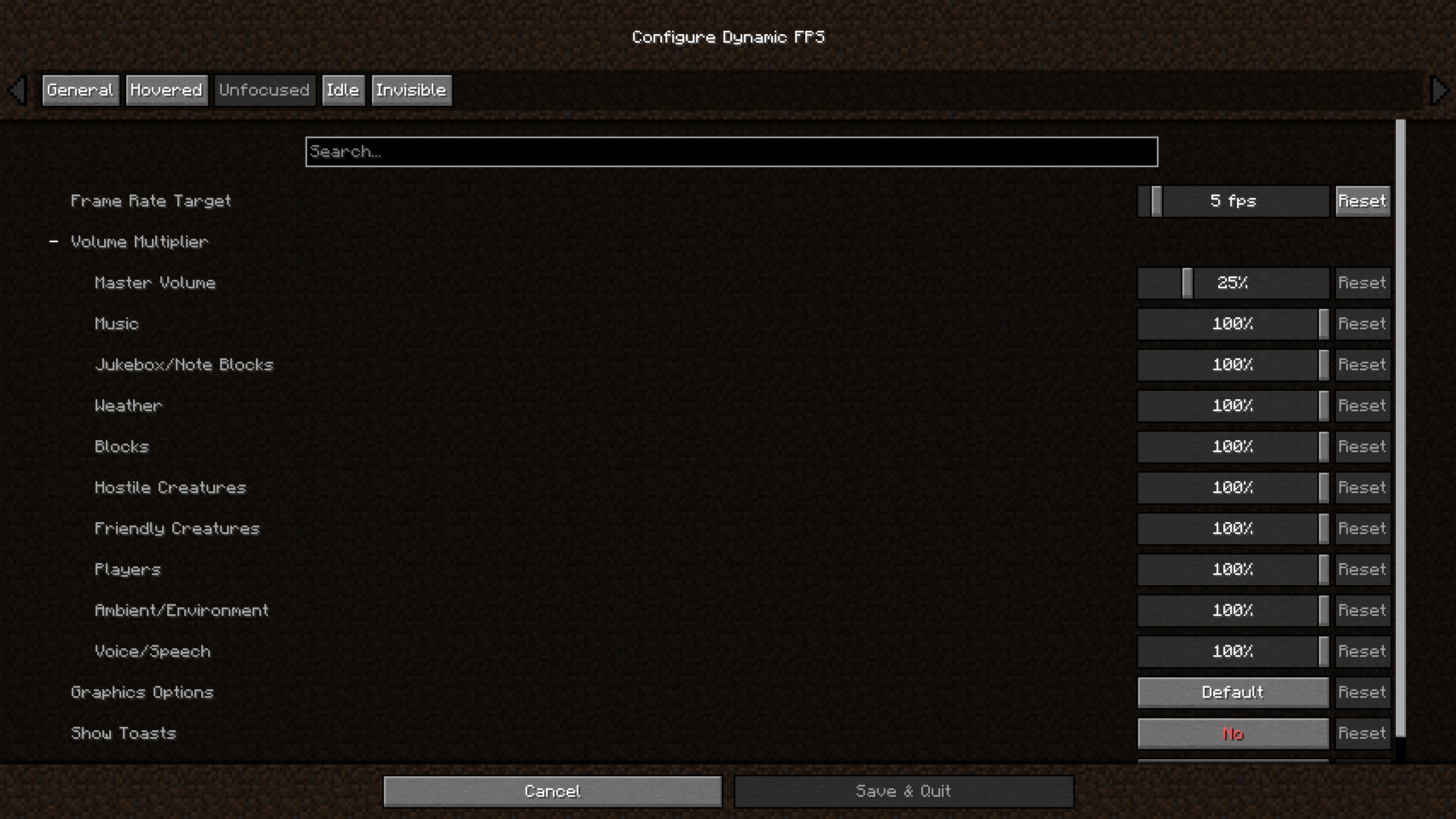
The mod also offers upward and downward Volume Transition speeds if sudden changes are unpleasant. Show Toasts determines whether Minecraft’s small notification popups keep displaying or are delayed in that state. It does not replace server chat or guarantee that a separate voice-chat mod follows every vanilla audio setting.
Battery mode and its optional indicator
Enable Battery Tracking if you want the power-related features. Enable On Battery State controls automatic switching to that profile. You can enable battery notifications and choose when the indicator appears: while discharging, at a critical charge level or constantly. Its screen corner can be changed so it does not cover another HUD element.
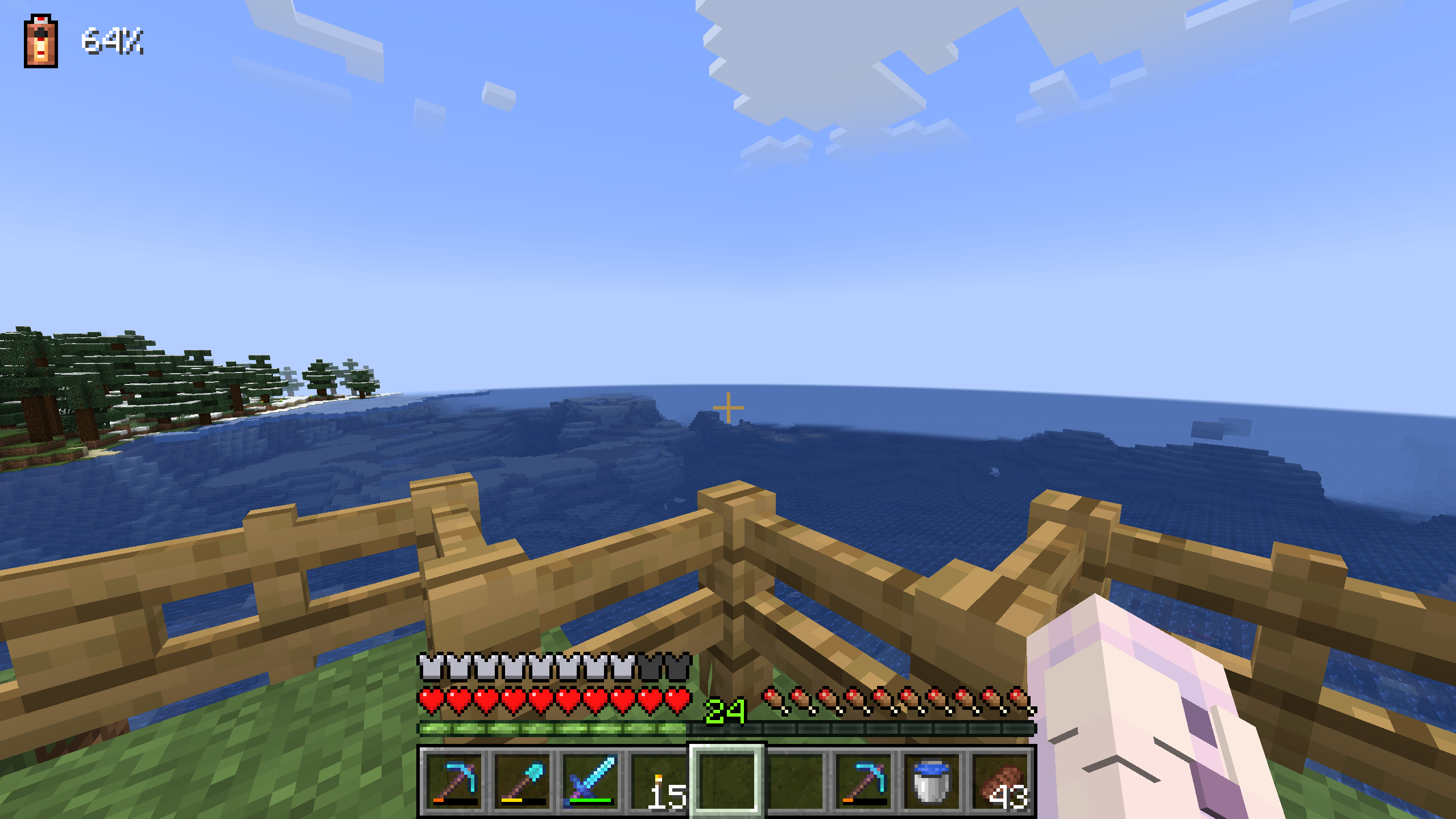
Battery integration needs an additional system library that the mod can download when this feature is enabled. Download Natives controls that permission. If you do not want the extra download or the computer is unsupported, disable Battery Tracking and keep using the ordinary window-state features. Battery detection and savings depend on your device; no fixed runtime increase is guaranteed.
Fix low FPS after returning, missing settings or battery errors
- The game stays slow after switching back: make sure the Minecraft window has focus. Check the On Battery target, idle settings and whether Force Unfocused Mode (Toggle) has been activated. Also check Minecraft’s own FPS limit and other frame-limiting software.
- You need a quick comparison: in Options → Controls → Key Binds, find Disable Dynamic FPS (Toggle) and assign an unused key. Temporarily disable the mod; if the problem remains, Dynamic FPS may not be the source.
- A counter still says 15 FPS with a lower target: the author explains that the client loop remains responsive while extra frames are skipped. Some counters can reflect that loop rather than the number of fully rendered frames. A 15 reading alone does not prove that your lower rendering target was ignored.
- No configuration screen: install the correct Cloth Config for your loader. On Fabric, use Mod Menu as the entry point. Without the settings library, automatic operation with defaults is still available.
- Sound stays too quiet: check which state is active and its master/category multipliers. A battery or forced-unfocused state can still apply while you are looking at the game.
- Battery library download fails or the device is unsupported: turn off Battery Tracking if you do not need it. Ordinary background limits can still be useful. Do not replace the mod with a different Minecraft version to solve a power-detection problem.
- A recording becomes choppy while you use another app: raise the Unfocused/Invisible limit or disable the mod during recording. A low background frame rate is the intended behavior, even when a capture application is watching the window.
To reset a confusing setup, close Minecraft, keep a backup of config/dynamic_fps.json and remove that configuration file so defaults can be recreated. To uninstall, close the game and remove its Dynamic FPS JAR. Keep shared Fabric API or Cloth Config files if other mods still need them.
What changed in 3.11.9?
The release fixes background tasks not shutting down correctly, which could crash the game when quitting. This is an exit-related fix, not a new promise of higher active-play FPS.
Authors and sources
Dynamic FPS is developed by juliand665, LostLuma and contributors under the MIT license. MineBrush provides this player guide, a branded editorial illustration and locally hosted original files. The mod and original screenshots remain the work of their creators.
Sources: Fabric/Quilt 3.11.9 release, NeoForge 3.11.9 release, official documentation and source, author gallery, Cloth Config by shedaniel and Fabric API by FabricMC. The cover illustrates the idea of a quieter break; it is not a gameplay test or a measurement.
More for your Java setup.
Understand a Minecraft server before moving in: edition and join details, claims, PvP, world resets, costs and community hours. See a clear example profile, official connection screenshots and the questions that protect your time and builds.
- Edition
- Cross-edition
- Difficulty
- Intermediate
- Time
- 8 min read
Check the server’s own current rules and join page.
MineBrush · Guide
Read a Minecraft Server Profile
Understand a Minecraft server before moving in: edition and join details, claims, PvP, world resets, costs and community hours. See a clear example profile, official connection screenshots and the questions that protect your time and builds.
Check the server’s own current rules and join page.
- Minecraft version
- Java & Bedrock — check the server’s supported releases
- Game edition
- Cross-edition
- Platform family
- Cross-edition
- Supported devices
- Java PC; Bedrock access depends on device and server
- Install format
- Read online — no download required
- Touch readiness
- Not required
- Resource type
- Guide
- Compatibility confidence
- Not applicable
- Card evidence statement
- Understand joining, claims, resets and community rules.
- Card delivery statement
- Practical guide · clear fictional profile example
- Card limitation note
- Check the server’s own current rules and join page.
- Edition applicability
- Java + Bedrock
- Tested environment
- Java and Bedrock server listings
- Estimated time
- 8 min read
- Guide difficulty
- Intermediate
- Delivery state
- No file
- Lifecycle state
- Current
Simple Voice Chat
2.6.23Talk to nearby players, coordinate distant building teams and create voice groups for adventures. Download Simple Voice Chat 2.6.23 for Java 26.2, choose your loader and set up clear, comfortable in-game conversation with friends.
- Minecraft
- Java 26.2
- Loader
- Fabric
- Runtime
- Both
Client + server required; Java 26.2 mod builds are beta
Java · Mod
Simple Voice Chat
Talk to nearby players, coordinate distant building teams and create voice groups for adventures. Download Simple Voice Chat 2.6.23 for Java 26.2, choose your loader and set up clear, comfortable in-game conversation with friends.
Client + server required; Java 26.2 mod builds are beta
- Minecraft version
- Java 26.2
- Game edition
- Java Edition
- Loader / platform
- Fabric
- License
- All Rights Reserved
- Platform family
- Bedrock & Mobile
- Supported devices
- Windows · macOS · Linux
- Install format
- .jar client/server mod or Bukkit-family server plugin
- Touch readiness
- Not required
- Resource type
- Mod
- Project version
- 2.6.23
- Last verified at
- Sep 12, 2026
- Secondary guide action
- Setup & fixes
- Compatibility confidence
- Source claimed
- Java mod loader
- Fabric
- Java runtime side
- Both
- Card evidence statement
- Proximity conversations and distant voice groups
- Required dependency
- Compatible voice component on server; matching client mod
- Card delivery statement
- Five original JAR variants through MineBrush attachments
- Card limitation note
- Client + server required; Java 26.2 mod builds are beta
- Edition applicability
- Java
- Delivery state
- Direct download
- Lifecycle state
- Current
Not Enough Animations
1.12.4Make your character visibly eat, read maps, row and crawl in third person. Download Not Enough Animations 1.12.4 for Fabric 26.2 or NeoForge 26.1.2, see the author’s examples and choose the motions you like.
- Minecraft
- Java 26.2 (Fabric); 26.1.2 (NeoForge)
- Loader
- Fabric
- Runtime
- Client
Client only · choose the matching Minecraft version
Java · Mod
Not Enough Animations
Make your character visibly eat, read maps, row and crawl in third person. Download Not Enough Animations 1.12.4 for Fabric 26.2 or NeoForge 26.1.2, see the author’s examples and choose the motions you like.
Client only · choose the matching Minecraft version
- Minecraft version
- Java 26.2 (Fabric); 26.1.2 (NeoForge)
- Game edition
- Java Edition
- Loader / platform
- Fabric
- License
- tr7zw Protective License
- Platform family
- Java & PC
- Supported devices
- Windows · macOS · Linux
- Install format
- .jar mod file from the creator
- Touch readiness
- Not required
- Resource type
- Mod
- Project version
- 1.12.4
- Last verified at
- Sep 12, 2026
- Secondary guide action
- Setup & fixes
- Compatibility confidence
- Source claimed
- Java mod loader
- Fabric
- Java runtime side
- Client
- Card evidence statement
- Natural third-person actions for travel, survival and screenshots
- Required dependency
- Fabric API for Fabric; no separate library for NeoForge
- Card delivery statement
- Fabric 26.2 or NeoForge 26.1.2 · native downloads
- Card limitation note
- Client only · choose the matching Minecraft version
- Edition applicability
- Java
- Delivery state
- Direct download
- Lifecycle state
- Current
Cut your Minecraft player out of a recorded scene for intros, overlays and thumbnails. Download EntityMask 1.0 for Java 1.20–1.21.8, see the author's real mask previews, and learn how to align two recordings and keep the player with an inverted luma matte.
- Format
- Workflow
- Path
- Replay → normal recording + mask → video editor
- Output
- Player cutout for an intro, title effect or thumbnail
Version 1.0 beta; Java 26.x support is not listed.
MineBrush · Creator
EntityMask 1.0
Cut your Minecraft player out of a recorded scene for intros, overlays and thumbnails. Download EntityMask 1.0 for Java 1.20–1.21.8, see the author's real mask previews, and learn how to align two recordings and keep the player with an inverted luma matte.
Version 1.0 beta; Java 26.x support is not listed.
- Minecraft version
- Java 1.20–1.21.8
- Game edition
- Java Edition
- Loader / platform
- Not applicable
- License
- MIT
- Creator resource format
- Workflow
- Platform family
- Java & PC
- Supported devices
- Minecraft Java on desktop
- Install format
- ZIP → shaderpacks
- Touch readiness
- Not required
- Resource type
- Shader
- Last verified at
- Sep 18, 2026
- Compatibility confidence
- Source claimed
- Card evidence statement
- Record matching color and mask clips; combine them in your editor.
- Card delivery statement
- Shader ZIP · Iris or OptiFine required
- Card limitation note
- Version 1.0 beta; Java 26.x support is not listed.
- Edition applicability
- Java
- Tested environment
- Java with Iris or OptiFine; replay recorder and matte-capable video editor
- Example artifact path
- Replay → normal recording + mask → video editor
- Creator output
- Player cutout for an intro, title effect or thumbnail
- Estimated time
- 8 min read; recording time varies
- Guide difficulty
- Intermediate
- Delivery state
- Direct download
- Lifecycle state
- Current
Player discussion 0
Questions, discoveries and help from other players.