
MineBrush publication
Continuity for Minecraft Java: Download and Connect Glass Textures
Connect glass, sandstone and bookshelf textures in Java 26.2. Download Continuity and Fabric API, then enable the built-in packs with this installation guide.
Continuity lets compatible resource packs join neighboring textures without installing OptiFine. It is useful for cleaner glass walls and windows, continuous bookshelf textures and connected sandstone. The effect depends on the enabled resource pack: installing the mod alone is only the first step.
Jump to: Downloads · Enable textures · Built-in packs · Fixes
Build with connected textures
Large windows and greenhouses: place touching glass blocks across a wall and enable Default Connected Textures. Removing repeated internal borders helps the window read as one surface. Look across several blocks; a single isolated block cannot show the benefit.
Libraries and sandstone buildings: the included pack also connects supported bookshelf and sandstone textures. Try a continuous bookshelf wall or a broad sandstone facade to see how neighboring blocks affect the pattern. The blocks keep their ordinary functions and crafting recipes.
Tall glass-pane windows: enable Glass Pane Culling Fix for the included correction between vertically stacked panes. This is useful when your window uses panes rather than full glass blocks; it is a separate built-in pack in the same Resource Packs menu.
A particular artistic style: install a compatible connected-texture pack if you want a different glass design or special emissive textures. The built-in pack can retain glass streaks; a cleaner result in another pack’s gallery may depend on that separate pack. Emissive surfaces can appear bright without becoming a source of light for surrounding blocks.
These choices work on existing builds. Enable the desired packs, let resources reload and return to your world. You do not need to rebuild the window, and other players’ views depend on their own client packs.
Download Continuity for Minecraft Java 26.2
The installation below uses Fabric, the developer's recommended platform. Download Continuity 3.0.1 and Fabric API for Java 26.2, then put both JARs in the same instance's mods folder. If your modpack already includes a compatible Fabric API, keep one copy rather than adding a duplicate.
These files are for Java Edition, not Bedrock or mobile Minecraft. The Continuity release also lists Quilt, but this guide and the attached dependency follow the Fabric installation. Do not place this Fabric setup into Forge or NeoForge: those routes involve separate compatibility components and version requirements.
Install the mod and enable connected textures
- Close Minecraft and select a Java 26.2 Fabric instance in your launcher. Keep a modpack's existing Minecraft and loader versions together; these files are not a way to update only part of an older pack.
- Open that instance's game folder. Put Continuity and Fabric API in
mods. Keep the JARs intact and remove duplicate older copies of the same mods. - Launch the Fabric instance. Open Options → Resource Packs.
- Move Default Connected Textures, supplied by Continuity, into the selected packs. Enable Glass Pane Culling Fix as well if you want the included correction for vertically stacked glass panes.
- Press Done and allow the resources to reload. Look at a wall of touching glass blocks and at stacked panes. The selected pack should remove the applicable internal joins; isolated blocks will not demonstrate a connection.
No shader is required for the included connected textures. This is a client mod: install it on the computer where you play, not just on a dedicated server. Other players can use their own visual setup.
What the result and setup look like
These original images are from aka_Jammy, creator of Clean Connected Glass, a separate pack that uses Continuity or OptiFine. They illustrate the clean-glass style and the pane-fix setup. The source examples date from the Java 1.20 era; they are not a MineBrush test of Java 26.2. The built-in pack can retain glass streaks, while Clean Connected Glass removes them.
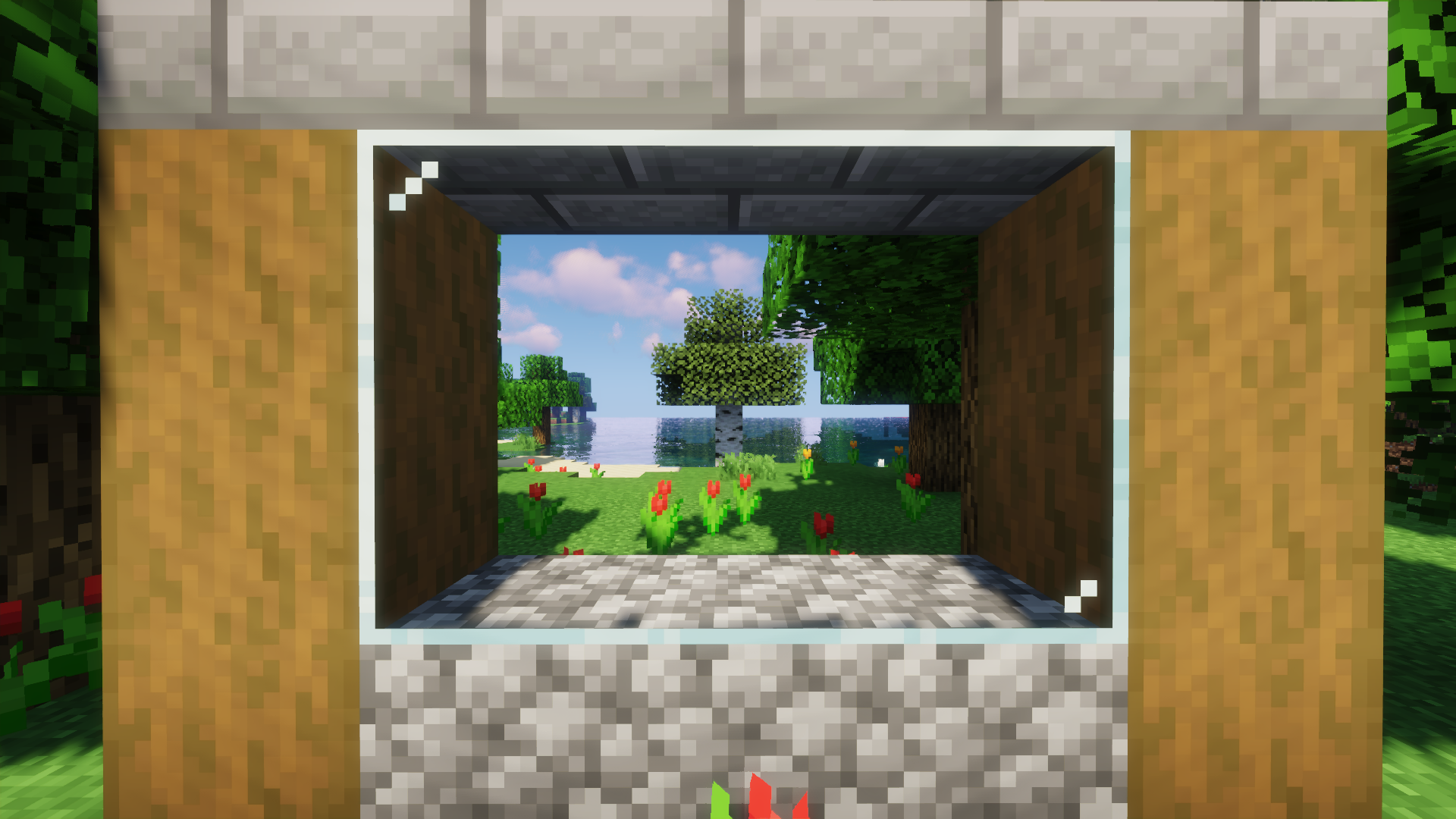
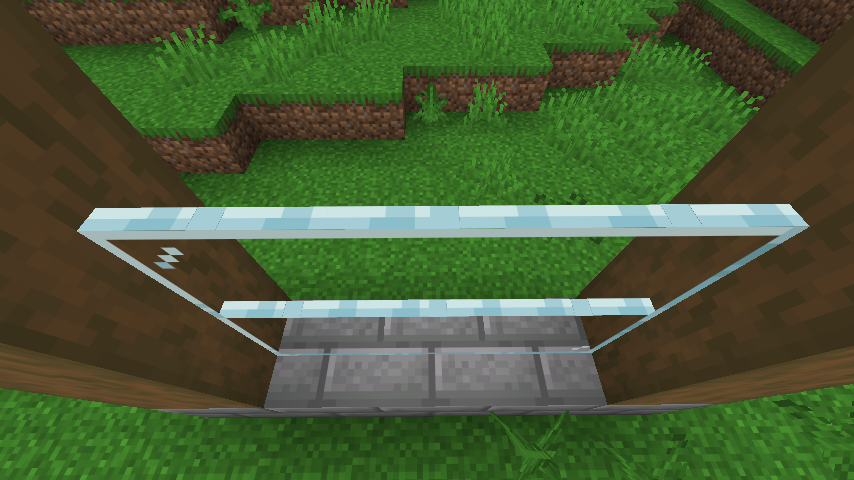
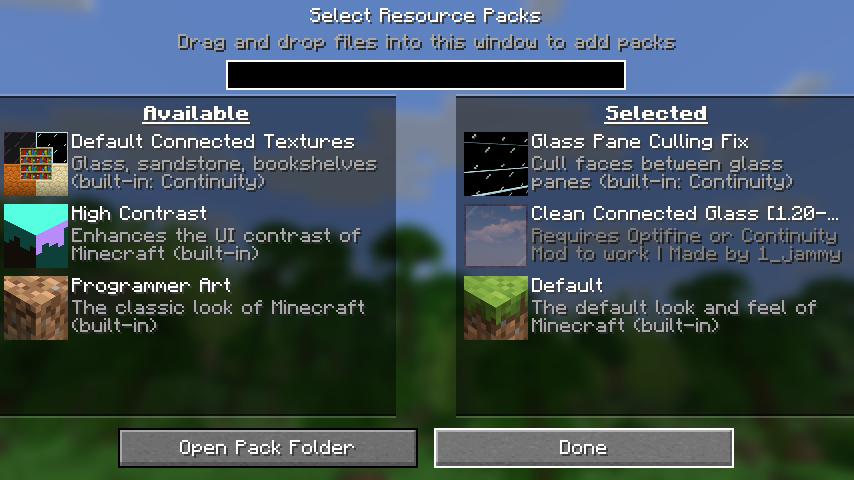
The source project lists CC BY-NC-SA 4.0. Displayed copies are resized and converted to WebP; the images remain credited to their creator.
What is included, and what needs another pack?
The built-in connected-texture pack covers glass, sandstone and bookshelves. The pane fix removes faces between vertically stacked glass panes. Continuity also supports compatible packs using connected textures, emissive textures for blocks and item models, and custom block layers.
It does not turn every ordinary texture pack into a connected-texture pack. If a downloaded pack advertises glowing blocks or special connections, it must actually include the relevant assets. Support for block and item emissive textures does not mean every OptiFine feature or glowing entity texture is supported.
Using your own resource pack
Install the pack ZIP through the Resource Packs menu and follow its author's ordering instructions. Packs higher in the selected list take priority when they supply the same resources. If two packs replace the same glass textures, enable one at a time to establish which look each provides before combining them.
For a quick diagnosis, temporarily use Minecraft's default resources plus Continuity's built-in packs. If their glass connections work, the installation is functioning and the remaining issue is likely specific to your other pack or combination. You do not need to edit texture-format files for ordinary installation.
Common problems
- Fabric API is missing: install the attached dependency into the same instance as Continuity. Putting it in a different launcher's folder will not satisfy the requirement.
- The mod loads but glass still has joins: enable Default Connected Textures, press Done and inspect touching glass blocks. Check that another pack is not overriding its textures.
- Horizontal lines remain between stacked panes: enable Glass Pane Culling Fix. This is a separate built-in pack, not another JAR to search for.
- A texture pack's special feature is absent: confirm that the pack supports Continuity and your Minecraft version. A general “OptiFine required” label can cover features beyond Continuity's scope.
- The game crashes after adding it: check Minecraft 26.2, the Fabric profile, Fabric API and duplicate mod files first. If those match, temporarily remove the newly added mod and restore the previous working combination.
- A shader or another rendering mod changes the result: disable that extra while checking the built-in packs. Follow the versions documented for your current combination rather than copying dependency advice from a guide for an older Minecraft release.
Remove Continuity
Disable its built-in packs, close Minecraft and remove the Continuity JAR from mods. Keep Fabric API if your other mods require it. Removing this visual setup does not remove the glass, sandstone or bookshelves from your world.
Continue your setup
If textures still look wrong, check resource pack installation and pack order. For another kind of visual change, explore the Fresh Animations mob-animation guide; it has its own setup requirements and does not replace Continuity.
Developers and original sources
Continuity is by PepperCode1 and contributors. See the official project, Java 26.2 release and developer repository. Fabric API is maintained by the Fabric team and contributors; its matching release page provides the original dependency. MineBrush preserves the unmodified files and their license notices and provides this installation guide. The cover is an editorial illustration, not a verified gameplay screenshot.
More for your Java setup.
Give your Java world a new look without losing your familiar setup. Learn which resource pack to choose, where its ZIP belongs, how to activate it and combine overlays, and how to fix missing textures or version warnings—with illustrated steps for Windows, Mac and Linux.
- Edition
- Java Edition
- Difficulty
- Beginner
- Time
- 8 min read; setup time varies
MineBrush · Guide
Install & Combine Java Resource Packs
Give your Java world a new look without losing your familiar setup. Learn which resource pack to choose, where its ZIP belongs, how to activate it and combine overlays, and how to fix missing textures or version warnings—with illustrated steps for Windows, Mac and Linux.
- Minecraft version
- Choose a pack for your Java version
- Game edition
- Java Edition
- Platform family
- Java & PC
- Supported devices
- Windows · macOS · Linux
- Install format
- Java resource-pack ZIP
- Touch readiness
- Not required
- Resource type
- Guide
- Compatibility confidence
- Not applicable
- Edition applicability
- Java
- Estimated time
- 8 min read; setup time varies
- Guide difficulty
- Beginner
- Delivery state
- No file
- Lifecycle state
- Current
CubeCraft offers EggWars teamwork, quick SkyWars fights, unpredictable Lucky Islands and lasting Skyblock projects. Choose the right Java or Bedrock route, invite friends and start with a clear plan.
- Edition
- Java + Bedrock
- Modes
- Minigames
- Region
- None
Choose the same edition as your friends
Minecraft · Server
CubeCraft
CubeCraft offers EggWars teamwork, quick SkyWars fights, unpredictable Lucky Islands and lasting Skyblock projects. Choose the right Java or Bedrock route, invite friends and start with a clear plan.
Choose the same edition as your friends
- Minecraft version
- Java 1.21.8+ · Bedrock 1.21.120+
- Game edition
- Cross-edition
- Loader / platform
- Not applicable
- License
- CubeCraft rules and terms
- Server address
- play.cubecraft.net
- Server modes
- Minigames
- Platform family
- Cross-edition
- Supported devices
- Java on PC/Mac; Bedrock on Windows, mobile and consoles
- Install format
- Java server address or Bedrock Featured Servers
- Touch readiness
- Not required
- Resource type
- Server
- Last verified at
- Sep 14, 2026
- Compatibility confidence
- Source claimed
- Card evidence statement
- Official CubeCraft guides and game updates
- Card delivery statement
- Join Java or Bedrock using the guide
- Card limitation note
- Choose the same edition as your friends
- Edition applicability
- Java + Bedrock
- Bedrock address copy availability
- Copy unavailable
- Java address copy availability
- Copy available
- Java server address
play.cubecraft.net- Delivery state
- No file
- Lifecycle state
- Current
Entity Culling
1.10.5Reduce hidden rendering work around busy bases, storage rooms and server hubs. Download Entity Culling 1.10.5 for Fabric 26.2 or NeoForge 26.1.2, with practical settings and visual fixes.
- Minecraft
- 26.2 (Fabric) / 26.1.2 (NeoForge)
- Loader
- Fabric
- Runtime
- Client
Client only · Fabric 26.2 / NeoForge 26.1.2
Java · Mod
Entity Culling
Reduce hidden rendering work around busy bases, storage rooms and server hubs. Download Entity Culling 1.10.5 for Fabric 26.2 or NeoForge 26.1.2, with practical settings and visual fixes.
Client only · Fabric 26.2 / NeoForge 26.1.2
- Minecraft version
- 26.2 (Fabric) / 26.1.2 (NeoForge)
- Game edition
- Java Edition
- Loader / platform
- Fabric
- License
- tr7zw Protective License
- Platform family
- Java & PC
- Supported devices
- Windows · macOS · Linux
- Install format
- .jar mod file from the creator
- Touch readiness
- Not required
- Resource type
- Mod
- Project version
- 1.10.5
- Last verified at
- Sep 5, 2026
- Secondary guide action
- Setup & fixes
- Compatibility confidence
- Source claimed
- Java mod loader
- Fabric
- Java runtime side
- Client
- Card evidence statement
- Skip hidden rendering around busy bases and server hubs
- Required dependency
- Fabric API for the Fabric build; no Fabric API on NeoForge
- Card delivery statement
- Download from MineBrush · choose game version and loader
- Card limitation note
- Client only · Fabric 26.2 / NeoForge 26.1.2
- Edition applicability
- Java
- Delivery state
- Direct download
- Lifecycle state
- Current
Give familiar mobs new shapes and expressive animations with compatible resource packs. Download Entity Model Features and its required ETF companion for Java 26.2, then bring your chosen pack to life.
- Minecraft
- Java 26.2
- Loader
- Fabric
- Runtime
- Client
Client only · Compatible resource pack required
Java · Mod
Entity Model Features
Give familiar mobs new shapes and expressive animations with compatible resource packs. Download Entity Model Features and its required ETF companion for Java 26.2, then bring your chosen pack to life.
Client only · Compatible resource pack required
- Minecraft version
- Java 26.2
- Game edition
- Java Edition
- Loader / platform
- Fabric
- License
- LGPL-3.0-only
- Platform family
- Java & PC
- Supported devices
- Windows · macOS · Linux
- Install format
- Two .jar mods + a compatible resource-pack ZIP
- Touch readiness
- Not required
- Resource type
- Mod
- Project version
- 3.3.5
- Last verified at
- Sep 5, 2026
- Secondary guide action
- Setup & fixes
- Compatibility confidence
- Source claimed
- Java mod loader
- Fabric
- Java runtime side
- Client
- Card evidence statement
- Custom mob models and animations from resource packs
- Required dependency
- Entity Texture Features 7.2.1 for the same loader
- Card delivery statement
- Download EMF + ETF for Fabric, Quilt or NeoForge
- Card limitation note
- Client only · Compatible resource pack required
- Edition applicability
- Java
- Delivery state
- Direct download
- Lifecycle state
- Current
Player discussion 0
Questions, discoveries and help from other players.