
MineBrush publication
WorldEdit 7.4.5: Build Faster with Selections, Schematics and Brushes
Build a courtyard, repeat a bridge and reuse your favourite structures. Download WorldEdit 7.4.5 for Java, choose the mod or server plugin, and learn selections, copy-and-paste, schematics and terrain brushes.
A castle wall is fun to design once. Rebuilding the same section twenty times is where WorldEdit earns its place in your toolbox. EngineHub’s Java Edition editor lets you select an area, change its blocks, repeat a finished section and move copies of your builds around the world.
Use it to spend more time choosing shapes and materials, and less time placing identical blocks. You still decide what looks good: WorldEdit handles the repetition. This guide starts with a small courtyard, then moves on to bridges, reusable buildings and terrain.
What is WorldEdit useful for?
- Creative towns: build one lamp, market stall or wall section by hand, then reuse it while varying the details.
- Large building projects: lay out floors and walls quickly, compare material palettes, and extend a bridge without rebuilding each span.
- Adventure maps: keep a collection of rooms and structures as schematics, then assemble and decorate them in a new layout.
- Landscaping: create a rough hill or embankment, soften the shape and finish the surface before adding paths and planting.
It is an editing tool, not a survival recipe system or an automatic architect. On a shared server, access depends on the owner’s permissions. It also does not turn a Java mod into a Bedrock add-on: the separately maintained WorldEdit for Bedrock uses a different installation and command system.
Choose the right WorldEdit 7.4.5 download
The mod and plugin are different files. Choose the platform that runs your world. These are the current stable 7.4.5 packages listed by EngineHub; the release records below do not list Minecraft 26.3 support. A new Minecraft release does not automatically make an older editing tool compatible.
Fabric or NeoForge: Minecraft Java 26.2
Use this combined mod JAR for a matching Fabric or NeoForge profile or server. This particular file is for 26.2; do not substitute it for an older Minecraft build or a Forge release.
Paper, Spigot, Bukkit or Folia server
Use the plugin JAR. Its release record lists Java 1.21.4–1.21.11, 26.1–26.1.2 and 26.2. Players connect to the server normally; installing a client copy does not grant editing access.
Keep just the matching WorldEdit file for your installation. A schematic, a selection-outline mod and WorldEdit itself are three different things; neither download above is a collection of buildings.
Install it where the world runs
- Close the game or stop the server. Copy your world somewhere separate before experimenting.
- Single-player Fabric/NeoForge: open that launcher profile’s game folder and put the mod JAR in
mods. Launch the matching 26.2 profile and use a world with cheats enabled. - Fabric/NeoForge server: put the mod JAR in the server’s
modsfolder. Ask the administrator to grant the appropriate editing access. - Paper/Spigot/Bukkit/Folia: put the plugin JAR in the server’s
pluginsfolder and restart. Do not put the mod JAR there as well. - In a spare creative world or copied build area, enter
//wand. If it is unknown or denied, use the troubleshooting section before trying other edits.
Server operators normally have access, but handing out operator status to every builder is unnecessary. Owners can use WorldEdit permissions and edit limits to decide who can do what. On someone else’s server, ask for access rather than changing your client files.
Your first project: a small textured courtyard
Start with a clear patch away from finished builds. Picture a 9-by-9 courtyard outside a small house: a simple floor gives you a useful result while keeping the first selection easy to inspect.
- Enter
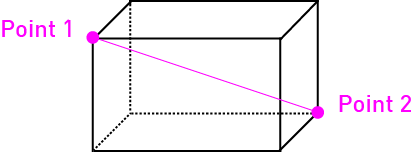
//wandto receive the wooden selection axe. - Left-click one corner of the intended floor, then right-click its diagonally opposite corner. Keep both corners at the same height for a one-block-thick floor.
- Enter
//size. A 9 × 9 × 1 selection contains 81 blocks. If the height or size is wrong, reselect the corners. - Enter
//set stone_bricksto fill that selected floor. Look at it before continuing. - Try
//undo, inspect the result, then//redoto restore your floor.
Now give the paving some variation:
//replace stone_bricks 80%stone_bricks,20%mossy_stone_bricksThis changes only stone bricks inside your selection, mixing in mossy ones. The weights describe random chances, so a small courtyard will not necessarily contain exactly 20% mossy blocks. Try a small sample, undo it if the texture feels too busy, and adjust the mix.
For a wall, select only the intended wall area. If you select a taller box around the courtyard, //walls stone_bricks creates its sides without a floor or ceiling. It does not add doors, windows or a roof; those are the design decisions you make next. Keep the first shell away from anything you want to preserve.
The practical difference is worth remembering: //set fills the selection, including its air; //replace with a named source block changes matching blocks. Selecting an entire furnished room and setting it to stone will not politely preserve the furniture.
Build one bridge section, then repeat it
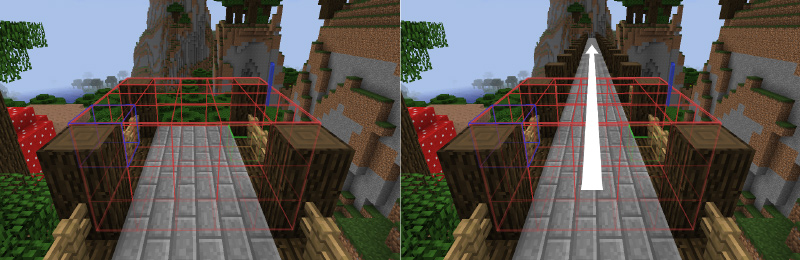
A bridge, aqueduct or long fence is a good second project. Finish one repeatable module first: for example, a short deck section with railings. Select its full width and height, but be deliberate about the length along the bridge.
//stack 3 eastThis adds three copies to the east, leaving the original in place. The spacing comes from the size of your selected module. Unwanted empty space at an end becomes an unwanted gap; selecting shared end pillars twice can make joins look crowded. Make one short trial before extending across the river.
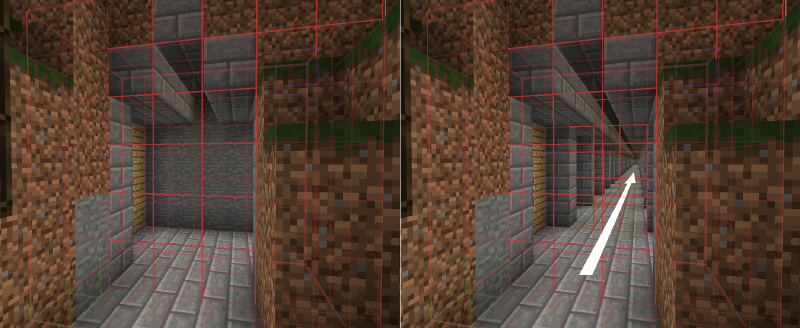
The same idea works for a tunnel module. Include the lining and its empty passage in the selection so the repeated section carries the intended interior with it. Check what lies ahead: stacking also writes into the destination.
Copy a building without losing its position
For a market stall or gatehouse, select the complete structure and stand on a memorable reference point before //copy. WorldEdit remembers your position relative to the selection. Stand at the equivalent destination point when you paste.
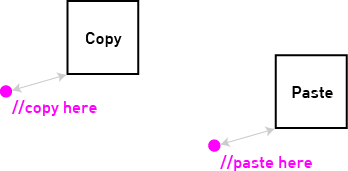
Use //paste -n to select the destination area without placing blocks. Then //paste -a skips copied air. This helps place a tree or stall without its surrounding empty box clearing the landscape, but solid copied blocks can still overwrite the destination.
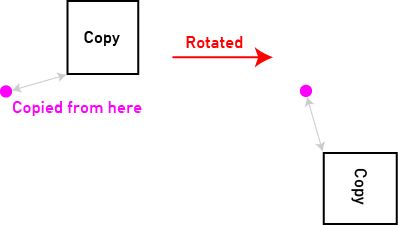
//rotate 90 rotates the clipboard before the next paste; it does not turn the original building. The copy position is also the pivot, which explains unexpected offsets.
Keep useful builds as schematics
After copying, use //schem save market_stall. Later, //schem load market_stall restores it to the clipboard for pasting. The default folder is plugins/WorldEdit/schematics for Bukkit-family servers or config/worldedit/schematics for mods. Add downloaded .schem files there; on a server, that means the server’s folder.
Give a build somewhere to belong
Instead of starting with a huge mountain, practise on a small bank behind a cottage. Hold a spare tool and bind a small stone sphere brush:
/brush sphere stone 2Right-click terrain away from your buildings to place a small volume. Build up a rough shape with a few placements, inspect it from ground level, and undo anything that overwhelms the cottage. Disable the brush with /brush none when finished, while holding the bound item.
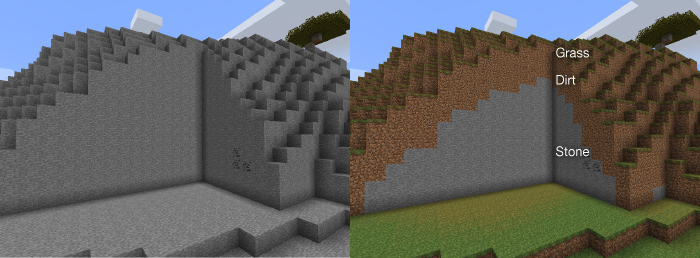
For a selected surface, //smooth 1 softens the height profile. It is a surface operation, not a reliable way to sculpt cave interiors or detailed walls. //naturalize can give selected terrain a grass-and-dirt surface over stone.
For your next pass, walk the route a player will actually take. Keep the entrance visible, leave space for a path, and add a few hand-built details at eye level. These small choices make a repeated structure feel like part of a place.
Undo helps, but keep a world backup
//undo reverses a recorded WorldEdit action; //redo reapplies it. History is limited and session-based. Water flowing, unsupported blocks breaking and other indirect reactions may not be restored with the edit. Do not rely on a future login or server restart to preserve your escape route.
For valuable builds, keep the untouched world backup and work in manageable stages. After a mistake, stop and inspect before adding more commands. If the edited copy is no longer trustworthy, return to the backup instead of layering new fixes over uncertain damage.
When WorldEdit does not do what you expected
“Unknown command” or “You don’t have permission”
These point to different problems. For an unknown command, check that the correct mod or plugin actually loaded, and preserve the double slash in commands such as //wand. For denied access, check cheats in single-player or ask the server owner about permissions.
The selection is invisible
Try //drawsel for a small cuboid in creative mode. Its outline has size limits. WorldEdit CUI is a separate client visualization mod, not a required replacement for WorldEdit. You can still check your selection with //size.
The copy appeared too high, too low or beside me
Undo, return to the original build and choose a clearer copying anchor. Preview the next destination with //paste -n. Looking in a new direction alone does not rotate the clipboard; use the rotation command deliberately.
A paste left blocks inside the building
You may have used -a, which skips copied air. That is helpful for placing objects but does not clear an interior. Check the destination on a copy before deciding whether you want a normal paste that also writes air.
Minecraft fails to start after installation
Check the exact game version and platform, remove an accidentally duplicated WorldEdit JAR, and read the first relevant loading error. The mod download here is for 26.2. Updating Minecraft to 26.3 and keeping that same file is not a supported shortcut.
A large edit is slow
Reduce the area and inspect //size before retrying. Do not queue more giant commands while the server is busy. Performance depends on the world and server; splitting a project into sections also makes the result easier to review.
If your goal is to discard distant explored chunks so Minecraft can generate them again, use the MCA Selector guide. If you want terrain ready before players explore it, see Chunky. Those are different jobs from designing a courtyard or repeating a bridge with WorldEdit.
More for your Java setup.
Keep your bases while refreshing unused terrain. Download MCA Selector 2.9 for Windows, Mac or Linux, learn to read the chunk map, review activity filters and reset selected areas of a Java world.
- Edition
- Java Edition
- Difficulty
- Intermediate
- Time
- 10 min read
MineBrush · Guide
MCA Selector 2.9
Keep your bases while refreshing unused terrain. Download MCA Selector 2.9 for Windows, Mac or Linux, learn to read the chunk map, review activity filters and reset selected areas of a Java world.
- Minecraft version
- Java 1.2.1–1.21.11 / 26.1–26.3
- Game edition
- Java Edition
- Platform family
- Java PC
- Supported devices
- Windows, macOS, Linux
- Install format
- Desktop application; ZIP installers or universal JAR
- Touch readiness
- Not required
- Resource type
- Guide
- Compatibility confidence
- Source claimed
- Edition applicability
- Java
- Estimated time
- 10 min read
- Guide difficulty
- Intermediate
- Delivery state
- Direct download
- Lifecycle state
- Current

Chunky
1.5.3 / 1.5.4Prepare terrain before your next survival session. Download Chunky for Java 26.2–26.3, choose the right build, generate an area around your base, and pause or expand it when needed.
- Minecraft
- Java 26.2–26.3
- Loader
- Fabric / Forge / NeoForge / Paper / Spigot / Bukkit / Folia / Sponge
- Runtime
- Server
Also available for Forge, NeoForge, Paper and Sponge.
Java · Mod
Chunky
Prepare terrain before your next survival session. Download Chunky for Java 26.2–26.3, choose the right build, generate an area around your base, and pause or expand it when needed.
Also available for Forge, NeoForge, Paper and Sponge.
- Minecraft version
- Java 26.2–26.3
- Game edition
- Java Edition
- Loader / platform
- Not applicable
- License
- GPL-3.0-only
- Platform family
- Java PC
- Supported devices
- Fabric, Forge, NeoForge, Paper/Spigot/Folia/Bukkit, Sponge
- Install format
- .jar
- Touch readiness
- Not required
- Resource type
- Mod
- Project version
- 1.5.3 / 1.5.4
- Secondary guide action
- Setup & fixes
- Compatibility confidence
- Source claimed
- Java mod loader
- Fabric / Forge / NeoForge / Paper / Spigot / Bukkit / Folia / Sponge
- Java runtime side
- Server
- Card evidence statement
- Prepare terrain before exploring it.
- Required dependency
- Fabric API for the Fabric build only
- Card delivery statement
- Choose your server or mod-loader build
- Card limitation note
- Also available for Forge, NeoForge, Paper and Sponge.
- Edition applicability
- Java
- Delivery state
- Direct download
- Lifecycle state
- Current
Plan mountain bases and river expeditions with Tectonic and Terralith. Choose mods or datapacks, install the right combination, and shape a fresh Java world around your next adventure.
- Edition
- Java Edition
- Difficulty
- Beginner
- Time
- 8 min read
Start a new world
MineBrush · Guide
Tectonic + Terralith
Plan mountain bases and river expeditions with Tectonic and Terralith. Choose mods or datapacks, install the right combination, and shape a fresh Java world around your next adventure.
Start a new world
- Minecraft version
- Java — match project releases
- Game edition
- Java Edition
- Platform family
- Java PC
- Supported devices
- Windows, macOS, Linux
- Install format
- Mods or datapacks
- Touch readiness
- Not required
- Resource type
- Guide
- Compatibility confidence
- Source claimed
- Card evidence statement
- Terrain, biomes and practical setup
- Card delivery statement
- Step-by-step guide
- Card limitation note
- Start a new world
- Edition applicability
- Java
- Estimated time
- 8 min read
- Guide difficulty
- Beginner
- Delivery state
- No file
- Lifecycle state
- Current
Player discussion 0
Questions, discoveries and help from other players.