
MineBrush publication
Roughly Enough Items: Recipes, Search & Java 26.2 Downloads
Find recipes, discover what ingredients are used for, and keep your next project's parts in favorites. Learn REI searches, pinned recipes and Quick Craft, with separate Java 26.2 downloads for Fabric and NeoForge beta and their required libraries.
Roughly Enough Items (REI) is an in-game recipe browser. Look up how to make an item, discover what an unfamiliar ingredient is used for, and keep useful items in a favorites list beside your inventory. It is especially helpful when a modpack adds hundreds of materials and machines whose recipes you have not learned yet.
This guide covers REI 26.2.820 for Minecraft Java 26.2: a Fabric release and a separate NeoForge beta. Choose one loader and its matching dependencies. The illustrated features below come from the author's March 2023 gallery, so layouts may differ from the current interface.
Four useful ways to use REI
- Work backward from your next upgrade. Search for the machine or tool you want, inspect its recipe, then inspect an unfamiliar ingredient to find the next step. Bookmark the parts instead of trying to memorize the whole chain.
- Find a purpose for unfamiliar loot. Hover over an ingredient in your inventory and open its uses. This answers a different question from its recipe: what can you make with the item you already have?
- Compare building materials. Search stairs, slabs, or another block name, then narrow results by mod. Open the crafting or stonecutting category to see the process available in your actual pack.
- Prepare a crafting session. Keep your frequently needed components in favorites and use recipe transfer or Quick Craft where the current workstation supports it. You still need the ingredients.
Choose the correct download
Use only one of the two sets below. REI's original Fabric and NeoForge archives have the same filename. The MineBrush copies include the loader in their filenames so you can tell them apart; the contents are unchanged.
Fabric — release for Java 26.2
Install these four JARs together. The current Architectury library requires Fabric Loader 0.19.5 or newer and the listed Fabric API version or newer for Minecraft 26.2.
NeoForge — beta for Java 26.2
Use the NeoForge REI file with the two NeoForge libraries and NeoForge 26.2.0.82 or newer for Java 26.2. This REI release is marked beta by its author; try the set in a separate profile before changing an established modpack. Do not add the Fabric files to this profile.
Install and find the item panel
- Open your launcher profile's game folder. Confirm that its game version is Java 26.2 and its loader matches the set you chose.
- Close Minecraft. Put the matching JARs in that profile's
modsfolder without extracting them. Keep one version of each library; remove duplicate older copies from the folder. - Start the profile and enter a world. Open your inventory or a crafting table. REI's item panel and search field should appear alongside the normal screen.
- Type
chestinto the search field, hover over the chest entry, and press R to open its recipe. This is a simple first check that search and recipe browsing are working.
The item panel is a client interface. A modpack or server may also use REI's server component for integrations, but installing the browser does not add all the mods shown in someone else's screenshots. It also does not make a recipe available if the server or pack has removed it.
Recipes versus uses: learn both controls
With the default controls, R over an item opens the recipes that produce it; U opens recipes that consume it. In REI's item list, left-click and right-click provide those respective lookups. If your pack changes the bindings, use its configured keys.
For example, R on planks tells you how to make them. U on planks shows the recipes that accept them. If you find an unknown modded dust, the uses view can reveal which machines or ingredients need it, provided that mod exposes the relevant recipes to REI.
Tabs above the recipe display switch between recipe categories or workstations. A crafting recipe, furnace recipe, and stonecutter recipe are different ways to process materials; browse the tabs before assuming the first result is the only option.
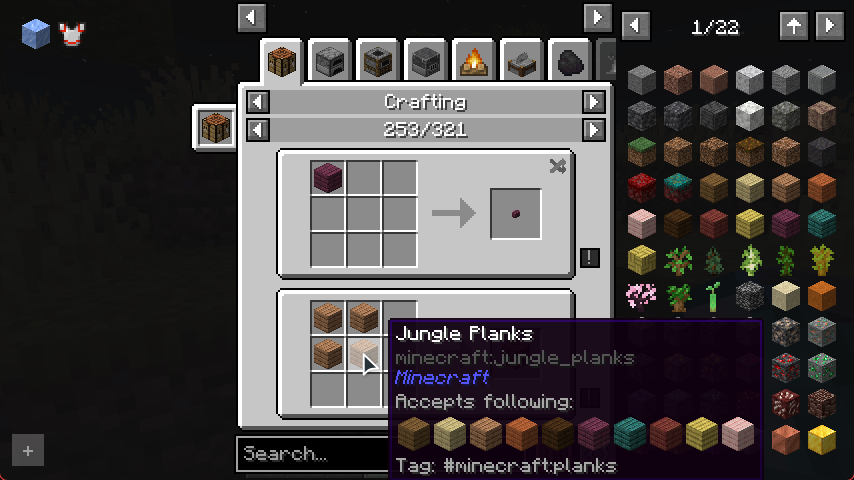
The author’s recipe view shows the item catalog on the right and a tooltip explaining accepted ingredient alternatives. Historical author illustration published March 2023; current styling can differ. Source: REI gallery · Original image.
Some ingredients cycle through several accepted items. Hover over them and read the tooltip before collecting a specific wood or material. A shared tag can allow alternatives, while another recipe may require one exact item.
Search a large modpack without scrolling through every page
Start with an ordinary item name. Add a filter only when the results are too broad:
@minecraft chestnarrows the search to Minecraft's entries instead of similarly named modded items.@applied chestis the author's example for Applied Energistics chests, when that mod is installed. You do not need to type the entire mod name.$logssearches matching item tags, useful when you want to find acceptable members of a material group.#protectionsearches tooltip text, such as matching enchanted books.stairs -oakexcludes names matching oak from the stair search. This also affects names containing that text, so check the results.*crafting_tablesearches item identifiers when a displayed name is ambiguous.apple|$logscombines alternatives. Quotes keep a phrase together, for example"#protection iii".
If the list suddenly looks empty, clear the query first and check whether Craftable Only is enabled. That filter answers what you can currently craft; it is not a complete catalog of everything in the pack.
Favorites and pinned recipes as a personal checklist
Press A while hovering over an item to favorite it. Keep a short list for your current project: a chest, hopper, comparator, and other parts for a storage build, for example. This list is easier to use than repeating the same searches after every trip to your supplies.
REI also supports pinning recipe displays. Use the recipe's pin control to keep the pattern visible beside your crafting screen. A favorite is an item shortcut; a pinned recipe keeps the recipe itself in view.
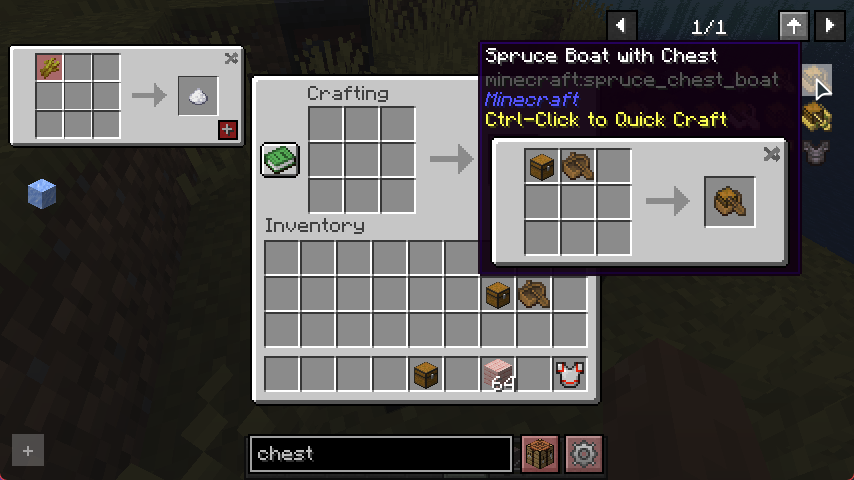
A pinned recipe stays visible at the left while the chest boat entry shows the Quick Craft shortcut. Historical author illustration published March 2023; current styling can differ. Source: REI gallery · Original image.
Neither feature reserves materials or fills gaps in a recipe. An item can be visible in REI even when it has no Survival crafting recipe, needs a different machine, or is unavailable under the pack's progression rules.
Quick Craft and moving ingredients into the grid
Where supported, the recipe transfer control places available ingredients into the workstation's slots. Quick Craft provides another shortcut: the author's interface shows Ctrl-click on an entry to use it. Read the displayed tooltip and use a compatible open crafting screen; this is not a command to create items for free.
For a first example, open a crafting table with the ingredients for a chest boat in your inventory. Find that item and inspect the recipe, then use the available transfer or Quick Craft control. If it cannot act, check the required workstation and ingredients rather than repeatedly clicking.
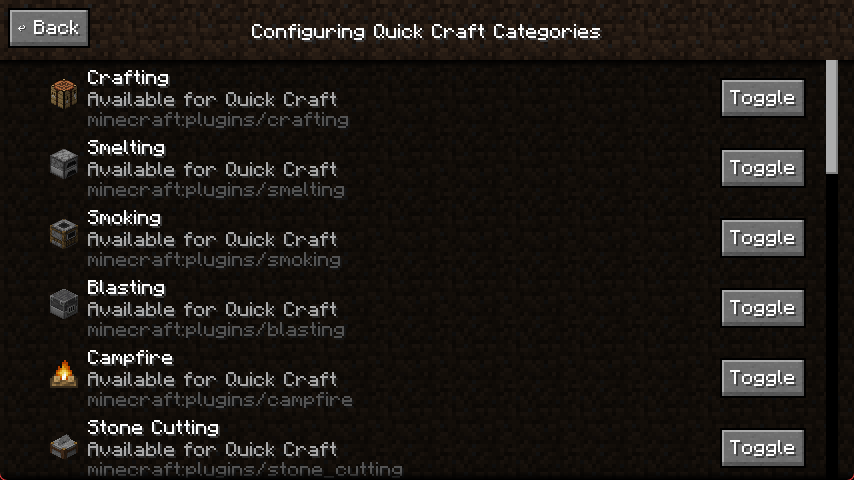
Quick Craft categories can be toggled individually; the screen shows which processes are enabled. Historical author illustration published March 2023; current styling can differ. Source: REI gallery · Original image.
The Quick Craft settings let you enable or disable recipe categories. Use them to keep the shortcut focused on the workstations you want. Keep Cheating Mode off for normal Survival recipe browsing: giving items is a separate feature and still needs the appropriate game or server permissions.
Make the panel easier to use
Open REI's settings control near the search area. You can adjust the interface and search position; the author's manual also describes options accessible by hovering over the search-filter and settings buttons.
Use Customized Filtering when the list contains entries you never want to browse. Select entries, then use Hide Selected; use Show Selected to restore them. Hiding an entry changes your browser view, not the actual recipes or blocks in the world.
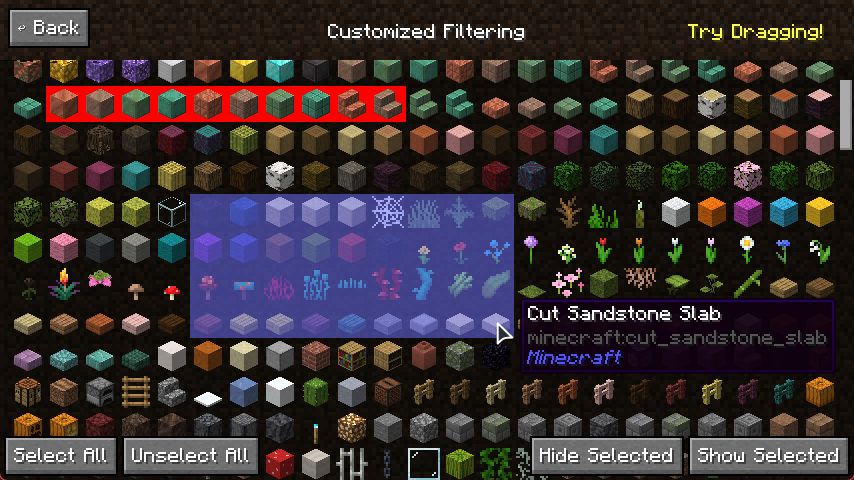
Select unwanted entries and hide them from your personal item list, or show them again with the adjacent control. Historical author illustration published March 2023; current styling can differ. Source: REI gallery · Original image.
A small favorites list and a focused search are usually enough. If something you previously used disappears, check your hidden entries and filters before reinstalling the mod.
What the tag view tells you
Tags group items or blocks for game and recipe rules. REI's tag tree shows groups and their contents, helping explain why several materials belong together. Use this alongside the recipe tooltip when a pattern accepts a group rather than one particular block.
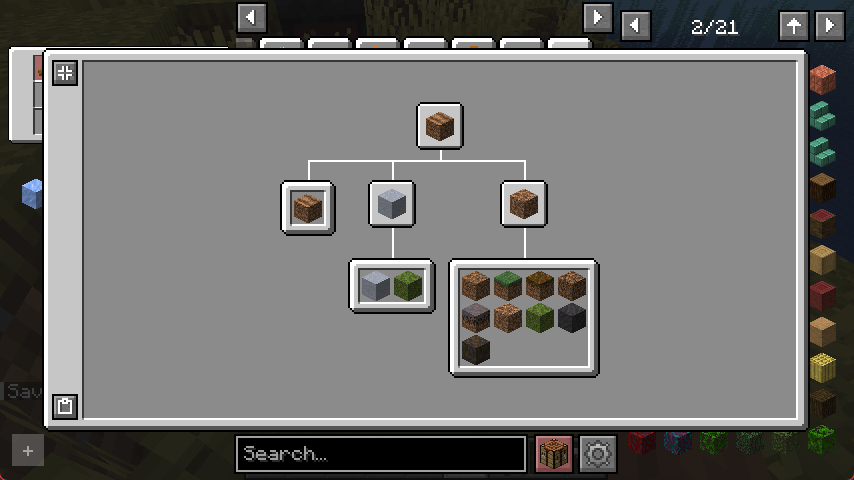
The tag tree visualizes membership and nested groups. It describes tags, not a sequence of crafting recipes. Historical author illustration published March 2023; current styling can differ. Source: REI gallery · Original image.
The tag tree is not a crafting progression tree. Sharing a tag does not mean two items can replace each other in every recipe; the recipe must actually accept that group.
Missing recipes, duplicate panels, and known issues
- No panel: confirm the correct launcher profile loaded REI and all required libraries. Check its visibility and keybind settings before reinstalling.
- Items appear but a recipe does not: confirm it exists in your pack and that its mod supplies a compatible recipe integration. Server changes, progression systems, and custom machines may affect what is exposed.
- Two recipe browsers overlap: keep the browser selected by the modpack or choose one deliberately. For alternatives, see JEI and EMI; their loader and version support must match your profile.
- A dependency error stops launch: check the loader-specific filenames. Fabric needs Fabric API, Fabric Architectury, and Fabric Cloth Config; NeoForge uses its own Architectury and Cloth Config.
- Quick Craft does nothing: inspect its category setting, open the right workstation, and check ingredient availability. Ordinary recipe viewing does not require Cheating Mode.
Two author-tracker reports were still open when checked on September 17, 2026: a 26.2 configuration-button crash and recipes failing with Polymer 0.17.3+26.2 on Fabric. These are reports from particular mod combinations, not a claim that everyone is affected. If your symptoms match, compare the affected versions and test changes in a copy of the profile; do not remove a server-required mod from your only working setup.
Previous libraries and source files
Previous Java 26.2 libraries: retained for an existing profile that needs its earlier setup. The current installation sets above use Fabric API 0.160.0 and Architectury 21.1.9.
Source archives and licenses: optional for readers inspecting or modifying the projects; these do not go in your mods folder. The new Architectury source is the official 26.2 branch snapshot at the 21.1.9 release.
Creators and sources
REI is by shedaniel and contributors. Its code uses the MIT license; the dependency libraries retain their own licenses. Screenshots are from the author's gallery, and the MineBrush cover is an editorial illustration.
Sources: official project, Fabric release, NeoForge beta, creator's manual, source repository, Architectury, Cloth Config, and Fabric API.
More for your Java setup.
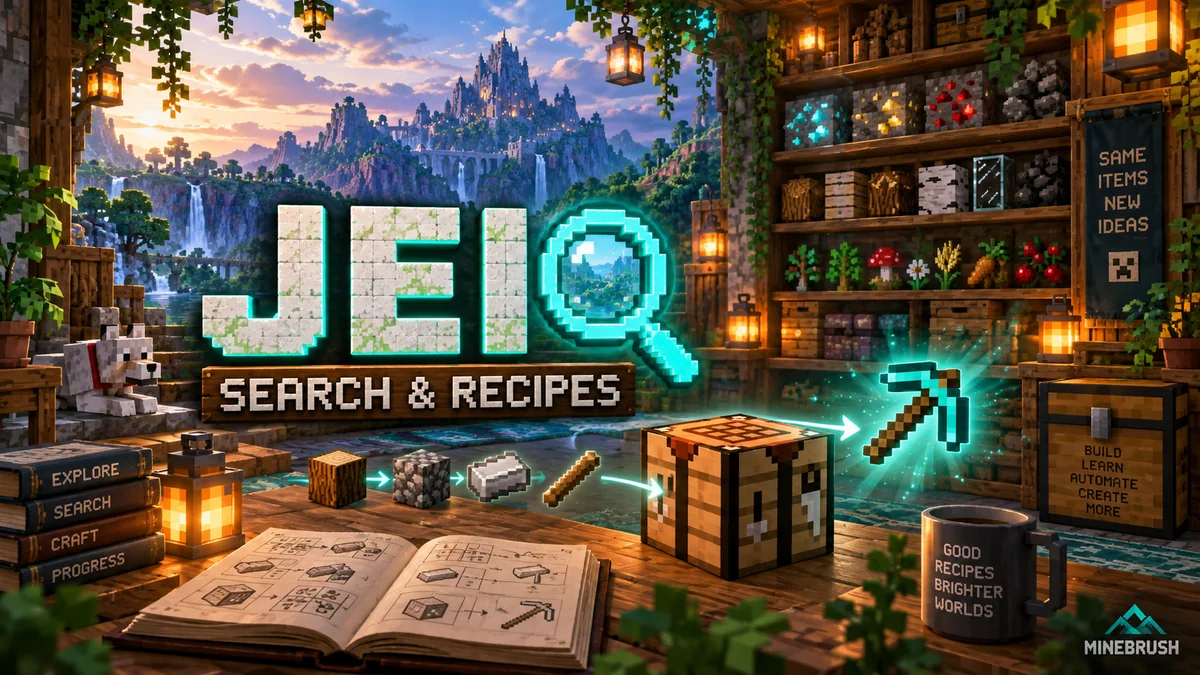
Find items faster, follow crafting chains and discover uses for spare materials with JEI. Learn search filters, recipe transfer and bookmarks, with original author screenshots and a NeoForge 26.2 download.
- Edition
- Java Edition
- Difficulty
- Beginner
- Time
- 10–12 min
Plan crafting chains and find uses for your materials
MineBrush · Guide
JEI Search & Recipes
Find items faster, follow crafting chains and discover uses for spare materials with JEI. Learn search filters, recipe transfer and bookmarks, with original author screenshots and a NeoForge 26.2 download.
Plan crafting chains and find uses for your materials
- Minecraft version
- 26.2
- Game edition
- Java Edition
- Platform family
- Bedrock & Mobile
- Supported devices
- Windows · macOS · Linux
- Install format
- JAR · NeoForge 26.2
- Touch readiness
- Not required
- Resource type
- Guide
- Compatibility confidence
- Source claimed
- Card evidence statement
- Original author screenshots
- Card delivery statement
- Search, recipes and a NeoForge download
- Card limitation note
- Plan crafting chains and find uses for your materials
- Edition applicability
- Java
- Estimated time
- 10–12 min
- Guide difficulty
- Beginner
- Delivery state
- Direct download
- Lifecycle state
- Current
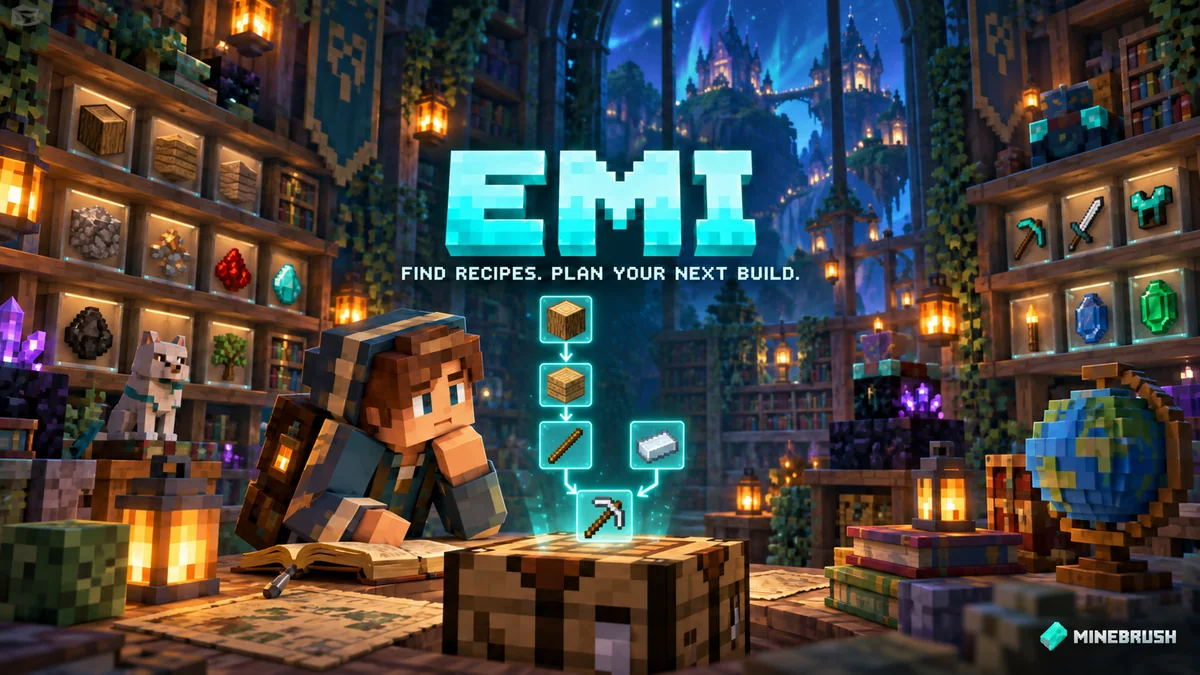
EMI
1.1.24Find recipes, discover uses for your loot and plan complex crafts before gathering supplies. Learn EMI search, favourites, recipe trees and crafting tools, then download the right setup for Java 1.21.1.
- Minecraft
- Java 1.21.1
- Loader
- Fabric
- Runtime
- Client
Client recipe viewer; transfer support varies by integration
Java · Mod
EMI
Find recipes, discover uses for your loot and plan complex crafts before gathering supplies. Learn EMI search, favourites, recipe trees and crafting tools, then download the right setup for Java 1.21.1.
Client recipe viewer; transfer support varies by integration
- Minecraft version
- Java 1.21.1
- Game edition
- Java Edition
- Loader / platform
- Fabric
- License
- MIT
- Platform family
- Java PC
- Supported devices
- Windows · macOS · Linux
- Install format
- .jar mod file from the creator
- Touch readiness
- Not required
- Resource type
- Mod
- Project version
- 1.1.24
- Last verified at
- Sep 15, 2026
- Secondary guide action
- Setup & fixes
- Compatibility confidence
- Source claimed
- Java mod loader
- Fabric
- Java runtime side
- Client
- Card evidence statement
- Find recipes, explore item uses and plan multi-step crafting
- Required dependency
- Fabric: Fabric API; Quilt: matching API setup; NeoForge: no extra library
- Card delivery statement
- Recipe search, favourites, material trees and matching downloads
- Card limitation note
- Client recipe viewer; transfer support varies by integration
- Edition applicability
- Java
- Delivery state
- Direct download
- Lifecycle state
- Current
Litematica
0.28.8Turn a saved build into a hologram you can follow in Survival. Use Litematica to plan a base, count materials, build in layers, and find misplaced blocks. Download Litematica 0.28.8 and MaLiLib for Java 26.2 Fabric, with a practical first-build guide.
- Minecraft
- 26.2
- Loader
- Fabric
- Runtime
- Client
Java · Mod
Litematica
Turn a saved build into a hologram you can follow in Survival. Use Litematica to plan a base, count materials, build in layers, and find misplaced blocks. Download Litematica 0.28.8 and MaLiLib for Java 26.2 Fabric, with a practical first-build guide.
- Minecraft version
- 26.2
- Game edition
- Java Edition
- Loader / platform
- Fabric
- License
- LGPL-3.0-only
- Platform family
- Java PC
- Supported devices
- Minecraft Java on Windows, macOS, and Linux
- Install format
- Two JARs in the Fabric mods folder
- Touch readiness
- Not required
- Resource type
- Mod
- Project version
- 0.28.8
- Secondary guide action
- Setup & fixes
- Compatibility confidence
- Source claimed
- Java mod loader
- Fabric
- Java runtime side
- Client
- Required dependency
- MaLiLib 0.29.6
- Card delivery statement
- Mod + required library
- Edition applicability
- Java
- Delivery state
- Direct download
- Lifecycle state
- Current
Player discussion 0
Questions, discoveries and help from other players.