
MineBrush publication
Minecraft Paper Crafter: First Craft, Automatic Layout and Full-Chest Stop
Make your first paper batch with a button, then follow an illustrated automatic station with a recipe detector and full-chest stop. Includes six real build images, a block plan and checks for your own game version.
Make paper in a crafter, then automate the repeated work. Start with a button-operated station, then follow a source-documented hopper circuit that waits for the whole recipe. Paper goes into a chest; a second circuit stops the input when storage is full.
The illustrated design is from Jangro’s June 2024 Minecraft 1.21 tutorial. The crafter itself is a released feature in both Java 1.21 and Bedrock 1.21, with no experiment required. The author’s page does not certify this exact circuit separately for both editions. The button-operated recipe below uses the released block mechanics. Treat the advanced illustrated layout as a Minecraft 1.21 source build to check in your own edition and version, not a certified cross-edition design. MineBrush has not performed an in-game test.
Recipe and ingredients · First button craft · Build the circuit · Test and start · Full storage · Fix problems
What this machine does for your base
A paper station is useful beside a sugar-cane supply and close to the place where you actually use paper. For a map room, keep output storage beside the cartography table: paper can expand eligible ordinary maps there. Explorer maps have separate rules; Java 26.3 no longer lets you zoom out explorer or buried-treasure maps. For a trading area, leave a separate collection chest so several players do not search through raw farm supplies. Mojang’s cartography-table guide explains the mapping uses.
This is the crafting stage, not a complete sugar-cane farm. Filling its input chest gives it a batch to process; continuous production still needs a working supply of cane. Keep the first build separate from your main farm so a reversed hopper or wrong recipe is easy to spot.
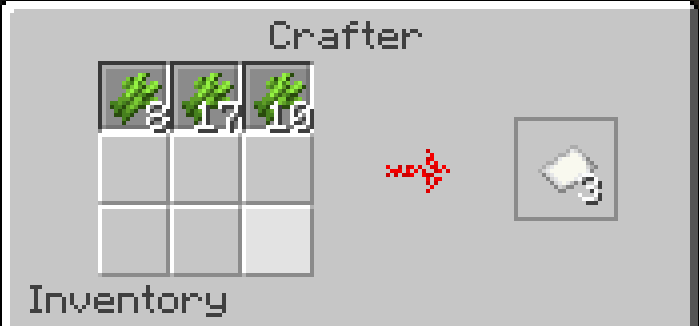
A crafter costs 5 iron ingots, 2 redstone dust, a crafting table and a dropper. Use the game’s recipe display to make it. In its interface, an empty slot can be disabled; hoppers skip disabled slots. The output shown on the right is a preview, not an item you collect by clicking. A redstone pulse ejects the result from the front. Official crafter mechanics.
Start with a button-operated paper station
- Place a crafter with its output face pointing into a chest. Leave room behind and beside it for a later circuit.
- Open its interface, leave one horizontal row available and disable the other six empty slots. Put one sugar cane in each of the three available slots. The preview should show three paper.
- Attach a button to the crafter; use your edition’s sneak/place control if interacting normally opens its interface. Close the interface and press the button once.
- Check the output chest: it should contain three paper. If paper is lying outside, correct the output direction. If you made sugar, stop and check that all three recipe slots were filled before the pulse.
This is a useful stopping point if you only need occasional batches. One button press requests one craft. A lever that stays on is not a repeating clock: it needs a fresh activation for another craft. Do not feed an unattended station until you have a trigger that waits for the complete recipe.
Build the advanced illustrated layout
Gather: 1 crafter, 1 hopper, 2 output chests, 3 comparators, 3 repeaters, 6 dust, 2 solid blocks, 1 redstone block, 1 lamp, 1 lever and 1 composter. Add floor blocks, compostable items, cane and an optional input chest.
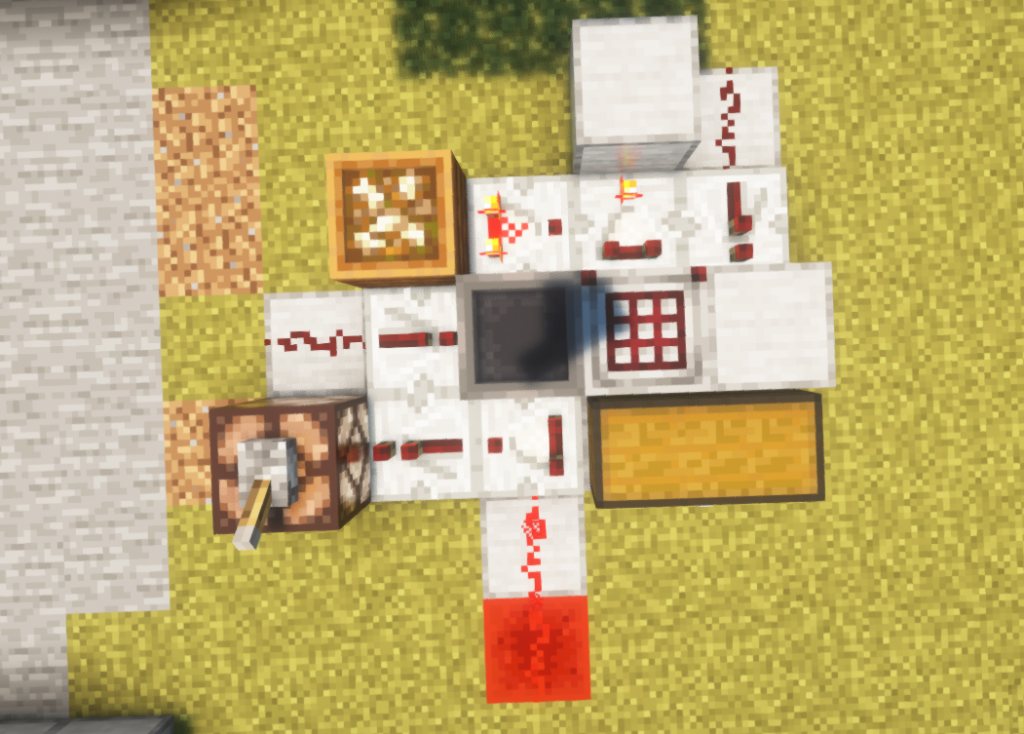
Top view: each cell is one block position. Build a solid floor underneath. Arrows show component output; dots are empty. Face the crafter toward the double chest.
| · | · | · | B | W |
| · | F | C→ | S↑ | R↓ |
| W | R→ | H→ | K↓ | B |
| L | R← | S← | Chest | Chest |
| · | · | W | · | · |
| · | · | X+W | · | · |
B: solid block; W: dust; F: composter ready for bonemeal; C: normal comparator; S: subtracting comparator; R: repeater; H: hopper; K: crafter; L: lamp with lever; X: redstone block. Put dust on X. Leave repeaters at their default delay.
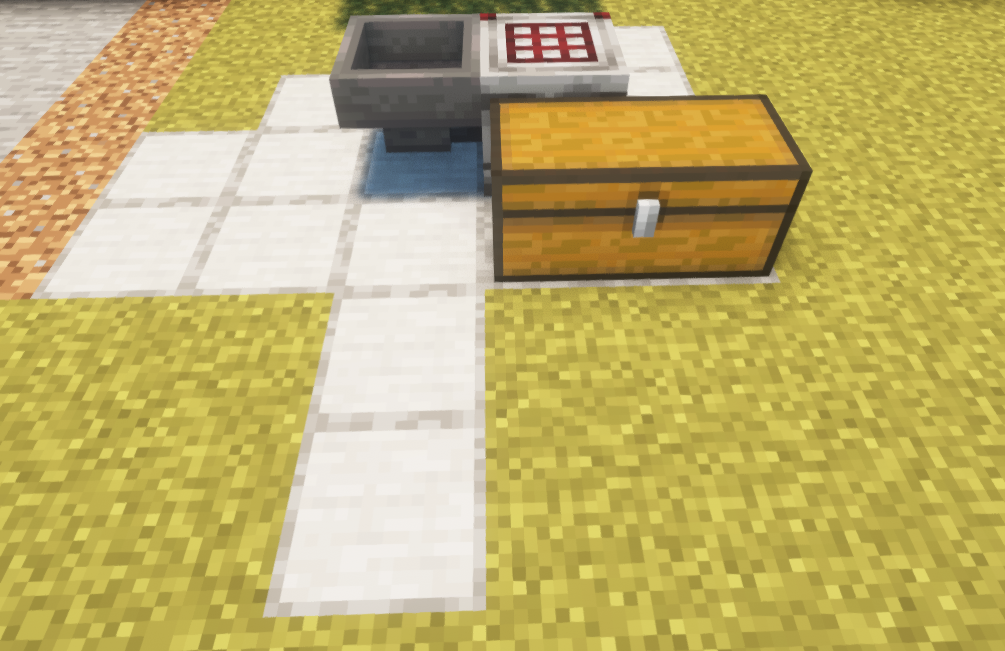
Keep input empty while assembling. Leave the top recipe row enabled; disable the other six slots. Do not harvest the composter. Switch the lamp lever on before adding supplies.
Original layout and build sequence by Jangro. Keep component spacing as shown; extending a dust line can change the signal reaching its destination.
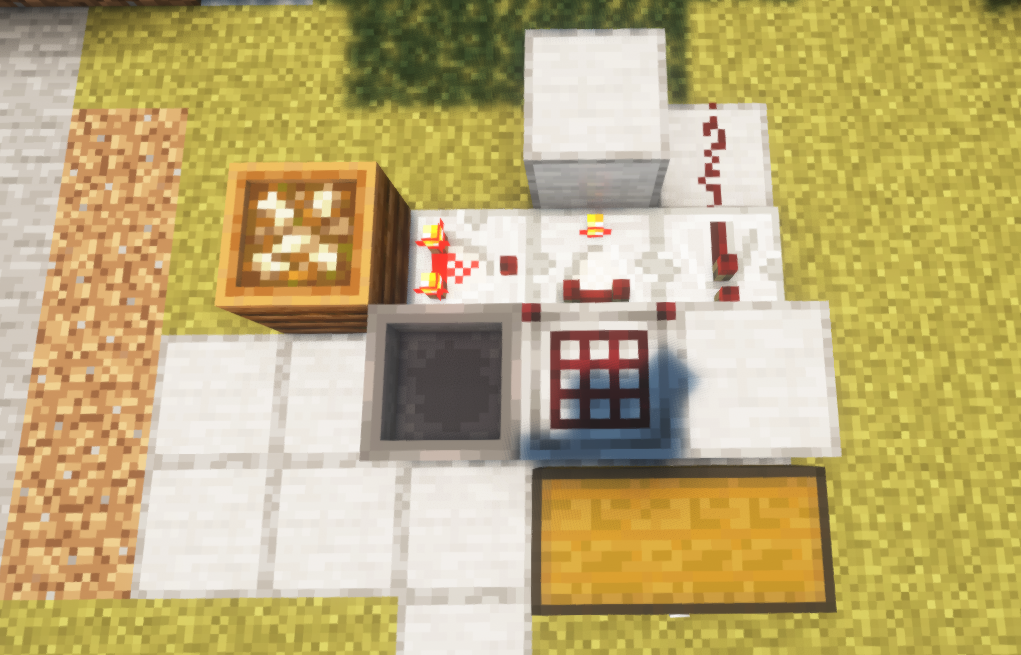
Why it waits for paper instead of making sugar
A crafter’s comparator counts occupied and disabled slots, up to nine. Six disabled slots plus one, two or three occupied slots therefore give signals of seven, eight or nine. Those numbers describe the recipe being ready, not how many stacks are stored.
The side comparator supplies eight. The subtracting comparator only produces a positive output when the recipe reaches nine: 9 − 8 = 1. The return path activates the crafter; consuming the ingredients makes the signal fall again. That is why a permanently powered lever attached directly to a crafter is not a repeating automatic trigger.
On a comparator, the single front torch is the output end; lighting it selects subtraction. It subtracts the stronger side input from the rear input. A comparator reading a full chest reaches fifteen. These are normal comparator functions, explained in Mojang’s comparator guide.
Commission it with a tiny batch
- Leave the output chest empty and remove any ingredients accidentally placed in the crafter. Confirm that only its top row is enabled.
- Put two sugar cane into the input hopper, then release the stop lever. Wait until both have entered the grid. The chest should still contain no paper or sugar.
- Add a third cane. Expect one craft producing three paper in the output chest.
- Add six more. Expect two further crafts and nine paper in total, with no sugar mixed in.
- Turn the stop lever on, add a little more cane and check that the hopper holds it. Turn the lever off and confirm that processing resumes.
These are acceptance checks for your copy of the build. If a check fails, fix that stage before connecting a larger supply. Use the actual game version and server where the machine will live, rather than treating a successful test in a different setup as a guarantee.
Check the full-chest stop before leaving it running
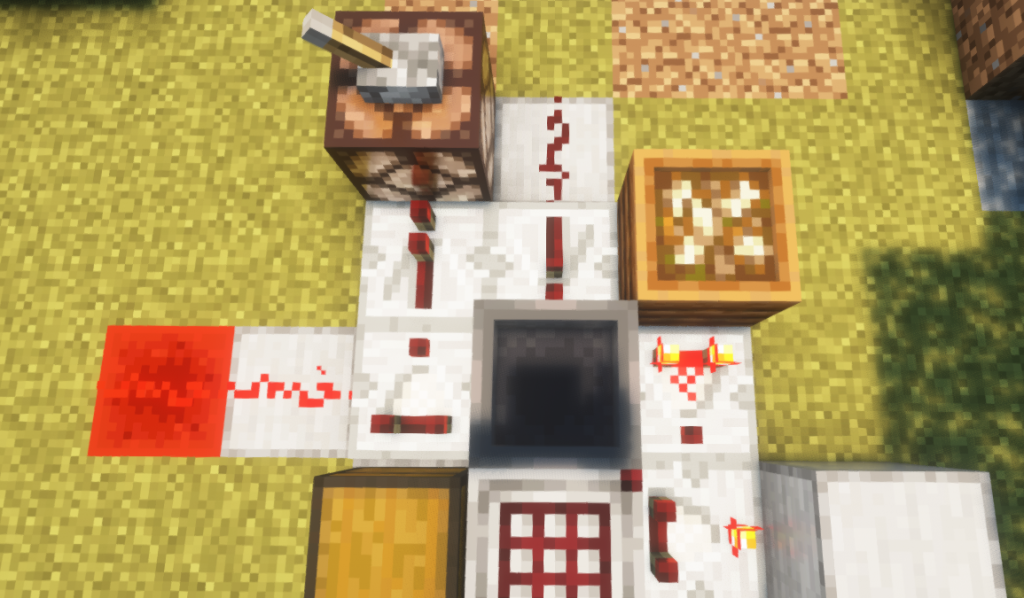
The storage reader subtracts fourteen from the chest signal. At fifteen, the remaining signal lights the lamp and powers the input hopper’s stop circuit. The lever also provides a manual stop.
Test storage with paper only: stop the input, fill the double chest with paper, then release the lever with a small cane supply waiting. Check that the input remains stopped. Remove one full stack of paper and confirm that the lamp turns off and crafting can resume. Keep watching the front of the crafter for loose items.
Do not use this test with random filler items: a chest can have no suitable space for paper without being full by the circuit’s measurement. Keep this output dedicated to paper. Empty it regularly, and do not assume the input stop also stops whatever farm supplies the machine.
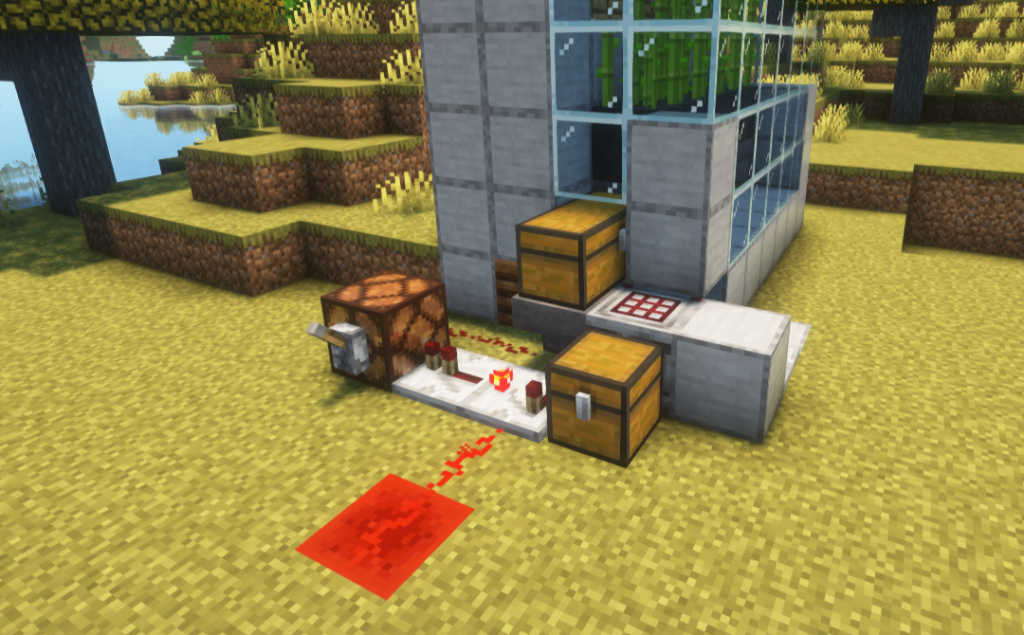
Find the fault by following the item
- Cane stays in the input: inspect the hopper’s spout, the stop lever and the storage lamp before touching the recipe circuit.
- Sugar appears: stop feeding. Check the six disabled slots, the subtracting comparator’s lit front torch and the prepared composter. Remove any additional button or clock that could trigger a partial recipe.
- The result lands on the ground: check the crafter’s front and available paper space in the output chest. A container somewhere near the machine is not necessarily in its output path.
- It crafts once and stalls: stop input and inspect the grid. If every enabled slot still contains ingredients after a craft, the readiness signal can remain high. Empty the grid, check for unintended extra feeding paths, then repeat the three-cane test.
- You want another recipe: stop input, clear the grid and output, then configure and test that recipe separately. A layout designed for one ingredient does not automatically manage several different ingredients.
Bedrock note: WingsOfEnd demonstrates a separate paper crafter specifically for Bedrock 1.21. It is an alternative design, not proof that every detail of the illustrated circuit above behaves identically in every later Java or Bedrock build.
For the update that introduced the block, see our Tricky Trials guide. The cover is an editorial illustration; the build photographs are Jangro’s real game captures. No world download is needed to follow this layout.
More from MineBrush.

Find trial chambers, beat the breeze, match keys to vaults and prepare for ominous trials. Learn mace and wind-charge tricks, build your first crafter and put copper, tuff and dungeon rewards to use.
- Game released
- Java
- 1.21 · Stable
- Bedrock
- 1.21 · Stable
Focus Trial chambers, vault rewards, mace combat, wind charges and automatic crafting
Topic Tricky Trials
Install Included in the official game update
Back up before updating
Java + Bedrock · Release
Tricky Trials
Find trial chambers, beat the breeze, match keys to vaults and prepare for ominous trials. Learn mace and wind-charge tricks, build your first crafter and put copper, tuff and dungeon rewards to use.
Back up before updating
- Update type
- Major release
- Release channel
- Unknown / not stated
- Official release date
- 2024-06-13
- World safety
- Back up before updating
- Player impact
- Trial chambers, vault rewards, mace combat, wind charges and automatic crafting
- Platform family
- Cross-edition
- Supported devices
- Java: Windows, macOS, Linux. Bedrock: supported Windows, mobile and console devices.
- Install format
- Included in the official game update
- Touch readiness
- Not required
- Resource type
- Update
- Last verified at
- Sep 18, 2026
- Update state
- historical
- Compatibility confidence
- Source claimed
- Bedrock version/build
- 1.21
- Card delivery statement
- Included in the official game update
- Edition applicability
- Java + Bedrock
- Java version/build
- 1.21
- Shared update topic
- Tricky Trials
- Delivery state
- No file
- Lifecycle state
- Superseded
- Java update channel
- Stable
- Bedrock update channel
- Stable
Do you need a swamp librarian for Mending? Compare ordinary trading with Trade Rebalance, use the special-book table, avoid wasted cures, and follow the released map and name-tag changes in Java and Bedrock.
- Edition
- Cross-edition
- Difficulty
- Intermediate
- Time
- 8 min read; trading setup varies
MineBrush · Guide
Villager Trading: Normal vs Experimental
Do you need a swamp librarian for Mending? Compare ordinary trading with Trade Rebalance, use the special-book table, avoid wasted cures, and follow the released map and name-tag changes in Java and Bedrock.
- Minecraft version
- Java & Bedrock — ordinary and experimental rules
- Game edition
- Cross-edition
- Platform family
- Cross-edition
- Touch readiness
- Yes
- Resource type
- Guide
- Compatibility confidence
- Source claimed
- Edition applicability
- Java + Bedrock
- Estimated time
- 8 min read; trading setup varies
- Guide difficulty
- Intermediate
- Delivery state
- No file
- Lifecycle state
- Current

Explore Dappled Forest, follow abandoned-camp maps and sleep on straw beds without moving your home spawn. Learn what Wilderness Bound adds in Java 26.3 and Bedrock 26.50, with camping steps, building ideas and official images.
- Game released
- Java
- 26.3 · Stable
- Bedrock
- 26.50 · Stable
Focus Exploration, camping and building
Topic Camps, maps and building
Back up before updating
Java + Bedrock · Release
Wilderness Bound
Explore Dappled Forest, follow abandoned-camp maps and sleep on straw beds without moving your home spawn. Learn what Wilderness Bound adds in Java 26.3 and Bedrock 26.50, with camping steps, building ideas and official images.
Back up before updating
- Update type
- Major release
- Release channel
- Java & Bedrock
- Official release date
- 2026-09-15
- World safety
- Back up before updating
- Player impact
- Exploration, camping and building
- Platform family
- Cross-edition
- Touch readiness
- Yes
- Resource type
- Update
- Last verified at
- Sep 18, 2026
- Update state
- current
- Compatibility confidence
- Source claimed
- Bedrock version/build
- 26.50
- Edition applicability
- Java + Bedrock
- Java version/build
- 26.3
- Shared update topic
- Camps, maps and building
- Delivery state
- No file
- Lifecycle state
- Current
- Java update channel
- Stable
- Bedrock update channel
- Stable
Player discussion 0
Questions, discoveries and help from other players.