
MineBrush publication
Minecraft Bedrock 1.20.30: Crawling, Recipes and Useful Builds
Use one-block crawl passages, understand recipe unlocking and touch crafting, and build a small pink-petal station. Bedrock 1.20.30 explained with real mobile screenshots, trading checks and multiplayer sleep tips.
Bedrock 1.20.30 made one-block crawling and recipe unlocking ordinary features. Released on 19 September 2023, it also changed deep diamond generation and repeated villager-cure discounts. This historical guide focuses on things you can use: a compact passage, easier crafting, a small flower station and a sensible check of an existing world. Mojang’s release notes.
This is not the newest Bedrock version. Use the Bedrock update history to follow later changes; do not downgrade a newer world to reproduce an old release.
How to crawl · Recipes and touch crafting · A useful flower project · Existing worlds · Multiplayer sleep · First-session checklist
Build and use a one-block passage
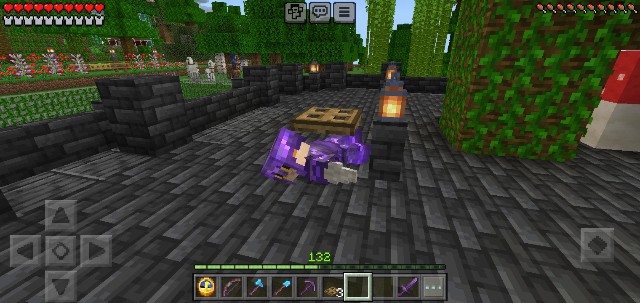
Crouching and crawling are different. Short sneaking fits a 1.5-block gap; crawling fits a one-block gap. Mojang introduced crawling for testing in 1.20.10, then removed its experimental requirement in 1.20.30. Old instructions telling you to enable a crawling experiment do not describe the normal 1.20.30 setup.
- Make a short tunnel with one empty block between its floor and ceiling. Start with only a few blocks of length and an open, safe exit.
- At the entrance, place a wooden trapdoor so that closing it over your standing position forces you into the low space. Open it, stand beneath its closing position, and use it to lower yourself.
- Move forward into the tunnel. Keep enough clearance at the far end to stand up again. The game automatically changes your pose when the available space changes.
- Try both directions before making the entrance part of a permanent build.
On a controller, aim at the trapdoor and use your assigned interact/use control; on touch, use the interaction method for your selected control layout. This is an interaction with a block, not a dedicated “crawl” button. If you only crouch, check the trapdoor’s height and your position underneath it before changing world settings.
Three practical uses: a maintenance route behind a storage wall, a low entrance to a hidden room, or a short mine branch where you want to remove fewer blocks. Provide a normal doorway or another accessible exit for a route friends will use frequently. Crawling is slow, and a cramped passage is a poor emergency escape if you have not checked the exit.
Understand recipe unlocking without getting stuck
Recipe unlocking can be enabled or disabled per world. Notifications teach you recipes as you discover materials. The separate limited-crafting rule is off by default; seeing an undiscovered recipe is not, by itself, a ban on crafting it. In 1.20.30, recipe search matches the beginning of a word in the item name. Touch players can again hold the output slot to craft repeatedly. Recipe and touch changes.
Try a small workshop task: collect wood, open the crafting interface and search for the item you want to build. Use a full word from its displayed name if a short fragment finds nothing. Check the ingredient preview and the recipe’s required grid: an inventory grid cannot replace a crafting table for every recipe.
When playing with a controller, pause on the selected recipe long enough to confirm the quantity before crafting. On a phone, first make one item; use the held output action only after confirming the recipe and your supply. This is particularly useful when making a set of building components without accidentally spending your last materials.
If crafting still fails, distinguish three situations: a missing ingredient, the wrong crafting grid, or a world with restricted crafting. Ask the host which rules and packs are active. Reinstalling the game is not a useful first response to a recipe filter or missing material.
Make a small pink-petal station for your garden
One useful 1.20.30 fix lets dispensers apply bone meal to pink petals. Official block fixes. The author of this mobile survival report demonstrated the result in an existing world and built a collection setup around it.
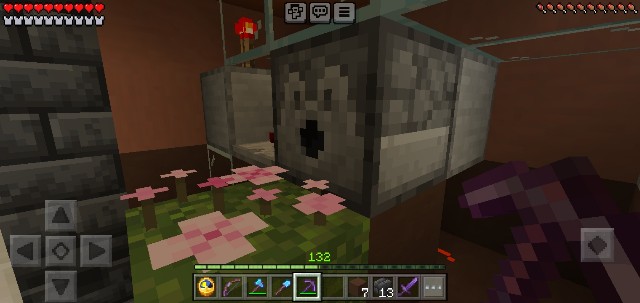
Start with a manual version: gather a dispenser, a button, bone meal, a grass block and pink petals. Place the petals on the grass and aim the dispenser into their space. Put bone meal inside, attach the button to the dispenser, and activate it once at a time. Inspect what changes before adding any automatic clock.
Pink petals can fill a block in four stages; bone meal increases the amount, and a full patch can produce an extra petal item. See Mojang’s Trails & Tales feature description for the original plant and the author’s images for its dispenser application. Keep the growing patch in place and collect the extra items for paths, a courtyard or the edge of a pond.
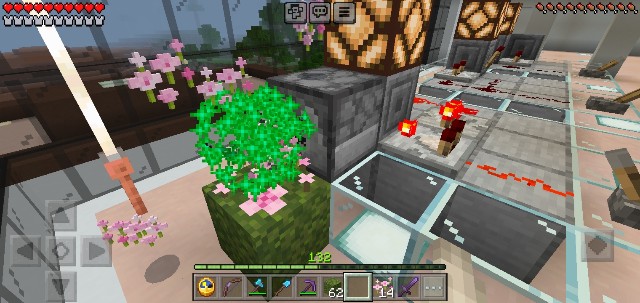
Use a small amount of bone meal while checking the setup. If nothing happens, inspect the dispenser’s direction, its inventory and whether the target space really contains pink petals. If dropped items escape, add a simple enclosure and collect them manually before designing storage. Do not build a large automatic machine until the one-button test works in your world.
What should you revisit in an existing save?
Mining: the deeper diamond-generation increase benefits newly generated terrain; it does not refill an excavated mine. Keep your base and plan a separate outpost beyond known generated areas. A place you visited only on the surface can already have its underground terrain generated.
Trading: repeated reinfection and curing no longer stacks further discounts on the same villager. The biome-based librarian changes, however, were behind a separate trading experiment in this release. Ordinary and experimental changes. Check important offers in your real hall before spending more golden apples.
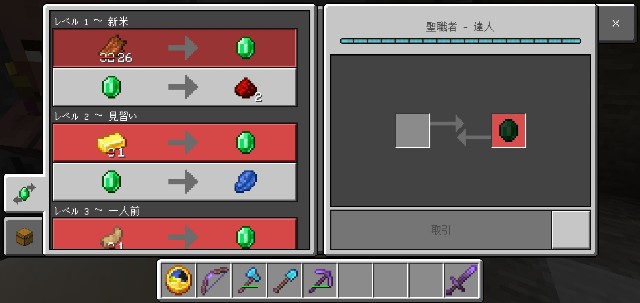
Keep a short list of the trades your projects depend on, then inspect those residents first. There is no need to demolish a working hall because a tutorial uses different experimental rules. Also check server packs and plugins before assuming every difference comes from the base game.
Let a group skip the night without everyone returning home
The new playerssleepingpercentage rule controls the proportion of online players who must sleep. A value of zero still requires one sleeper; a value above 100 prevents night skipping. Sleeping rule.
For example, a host can use /gamerule playerssleepingpercentage 50 so that two of four online players can skip the night. Agree on the rule first: one friend may be deliberately hunting night-time mobs. Changing it requires the appropriate command permission. If enabling cheats is necessary, check the game’s achievement warning before accepting it; a convenience setting is not worth an unintended permanent change for an achievement-focused world.
What to check in your first session
- Preserve a copy of the world before changing versions or testing packs. Keep the original separate.
- Try the crawl entrance near home with an easy exit before using it underground.
- Craft one item before a batch and confirm how your touch or controller layout selects the output.
- Check essential trades and a small petal station before expanding either project.
- Coordinate with friends on version and world rules. For connection problems, use our Bedrock and Realms version-mismatch guide.
This guide uses Mojang’s release documentation and credited gameplay images from morifumikirikita319’s mobile survival diary. MineBrush has not independently tested this world or certified the author’s larger redstone machine. The cover is an editorial illustration; the four images inside are source screenshots with original-size links.
More for your Bedrock world.

Find the Bedrock update that matters to your world or device. Explore stable releases, practical game-drop guides, platform-specific fixes and a separate Beta/Preview archive.
- Coverage
- 2023–2026
- Edition
- Bedrock Edition
- Versions
- Bedrock 1.20.30–26.51
Bedrock · Update history
Bedrock Update History
Find the Bedrock update that matters to your world or device. Explore stable releases, practical game-drop guides, platform-specific fixes and a separate Beta/Preview archive.
Back up before updating
- Minecraft version
- Bedrock 1.20.30–26.51
- Game edition
- Bedrock Edition
- Update type
- Unknown / not stated
- Release channel
- Bedrock Edition
- World safety
- Back up before updating
- Player impact
- Find a useful release, platform fix or practical game-drop guide
- Platform family
- Bedrock & Mobile
- Supported devices
- Windows, consoles and mobile; patch availability varies
- Touch readiness
- Yes
- Last verified at
- Sep 17, 2026
- Update state
- current
- Compatibility confidence
- Source claimed
- Card delivery statement
- Player guides and official release notes
- Edition applicability
- Bedrock
- Bedrock enrollment route
- Preview app
- Delivery state
- No file
- Lifecycle state
- Current
- History coverage
- 2023–2026

Get back to your shared world. Fix Outdated Client or Outdated Server in Bedrock and Realms with device-specific update steps, clear host/player checks and help for Preview, LAN and missing updates.
- Edition
- Bedrock Edition
- Difficulty
- Beginner
- Time
- 5–15 min; update time varies
Client, server and Preview checks
MineBrush · Guide
Fix Outdated Client
Get back to your shared world. Fix Outdated Client or Outdated Server in Bedrock and Realms with device-specific update steps, clear host/player checks and help for Preview, LAN and missing updates.
Client, server and Preview checks
- Minecraft version
- Current compatible Bedrock release
- Game edition
- Bedrock Edition
- Platform family
- Bedrock & Mobile
- Supported devices
- Windows · Android · iPhone/iPad · Xbox · PlayStation · Switch
- Install format
- Step-by-step guide
- Touch readiness
- Check guide
- Resource type
- Guide
- Compatibility confidence
- Not applicable
- Card limitation note
- Client, server and Preview checks
- Edition applicability
- Bedrock
- Estimated time
- 5–15 min; update time varies
- Guide difficulty
- Beginner
- Delivery state
- No file
- Lifecycle state
- Current

Plan a better diamond trip, avoid wasting golden apples on repeated cures, and check your trading hall and mob farms. Learn what Java 1.20.2 changed in ordinary worlds and what belonged to its optional trade experiment.
- Java
- Java 1.20.2
- Release type
- Release
- Game released
Focus Diamond mining, villager discounts and mob-farm safety
Back up before updating
Java · Release
Java 1.20.2: Diamonds & Villagers
Plan a better diamond trip, avoid wasting golden apples on repeated cures, and check your trading hall and mob farms. Learn what Java 1.20.2 changed in ordinary worlds and what belonged to its optional trade experiment.
Back up before updating
- Minecraft version
- Java 1.20.2
- Game edition
- Java Edition
- Update type
- Stable update
- Release channel
- Java Edition
- Official release date
- 2023-09-21
- World safety
- Back up before updating
- Player impact
- Diamond mining, villager discounts and mob-farm safety
- Related major release
- Java 1.20 — Trails & Tales
- Platform family
- Java & PC
- Last verified at
- Sep 18, 2026
- Update state
- historical
- Compatibility confidence
- Source claimed
- Edition applicability
- Java
- Delivery state
- No file
- Lifecycle state
- Current
Player discussion 0
Questions, discoveries and help from other players.