
MineBrush publication
System Dynamic Light 3.3.0: Offhand Torches, Settings and Bedrock Guide
Carry light through caves with a torch in your offhand, use sea pickles underwater and tune System Dynamic Light 3.3.0 for a phone or Realm. Learn the controls, personal settings, performance profiles and custom-item options.
System Dynamic Light lets you explore Bedrock caves with a light source in your hand instead of placing a torch at every step. Move a supported item to your offhand and keep your pickaxe ready, use a sea pickle for underwater visibility, or let dropped torches and glowing mobs illuminate their surroundings. The configuration book lets you keep that simple setup or tune the system for a busy multiplayer world.
This guide covers SystemTv’s version 3.3.0, released September 14, 2026. Its useful additions include separate personal and world settings, performance presets and support for registering items from other addons. Lantern helmets belong to the optional System Dynamic Extra pack; the current archive includes that extra component, but it must be activated separately if you want its items.
First light and controls · Useful ways to play · Settings · Performance · Other addons · Download and installation · Troubleshooting
Start with a torch, then free your main hand
- Activate both required packs in the world, then equip a normal torch in your main hand.
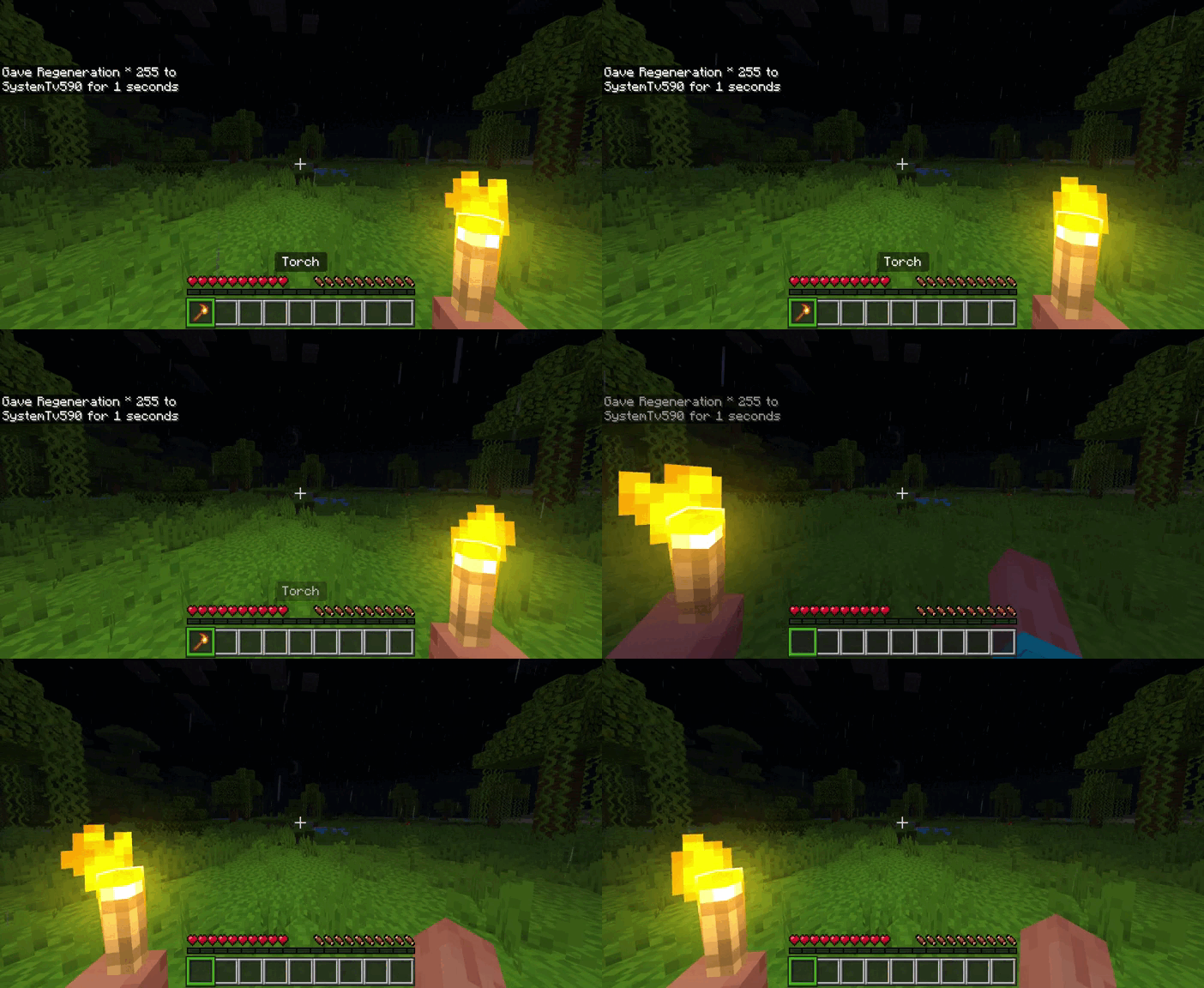
- Enter a dark area and keep the torch selected. The light should follow you as you move.
- Empty your offhand. Look into empty air so the game does not place the torch against a block.
- Use the item: right-click on a mouse, press and hold on a touchscreen, or use your controller’s normal interact button. With the default use-item activation selected, supported items move to the offhand.
- Select your pickaxe in the main hand. You can now work while the offhand light illuminates the nearby area.
The activation method is configurable. If you choose Sneak + Use Item in Personal Settings, crouch as you use the item; if it is Disabled, that transfer shortcut will not run. Keep a shield or other offhand item in your inventory before trying the transfer.
What you can actually do with it
Scout a cave before committing to a route
Carry a torch in the offhand while checking branches, exposed ore and drops. You can inspect the next chamber without repeatedly switching between a pickaxe and a torch. Keep placing permanent torches along the route you want to find again: portable light moves away with you and is not a permanent trail marker.
Work inside an unfinished building
Use offhand light while adding stairs, checking roof gaps or finishing a basement. This is convenient when you want to see a corner before deciding where the final lamps belong. Once the room is complete, install its permanent lighting instead of relying on whichever player is carrying a torch.
Illuminate a spot with a dropped item
With Dropped Item Lights enabled, a supported item such as a torch can light the place where it lands. This can help you inspect a ledge while keeping both hands available. A dropped item is still a dropped item: it can be collected or despawn, and a world’s light limit can prevent every item in a large pile from contributing. Use placed blocks for a lasting workshop or route.
See better underwater
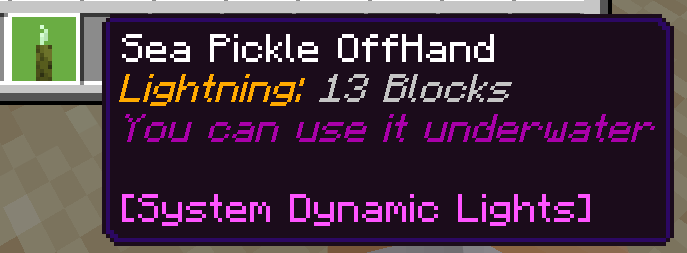
Use a sea pickle, which the author explicitly supports underwater. A normal torch and a sea pickle are not interchangeable for this purpose. Light improves local visibility; it does not provide air, breathing time or swimming protection. Take the usual equipment for the dive.
Which items provide light?
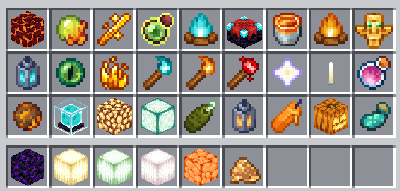
The supported catalogue includes ordinary, soul and redstone torches; lanterns; glowstone; shroomlights; sea lanterns; candles; campfires; lava buckets; and several luminous ingredients or special items. Examples include glowstone dust, blaze rods, blaze powder, glow ink sacs, fire charges, nether stars and totems of undying.
These are not all equally bright and not all can be placed as blocks. Turn on Personal Settings → Item Information → Full Information to see the supported item’s light level and its underwater, offhand and placement properties. Once you know your equipment, choose Light Level Only or Disabled to keep tooltips short.
Personal settings versus world settings
Use the System Dynamic Light Config book to open the menu. Its Information section explains the options in-game.
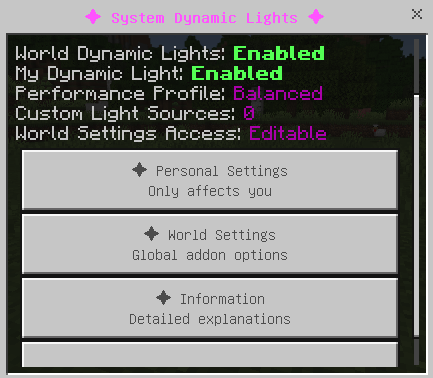
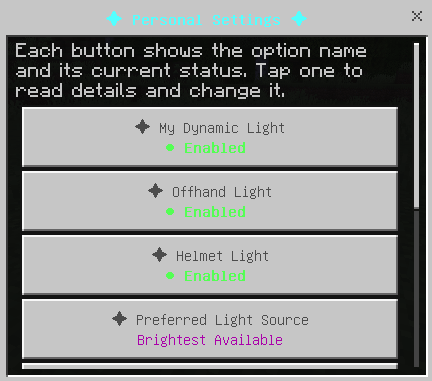
Personal Settings affect your character: your dynamic light, offhand light, helmet light, preferred source, offhand activation and placement shortcuts, and item information. One player can disable their own light without changing everybody else’s preference.
World Settings control the global switch, dropped-item lighting, item-light limits, entity lighting, dimension settings, performance presets and custom sources. Only the host or an operator can change these. Other players can read the menu without receiving permission to edit the whole world.
Choose which source wins
Brightest Available is a useful general starting point when you carry several light sources. Prefer Offhand makes the dedicated lamp your first choice; Prefer Main Hand is useful when you deliberately select different light items. Prefer Helmet applies when the optional helmet content is installed. If the preferred source is unavailable, the system can fall back to the brightest remaining source.
Place lights without putting away your tool
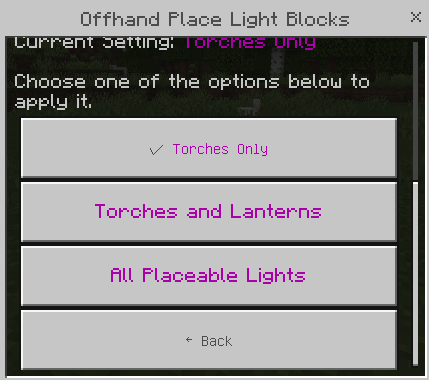
Enable offhand placement, aim at the intended block and use Sneak + Hit. The placement filter offers Torches Only, Torches and Lanterns, or All Placeable Lights. Torches Only is a sensible first choice for cave routes: it limits the shortcut to the item you expect. A luminous ingredient or totem has no placeable light-block form simply because it emits light.
Choose a profile for your world
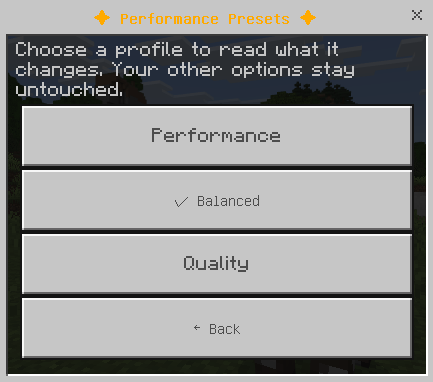
The presets mainly control dropped-item lights and entity lighting. They are starting points, not measured FPS promises.
- Performance: up to 10 dropped-item lights per dimension and natural glowing mobs only. Start here on a phone, on a busy Realm or when lighting causes stutter.
- Balanced: up to 25 dropped-item lights and all supported entity lighting. A reasonable starting point for an ordinary shared world.
- Quality: up to 50 dropped-item lights and all supported entities. Choose it when you actually want more simultaneous sources and the world remains responsive.
The manual dropped-item limit also offers Unlimited, but that is rarely the best first setting. Lower the limit before removing the portable light feature you use most. Entity lighting can be Disabled, Burning Entities Only, Natural Glowing Mobs Only or All Supported Entities. Supported natural examples include blazes, magma cubes, glow squid, allays and creakings.
Make an item from another addon emit light
An operator can open World Settings → Custom Light Sources → Add Light Source, enter the item’s exact identifier, choose level 6, 9, 11, 13 or 15, and submit it. Up to 24 custom sources can be registered. For example, myaddon:crystal_lamp illustrates the required identifier format; it is not an item supplied by System Dynamic Light.
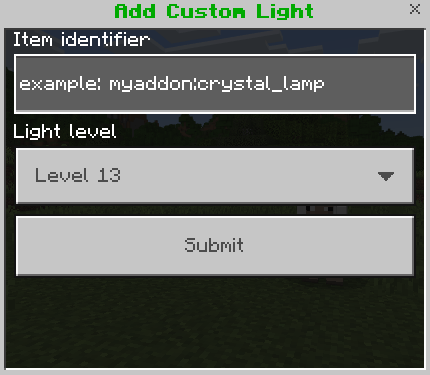
A registered source can work in the main hand, as a dropped item, or in the offhand if that item already supports being held there. Registration does not add automatic offhand transfer or special block placement to somebody else’s item. Vanilla items already handled by the addon do not need registering again.
Optional lantern helmets
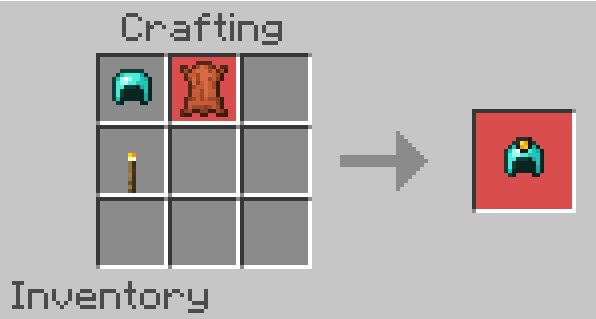
The separate System Dynamic Extra content pack adds lantern helmets across several armour tiers. With Helmet Light enabled, these can provide light level 15 and leave both hands free. The author says the helmets retain normal repair and enchantment behaviour. Install the extra pack as well as the main system if this is the feature you want.
Download and install System Dynamic Light 3.3.0
The current author release is System Dynamic Lights V3.3.0.mcaddon. Its CurseForge listing includes Bedrock 26.40, 26.30, 26.20 and several earlier builds. Select a version explicitly listed on the official release page; newer game builds are not automatically covered by that list. The original archive is available below. It includes the Behaviour Pack, Resource Pack and an extra-content component.
- Save a copy of an existing world before replacing its addon version.
- Open the downloaded file with Minecraft and wait for import to finish.
- In the world settings, activate both System Dynamic Light BP/BH and RP/RS. Behaviour and resources are both required. Activate System Dynamic Extra Content V3.3.0 as well if you want its additional items.
- Leave experimental gameplay switches off: the author says the addon does not require them.
- Enter the world and try a normal torch before changing advanced options or combining extra lighting addons.
SystemTv describes the addon as compatible with Realms, multiplayer and Actions & Stuff. It avoids a player.json override, which helps with player-animation addons. That does not guarantee every possible pack combination. Start with one dynamic-light system rather than stacking several addons that control the same feature. The author also describes the pack as achievement-friendly; keep the world’s other settings and packs in mind instead of assuming one addon determines achievement eligibility on its own.
When something does not work
- No light at all: confirm both packs are active, then check the global Enable Dynamic Light switch and your personal My Dynamic Light setting. Test with a normal torch before diagnosing a custom item.
- The torch will not transfer: empty the offhand, look into empty air and check Offhand Activation Method. Use the selected shortcut rather than the one you used in an older setup.
- Only some dropped items glow: check Dropped Item Lights and the per-dimension limit. A busy item pile can exceed the selected profile.
- Water stops your light: try a sea pickle and read its item information. Underwater support varies by item.
- You cannot change world options: ask the host or operator. The read-only global menu for ordinary players is intentional.
- A registered addon item will not move into the offhand: custom-light registration does not implement that transfer. Use the item in the main hand or its own supported offhand method.
- The game stutters near many sources: switch to Performance, reduce dropped-item lights and narrow entity lighting before disabling the addon entirely.
- Item descriptions repeat: version 3.2.9 specifically addressed duplicate lore and 3.3.0 continues that cleanup. Remove obsolete duplicate pack versions from the world and use the current matched pair.
Author and sources
System Dynamic Light is created by SystemTv. See the official description, configuration guide and original illustrations, the 3.3.0 release, and STV Addons. The cover is a MineBrush editorial illustration; the in-article menus and demonstration are the creator’s material.
More for your Bedrock world.

Understand Minecraft 26, tell normal releases from test builds, and choose the right version for friends, servers and mods. Clear Java and Bedrock examples without the technical clutter.
- Topic
- Choosing your Minecraft version
- Scope
- None
- Evidence
- Official Minecraft sources · checked 9 Sep 2026
A shared “26” prefix never proves cross-edition compatibility.
MineBrush · News
Minecraft Versions Made Simple
Understand Minecraft 26, tell normal releases from test builds, and choose the right version for friends, servers and mods. Clear Java and Bedrock examples without the technical clutter.
A shared “26” prefix never proves cross-edition compatibility.
- Compatibility confidence
- Source claimed
- Card evidence statement
- Official policy and indexes checked 9 Sep 2026; client display NOT_OBSERVED.
- Card delivery statement
- Choose a version for everyday play or testing
- Card limitation note
- A shared “26” prefix never proves cross-edition compatibility.
- Edition applicability
- Java + Bedrock
- News topic
- Choosing your Minecraft version
- Public news evidence label
- Official Minecraft sources · checked 9 Sep 2026
- Delivery state
- No file
- Lifecycle state
- Current
- News evidence type
- Official Minecraft source
Build a richer Bedrock survival world with Core Craft 1.2.6: quests, farming, cooking, market trading and End adventures. Download the paired packs and follow a practical route from your first Quest Book to a working market.
- Minecraft
- 26.40 / 26.30 / 26.20 / 26.13–26.10
- Components
- Paired
- Package
- .mcaddon
Bedrock · Add-on
Core Craft: Build Your Survival Adventure
Build a richer Bedrock survival world with Core Craft 1.2.6: quests, farming, cooking, market trading and End adventures. Download the paired packs and follow a practical route from your first Quest Book to a working market.
- Minecraft version
- 26.40 / 26.30 / 26.20 / 26.13–26.10
- Game edition
- Bedrock Edition
- Loader / platform
- Bedrock
- License
- All Rights Reserved
- Platform family
- Bedrock & Mobile
- Install format
- .mcaddon
- Touch readiness
- Check guide
- Resource type
- Add-on
- Project version
- 1.2.6
- Compatibility confidence
- Source claimed
- Bedrock add-on packs
- Paired
- Bedrock add-on import route
- Open .mcaddon in Minecraft; activate the matching behavior and resource packs in the world.
- Required experiments
- None
- Edition applicability
- Bedrock
- Delivery state
- Direct download
- Lifecycle state
- Current
WorldEdit Bedrock
0.11.0-beta.5 / 0.10.4Copy builds, replace materials and shape terrain with WorldEdit for Bedrock. Learn the wand, clipboard, brushes and undo, then choose the right download for a normal world, Windows Editor or dedicated server.
- Minecraft
- 26.10 minimum (beta); 1.21.130 (stable)
- Components
- Paired
- Package
- .mcaddon for worlds; .zip for dedicated servers
Beta APIs required. Start in a copied world.
Bedrock · Add-on
WorldEdit Bedrock
Copy builds, replace materials and shape terrain with WorldEdit for Bedrock. Learn the wand, clipboard, brushes and undo, then choose the right download for a normal world, Windows Editor or dedicated server.
Beta APIs required. Start in a copied world.
- Minecraft version
- 26.10 minimum (beta); 1.21.130 (stable)
- Game edition
- Bedrock Edition
- Loader / platform
- Bedrock
- License
- GPL-3.0-or-later
- Platform family
- Bedrock & Mobile
- Supported devices
- Windows · Android · iOS/iPadOS
- Install format
- .mcaddon for worlds; .zip for dedicated servers
- Touch readiness
- Check guide
- Resource type
- Add-on
- Project version
- 0.11.0-beta.5 / 0.10.4
- Last verified at
- Sep 15, 2026
- Compatibility confidence
- Source claimed
- Bedrock add-on packs
- Paired
- Bedrock add-on import route
- Import the normal .mcaddon; activate both packs and Beta APIs.
- Required experiments
- Required
- Card evidence statement
- Select, copy, replace and shape your builds
- Card delivery statement
- Normal add-on, Windows Editor and server packages
- Card limitation note
- Beta APIs required. Start in a copied world.
- Edition applicability
- Bedrock
- Delivery state
- Direct download
- Lifecycle state
- Current
Bring a Bedrock adventure, parkour course or survival map to Android, iPhone or iPad. Find the download, import the world or template, start playing and keep your progress separate from the original file.
- Edition
- Bedrock Edition
- Difficulty
- Intermediate
- Time
- None
Keep your progress separate from the original map
MineBrush · Guide
Import Bedrock Maps on Mobile
Bring a Bedrock adventure, parkour course or survival map to Android, iPhone or iPad. Find the download, import the world or template, start playing and keep your progress separate from the original file.
Keep your progress separate from the original map
- Game edition
- Bedrock Edition
- Platform family
- Bedrock & Mobile
- Supported devices
- Android / iPhone / iPad
- Install format
- .mcworld / .mctemplate
- Touch readiness
- Check guide
- Resource type
- Guide
- Compatibility confidence
- Source claimed
- Card evidence statement
- Worlds, templates and first steps
- Card delivery statement
- Import and start playing
- Card limitation note
- Keep your progress separate from the original map
- Edition applicability
- Bedrock
- Guide difficulty
- Intermediate
- Delivery state
- No file
- Lifecycle state
- Current
Player discussion 0
Questions, discoveries and help from other players.