
MineBrush publication
Crimson Ranger Minecraft Skin: Hooded Adventurer, Slim Model and Download
A crimson-hooded adventurer with a diagonal strap and gold accents. See the real Slim-model skin, download its PNG in a ZIP and follow the correct import steps.
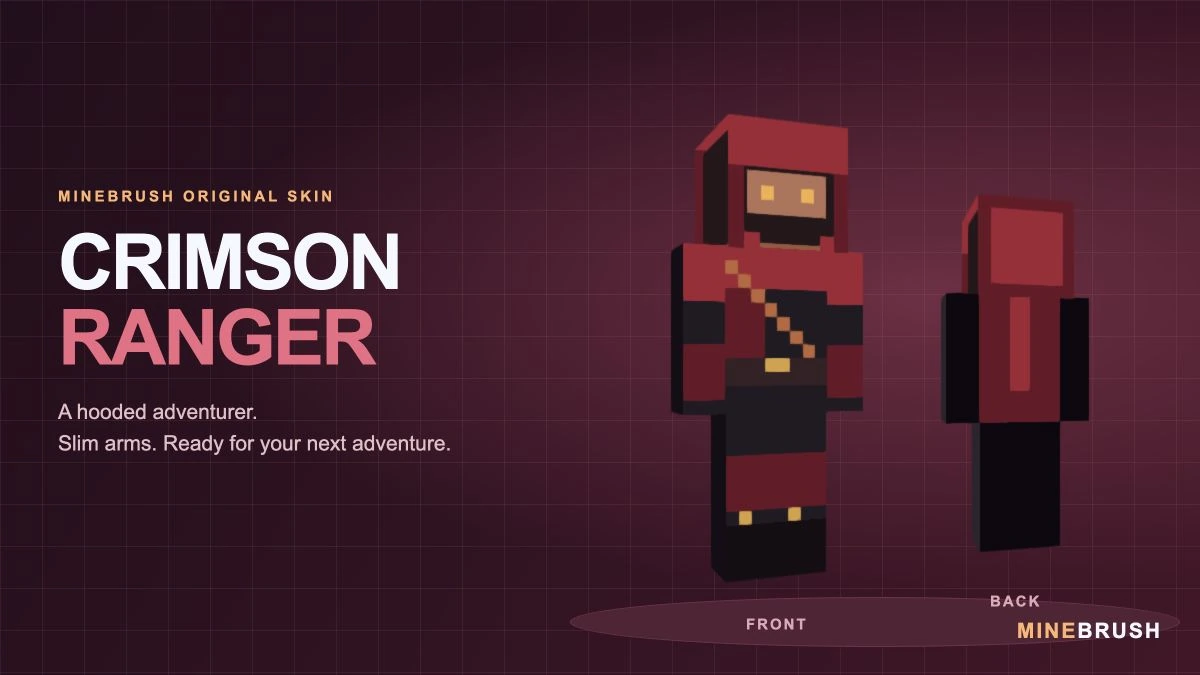
Crimson Ranger is a MineBrush original skin with a red hood, dark adventurer’s clothes and warm gold accents. The covered lower face, diagonal chest strap and compact belt give it the look of a travelling scout. Its stronger red areas help the silhouette stand out while the darker sleeves and boots keep the ranger outfit restrained.
This skin uses the Slim / Narrow model with three-pixel arms. Download the ZIP, extract crimson-ranger-64x64.png and choose Slim when importing it. The preview below uses that exact model and source texture.
Choose a role for your ranger
- A fantasy explorer: wear it while following woodland paths, searching ruins or setting out from a medieval settlement.
- A survival traveller: give your character a consistent expedition outfit for mapping, visiting villages and building roadside shelters.
- A scout in a co-op group: the crimson hood works as a visual identity when your friends each choose a different role or colour.
- An adventure-map character: use the ranger theme for a treasure hunt, parkour journey or story-driven playthrough where custom skins are allowed.
The role is yours to invent. The skin does not include a bow, special abilities, stealth mechanics or protection from damage. Gold-coloured eyes and buckles are painted details, not a night-vision or lighting effect.
Look closely at the hood, strap and back
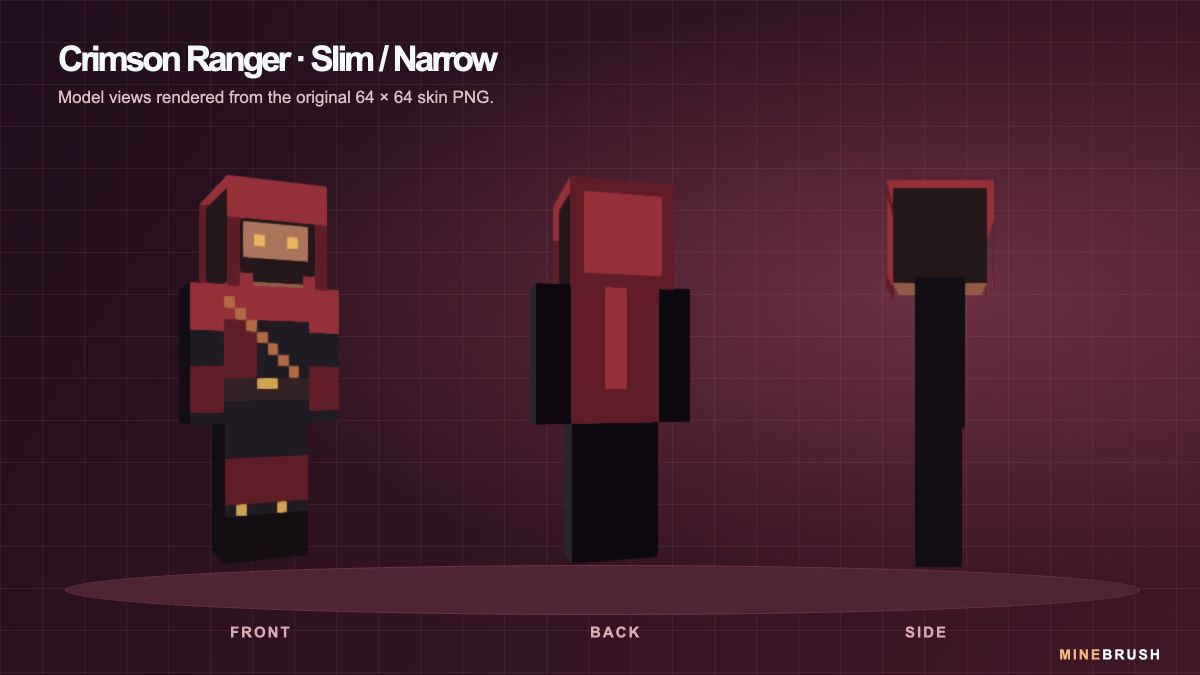
The front has a warm diagonal strap over the dark shirt and a gold-coloured belt buckle. The back shows a long crimson panel and a brighter central stripe. These details are part of the skin texture; the back panel is not a separate animated cape.
The side view is especially useful here: it shows the narrow sleeve and how the hood surrounds the head. This is why choosing the correct arm model matters more than the square dimensions of the PNG alone.
Download Crimson Ranger
This download is a ZIP containing crimson-ranger-64x64.png. Extract it with your device’s file manager. The small, flat PNG is the skin Minecraft needs; the large character preview and cover are for viewing only.
No mod loader, resource pack or executable is required. Keep the skin as PNG and do not resize it before importing. Saving it as JPEG or using a screenshot of the preview will not preserve the skin layout.
Choose Slim / Narrow, not Classic / Wide
Crimson Ranger is drawn for three-pixel-wide arms, the shape Minecraft calls Slim. The Classic/Wide model uses a different arm layout. Choosing it can expose misplaced pixels or change how the sleeve wraps around the arm.
When the importer offers two silhouettes, select the one with thinner arms. If the hands or sleeves look wrong later, change the saved skin’s model to Slim first. The original PNG does not need to be repainted for its intended model.
Put it on in Minecraft Java Edition
- Extract the downloaded ZIP and locate crimson-ranger-64x64.png.
- Open Minecraft Launcher and select Minecraft: Java Edition.
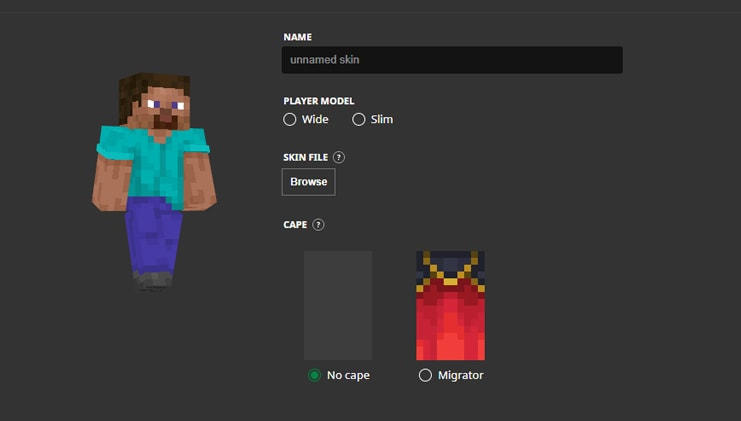
- Open Skins, choose New Skin and give it a recognisable name such as Crimson Ranger.
- Select Slim / Narrow, choose Browse and select the extracted PNG.
- Choose Save & Use. If Minecraft was already running, restart the game before checking the new appearance.
You can also use the custom-skin upload in your Java profile on Minecraft.net. Select the same Slim model and upload the extracted PNG there.
Using the PNG in Bedrock
On Bedrock platforms that support importing a custom Classic skin, use the Dressing Room, select a character slot and open Classic Skins. Find the import/custom-skin option, select the extracted PNG from your device and choose the slim-armed model when prompted.
Mojang documents local custom-skin import on Windows and mobile. Console editions do not provide the same local PNG import route. If your device has no import option, buying or installing a mod loader will not add that option to this file.
Keep a copy of the PNG on each device where you want to use it. Do not assume an imported Bedrock skin will automatically sync to every device on the same account. In Bedrock, “Classic Skins” is the name of the imported-skin category; it does not mean you should select wide arms. Choose the Slim silhouette for Crimson Ranger. Imported PNG skins are separate from outfits assembled item by item in Character Creator.
Get the most from the ranger look
Switch to third-person view to see more than your arm. In Java, use the assigned perspective key, normally F5; some keyboards require an Fn combination. In Bedrock, use the camera-perspective setting available on your device.
For a character portrait, stand in even lighting and turn slightly so the hood, diagonal strap and one narrow sleeve are visible. A forest trail, camp or castle gateway makes a fitting backdrop; none of those locations is included with the skin. Equipped armour can cover much of the ranger outfit. You can remove it for a posed picture in a safe setting, but the skin itself offers no protection during survival play.
If you use shaders or visual packs, the crimson and gold colours may look warmer, darker or brighter than the neutral model preview. The downloaded skin does not include those lighting effects.
Quick fixes
- The importer cannot find a skin: extract the ZIP first and select the PNG inside, not the archive.
- The image is rejected: check that you selected the original 64 × 64 PNG instead of the large preview. Download it again if another app converted or resized it.
- The sleeves show misplaced pixels: change the arm model to Slim.
- The old skin still appears: confirm Save & Use, check that you are using the intended account and restart the game.
- Another player sees a default skin: check the game’s skin/account connection and any custom-skin restrictions in that session. A successful local preview does not guarantee that every server or device will display it identically.
- The outfit seems to have disappeared: check whether armour is covering it before replacing the skin.
To change back, choose a previous skin in the Java Launcher’s skin library or another saved character in Bedrock’s Dressing Room. Your worlds and builds remain in place.
Credits and official help
Skin and model previews: MineBrush Studio. Crimson Ranger is an original MineBrush design. The downloadable PNG is the source used for its model views and cover, rather than a resized illustration.
Installation references: Mojang’s guide to Minecraft skins, including the Launcher illustration above; official Java custom-skin help; and Mojang’s Classic-skin and platform FAQ. The model previews demonstrate the file’s appearance; they are not a claim of independent in-game testing.
More from MineBrush.
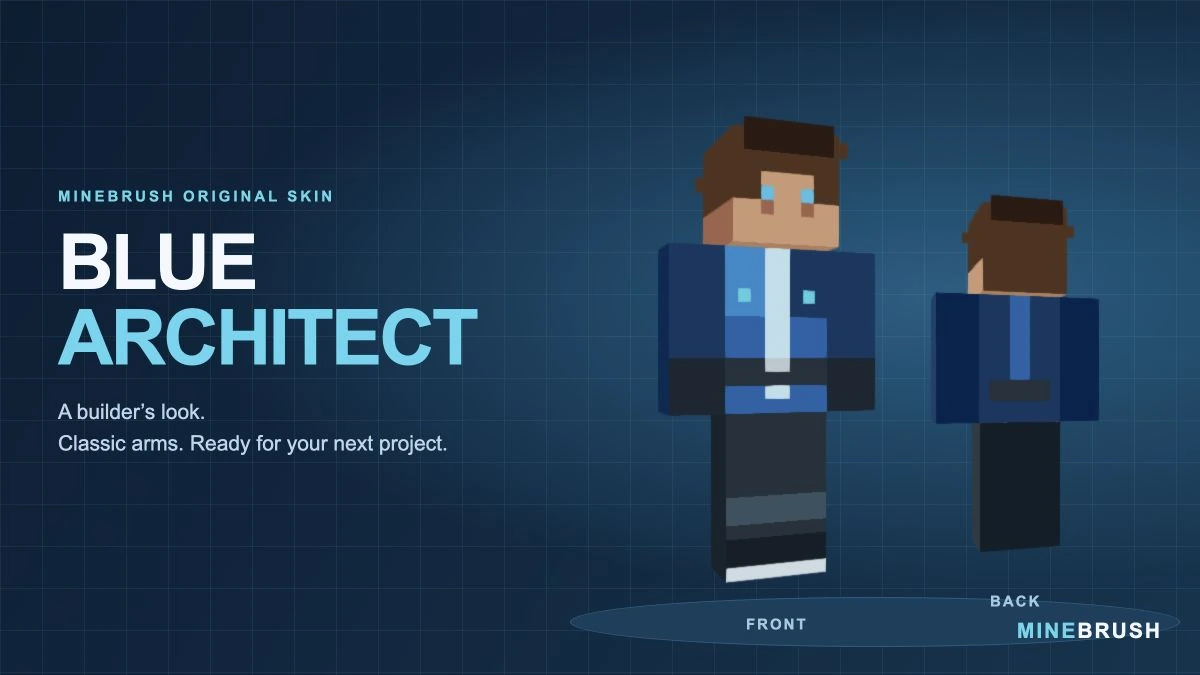
A blue workshop outfit for builders and survival projects. Inspect the real skin from three angles, download its PNG in a ZIP and follow the Classic/Wide import steps.
- Model
- Classic (4 px arms)
- Texture
- 64×64 PNG
- Import
- Java Launcher; supported Bedrock Classic Skin import
Extract the PNG, then choose Classic / Wide
Minecraft · Skin
Blue Architect
A blue workshop outfit for builders and survival projects. Inspect the real skin from three angles, download its PNG in a ZIP and follow the Classic/Wide import steps.
Extract the PNG, then choose Classic / Wide
- Minecraft version
- Classic / Wide skin import
- Game edition
- Cross-edition
- Loader / platform
- Not applicable
- License
- Original MineBrush design
- Skin model
- Classic (4 px arms)
- Platform family
- Cross-edition
- Supported devices
- Java Launcher; Bedrock local skin import on supported devices
- Install format
- ZIP containing a 64×64 PNG
- Touch readiness
- Not required
- Resource type
- Skin
- Last verified at
- Sep 14, 2026
- Compatibility confidence
- Source claimed
- Card evidence statement
- Model preview from the original PNG; no independent gameplay test
- Skin texture resolution
- 64×64 PNG
- Skin PNG validation
- Original 64×64 PNG; choose Classic / Wide
- Skin import scope
- Java Launcher; supported Bedrock Classic Skin import
- Skin preview status
- Model views from the downloadable skin
- Card delivery statement
- PNG inside ZIP · Classic / Wide
- Card limitation note
- Extract the PNG, then choose Classic / Wide
- Edition applicability
- Java + Bedrock
- Delivery state
- Direct download
- Lifecycle state
- Current
- Skin import route
- Java Launcher upload
- Skin texture
- 64x64 PNG validated
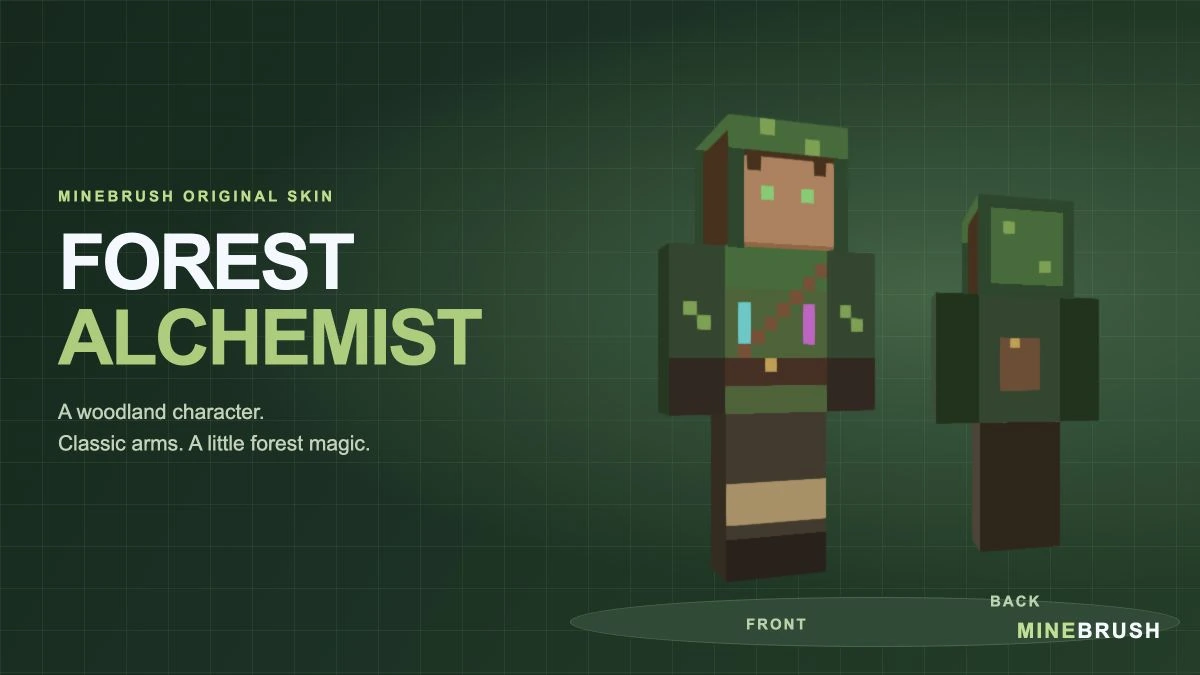
A woodland alchemist with a green hood, painted potion vials and a back satchel. See the real skin, compare the hood layer and download the Classic/Wide PNG in a ZIP.
- Model
- Classic (4 px arms)
- Texture
- 64×64 PNG
- Import
- Java Launcher; supported Bedrock Classic Skin import
Choose Classic / Wide; show the Hat layer for the complete hood
Minecraft · Skin
Forest Alchemist
A woodland alchemist with a green hood, painted potion vials and a back satchel. See the real skin, compare the hood layer and download the Classic/Wide PNG in a ZIP.
Choose Classic / Wide; show the Hat layer for the complete hood
- Minecraft version
- Classic / Wide skin import
- Game edition
- Cross-edition
- Loader / platform
- Not applicable
- License
- Original MineBrush design
- Skin model
- Classic (4 px arms)
- Platform family
- Cross-edition
- Supported devices
- Java Launcher; Bedrock local skin import on supported devices
- Install format
- ZIP containing a 64×64 PNG
- Touch readiness
- Not required
- Resource type
- Skin
- Last verified at
- Sep 14, 2026
- Compatibility confidence
- Source claimed
- Card evidence statement
- Model preview from the original PNG; no independent gameplay test
- Skin texture resolution
- 64×64 PNG
- Skin PNG validation
- Original 64×64 PNG; choose Classic / Wide
- Skin import scope
- Java Launcher; supported Bedrock Classic Skin import
- Skin preview status
- Model views from the downloadable skin
- Card delivery statement
- PNG inside ZIP · Classic / Wide
- Card limitation note
- Choose Classic / Wide; show the Hat layer for the complete hood
- Edition applicability
- Java + Bedrock
- Delivery state
- Direct download
- Lifecycle state
- Current
- Skin import route
- Java Launcher upload
- Skin texture
- 64x64 PNG validated
Player discussion 0
Questions, discoveries and help from other players.