
MineBrush publication
Sodium Translations: Languages, Settings and Download
Read Sodium's graphics settings in your own language. Download Sodium Translations 8.14.0 for Java 1.20–26.2, enable the pack, choose your language and understand tooltips, pack priority and updates.
Translations for Sodium makes Sodium's graphics settings easier to understand in your own language. It supplies community translations for menu labels, explanations and messages. If Minecraft is already in Russian, Ukrainian, Spanish or another supported language but Sodium still shows English text, this resource pack can fill that gap.
The download below is Sodium Translations 8.14.0, released September 12, 2026. The author lists this release for Minecraft Java 1.20 through 26.2. It requires Sodium in the same instance. The ZIP is a resource pack: you enable it in Resource Packs after installing the appropriate Sodium mod for your game version.
When this pack is useful
- Understand a setting before changing it. Read the translated tooltip for render distance, frame limits or graphics quality instead of guessing from the English label.
- Help someone configure their game. A friend or younger player can follow the settings in their usual Minecraft language. Explain one setting at a time and let them read its description.
- Make a modpack feel more consistent. Keep Sodium's menus closer to the language used by the rest of Minecraft. Each player can select their own language while using the same ZIP.
- Recognize warnings and buttons. Translated messages and Apply/Undo labels can make it clearer what the menu is asking you to do.
- Compare advice in different languages. Temporarily switch Minecraft to English when following an English tutorial, then return to your preferred language afterward. You do not need a second translation ZIP.
The pack changes words, not rendering behavior. Installing it does not increase FPS, choose optimal settings, add shaders or change your world's appearance. Its benefit is helping you understand the controls Sodium already provides.
See the translated menus
These are original examples from the project's author gallery, uploaded May 4, 2023. They show the purpose of the pack in an older Sodium interface; current versions can have different tabs, options and wording. Each image opens its unchanged original.
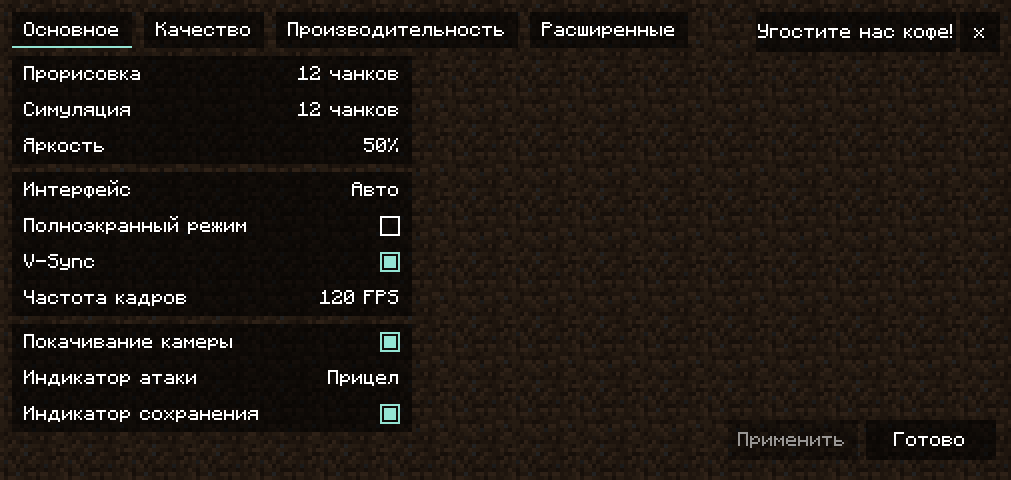
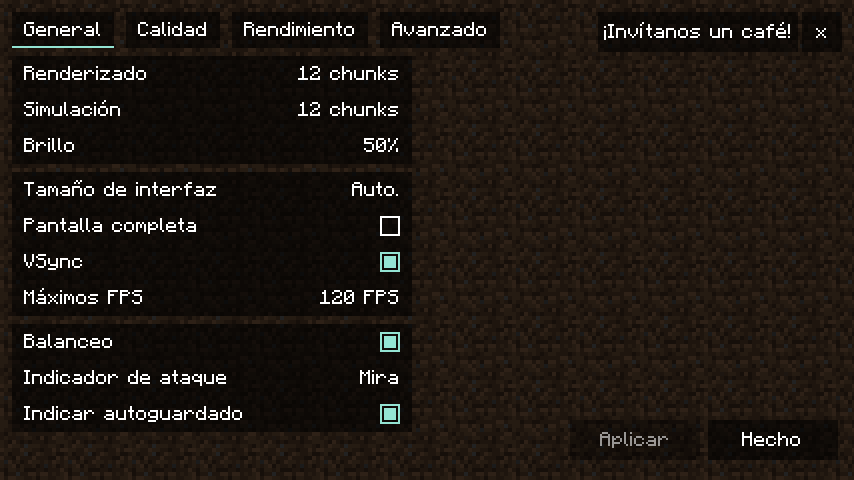
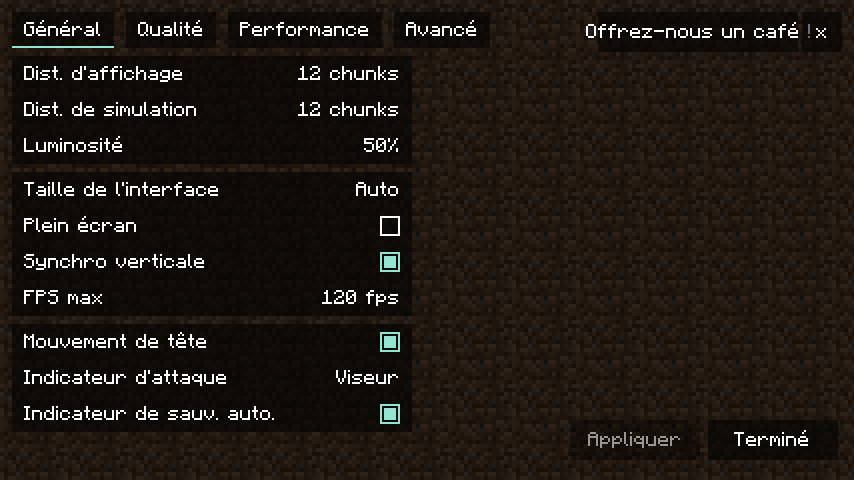
Download Sodium Translations 8.14.0
One ZIP contains the languages. You do not need separate Russian, Ukrainian or Spanish downloads. Use the native download below, then keep the file compressed.
Required: Sodium for your Minecraft version and loader. If your modpack already includes Sodium, keep its compatible installation. Otherwise use our Sodium guide and downloads to choose the correct route. A newer translation pack is not a reason to replace a working stable Sodium with a beta.
This download is for Java Edition on Windows, macOS or Linux. It is not a Bedrock or mobile Bedrock pack. The translation ZIP itself has no separate Fabric/NeoForge variants; your Sodium installation still needs to match its loader and game version. For Minecraft older than 1.20, consult the official version history for a suitable older release.
Install and enable the translation
- Launch the Minecraft instance where Sodium is installed. Open Options → Resource Packs → Open Pack Folder. This selects the correct instance even if you use several modpacks.
- Place SodiumTranslations.zip in that folder. Do not extract it and do not place it in
mods. - Return to Resource Packs and move Sodium Translations from Available to Selected. If the entry has not appeared yet, close and reopen the screen.
- Put it above other packs that also translate Sodium, then press Done and wait for resources to reload.
- Open Minecraft's Language menu and choose the language you want to play in. Enabling the pack alone does not change an English language selection.
- Open Options → Video Settings. Read a category heading and hover an option to check its translated explanation.
There is no command, recipe or in-world item to activate. You can use the pack with an existing save and on multiplayer servers. It works on your own client; the server and other players do not have to install it.
Which languages can I use?
The author's August 2026 list includes Russian, Ukrainian, English-derived Anglish, Arabic, Belarusian, Bulgarian, Czech, Danish, Dutch, Estonian, Finnish, French, German, Greek, Hebrew, Hungarian, Italian, Japanese, Korean, Malay and Malay Jawi, Norwegian Nynorsk, Persian, Polish, Portuguese and Brazilian Portuguese, Romanian, Serbian Cyrillic, Spanish and Venezuelan Spanish, Swedish, Turkish, Vietnamese, Simplified Chinese and two Traditional Chinese variants.
Translation progress varies by language and by the Sodium version you use. A language being available does not promise that every new option is already translated. Some English text can remain when Sodium adds a setting before volunteers translate it. Choose the matching regional language in Minecraft where available; for example, Brazilian Portuguese and Portuguese are separate selections.
The project normally publishes a new version on Saturdays when there are changes. You do not need to reinstall the pack every week if your menus are already clear. Updating is most useful after new Sodium options appear or a translation you use has been corrected.
Use tooltips to make better choices
After enabling the pack, hover the setting you want to understand. For example, render distance describes how far you can see, while simulation distance concerns how far the world is actively updated. Reading both explanations can stop you from changing the wrong slider when following a performance guide.
For a laptop, read the frame-limit and VSync explanations before changing them. For a visual issue, look at the relevant quality option rather than changing every performance switch. The translation does not decide the best values for your device: change one setting, apply it and compare the result in the same world. Keep advanced options at their defaults when you do not need their specific behavior.
If a tutorial uses English option names, switch Minecraft to English briefly to locate the same option. Switching language changes its label, not its purpose. Return to your usual language when finished.
Pack order and other language mods
Resource packs higher in the Selected list take priority when they supply the same text. Put Sodium Translations above another pack that edits Sodium's translations if you want these words to appear. Ordinary block-texture packs can remain enabled; this package supplies language resources rather than replacement block textures.
A modpack may already include the pack. Check its Selected list before adding another copy. If you prefer a modpack's custom wording, keep that pack above this one. When menus unexpectedly mix translations, temporarily disable competing language packs and reopen Video Settings to identify the override.
Language Reload can be useful for frequent language switching, but it is optional. It does not replace the actual translations supplied here. This pack targets Sodium; it does not promise translations for every separate settings add-on, other mods or player chat.
If the translation does not appear
- Everything is still English: check Minecraft's selected language, confirm the pack is in Selected, and reopen Video Settings after the resource reload.
- The ZIP is missing from the list: use Open Pack Folder from the instance you actually launched. Check that the ZIP is in
resourcepacksand has not been placed inside another downloaded folder. - Only a few options remain English: check for a newer pack release. A recently added Sodium option or a separate add-on may not have a translation yet.
- Another translation keeps returning: move this pack above competing language packs, or temporarily disable them to compare.
- A long label is difficult to read: try a smaller GUI scale or a wider game window. An older gallery image cannot show how every current translation fits your screen.
- Minecraft reports incompatible pack versions: check the release's game-version listing before enabling it. The file here is listed for 1.20–26.2; use an appropriate release for another branch instead of changing the ZIP's metadata.
- A sentence is wrong or confusing: use the project's Crowdin page to report the phrase, with the language and a screenshot of the affected setting. Suggestions and votes help volunteers improve it.
Update or remove the pack
To update manually, replace the older ZIP in the same instance's resourcepacks folder with the newer download, then reopen the Resource Packs screen and check that the pack remains selected. Avoid keeping duplicate copies with indistinguishable names. If your launcher manages the pack, use its update controls for that instance.
To remove it, move the pack out of Selected and press Done. Delete the ZIP afterward if you no longer want it. This removes its translations without uninstalling Sodium or deleting your worlds. Minecraft and other active packs supply the remaining menu text.
Authors and sources
Translations for Sodium is maintained by Madis0, Reese and community translators. The project uses CC0-1.0 and welcomes contributions through Crowdin. MineBrush hosts the original release ZIP and provides this player guide. The cover is a MineBrush editorial illustration; the menu images are historical author screenshots.
- Official project and language list
- Sodium Translations 8.14.0 release
- Author's installation instructions and source
- Translation contributions and corrections
More for your Java setup.
Sodium
0.9.1Make Minecraft Java feel smoother with Sodium. Download the Fabric or NeoForge version for Java 26.2, follow the installation steps, and find help with shaders, resource packs and startup problems.
- Minecraft
- Java 26.2
- Loader
- Fabric
- Runtime
- Client
Java 26.2 · choose Fabric or NeoForge
Java · Mod
Sodium
Make Minecraft Java feel smoother with Sodium. Download the Fabric or NeoForge version for Java 26.2, follow the installation steps, and find help with shaders, resource packs and startup problems.
Java 26.2 · choose Fabric or NeoForge
- Minecraft version
- Java 26.2
- Game edition
- Java Edition
- Loader / platform
- Fabric
- License
- Polyform Shield 1.0.0
- Platform family
- Bedrock & Mobile
- Supported devices
- Windows · macOS · Linux
- Install format
- .jar mod file from the creator
- Touch readiness
- Not required
- Resource type
- Mod
- Project version
- 0.9.1
- Last verified at
- Sep 19, 2026
- Secondary guide action
- Setup & fixes
- Compatibility confidence
- Source claimed
- Java mod loader
- Fabric
- Java runtime side
- Client
- Card evidence statement
- Compatibility information from CaffeineMC
- Card delivery statement
- Download from MineBrush · 2 loader versions
- Card limitation note
- Java 26.2 · choose Fabric or NeoForge
- Edition applicability
- Java
- Delivery state
- Direct download
- Lifecycle state
- Current
Language Reload
1.7.7Play in your preferred language and still find the items named in an English guide. Language Reload adds fast switching, language fallbacks and multilingual item search for Minecraft Java 26.2, with practical controls and required downloads.
- Minecraft
- Java 26.2
- Loader
- Fabric
- Runtime
- Client
Uses existing translations; does not translate player chat
Java · Mod
Language Reload
Play in your preferred language and still find the items named in an English guide. Language Reload adds fast switching, language fallbacks and multilingual item search for Minecraft Java 26.2, with practical controls and required downloads.
Uses existing translations; does not translate player chat
- Minecraft version
- Java 26.2
- Game edition
- Java Edition
- Loader / platform
- Fabric
- License
- MIT
- Platform family
- Java & PC
- Supported devices
- Windows · macOS · Linux
- Install format
- .jar mod file from the creator
- Touch readiness
- Not required
- Resource type
- Mod
- Project version
- 1.7.7
- Last verified at
- Sep 13, 2026
- Secondary guide action
- Setup & fixes
- Compatibility confidence
- Source claimed
- Java mod loader
- Fabric
- Java runtime side
- Client
- Card evidence statement
- Search items across selected languages and switch without a full resource reload
- Required dependency
- Fabric API for 26.2; Mod Menu optional
- Card delivery statement
- Download on MineBrush · mod and required Fabric API
- Card limitation note
- Uses existing translations; does not translate player chat
- Edition applicability
- Java
- Delivery state
- Direct download
- Lifecycle state
- Current
Player discussion 0
Questions, discoveries and help from other players.