
MineBrush publication
VeinMiner Hotkey: Preview Blocks, Choose Patterns and Mine with a Key
Activate vein mining with a key, preview connected blocks and choose tunnel or stairs patterns. Download VeinMiner Hotkey for Java 26.2 with its base mod, libraries and practical controls.
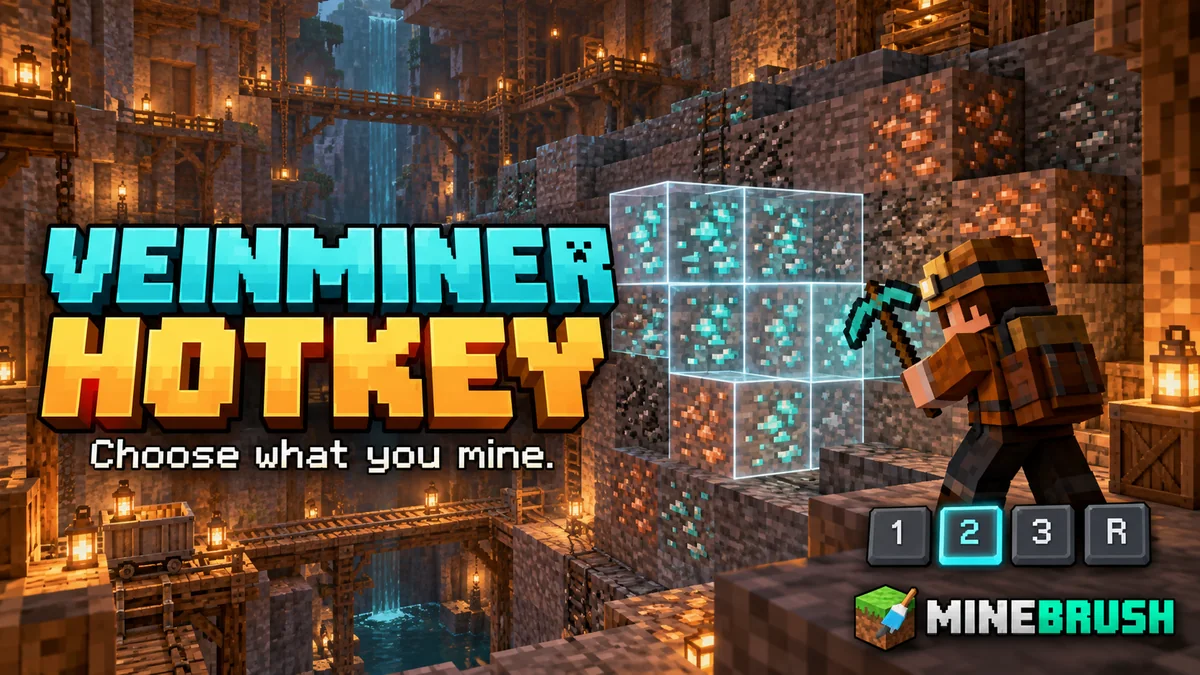
VeinMiner Hotkey puts you in control of when and how you mine a group of blocks. Hold a key to activate vein mining, inspect the highlighted blocks before breaking, and switch between mining patterns without opening a menu every time. It is useful when you want fast resource gathering but still need ordinary, precise mining around a build.
This is the client add-on for Miraculixx’s VeinMiner, also listed as VeinMiner Client. It needs the base VeinMiner: in single-player that belongs in your game profile; on a server the server must also support VeinMiner. Installing Hotkey alone does not give a vanilla server mass mining.
Where the hotkey and preview help
- Gather an ore vein: aim at an exposed ore, hold the key and inspect the connected selection before mining. This gives you a clearer idea of the group you are about to remove.
- Work near a build: use ordinary mining for individual corrections, then activate vein mining only for the group you intend to clear. A hold binding is convenient because releasing it stops the activation state.
- Dig a passage: choose a tunnel pattern and suitable dimensions for an access route. This only works on blocks allowed by your world or server; an ore-only configuration will not automatically turn stone into an eligible block.
- Clear a surface or make steps: flat and stairs patterns offer more controlled shapes than following an irregular vein. Preview the selection before starting, especially near floors or existing walls.
- Harvest configured logs: the add-on can work with a server’s log-and-axe group. It does not itself add every wood type to the allowed list or distinguish a tree from logs in a house.
Download the matching Java 26.2 setup
The current Hotkey release here is 2.12.1. Choose the section matching your loader and use one copy of each required component. These are Java mods for PC, not Bedrock add-ons.
Fabric / Quilt
Use the Fabric/Quilt Hotkey and base VeinMiner files, plus Fabric API and Fabric Language Kotlin. For the Fabric setup below, use Fabric Loader 0.19.5 or newer: the current Kotlin library needs that loader version. Minecraft 26.2 uses Java 25.
The author lists the same mod files for Quilt. Keep its Fabric-compatible API and language support matched to 26.2; these files are not a reason to switch an older Quilt profile to an unsupported game version. Fabric is the straightforward starting point for the listed library set.
NeoForge
Use the two NeoForge mod files and KotlinLangForge. Do not add Fabric API or Fabric Language Kotlin to this setup. KotlinLangForge is the dependency named by this release; Kotlin for Forge is a different project.
Using a server? Keep the client components in your game profile and have the server owner provide the matching base VeinMiner support. A Paper/Purpur/Folia server uses its separate base plugin; the Hotkey client JAR does not belong in its plugins folder. See our base VeinMiner guide and downloads for that route. This page does not provide a Forge Hotkey build.
For another Minecraft version, select that version in the author’s release history. Matching the mod name alone is not enough.
Install and mine your first vein
- Close Minecraft and open the game folder for your chosen launcher instance.
- Place the matching Hotkey, base mod and required libraries in
mods. Replace old copies of the same components instead of keeping duplicate versions. - Launch the corresponding modded profile. Open Options → Controls → Key Binds and find the Veinminer category.
- Check Veinmining (Hold). The usual key is Y, or Z with some keyboard layouts; you can assign a different unused key.
- Enter a world with base VeinMiner installed. Aim at a small allowed ore vein with a suitable pickaxe, hold the key and inspect the outline.
- Break the starting ore with the normal attack/mining action while holding the key. The base mod handles the eligible connected blocks according to the world’s rules.
The hotkey is an activation control, not a replacement for the ordinary mining button. You still need the correct tool for the block. Tool wear, allowed blocks, maximum chain size and any configured hunger cost come from base VeinMiner’s settings.
Hold, toggle and change patterns
Veinmining (Hold) is the easiest starting point: press it for the current job and release it for normal mining. Veinmining (Toggle) is unbound by default; assign a key if you prefer switching the mode on and off. Watch the active indicator when using toggle so you do not leave group mining enabled unintentionally.
While holding the mining hotkey, scroll the mouse wheel to select a pattern. Hold Shift as well while scrolling to adjust the pattern’s depth or width control. Read the on-screen selection before breaking a block; ordinary hotbar scrolling and pattern scrolling serve different purposes.
Open Client Settings uses O in the current source and project instructions. Older gallery text mentions P, so follow the binding shown in your own Controls menu. You can also reach configuration through optional Mod Menu on Fabric.
Choose a useful mining shape
- Normal: the familiar connected-block route. Use it for irregular veins of eligible ore.
- Flat: a planar selection for working across a surface. Check which face and layer the preview selects before clearing it.
- Tunnel: set width and height for a passage, then adjust its extent with the in-game controls. Start small when opening a route near other rooms.
- Stairs: configure an upward or downward stepped route. This is useful for access between levels when those blocks are allowed for vein mining.
The configuration screen lets you add and remove patterns, change their type, adjust dimensions and colours, and reorder the list. Keep the shapes you actually use near each other so wheel selection is quicker. The scroll-direction setting helps if the selection moves opposite to what you expect.
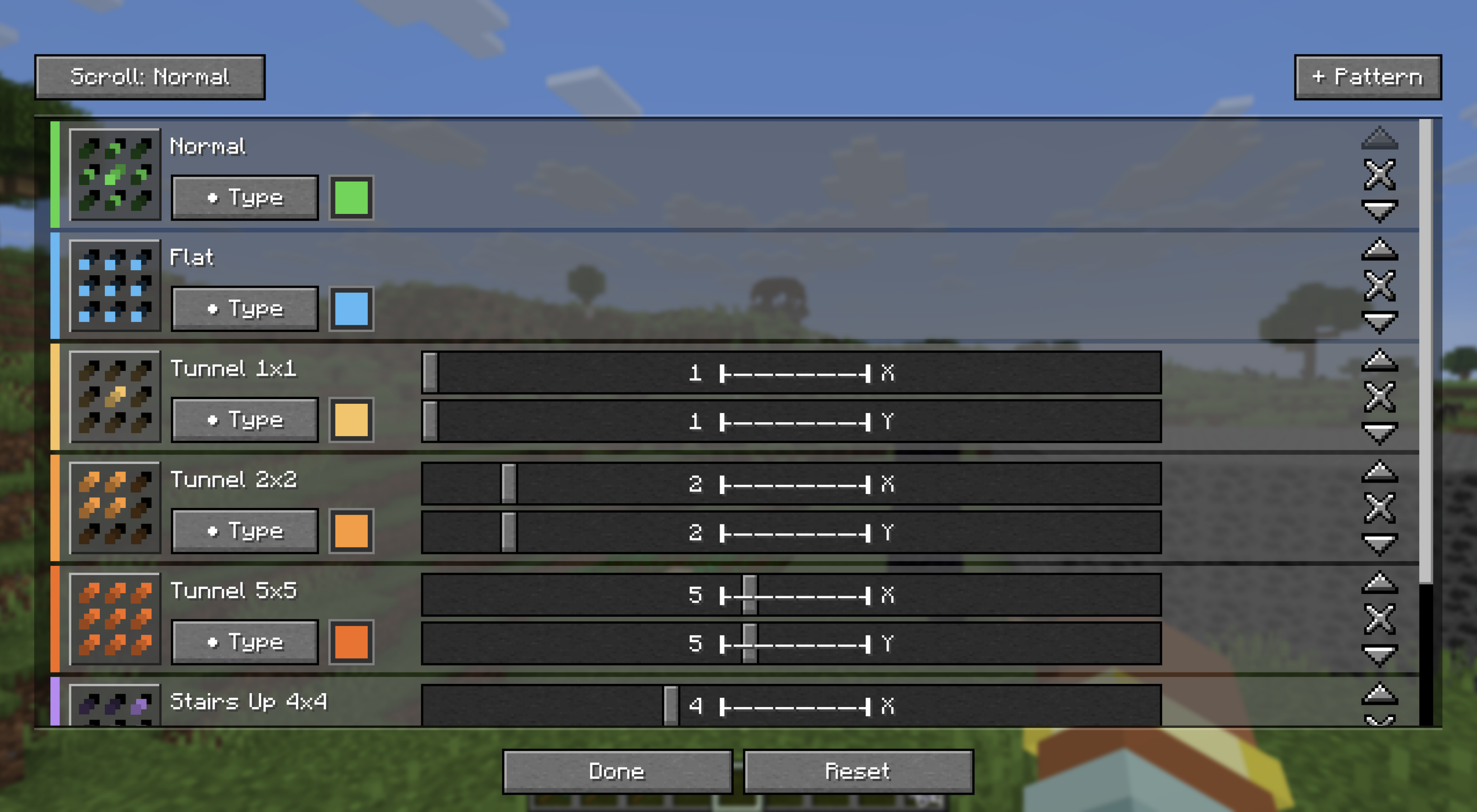
A shape is not permission to mine every block. Base VeinMiner normally starts with ore-and-pickaxe rules. For stone tunnels, log harvesting or other jobs, your world/server needs suitable block groups or settings. Choosing a larger shape also does not remove the server’s block-count limit.
Understand the block preview
The outline shows the client’s predicted selection. The dynamic crosshair indicates that vein mining is active. Translucent highlighting can show outlines behind other blocks, making the extent of a connected group easier to inspect; the server can disable this feature.
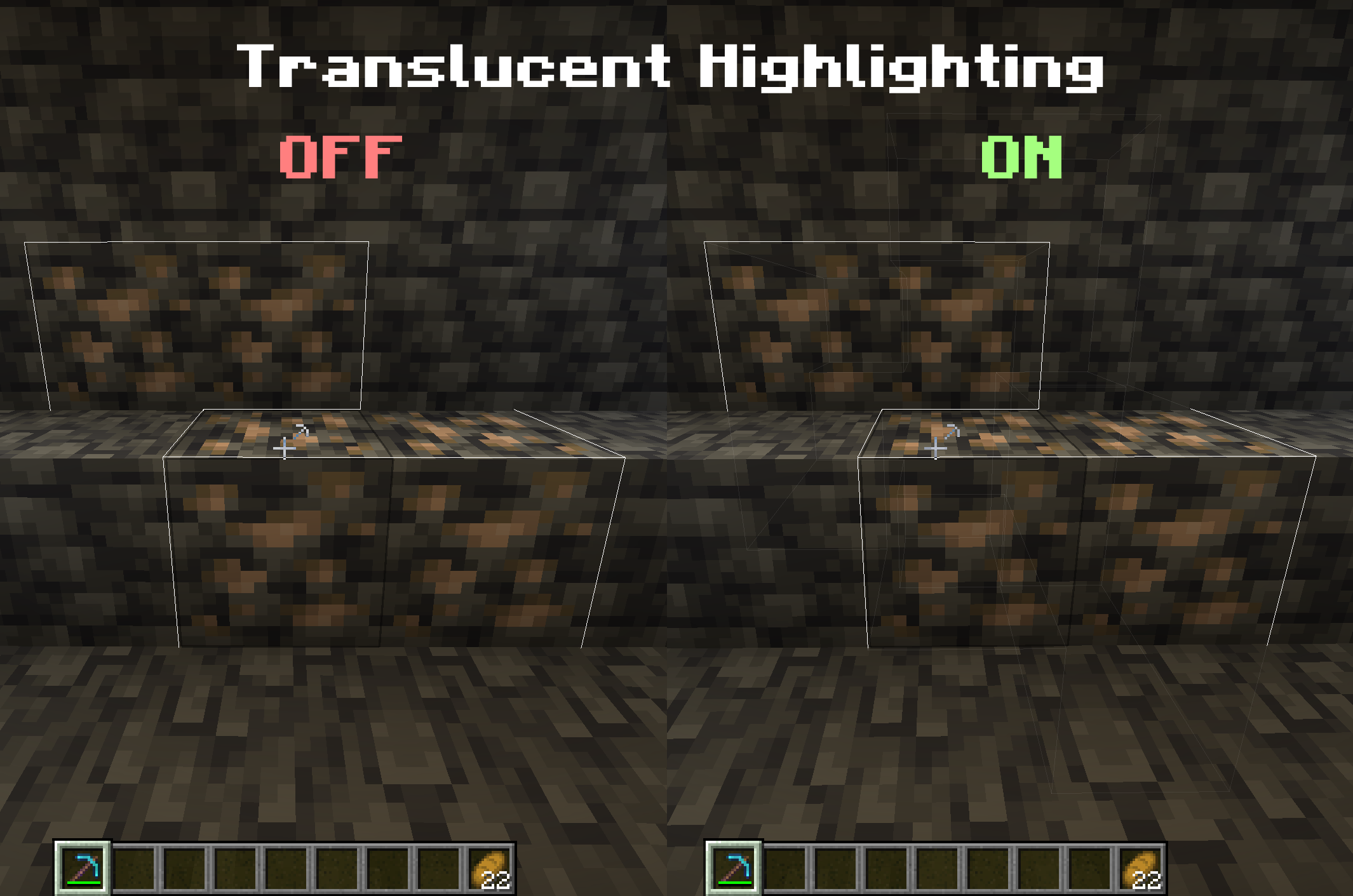
The final result still depends on the server: protection, allowed tools, block rules and chain limits can reduce or cancel a selection. If fewer blocks break than the preview suggests, check those rules rather than assuming the next key press should remove everything.
Useful settings for your own world
Ordinary players can change their key bindings and patterns. World/server settings require the appropriate permissions. For a server you manage, the author documents /veinminer settings client ... with these options:
- allow: permits the client add-on. If disabled, its controls cannot enable mining anyway.
- translucentBlockHighlight: controls whether the preview is visible through other blocks.
- allowAllBlocks: allows hotkey users to mine more than the normal block groups, while other rules still apply. It is false by default; leave it off if the world is intended to allow ores only.
The base mod’s group settings are a better fit for specific jobs such as allowing logs only with axes. Our VeinMiner guide explains those rules. If the separate enchantment add-on is used, its enchanted-tool requirement still applies.
When something does not work
- “Veinminer Not Available” in single-player: install the matching base VeinMiner as well as Hotkey and its libraries.
- “Veinminer Disabled” on a server: that server lacks support or has disallowed the client add-on. Installing another client copy does not change the server’s configuration.
- No activation or the wrong menu opens: check the actual Hold and Open Client Settings bindings, including conflicts with zoom, voice-chat and other mods.
- The wheel changes the wrong thing: check whether Hold or Toggle is active and whether Shift is down. Version 2.12.1 fixes the toggle hotkey consuming scroll input; update an older installation before working around that bug.
- Only one block breaks: confirm the mode is active, the block is allowed, the tool is suitable and the server has not limited or denied the action.
- A large selection causes stutter: use a smaller pattern or chain limit. Mining and dropping many blocks at once is additional work for both the world and the client.
- A missing-library error on launch: use the full matching set above. In particular, NeoForge needs KotlinLangForge; the Fabric set’s current Kotlin library needs Loader 0.19.5+.
To remove Hotkey, close the game and remove its client JAR. The base VeinMiner can still operate by its normal rules, so removing the add-on is not the same as disabling all vein mining. Keep shared libraries if other installed mods need them.
Release, authors and sources
VeinMiner Hotkey 2.12.1 was released August 23, 2026 by Miraculixx, Max Bossing and contributors. Besides the scroll fix, the release adjusts block-breaking events for Fabric/NeoForge and Paper event priority in the shared project. Hosted archives retain the authors’ original contents and license notices.
Sources: official Hotkey project and gallery, Fabric/Quilt release, NeoForge release, author’s controls and source code, base VeinMiner, Fabric API, Fabric Language Kotlin, and KotlinLangForge. The MineBrush cover is an editorial illustration; the guide images are dated author demonstrations.
More for your Java setup.

Understand Minecraft 26, tell normal releases from test builds, and choose the right version for friends, servers and mods. Clear Java and Bedrock examples without the technical clutter.
- Topic
- Choosing your Minecraft version
- Scope
- None
- Evidence
- Official Minecraft sources · checked 9 Sep 2026
A shared “26” prefix never proves cross-edition compatibility.
MineBrush · News
Minecraft Versions Made Simple
Understand Minecraft 26, tell normal releases from test builds, and choose the right version for friends, servers and mods. Clear Java and Bedrock examples without the technical clutter.
A shared “26” prefix never proves cross-edition compatibility.
- Compatibility confidence
- Source claimed
- Card evidence statement
- Official policy and indexes checked 9 Sep 2026; client display NOT_OBSERVED.
- Card delivery statement
- Choose a version for everyday play or testing
- Card limitation note
- A shared “26” prefix never proves cross-edition compatibility.
- Edition applicability
- Java + Bedrock
- News topic
- Choosing your Minecraft version
- Public news evidence label
- Official Minecraft sources · checked 9 Sep 2026
- Delivery state
- No file
- Lifecycle state
- Current
- News evidence type
- Official Minecraft source
VeinMiner
2.12.1 / datapack 1.3.5Mine connected ore with one block break, or configure groups for logs and other materials. Download VeinMiner for Java 26.2, choose Fabric, NeoForge, Paper or the vanilla datapack, and learn how to activate it and control tool wear.
- Minecraft
- 26.2
- Loader
- Fabric
- Runtime
- Server
Choose one platform · server rules apply
Java · Mod
VeinMiner
Mine connected ore with one block break, or configure groups for logs and other materials. Download VeinMiner for Java 26.2, choose Fabric, NeoForge, Paper or the vanilla datapack, and learn how to activate it and control tool wear.
Choose one platform · server rules apply
- Minecraft version
- 26.2
- Game edition
- Java Edition
- Loader / platform
- Fabric
- License
- AGPL-3.0-only
- Platform family
- Bedrock & Mobile
- Supported devices
- Windows · macOS · Linux
- Install format
- .jar mod or plugin / .zip datapack
- Touch readiness
- Not required
- Resource type
- Mod
- Project version
- 2.12.1 / datapack 1.3.5
- Last verified at
- Sep 5, 2026
- Secondary guide action
- Setup & fixes
- Compatibility confidence
- Source claimed
- Java mod loader
- Fabric
- Java runtime side
- Server
- Card evidence statement
- Four creator files checked 2026-09-05 · runtime not tested
- Required dependency
- Fabric: Fabric API + Kotlin; NeoForge: KotlinLangForge
- Card delivery statement
- Hosted mod, plugin and datapack files
- Card limitation note
- Choose one platform · server rules apply
- Edition applicability
- Java
- Delivery state
- Direct download
- Lifecycle state
- Current
Xaero's Minimap
26.5.0Find your way home, mark mines and portals, and organize expeditions with Xaero’s Minimap. Download for Java 26.2 with clear loader choices, illustrated waypoint controls and useful settings.
- Minecraft
- Java 26.2
- Loader
- Fabric
- Runtime
- Client
Waypoints, terrain and navigation
Java · Mod
Xaero's Minimap
Find your way home, mark mines and portals, and organize expeditions with Xaero’s Minimap. Download for Java 26.2 with clear loader choices, illustrated waypoint controls and useful settings.
Waypoints, terrain and navigation
- Minecraft version
- Java 26.2
- Game edition
- Java Edition
- Loader / platform
- Fabric
- License
- All Rights Reserved
- Platform family
- Java & PC
- Supported devices
- Windows · macOS · Linux
- Install format
- JAR
- Touch readiness
- Not required
- Resource type
- Mod
- Project version
- 26.5.0
- Last verified at
- Sep 14, 2026
- Secondary guide action
- Setup & fixes
- Compatibility confidence
- Source claimed
- Java mod loader
- Fabric
- Java runtime side
- Client
- Card evidence statement
- Official project and release documentation
- Required dependency
- Fabric API for Fabric; XaeroLib included
- Card delivery statement
- Download JAR
- Card limitation note
- Waypoints, terrain and navigation
- Edition applicability
- Java
- Delivery state
- Direct download
- Lifecycle state
- Current
WorldEdit Bedrock
0.11.0-beta.5 / 0.10.4Copy builds, replace materials and shape terrain with WorldEdit for Bedrock. Learn the wand, clipboard, brushes and undo, then choose the right download for a normal world, Windows Editor or dedicated server.
- Minecraft
- 26.10 minimum (beta); 1.21.130 (stable)
- Components
- Paired
- Package
- .mcaddon for worlds; .zip for dedicated servers
Beta APIs required. Start in a copied world.
Bedrock · Add-on
WorldEdit Bedrock
Copy builds, replace materials and shape terrain with WorldEdit for Bedrock. Learn the wand, clipboard, brushes and undo, then choose the right download for a normal world, Windows Editor or dedicated server.
Beta APIs required. Start in a copied world.
- Minecraft version
- 26.10 minimum (beta); 1.21.130 (stable)
- Game edition
- Bedrock Edition
- Loader / platform
- Bedrock
- License
- GPL-3.0-or-later
- Platform family
- Bedrock & Mobile
- Supported devices
- Windows · Android · iOS/iPadOS
- Install format
- .mcaddon for worlds; .zip for dedicated servers
- Touch readiness
- Check guide
- Resource type
- Add-on
- Project version
- 0.11.0-beta.5 / 0.10.4
- Last verified at
- Sep 15, 2026
- Compatibility confidence
- Source claimed
- Bedrock add-on packs
- Paired
- Bedrock add-on import route
- Import the normal .mcaddon; activate both packs and Beta APIs.
- Required experiments
- Required
- Card evidence statement
- Select, copy, replace and shape your builds
- Card delivery statement
- Normal add-on, Windows Editor and server packages
- Card limitation note
- Beta APIs required. Start in a copied world.
- Edition applicability
- Bedrock
- Delivery state
- Direct download
- Lifecycle state
- Current
Player discussion 0
Questions, discoveries and help from other players.