
MineBrush publication
Cloth Config: Choose the Right File and Make Mod Settings Work
Install the Cloth Config build your mods need, find their settings and fix invalid values without losing your setup. Includes Fabric downloads for Java 26.3 and 26.2, a separate NeoForge 26.2 file and practical configuration tips.
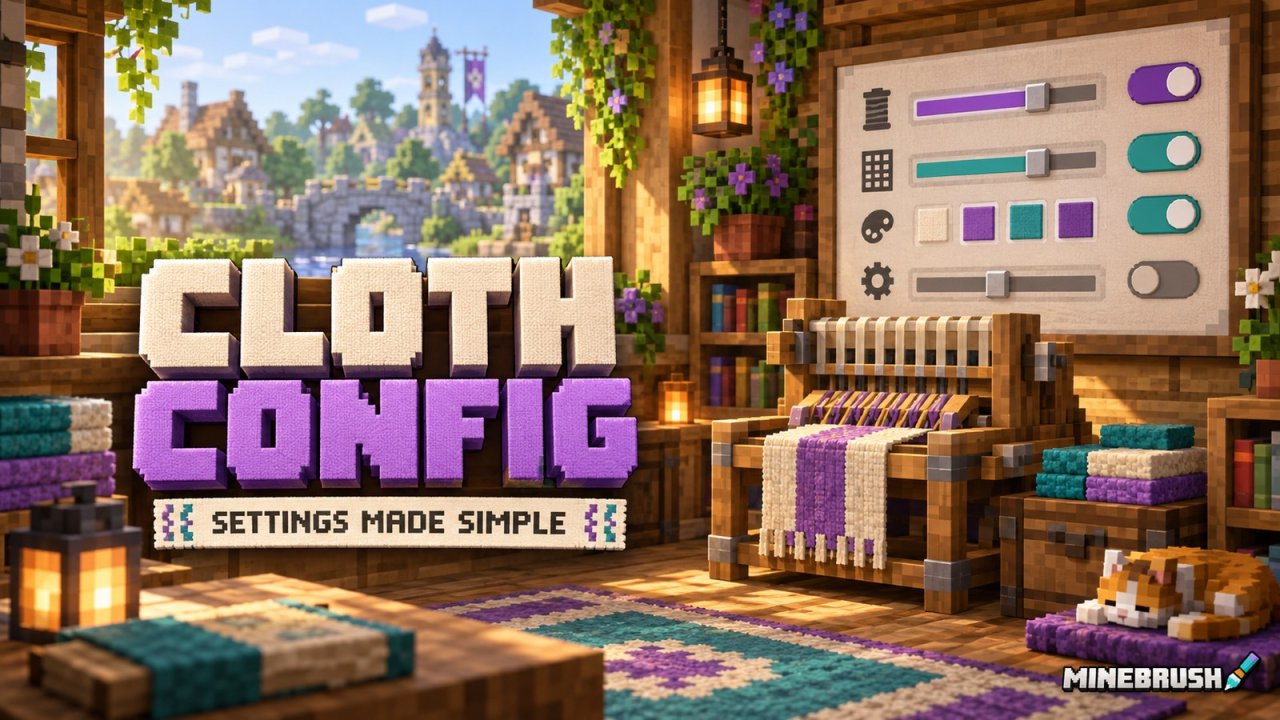
Cloth Config API helps Minecraft mods give you usable settings screens. Instead of changing a number in a configuration file and hoping you got the format right, a mod can offer labelled options, categories, tooltips and controls that check what you enter.
Most players meet Cloth Config when another mod lists it as a requirement or Minecraft reports that it is missing. Install the right build for that modpack, then open the settings of the mod you actually want to adjust. Cloth Config supplies the interface; the dependent mod supplies the gameplay feature and decides which settings are available.
Use the settings · Pick a file · Install it · Fix missing-library errors
What can you do with a Cloth Config screen?
The useful outcome depends on the mod using the library. A display mod might let you adjust an overlay, a utility mod might expose behaviour switches, and a mod with item filters might let you edit a list. Cloth Config does not add those features to unrelated mods, but it gives authors a way to make the options easier to navigate and change.
Start with one problem you want to solve: a distracting display, an inconvenient control or a setting that does not fit your usual play. Open the relevant mod's configuration, read the option's explanation and change one thing. Save, return to the same situation in your world and compare the result. This makes it much easier to keep a useful change or undo an unhelpful one.
Example: change a colour without breaking the setting
When a mod exposes a colour field, its screen may offer a picker, a text value or both. Choose a colour that stays readable against the background where that information appears. If you type a value manually, follow the format expected by that particular field; an ordinary colour and a colour with transparency need not use the same format. Use that entry's Reset button if you lose track of the original value.
Example: fix an invalid item entry
If a setting asks for an item identifier and offers suggestions, selecting a listed item is safer than guessing its spelling. A red entry or validation warning means the screen has rejected something. Correct that entry before trying to save the rest of your changes.
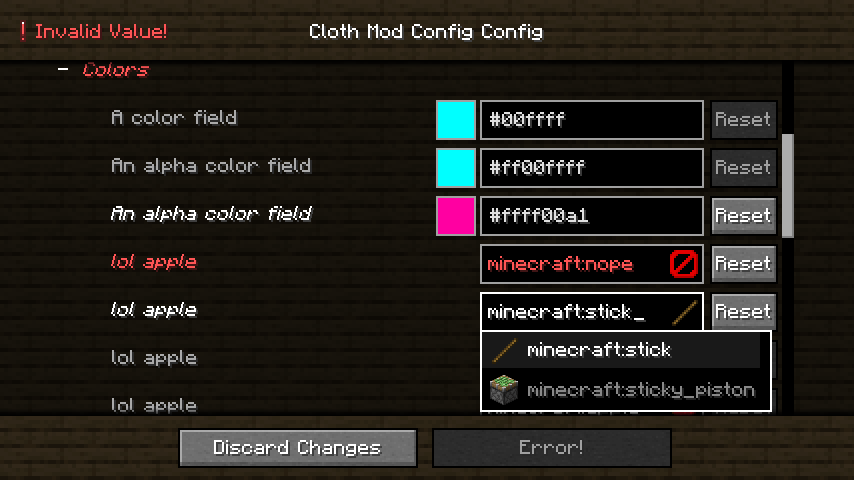
This gallery example dates from 2022. It explains the controls and error feedback, rather than claiming to show the current 26.3 screen. Actual labels and available options belong to each mod. You do not need to reproduce the demonstration's colours or test values in your own configuration.
Find the settings for the mod you want to change
A configuration library is not a single control panel for every installed mod. Follow the dependent mod's instructions: it may offer a menu button, a keybind, a command or integration with a mod-list screen. On Fabric, Mod Menu can open a supported mod's configuration. A library entry or demonstration screen is not the same thing as that mod's actual settings.
After editing, use the screen's save or completion action. If you choose Discard Changes, your edits are intentionally abandoned. Reopen the menu to make sure the value stayed; restart Minecraft if the option says a restart is needed. A client display change also does not automatically change the server's gameplay rules.
Choose Cloth Config by game version and loader
Match both parts of your profile. The Fabric 26.3 release here is 26.3.158. Java 26.2 uses 26.2.155 with separate Fabric and NeoForge builds. A larger library version number is not a reason to upgrade an older modpack independently.
| Your Minecraft profile | Cloth Config file | Required loader |
|---|---|---|
| Java 26.3, Fabric | 26.3.158 Fabric | Fabric for 26.3; library minimum is Loader 0.14.0 |
| Java 26.2, Fabric | 26.2.155 Fabric | Fabric for 26.2; library minimum is Loader 0.14.0 |
| Java 26.2, NeoForge | 26.2.155 NeoForge | NeoForge for 26.2 |
Use a loader release supported by the whole modpack, not just the library's minimum. These Cloth Config builds do not declare Fabric API as a required dependency of their own. Your other mods may still require Fabric API, Architectury or another library, so check their requirements separately.
Fabric for Java 26.3
Fabric for Java 26.2
NeoForge for Java 26.2
The author's two 26.2 builds originally share the same filename. The NeoForge download here adds a loader label to the name so you can tell them apart; its contents are unchanged. Do not install both in one instance. Renaming a Fabric file does not turn it into a NeoForge file.
For another Minecraft version, use the individual release listed for that game and loader on the official project page. The project's long compatibility history does not mean one current JAR works across all those versions.
Install Cloth Config without disturbing your modpack
- Check whether it is already installed. Managed modpacks often include their required libraries. Keep the pack's selected version unless you are deliberately updating the pack.
- Close Minecraft and open the correct instance folder. Use your launcher's folder action when available. Your modpack may not use the default
.minecraftfolder. - Choose one file for the instance's game and loader. Fabric and NeoForge are different choices, even when a release has the same version number.
- Put the unchanged JAR in
mods. Do not extract it, run it as an installer or place it inresourcepacks. Move an older copy out of the active folder when replacing it. - Add the dependent mod and its other required libraries. Launch the matching profile, open that mod's configuration and check that the screen works.
For an established world, keep a copy of the instance and its settings before changing the mod list. Our modded-world backup guide explains what to preserve and how to restore a separate copy.
Client, server or both?
The configuration screen is displayed on the client. That does not make Cloth Config universally client-only: a mod can also require library code on a server. Install it wherever the dependent mod says it is required, using that environment's matching game and loader.
If you only use a client-side utility, do not copy your entire client mods folder onto a server to make its settings work. If a dedicated modded server explicitly reports Cloth Config as missing, add the matching server-compatible dependency after stopping the server. Server configuration is handled through the method documented by the server mod, not a graphical menu inside the server console.
Fix the common problems
“Requires cloth-config” or “cloth_config”
Check the loader, game version and instance folder first. Then read the required version range in the error. A mod may need a particular Cloth Config release even when you already have a newer one. Download the appropriate build rather than keeping several versions active.
The file is present, but Minecraft still says it is missing
Confirm you launched the profile whose mods folder contains the file. Next, check the file's source and loader variant. This matters especially for 26.2, because the upstream Fabric and NeoForge filenames look identical. Use the clearly labelled choice above instead of judging by filename alone.
The game opens, but I cannot find a configuration menu
Check the mod you want to configure. Cloth Config does not invent a settings screen for a mod that has none, and a mod may use a different access route. Mod Menu is useful on supported Fabric setups, but is not a hard dependency of these Cloth Config releases.
The Save button is unavailable
Look for a red field or validation message, as in the demonstration above. Check recently edited text, numbers or item entries, then use a valid suggestion or reset only the problem entry. Some screens also disable saving when nothing has changed. Do not reinstall the library simply because a value is invalid.
The settings screen crashes
Check for duplicate library versions and confirm the dependent mod supports the installed release. Reproduce the issue in a copy of the instance with that mod and its required dependencies. Keep the crash report and note which screen or control caused the failure. A generic launcher exit code is less helpful than the first relevant error in the report.
Can I edit the configuration file directly?
Often a mod provides a text configuration as well, but its filename, location and valid values belong to that mod. Close the game before editing, make a copy, and follow its documentation. Editing while Minecraft is running can result in the game overwriting your changes when it saves. Do not reset every mod's configuration to fix one broken setting.
Cloth Config is not a replacement for every other library
YACL also supports configuration screens, but a mod written for one library still needs that library. Architectury provides a different set of shared functions. A pack can legitimately need more than one of them; install what each mod actually requires.
Cloth Config is developed by shedaniel. The official project is linked in the author panel, with source code and the LGPL license available from the developer. Keep a working pack together when updating, and remove the library only when no remaining mod depends on it.
More for your Java setup.
Get the settings library your Java mods need, then learn how to find their menus, adjust options and keep changes. Includes YACL 3.9.6 for Fabric and NeoForge on 26.2, the Fabric API companion and practical fixes.
- Minecraft
- Java 26.2
- Loader
- Fabric / NeoForge
- Runtime
- Both
Java · Mod
YetAnotherConfigLib (YACL)
Get the settings library your Java mods need, then learn how to find their menus, adjust options and keep changes. Includes YACL 3.9.6 for Fabric and NeoForge on 26.2, the Fabric API companion and practical fixes.
- Minecraft version
- Java 26.2
- Game edition
- Java Edition
- Loader / platform
- Fabric
- License
- LGPL-3.0-or-later
- Platform family
- Java PC
- Supported devices
- Minecraft Java on Windows, macOS and Linux
- Install format
- .jar
- Touch readiness
- Not required
- Resource type
- Mod
- Project version
- 3.9.6
- Last verified at
- Sep 19, 2026
- Secondary guide action
- Setup & fixes
- Compatibility confidence
- Source claimed
- Java mod loader
- Fabric / NeoForge
- Java runtime side
- Both
- Required dependency
- Fabric: Loader 0.18.0+ and Fabric API. NeoForge: matching 26.2 loader.
- Edition applicability
- Java
- Delivery state
- Direct download
- Lifecycle state
- Current
Keep your builds, inventory and modpack progress before an update. Find the right profile, back up the complete world and setup, restore a separate copy and know how to roll back if something breaks.
- Edition
- Java Edition
- Difficulty
- Intermediate
- Time
- Copy time depends on world size
Do not test an update on the only good copy
MineBrush · Guide
Back Up a Modded World
Keep your builds, inventory and modpack progress before an update. Find the right profile, back up the complete world and setup, restore a separate copy and know how to roll back if something breaks.
Do not test an update on the only good copy
- Game edition
- Java Edition
- Platform family
- Java & PC
- Supported devices
- Windows · macOS · Linux
- Install format
- Manual backup and restore; no extra mod needed
- Touch readiness
- Not required
- Resource type
- Guide
- Compatibility confidence
- Source claimed
- Card evidence statement
- Official storage and launcher docs reviewed · restore not run
- Card delivery statement
- Step-by-step backup and restore guide
- Card limitation note
- Do not test an update on the only good copy
- Edition applicability
- Java
- Estimated time
- Copy time depends on world size
- Guide difficulty
- Intermediate
- Delivery state
- No file
- Lifecycle state
- Current
Player discussion 0
Questions, discoveries and help from other players.