
MineBrush publication
Architectury API: Choose the Right Download for Your Minecraft Mods
A mod asks for Architectury? Choose the right Fabric or NeoForge file, add the required dependencies and get your Java modpack running. Includes downloads for 26.3 and 26.2, clear installation steps and fixes for common startup errors.
You downloaded a mod you want to play, but Minecraft stops at a message saying it needs Architectury. This is usually a missing dependency, not a broken world. Architectury API is a support library used by other Java mods. Install the matching version alongside the mod that requires it, and it works in the background.
You will not get a new building tool, crafting recipe or settings screen just by installing this library. Its benefit is that your chosen mod can load the shared functions it needs. The important choice is the combination of Minecraft version + mod loader + Architectury version, rather than whichever download has the highest number.
Choose a version · Downloads · Install it · Server setup · Fix startup errors
When do you actually need Architectury?
You are adding a mod manually
Read that mod's required dependencies. If Architectury API is listed, add it to the same instance's mods folder. Installing a library in your default Minecraft folder will not help a modpack stored in a different launcher instance.
Your launcher reports a missing dependency
Look for the name architectury and any required version in the message. For example, if a Fabric mod for Java 26.2 needs Architectury, choose a Fabric build for 26.2. A NeoForge file with the same version number is a different build and will not solve that Fabric dependency.
You are playing a ready-made modpack
The pack may already include Architectury. Check its installed-mod list before adding anything. Two copies can prevent startup, and independently updating shared libraries can put a carefully matched pack out of sync. Prefer the modpack's own update unless you are deliberately maintaining a separate copy.
If none of your mods requires Architectury, you do not need to install it pre-emptively. It does not improve FPS on its own, replace Fabric API or convert Forge and NeoForge mods into Fabric mods. A project can use the Architectury development tools without requiring the Architectury API download at all; follow the dependency list for the actual release you selected.
Choose the file that matches your instance
The current downloads here cover Java 26.3 and Java 26.2. Fabric and NeoForge have separate JARs. Choose one loader's Architectury file for your instance, not both.
| Your Minecraft profile | Architectury | Required setup |
|---|---|---|
| 26.3 Fabric | 22.0.2 Fabric | Fabric Loader 0.19.5+ and Fabric API 0.160.5+ for 26.3 |
| 26.3 NeoForge | 22.0.2 NeoForge | NeoForge 26.3.0.0-beta or a newer compatible 26.3 build |
| 26.2 Fabric | 21.1.10 Fabric | Fabric Loader 0.19.5+ and Fabric API 0.160.0+ for 26.2 |
| 26.2 NeoForge | 21.1.10 NeoForge | NeoForge 26.2.0.82 or a newer compatible 26.2 build |
The Fabric API downloads below are 0.161.0 builds for the respective game versions and meet these requirements. Fabric API is a separate dependency: the Architectury JAR does not replace it. Do not add Fabric API to the NeoForge setup.
For older worlds and modpacks: stay with the game version supported by the complete pack. The project also has older Forge and Quilt releases, but that does not make these four current Fabric/NeoForge files suitable for every loader or Minecraft version. Use the author's version list for a specifically supported older combination.
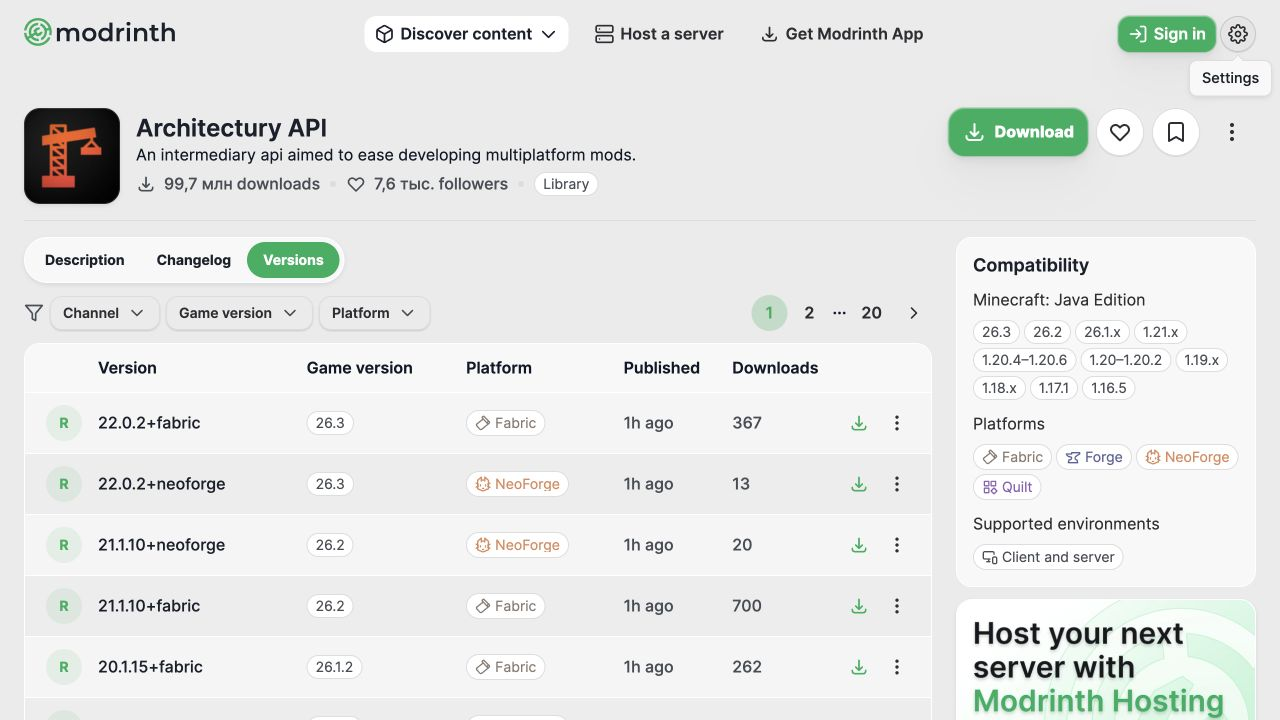
Download Architectury API
Choose the section for your game, then one loader. Keep JARs unchanged and place them in mods; do not unzip them or run them as installers. The Fabric API companion is needed only for the Fabric route.
Java 26.3
Fabric — Architectury 22.0.2:
NeoForge — Architectury 22.0.2:
Fabric only — required Fabric API companion for 26.3:
Java 26.2
Fabric — Architectury 21.1.10:
NeoForge — Architectury 21.1.10:
Fabric only — required Fabric API companion for 26.2:
Earlier Fabric 26.2 files for an existing pinned modpack
These are the previous downloads, retained for packs that deliberately use Architectury 21.0.7. Do not install them alongside the newer copies. The older Fabric API 0.158.0 does not satisfy Architectury 21.1.10's minimum requirement.
Install it in the right Minecraft instance
- Check the profile you actually launch. Note its Minecraft version and whether it uses Fabric or NeoForge. A plain vanilla profile cannot load these JARs.
- Close the game and copy the instance before changing an established modpack. Keep a backup of important worlds too.
- Open that instance's folder. A launcher's Open folder or equivalent action is safer than assuming every profile uses your default
.minecraftdirectory. - Put one matching Architectury JAR in
mods. Move an older Architectury JAR out of this folder when replacing it. Keep the old file in your backup, not as a second active copy. - For Fabric, add the matching Fabric API. Check that the Fabric Loader version meets the requirement above. NeoForge uses its own Architectury build instead.
- Add the mod that needs Architectury and any other dependencies that mod lists. Launch the same profile.
A successful result is that Minecraft reaches the menu and the dependent mod loads without an Architectury dependency error. There is no Architectury tool you must craft or command you must run. If your launcher or installed mod-list screen shows libraries, you may see it there; you do not need to install a mod-list interface just to make Architectury work.
Does the server need Architectury too?
Architectury supports both client and server environments. Install it wherever the mod that depends on it runs. A gameplay mod used on both sides normally needs its matching library on both sides as well. A purely client-side mod does not automatically mean you must modify the server.
For a dedicated modded server, stop the server, back up its files and place the compatible library in the server's mods folder. Use the same Minecraft and loader family as the rest of that server's modpack, then restart and check that startup completes. It is not a plugin for a Paper or Spigot plugins folder.
For a friends' modpack, agree on one complete pack version rather than swapping individual JARs at random. If joining fails, compare the gameplay mods and their required libraries on both sides; copying only Architectury cannot fix every missing mod or registry mismatch.
Fix the common startup messages
“Requires architectury”
Check that the JAR is in the folder of the profile you launched. Then check the loader in its filename and the Minecraft version in the download section. If those are correct, read the required version range in the error: the dependent mod may expect a newer or older Architectury release than the one you installed.
“Requires fabric-api” or an incompatible Fabric Loader
Architectury and Fabric API are different libraries. Add the Fabric API file for the same Minecraft version and update that profile's Fabric Loader if necessary. For the current Fabric downloads here, Loader 0.19.5 or later is required. A Fabric API file for 26.2 is not the recommended companion for a 26.3 profile.
Duplicate mod or two Architectury versions
Close Minecraft and keep only the intended Architectury file in the active mods folder. Also check for a second Fabric API copy if that name appears in the message. Renaming a duplicate JAR does not make it a different mod.
It broke after updating one library
Return to the working instance copy, then review the dependent mod's supported versions before trying again. A newer library is not automatically compatible with every older mod. If the update is part of a modpack release, apply the complete pack update instead of combining pieces from different versions.
The launcher only shows an exit code
Open the launcher's detailed log or the instance's logs/latest.log. Look for the first useful missing-dependency or incompatible-version message, rather than treating the final exit code as the cause. When asking the mod's support channel for help, include the Minecraft version, loader, Architectury version and the actual error text.
Updating, removing and keeping a working pack
Update Architectury when the mod you want to use requires it or when a compatible maintenance release addresses your issue. The current 22.0.2 and 21.1.10 changelogs include a NeoForge atlas fix; that is a maintenance change, not a new gameplay feature.
Before removing Architectury, check whether any remaining mod still depends on it. Remove or replace those dependents as part of the same change, and do not open your only world copy after stripping gameplay mods from a pack. Follow our guide to backing up a modded Minecraft world before changing an established pack.
Architectury API is maintained by the Architectury team. The official project is linked in the author panel; its source code and LGPL license remain available from the developers. The files here are the original releases, with the Fabric API companions kept separate.
More for your Java setup.
Keep your builds, inventory and modpack progress before an update. Find the right profile, back up the complete world and setup, restore a separate copy and know how to roll back if something breaks.
- Edition
- Java Edition
- Difficulty
- Intermediate
- Time
- Copy time depends on world size
Do not test an update on the only good copy
MineBrush · Guide
Back Up a Modded World
Keep your builds, inventory and modpack progress before an update. Find the right profile, back up the complete world and setup, restore a separate copy and know how to roll back if something breaks.
Do not test an update on the only good copy
- Game edition
- Java Edition
- Platform family
- Java & PC
- Supported devices
- Windows · macOS · Linux
- Install format
- Manual backup and restore; no extra mod needed
- Touch readiness
- Not required
- Resource type
- Guide
- Compatibility confidence
- Source claimed
- Card evidence statement
- Official storage and launcher docs reviewed · restore not run
- Card delivery statement
- Step-by-step backup and restore guide
- Card limitation note
- Do not test an update on the only good copy
- Edition applicability
- Java
- Estimated time
- Copy time depends on world size
- Guide difficulty
- Intermediate
- Delivery state
- No file
- Lifecycle state
- Current
Player discussion 0
Questions, discoveries and help from other players.