
MineBrush publication
Fresh Moves: Player Animations, Animated Eyes and Downloads
Give your character livelier movement with Fresh Moves 3.1.1 beta. Choose body animation with or without expressive eyes, download the ZIP and Fabric 1.21.4 dependencies, and learn the skin settings.
Fresh Moves makes your Minecraft character feel more alive. It replaces stiff player movements with more expressive walking, running, sneaking, swimming and idle animation. You can enjoy the body animation with your usual skin, or choose the animated-eyes edition and prepare a skin with the extra facial details the pack needs.
This guide provides Fresh Moves 3.1.1 beta, the latest release listed when checked on September 13, 2026. Both ZIP variants were released January 20, 2025 and are listed for Minecraft Java 1.21.3 and 1.21.4. The complete Fabric setup supplied below targets 1.21.4. Fresh Moves needs both Entity Model Features (EMF) and Entity Texture Features (ETF); OptiFine alone cannot run its custom player models.
What changes, and when you will notice it
- Explore in third person. Walking and sprinting have more coordinated arm and leg movement. Use your perspective key—F5 by default—to watch your character crossing a village or following a trail.
- Give quiet moments some movement. Idle breathing makes your character less rigid while standing beside a build, talking with friends or waiting between activities.
- Make a character showcase. Walk, stop, sneak and turn toward the camera to show your skin in different poses. Prepared eyes can add expression to close-up shots.
- Enjoy more natural everyday actions. The pack includes swimming and sleeping changes. The 3.1.1 update improves sneaking beneath low gaps and adjusts the sleeping pose and breathing.
- Complement capes and elytra. The release adjusts their movement and how the cape sits against the back. It animates equipment you already have; it does not grant a cape or elytra.
These are visual changes. Fresh Moves does not increase movement speed, change reach, add a combat system or unlock parkour abilities. In ordinary first-person play you see less of your own body, so third person is the easiest way to appreciate it.
Author demonstrations
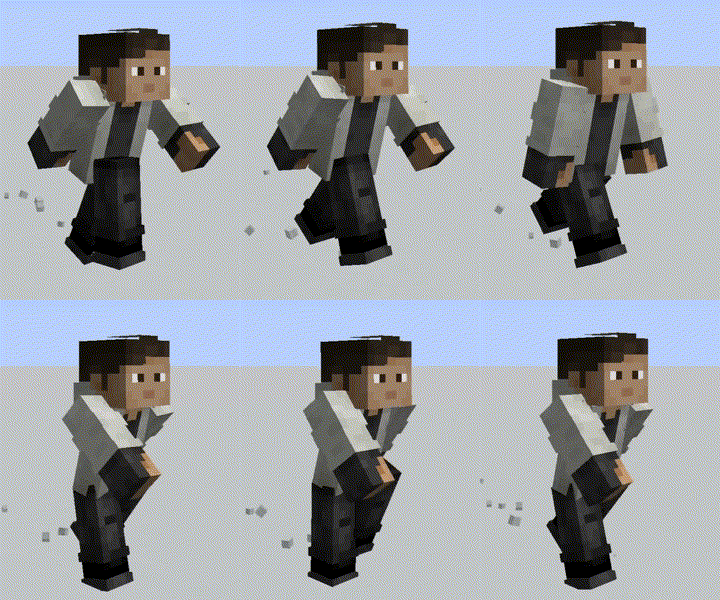
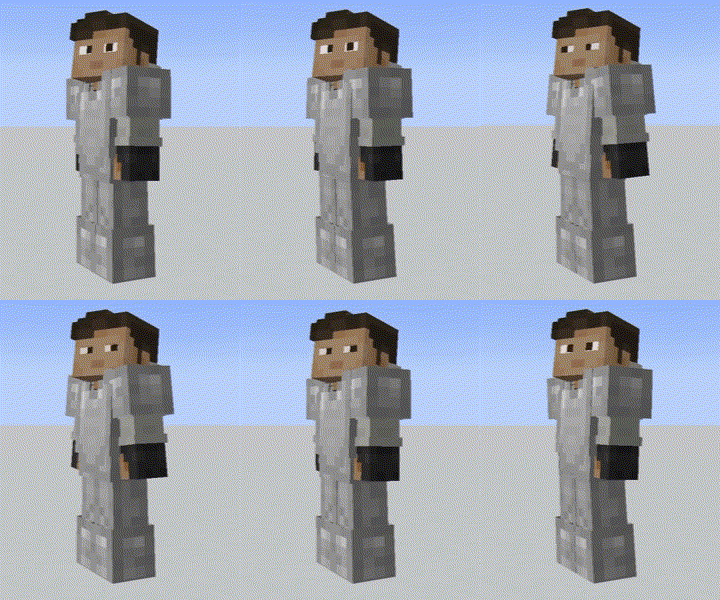
These previews come from the project's April 2, 2024 gallery. Click either preview to open the original animated GIF. They demonstrate the early animation style; version 3.1.1 later reworked walking and sprinting. The landscape and lighting in a showcase are not features supplied by Fresh Moves.
Choose your Fresh Moves download
Enable only one of these ZIPs. They replace the same player models. Stacking both does not combine their features.
Body animation without animated eyes
Choose this for the simplest setup, when you want to keep your existing face or do not want to edit a skin. You still get the player movement changes.
Body animation with animated eyes
Choose this if you want the facial system and are ready to add the required extra pixels to a compatible skin. Downloading this variant alone does not prepare every custom skin automatically.
The release names say “1.21.3 and Above,” but their actual compatibility listings name 1.21.3 and 1.21.4. Use these files for those versions. For another game branch, check the author's version history; do not assume that “and Above” guarantees support for 26.2.
Required mods: Fabric 1.21.4 setup
Install both of the following JARs in your Fabric 1.21.4 instance. EMF supplies the custom player models; ETF provides the skin features the pack uses. This pair uses EMF 3.3.5 and ETF 7.2.1. Use the Java 21 runtime for Minecraft 1.21.4, normally managed by your launcher.
If your modpack already has compatible EMF and ETF, keep one copy of each. These supplied dependency files are for 1.21.4; a 1.21.3 or another-loader installation needs matching dependency releases. Our EMF guide explains the model system. The official EMF and ETF histories let you select another supported branch.
This is a Java Edition resource pack for your client, not a Bedrock/mobile add-on or a server plugin. Shaders are optional and are not required for the animations.
Install and see the first animation
- Close Minecraft. Open the game folder for your Fabric 1.21.4 instance and place the two dependency JARs in
mods. - Place one Fresh Moves ZIP in
resourcepacks. Keep it compressed. ZIPs and JARs go in different folders. - Launch that instance. Open Options → Resource Packs and move Fresh Moves into Selected. Put it above other packs that replace player models, or disable those competing packs while trying it.
- Press Done and wait for the resource reload. Open a world you can move around in.
- Use the perspective key to view your character. Walk a few steps, sprint, stop and sneak. Your normal movement controls trigger the animations; there is no separate animation command.
- If you chose animated eyes, follow the skin preparation below. Body movement and eye preparation are separate parts of the setup.
To see your face, cycle the perspective again to the front-facing third-person view. If F5 is assigned differently, check Controls for Toggle Perspective. On keyboards that use function keys for hardware controls, your function-key setting may also affect F5.
Prepare a skin for animated eyes
The face system reads extra pixels in your skin. Keep an untouched copy of your original skin first. Use a PNG editor that supports transparency and precise pixel editing; the author recommends Blockbench. Avoid resizing or smoothing the skin while editing.
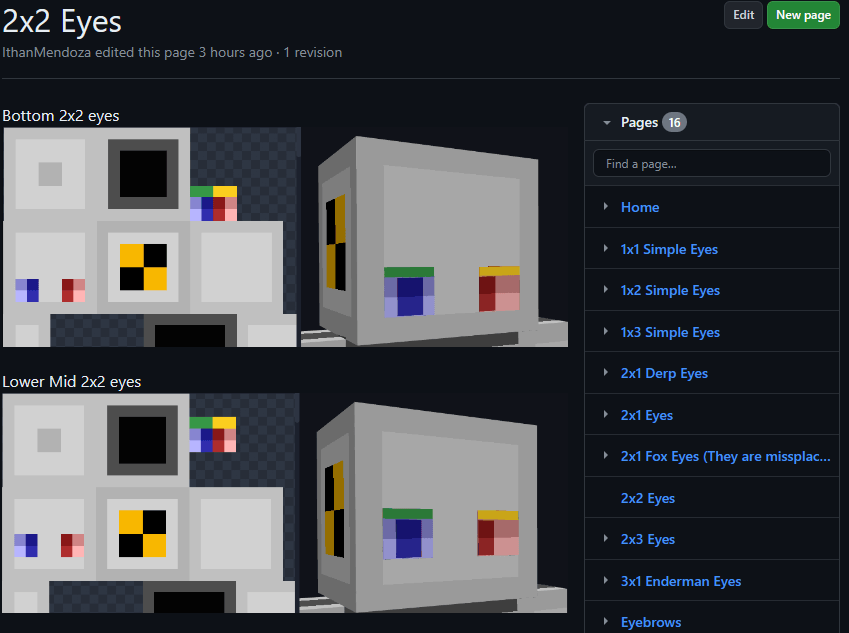
- Open your skin and identify the eyes' size and vertical position. A 2×2 eye near the bottom of the face needs a different layout from an eye placed higher.
- Choose the matching layout in the author's eye guide. It includes simple eyes, several eye sizes, derp and Enderman-style options, eyebrows and other facial details.
- Add the extra pixels in the locations shown by that layout. Leave your original face intact so clients without the pack still see the normal face.
- Include the eyelid pixels required by the selected layout. The 2×2 guide specifically explains that the pixels above the eyes act as eyelids and prevent duplicated eyes.
- Save the edited PNG with transparency preserved, then upload it as your skin through your Minecraft account or launcher's skin controls. Keep the correct classic or slim model selection.
- Rejoin or restart if the old skin is cached, enable the With Animated Eyes ZIP and inspect your face in third person.
You do not have to redesign your whole skin. Start with one matching eye type, then add optional eyebrows only after the eyes look right. If you prefer the original face at any point, switch to the No Animated Eyes variant.
Fix black eyes or unwanted hand movement
For black eyes, first update EMF and ETF to compatible releases for your Minecraft version. Open their settings using the small creeper-face button in the Resource Packs screen, then go to Textures → Player skin settings → Allow skin transparency → All skins. Back out to let resources reload; restart if needed.
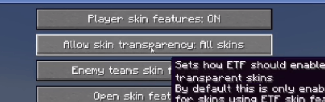
The author also identifies old AlphaSkins or CustomSkinLoader installations as possible problems. If you actually use one, compare in a profile without it before changing a working modpack. The selected eye layout and its transparent pixels also need to be correct.
Version 3.1.1 says its first-person hand fix is enabled by default. If the hand still moves unexpectedly, look in EMF's Models settings for Prevent first person hand animations and turn it on. Older instructions place it under Player settings or Options and Fixes. Back out, reload and restart if necessary. Minecraft's View Bobbing is a separate effect; disabling it can help you distinguish camera bobbing from the pack's hand movement.
Using it with animation mods and friends
Fresh Moves includes targeted compatibility for several animation mods, including Not Enough Animations, Quark emotes, Amendments and Real Camera. The 3.1.1 notes also describe Essential fixes, partial Emotecraft compatibility while standing still, and improved Better Combat leg rotations. These integrations do not install those mods or guarantee every later combination.
For Parcool, the author recommends disabling its Fast Running and Fast Swimming animators in its configuration. Keep Fresh Moves working on its own before adding several animation or camera mods, so a conflict is easy to identify.
On multiplayer servers, the pack affects what your client renders. Friends need their own compatible setup to see its animations. You can see another player's animated eyes when their skin includes the required pixels and your client has the matching pack and dependencies. Installing it does not force every player on the server to use it.
Quick fixes and removal
- No animation: check both EMF and ETF are installed in the instance you launched, and that the ZIP is selected. OptiFine alone is insufficient.
- Only eyes fail: check you selected the animated-eye variant, uploaded the edited skin, used the matching layout and enabled the transparency setting.
- Strange limbs or overlapping animations: keep one Fresh Moves variant active and temporarily disable other player-model packs or animation mods.
- Skin shape looks wrong: check the classic/slim choice for your uploaded skin before changing model settings.
- Version warning: match the ZIP and dependencies to the supported game branch. The supplied Fabric dependencies target 1.21.4.
- Want the original appearance back: deselect Fresh Moves and reload resources. Restore your original skin if you edited it. Keep EMF/ETF if other installed packs require them.
Creators and sources
Fresh Moves credits Ithan for animation editing and facial features, TrasTick for maintaining project pages, FreshLX and the Fresh Animations work used as a base, Traben for EMF/ETF, and BoZo-Xo2 and CoolRanchChris for the original Fresh Player Animations. The pack is labelled CC BY-NC-SA 4.0. MineBrush provides this player guide and hosts the original files; the branded cover is an editorial illustration.
- Official description, credits and demonstrations
- 3.1.1 animated-eyes release · 3.1.1 no-eyes release
- Skin layouts and troubleshooting wiki
- Laynce's facial-features tutorial, recommended by the author
- EMF 3.3.5 for Fabric 1.21.4 · ETF 7.2.1 for Fabric 1.21.4
More for your Java setup.
Give familiar mobs new shapes and expressive animations with compatible resource packs. Download Entity Model Features and its required ETF companion for Java 26.2, then bring your chosen pack to life.
- Minecraft
- Java 26.2
- Loader
- Fabric
- Runtime
- Client
Client only · Compatible resource pack required
Java · Mod
Entity Model Features
Give familiar mobs new shapes and expressive animations with compatible resource packs. Download Entity Model Features and its required ETF companion for Java 26.2, then bring your chosen pack to life.
Client only · Compatible resource pack required
- Minecraft version
- Java 26.2
- Game edition
- Java Edition
- Loader / platform
- Fabric
- License
- LGPL-3.0-only
- Platform family
- Java & PC
- Supported devices
- Windows · macOS · Linux
- Install format
- Two .jar mods + a compatible resource-pack ZIP
- Touch readiness
- Not required
- Resource type
- Mod
- Project version
- 3.3.5
- Last verified at
- Sep 5, 2026
- Secondary guide action
- Setup & fixes
- Compatibility confidence
- Source claimed
- Java mod loader
- Fabric
- Java runtime side
- Client
- Card evidence statement
- Custom mob models and animations from resource packs
- Required dependency
- Entity Texture Features 7.2.1 for the same loader
- Card delivery statement
- Download EMF + ETF for Fabric, Quilt or NeoForge
- Card limitation note
- Client only · Compatible resource pack required
- Edition applicability
- Java
- Delivery state
- Direct download
- Lifecycle state
- Current
Not Enough Animations
1.12.4Make your character visibly eat, read maps, row and crawl in third person. Download Not Enough Animations 1.12.4 for Fabric 26.2 or NeoForge 26.1.2, see the author’s examples and choose the motions you like.
- Minecraft
- Java 26.2 (Fabric); 26.1.2 (NeoForge)
- Loader
- Fabric
- Runtime
- Client
Client only · choose the matching Minecraft version
Java · Mod
Not Enough Animations
Make your character visibly eat, read maps, row and crawl in third person. Download Not Enough Animations 1.12.4 for Fabric 26.2 or NeoForge 26.1.2, see the author’s examples and choose the motions you like.
Client only · choose the matching Minecraft version
- Minecraft version
- Java 26.2 (Fabric); 26.1.2 (NeoForge)
- Game edition
- Java Edition
- Loader / platform
- Fabric
- License
- tr7zw Protective License
- Platform family
- Java & PC
- Supported devices
- Windows · macOS · Linux
- Install format
- .jar mod file from the creator
- Touch readiness
- Not required
- Resource type
- Mod
- Project version
- 1.12.4
- Last verified at
- Sep 12, 2026
- Secondary guide action
- Setup & fixes
- Compatibility confidence
- Source claimed
- Java mod loader
- Fabric
- Java runtime side
- Client
- Card evidence statement
- Natural third-person actions for travel, survival and screenshots
- Required dependency
- Fabric API for Fabric; no separate library for NeoForge
- Card delivery statement
- Fabric 26.2 or NeoForge 26.1.2 · native downloads
- Card limitation note
- Client only · choose the matching Minecraft version
- Edition applicability
- Java
- Delivery state
- Direct download
- Lifecycle state
- Current
Player discussion 0
Questions, discoveries and help from other players.