
MineBrush publication
Sodium 0.9.1 for Minecraft 26.2: Download & Better FPS
Make Minecraft Java feel smoother with Sodium. Download the Fabric or NeoForge version for Java 26.2, follow the installation steps, and find help with shaders, resource packs and startup problems.
Sodium helps Minecraft Java run more smoothly while keeping the familiar look of the game. It changes how the client draws the world, so it is useful when turning the camera, exploring or looking across a busy build feels choppy. It does not add blocks or change your survival progression. This page includes downloads for Sodium 0.9.1 on Minecraft Java 26.2, with separate Fabric and NeoForge files.
For Minecraft on Android, iPhone, consoles or Bedrock for Windows, these files will not work. They are Java mods for the computer running the game. You do not need to install Sodium on a dedicated server just to use it on your own client.
Quick start: Choose Fabric or NeoForge · Install Sodium · Improve smoothness · Shader compatibility · Fix a problem
Use Sodium for the way you play
For everyday survival, the useful goal is comfortable movement: turning toward a forest, walking through your base and looking around during a fight should feel consistent. Start at your usual render distance. If the game becomes smoother, keep that headroom before immediately raising every graphics setting.
For building, you may prefer a wider view of a large structure. Increase render distance gradually in Video Settings and stop when camera movement becomes uncomfortable. Render distance controls how much terrain you see; simulation distance controls how far the world actively runs. Raising one is not a substitute for understanding the other, and multiplayer servers can limit the terrain they send.
For a laptop or a quieter session, use a frame-rate limit suited to your screen and preference instead of chasing the largest FPS counter. Sodium provides a more efficient renderer; the settings you choose determine how you spend the available performance.
For a visual modpack, build around the features you actually want: Iris for supported shaders, Continuity for connected textures, or EMF and ETF for compatible mob-model packs. Sodium is the rendering foundation, while each extra supplies a different feature. Add only mutually compatible versions. After installation there is no item to craft or ability to activate: use Video Settings, then play your existing worlds normally.
Download Sodium for Java 26.2
Choose the loader already used by your Minecraft installation. Install one of the following files, not both. These are preserved copies of the developer's 0.9.1 release; a newer release for another Minecraft version is not a replacement for the file your modpack needs.
Fabric · Minecraft 26.2
NeoForge · Minecraft 26.2
Playing another Java version? Use the developer's version list to find its matching release. The two downloads above are specifically for 26.2. Keep your previous working file when updating a modpack.
What changes in the game?
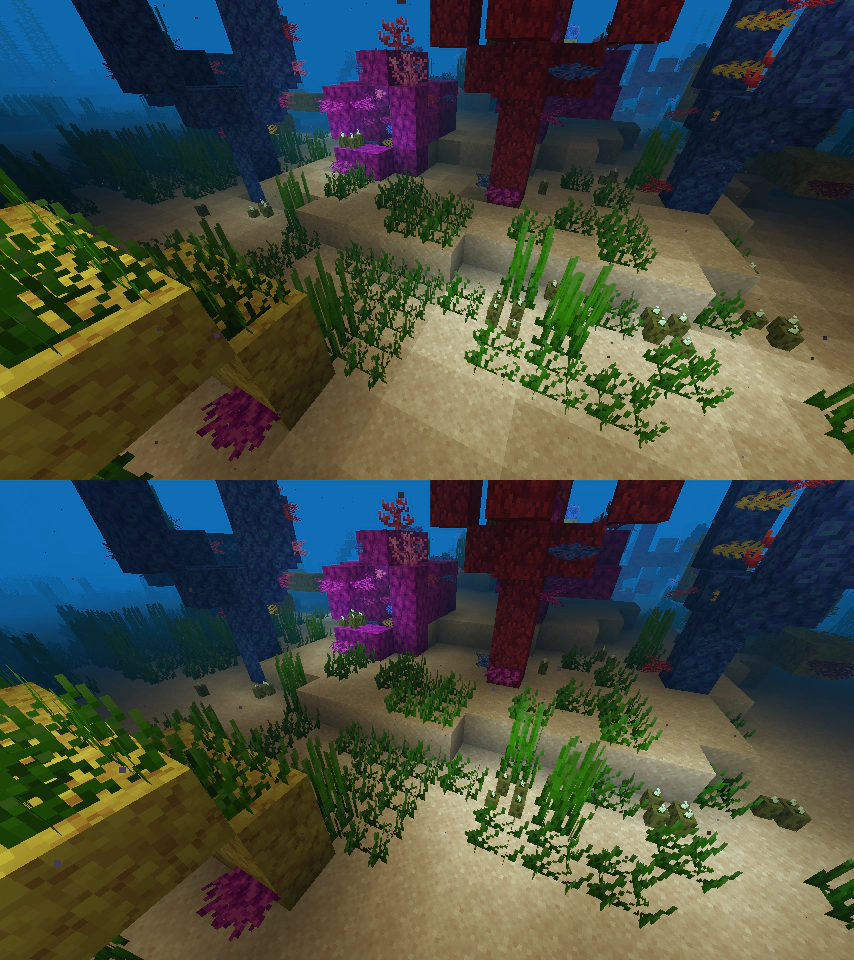
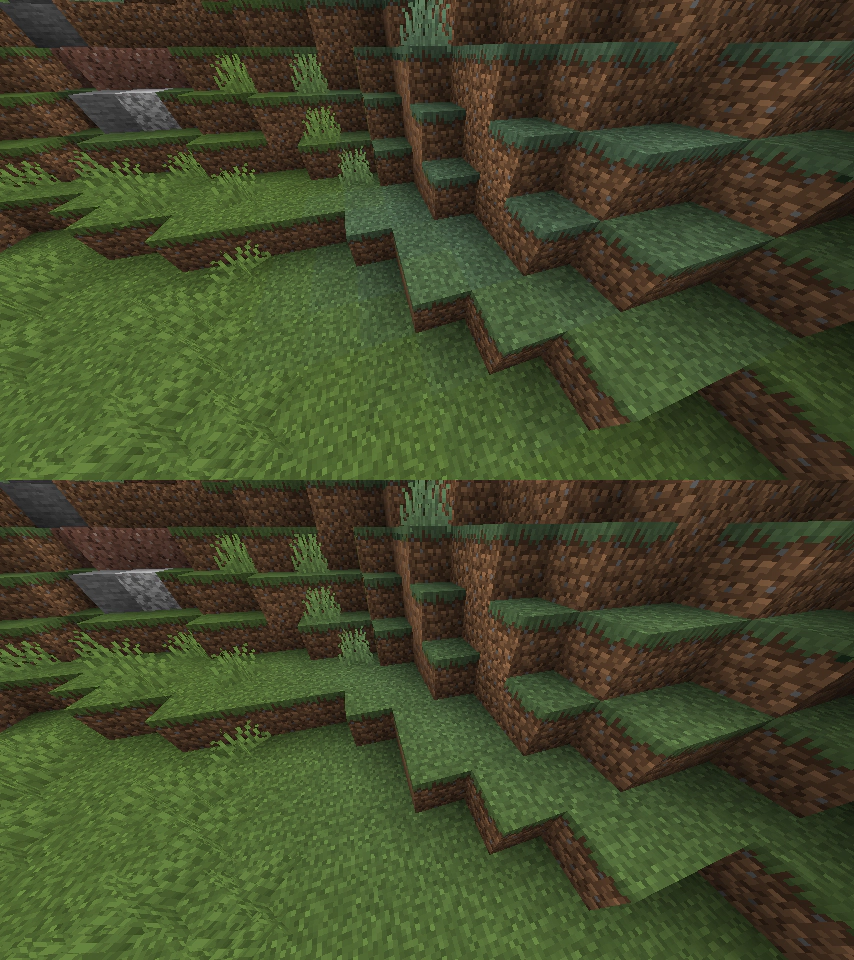
Sodium focuses on rendering performance and reducing small interruptions in motion. It also addresses visual problems such as uneven lighting. The improvement depends on your computer, settings and other mods; a download cannot guarantee a particular FPS number.
If the camera moves smoothly but mobs freeze, blocks reappear after breaking or multiplayer interactions are delayed, the problem may be server performance or the connection. Sodium is not a fix for every kind of lag. For game-logic performance, Lithium addresses a different part of Minecraft.
How to install
- Close Minecraft. In your launcher, select a Java 26.2 installation with Fabric or NeoForge. If you are starting from scratch, install one loader first. A modpack manager may provide this step automatically.
- Open that installation's game folder. Use its own folder rather than assuming every launcher uses the same Minecraft directory.
- Open or create the
modsfolder and put the matching Sodium JAR inside it. Leave the JAR intact; do not unzip it or double-click it as an installer. - Remove an older Sodium JAR from that same folder so that only one Sodium version remains. Keep the old file elsewhere if you may need to return to it.
- Start the matching loader installation. Open Options → Video Settings. Sodium's redesigned settings screen is a useful sign that the mod loaded.
- Open a world and play normally. Start with the default Sodium settings, then adjust view distance or graphics options if you still need better performance.
Do not combine Sodium with another replacement renderer such as Embeddium or VulkanMod in the same installation. When working with a ready-made modpack, follow its dependency and version choices instead of upgrading one rendering component on its own.
Shaders, resource packs and extra options
Sodium alone does not provide shader-pack support. For shaders, you need a compatible Iris release and a shader pack. Match the Minecraft and Sodium versions listed by Iris. In particular, the Sodium 0.9.1 release notes mark Iris 1.11.1 as incompatible.
A resource pack may require more than Sodium. Connected textures, custom entity models and special entity textures can depend on separate mods. Check the pack's requirements when a texture or model looks wrong rather than assuming the entire pack is unsupported.
Extra settings mods also need to match your Sodium version. If the video menu stops opening after adding one, remove that add-on first and launch again. Change one item at a time so you can tell which addition caused the problem.
Common problems and useful fixes
| What you see | What to try |
|---|---|
| The game will not start after installation | Check the Minecraft version and loader, remove duplicate Sodium files, and read the launcher's missing-dependency message. Restore the previous working combination if you updated a modpack. |
| The ordinary video menu still appears | Make sure you launched the loader installation and placed the JAR in that installation's mods folder. |
| Broken lighting or missing textures | Try without shaders and optional rendering add-ons. If the problem occurs only with one resource pack, check its required extensions. On supported PCs, outdated graphics drivers can also cause visual faults. |
| FPS barely changes | Check whether VSync or the frame-rate limit is capping the result. Lower an excessive render distance. Server delays and insufficient memory may need a different solution. |
| A shader pack fails | Check Iris compatibility and try the game without the shader. Do not install a random newer Iris file without checking its required Sodium version. |
To uninstall, close Minecraft and remove the Sodium JAR from the installation's mods folder. Remove add-ons that specifically require Sodium if you no longer need them. Your worlds are separate from the mod file; do not delete the saves folder.
Developer and sources
Sodium is developed by CaffeineMC and its contributors. MineBrush provides this player guide and preserves the downloads; it does not claim authorship of the mod or the developer's images. The files retain their included license and are distributed under the PolyForm Shield 1.0.0 terms.
- Official Sodium project — developer information and support links.
- Original Fabric 0.9.1 release and original NeoForge 0.9.1 release — the sources of the preserved files.
- Developer installation guide and resource-pack guidance.
- Developer image gallery — source of the two comparisons above.
More for your Java setup.
Iris Shaders
1.11.6 / 1.11.4Give your Java world the lighting you want. Download matching Iris and Sodium files, add a shader pack, tune it for survival or screenshots, and solve common setup problems with illustrated guidance.
- Minecraft
- 26.3 Fabric · 26.2 Fabric / NeoForge
- Runtime
- Iris
- Performance
- Performance not tested
Choose one matching pair; add a separate shader pack
Java · Shader
Iris Shaders
Give your Java world the lighting you want. Download matching Iris and Sodium files, add a shader pack, tune it for survival or screenshots, and solve common setup problems with illustrated guidance.
Choose one matching pair; add a separate shader pack
- Minecraft version
- 26.3 Fabric · 26.2 Fabric / NeoForge
- Game edition
- Java Edition
- Loader / platform
- Fabric
- License
- LGPL-3.0-only
- Performance expectation
- Depends on setup
- Platform family
- Bedrock & Mobile
- Supported devices
- Windows · macOS · Linux (Java Edition; GPU support varies)
- Install format
- Iris + Sodium JARs in mods; shader ZIP in shaderpacks
- Touch readiness
- Not required
- Resource type
- Mod
- Project version
- 1.11.6 / 1.11.4
- Last verified at
- Sep 18, 2026
- Compatibility confidence
- Source claimed
- Java shader runtime
- Iris
- Shader preview mode
- Single cover
- Performance evidence
- Depends on your shader pack, preset and GPU
- Notable feature
- Load shader packs and adjust their visual settings
- Shader performance tier
- Performance not tested
- Shader settings guide
- Available
- Card limitation note
- Choose one matching pair; add a separate shader pack
- Edition applicability
- Java
- Delivery state
- Direct download
- Lifecycle state
- Current
Lithium
0.25.3Help busy Minecraft Java worlds and servers run more smoothly with Lithium. Download the matching Fabric/Quilt or NeoForge file for Java 26.2, follow the installation steps and learn which kinds of lag it can help.
- Minecraft
- Java 26.2
- Loader
- Fabric
- Runtime
- Both
Java 26.2 · single-player and servers
Java · Mod
Lithium
Help busy Minecraft Java worlds and servers run more smoothly with Lithium. Download the matching Fabric/Quilt or NeoForge file for Java 26.2, follow the installation steps and learn which kinds of lag it can help.
Java 26.2 · single-player and servers
- Minecraft version
- Java 26.2
- Game edition
- Java Edition
- Loader / platform
- Fabric
- License
- LGPL-3.0-only
- Platform family
- Bedrock & Mobile
- Supported devices
- Windows · macOS · Linux
- Install format
- .jar mod file from the creator
- Touch readiness
- Not required
- Resource type
- Mod
- Project version
- 0.25.3
- Last verified at
- Sep 5, 2026
- Secondary guide action
- Setup & fixes
- Compatibility confidence
- Source claimed
- Java mod loader
- Fabric
- Java runtime side
- Both
- Card evidence statement
- Optimizes mob behavior and world updates
- Card delivery statement
- Download from MineBrush · choose your loader
- Card limitation note
- Java 26.2 · single-player and servers
- Edition applicability
- Java
- Delivery state
- Direct download
- Lifecycle state
- Current
Build your first Fabric setup for Minecraft Java. Download the installer, choose matching mods, find the right folder and check the feature in-game—with illustrated steps, useful examples and fixes for common errors.
- Edition
- Java Edition
- Difficulty
- Beginner
- Time
- 8 min read; setup time varies
MineBrush · Guide
Install Your First Fabric Mods
Build your first Fabric setup for Minecraft Java. Download the installer, choose matching mods, find the right folder and check the feature in-game—with illustrated steps, useful examples and fixes for common errors.
- Minecraft version
- Choose the version your mods support
- Game edition
- Java Edition
- Platform family
- Bedrock & Mobile
- Supported devices
- Windows · macOS · Linux
- Install format
- Universal installer JAR; Java required
- Touch readiness
- Not required
- Resource type
- Guide
- Compatibility confidence
- Not applicable
- Edition applicability
- Java
- Estimated time
- 8 min read; setup time varies
- Guide difficulty
- Beginner
- Delivery state
- Direct download
- Lifecycle state
- Current
Player discussion 2
Questions, discoveries and help from other players.