
MineBrush publication
Origins PE 6.0: Choose Your Origin, Class and Way to Survive
Choose a new way to survive with Origins PE 6.0. Compare Origins and Classes, learn touch and controller abilities, plan a themed world and install the complete Bedrock add-on.
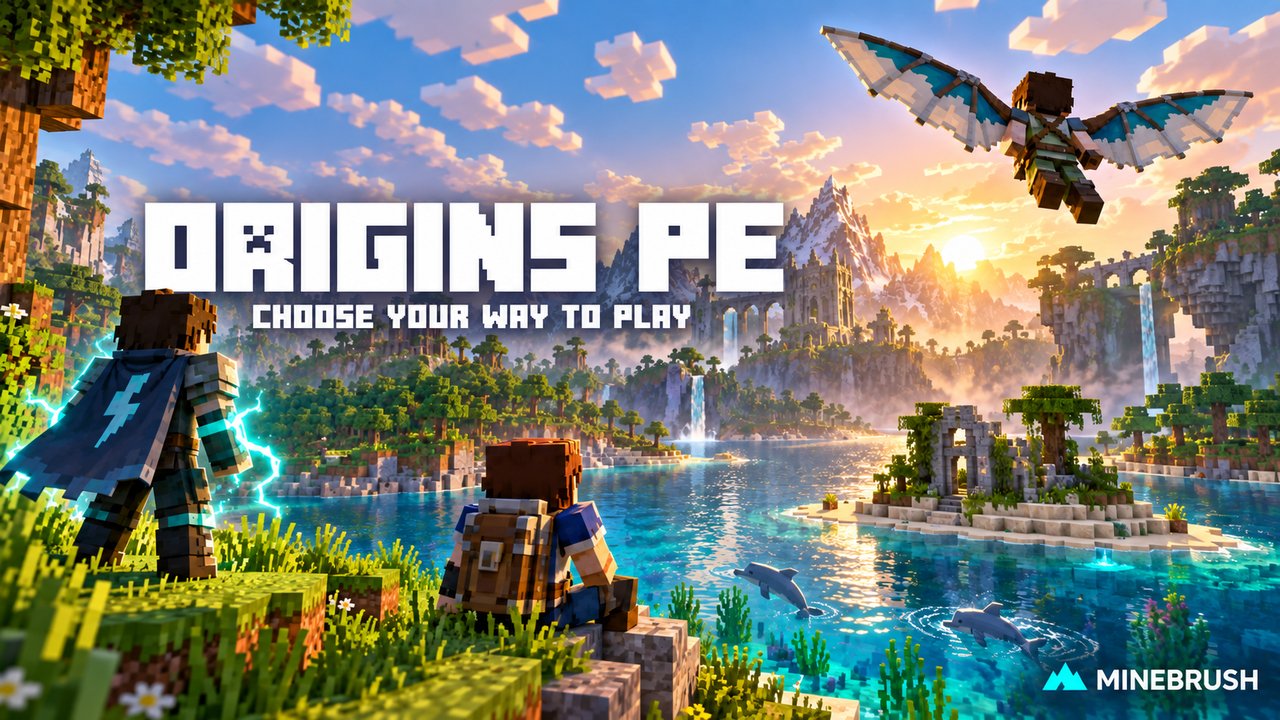
A mountain home feels different when your character needs high-altitude air to sleep. An ocean becomes a proper home when you can breathe underwater but struggle on land. Origins PE changes the way you plan a Minecraft world by giving each player a different set of strengths, weaknesses and abilities.
Created by r4isen1920 and contributors from the Origins concept by Apace100, this Bedrock add-on lets you choose an Origin and a separate Class. Your Origin changes how you survive; your Class adds a useful specialization. You can also choose Human and keep ordinary Minecraft rules while friends try stranger characters.
This guide follows Origins PE 6.0.0, whose listed Bedrock versions are 26.30 and 26.40. It includes 23 Origin choices counting Human, plus 15 Classes. Version 6 adds Child of Zeus, Vampire and Athlete.
Choose an Origin · Pick a Class · Use your abilities · World ideas · Change your choice · Download and install · Fix common problems
Choose the character whose drawbacks you want to play with
There is no single best Origin for every world. Decide what you want to do most—build, explore, mine, fight or support friends—then read the daily cost of the power. A weakness that changes your home, food or equipment matters much more than a spectacular ability you use occasionally.
For a first Origins world
Human is the simplest starting point: normal Minecraft, with no Origin-specific strengths or drawbacks. Add a gathering Class if you want a small change before committing to a completely different survival routine.
Avian suits an open-air explorer. You move faster and descend gently, but eat a vegetarian diet and need a bed at Y151 or higher. Plan a mountaintop shelter and a crop supply early. A lowland starter house may look perfect and still fail the sleeping requirement.
Feline works well for rooftops and dark caves: no fall damage, higher sprint-jumps and useful low-light effects. You have one fewer heart, and outside Strength your mining and attacks are weaker. Creepers normally avoid you, but attacking one removes that protection; it is not permission to ignore every nearby creeper.
For a world built around one environment
Merling turns an ocean settlement into a natural home. You breathe, see and mine effectively underwater, but cannot breathe normally on land. Build the first base with a submerged work area and a clear route back to water. Do not choose it for a long land expedition unless you have planned how to manage breathing.
Mole is a good match for a cave village: ore sensing, rapid underground digging, dark vision and a smaller body help you live below the surface. Direct sunlight causes trouble, swimming is difficult, and the diet is vegetarian. Grow food where you live rather than relying on repeated surface hunting trips.
Blazeborn is a Nether-oriented challenge with fire-related advantages, a Nether spawn and water vulnerability. Piglin also starts in the Nether, but focuses on gold-powered protection and close combat, with a greater food cost when recovering health. These choices change the opening hours; they are not just extra powers added to a normal Overworld start.
For movement and exploration
Elytrian gives you built-in wings and an upward launch, making scouting and travel exciting from the beginning. The trade-offs are heavy-armor restrictions, weakness under low ceilings and extra collision/fall danger. Build a high-roofed home with a clear landing approach. Wings do not make a head-first crash safe.
Enderian can teleport toward the block you look at, but water hurts and carrying pumpkin items causes weakness. It suits careful travel and positioning. An ocean-heavy route or a pumpkin collection job needs more planning than it would for a Human.
Fox combines smaller size, speed, pouncing and useful sweet berries. Lower maximum health and a fast metabolism make food and safe positioning important. Inchling takes small-scale living further, with a tiny body and useful sugar consumption, but only five hearts. A miniature home can be fun; a small hitbox does not replace a survival plan.
The new 6.0 characters
Child of Zeus is for Overworld sky adventures. Double-jumping lets you hover, and the active ability creates a throwable explosive trident. You can slow enemies and trigger electrical follow-up effects. Underground areas and other dimensions weaken you, and the trident ability cannot be called in the Nether or End. Practise its aim away from friends and anything you do not want caught in the blast.
Vampire changes food and daylight into central concerns. Hitting living creatures restores blood; ordinary food does not refill that resource. Bat form gives flight and daylight protection, but prevents attacks and tool use until you transform back. Plan shelter before sunrise and watch the blood supply, especially while healing drains it. This is a hunting-focused challenge, not simply a free flight option.
The other paths, at a glance
- Arachnid: wall climbing and temporary web traps suit vertical hunting. You eat meat and have three fewer hearts. Hold Jump while facing a suitable solid wall to climb.
- Shulk: natural protection and nine extra inventory slots help long supply runs. Hunger drains faster, and using a shield breaks it. Avoid choosing Warrior solely for its shield bonus with this Origin.
- Phantom: switch into a non-interacting form to pass through blocks, then return to normal to work. Daylight is a problem when exposed; phasing is not a way to mine while remaining untouchable.
- Slimecican: bouncing and a damaging leap reward close-range movement. Taking damage can shrink you and reduce your maximum health; keep slime balls for recovery.
- Bee: manage a limited supply of stingers and replenish them from flowers during daylight. Exhausting the supply is fatal, while night and rain weaken you. Keep flowers accessible before starting fights.
- Starborne: leaps and projectiles come with a rising Stress resource. Sneak at full health to lower it. Letting it fill causes a dangerous explosion, so resource management matters around a shared base.
- Elven: a dedicated bow specialist with magical follow-up attacks. Light armor and weapon restrictions make it a poor fit for someone who wants a heavily armored sword fighter.
- Voidwalker: a risky melee style built around missing health and life-force effects. Some attacks also cost your own health; it is not a straightforward tank. Friendly animals flee your presence.
- Diviner: link with up to three other players to share health-related effects and use support abilities. Shared damage creates responsibility as well as protection: agree before linking a group heading into danger.
- Rootkin: barehanded fighting and linked enemies reward close combat. Weapons reduce your effectiveness, and fire is especially dangerous. Build around those rules rather than carrying a sword out of habit.
The selection screen explains the full trait set before you commit. A server can ban particular choices or restrict repeated Origins, so an unavailable entry may be a deliberate world rule.
Pick a Class for the job you actually do
A Class is a second choice, not a replacement Origin. Choose a benefit you will use repeatedly. These suggestions are starting points, not claims that every combination is equally strong.
- Explorer: helpful for long trips, with a starting navigation kit and no hunger loss from sprinting. A useful partner for an Overworld traveller.
- Athlete: faster movement on foot and in water, plus stronger punches. Pick it for everyday mobility; it does not erase an Origin’s environmental weaknesses.
- Miner: connected-ore mining with a pickaxe makes resource runs quicker. A practical choice for someone who spends most sessions underground.
- Lumberjack: fell trees with an axe and benefit from possible replanting. Useful when building a wooden settlement.
- Farmer: chances of faster crop growth and extra harvests support a crop-based food supply.
- Rancher: animal breeding and mob-drop benefits suit a livestock keeper.
- Cook: improved prepared food and restorative stews make the base’s kitchen useful to the group.
- Blacksmith: enhanced crafted or smithed equipment and better repairs suit the player supplying everyone’s gear.
- Merchant: improved villager deals are useful around a trading settlement.
- Cleric: stronger or longer-lasting brewed potions reward a player who maintains a brewing room.
- Archer: improved movement while drawing a bow or crossbow, and arrows without normal gravity drop, suit a ranged role.
- Warrior: low-health attack benefits and shield protection suit compatible melee characters. They are not a reason to deliberately remain near death.
- Rogue: stealth and invisibility-related attack benefits suit ambush play.
- Beastmaster: stronger tamed animals and shared potion effects support a companion-focused adventure.
- Nitwit: no additional Class traits. Choose it when you want the Origin alone to define the challenge.
Open the Ability Wheel and use a power
The Ability Wheel contains your active abilities and the route to Preferences. Passive traits, such as a diet restriction, do not need to be activated from the wheel.
- Keyboard or controller: quickly double-tap your Sneak button. Touch controls: quickly triple-tap Jump.
- Choose a slot. On keyboard, use the displayed number keys 1–5. On touch, tap the slot. On a controller, follow the displayed button prompt, which depends on the controller.
- Select it again to confirm. If the ability has a cooldown or consumes a resource, check its bar before expecting another use.
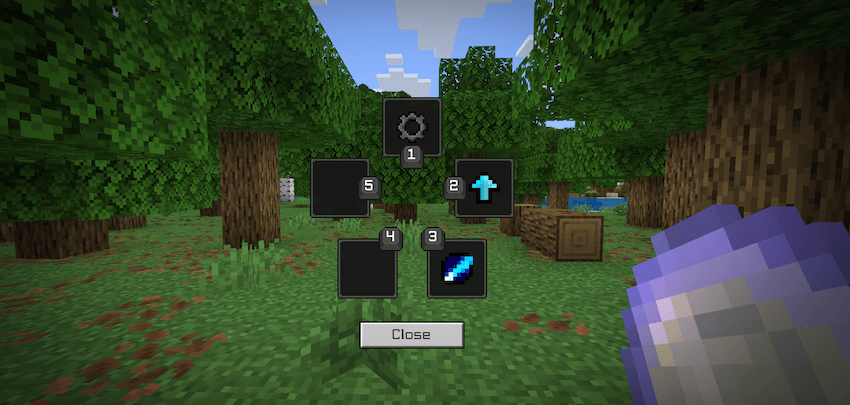
Use a safe area to learn the first activation. A movement power can send you over an edge, and an attack power may affect nearby players. If your wheel has fewer abilities than a video, first compare the chosen Origin rather than assuming the installation is broken.
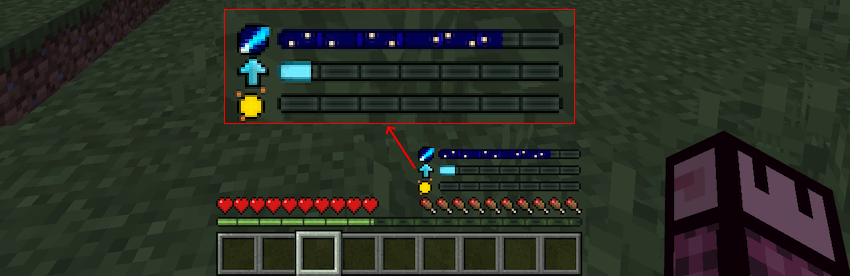
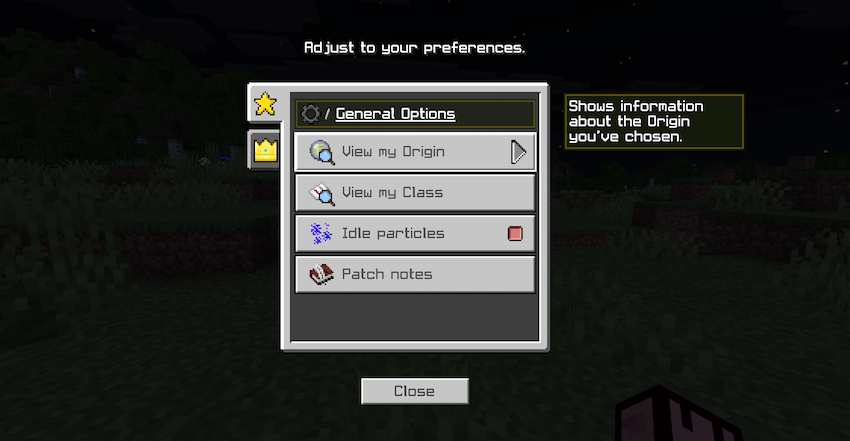
Open Options → View my Origin or View my Class to reread your traits. Preferences also includes idle-particle controls and the in-game patch notes. That is a better reference for your installed version than a years-old video using different controls.
Three ways to make Origins part of the world
A mountain village with different jobs
An Avian farmer can live high enough to sleep and grow a vegetarian food supply, while a Human blacksmith makes equipment below. Give the village paths and landing space suited to its residents. Different characters then change the architecture and daily routines instead of only changing combat.
An ocean base with a landward partner
A Merling handles submerged work while a Human or another land-friendly character gathers inland supplies. Build an underwater room connected to a shore depot. Each player gets a meaningful job without pretending the Merling’s land-breathing problem has disappeared.
A cave expedition with a support plan
A Mole can scout underground resources while a compatible companion carries supplies and manages surface errands. A Diviner can support a coordinated group, but discuss shared health before linking players. Decide who carries food that each character can actually eat; one stack of steak is not a universal team ration.
Change your Origin or Class
Orb of Origins opens an Origin change, while Resignation Paper changes the Class. Use the appropriate item while standing still on the ground and out of combat. Confirming the change consumes one item. The world owner can disable either option, so changing is not guaranteed on every server.
For a private practice world, the items are available in the Creative inventory. An operator can also supply them with /give @s r4isen1920_originspe:orb_of_origins or /give @s r4isen1920_originspe:resignation_paper. On someone else’s world, follow its rules for obtaining them. Do not assume an old crafting recipe or Wither-drop tutorial applies to this release.
Before changing, move somewhere safe for the new character. Switching into a Merling far from water or into a sunlight-sensitive character outdoors can immediately create a survival problem.
Download Origins PE 6.0.0
Bedrock 26.30 / 26.40 — behavior and resource packs included in one file. This is the stable package, not the developer build.
The pack’s minimum Bedrock version is 26.30. Its published file labels are 26.30 and 26.40; that is not a blanket promise for every newer game release. Java players need the separate Java Origins project, not this .mcaddon.
Install it in a new or backed-up world
- Back up an existing world before adding Origins PE. A new world is easiest if you want the character choice to shape the whole adventure.
- Open the downloaded
.mcaddonwith Minecraft. On mobile, use the file manager’s Open With or Share action and choose Minecraft. - Wait for both included packs to import. In the world’s settings, activate the Origins PE behavior pack and check that the matching resource pack is active.
- Launch the world, choose an Origin and Class, and try the Ability Wheel.
- Read the restrictions of your choice before leaving spawn. Arrange suitable food, shelter and equipment first.
For device-specific import help, see our Android, iPhone and iPad installation guide. The file includes its two required packs; you do not need a random extra “API pack” from another website.
Combining it with other add-ons or a shared world
Origins PE changes the player’s behaviour and presentation. Another add-on that also replaces the player can interfere with abilities, size, health or animations. Changing pack order is not a universal repair: it may make one add-on work while breaking the other.
First confirm Origins PE works alone in a separate world, then add the particular companion pack you want. For multiplayer, the host activates the world’s packs and joining players need the resource pack too. The author supports multiplayer; unusual pack combinations and host restrictions still need checking before moving your main group.
Agree on restricted Origins and whether change items are allowed before a competitive world begins. When updating, keep both the behavior and resource packs on the same version and retain a backup made before the update.
When something behaves differently than expected
No chooser or Ability Wheel appears
Check that both packs are active in this world, not merely imported. Confirm the game version, then try the correct input pattern: double Sneak for keyboard/controller, triple Jump for touch. If another UI or player add-on is active, compare with an Origins-only world.
I cannot eat, sleep, wear armor or use a shield
Open View my Origin before reinstalling anything. Avian has a high-altitude sleeping requirement, several characters have restricted diets, Elytrian and Elven limit equipment, and Shulk cannot use a shield. These can be intended trade-offs rather than bugs.
The Orb or Resignation Paper does nothing
Stop moving, stand on the ground and leave combat. Check whether the world owner disabled the item. Having the item in your inventory does not override the world’s settings.
A power stopped working after adding another pack
Try the same action in the separate Origins-only world. If it works there, investigate the newly added pack, especially player, animation or interface changes. Restore the backed-up setup if the combination cannot keep both projects working.
Origins is most enjoyable when the limitation is part of the adventure you wanted. Choose a character that gives you a reason to build a different home, take a different route or rely on a friend—not just the longest list of powers.
More for your Bedrock world.
Install Bedrock add-ons on Android, iPhone and iPad: find the downloaded file, open it in Minecraft, activate both packs when required and start using the new content. Includes illustrated steps and common fixes.
- Edition
- Bedrock Edition
- Difficulty
- Intermediate
- Time
- None
Import, world activation and first use
MineBrush · Guide
Install Bedrock Add-ons on Mobile
Install Bedrock add-ons on Android, iPhone and iPad: find the downloaded file, open it in Minecraft, activate both packs when required and start using the new content. Includes illustrated steps and common fixes.
Import, world activation and first use
- Game edition
- Bedrock Edition
- Platform family
- Bedrock & Mobile
- Supported devices
- Android · iPhone · iPad
- Install format
- Open in Minecraft; activate in world settings
- Touch readiness
- Check guide
- Resource type
- Guide
- Compatibility confidence
- Source claimed
- Card evidence statement
- Official device and Minecraft guidance
- Card delivery statement
- No file · step-by-step guide
- Card limitation note
- Import, world activation and first use
- Edition applicability
- Bedrock
- Guide difficulty
- Intermediate
- Delivery state
- No file
- Lifecycle state
- Current
Find supplies in one place with Advanced Storage Network 3.0.0. Build your first Bedrock storage network, automate useful jobs and set up wireless access. Includes the required Core download.
- Minecraft
- Bedrock 26.30 / 26.40
- Components
- Paired
- Package
- Two .mcaddon files: Core, then ASN
Bedrock · Add-on
Advanced Storage Network
Find supplies in one place with Advanced Storage Network 3.0.0. Build your first Bedrock storage network, automate useful jobs and set up wireless access. Includes the required Core download.
- Minecraft version
- Bedrock 26.30 / 26.40
- Game edition
- Bedrock Edition
- Loader / platform
- Bedrock
- License
- ISC
- Platform family
- Bedrock & Mobile
- Supported devices
- Windows, Android and iOS with add-on import
- Install format
- Two .mcaddon files: Core, then ASN
- Touch readiness
- Check guide
- Resource type
- Add-on
- Project version
- 3.0.0
- Last verified at
- Sep 18, 2026
- Compatibility confidence
- Source claimed
- Bedrock add-on packs
- Paired
- Bedrock add-on import route
- Import Core and ASN; activate both behavior and resource pack pairs in a new world
- Required experiments
- None
- Edition applicability
- Bedrock
- Delivery state
- Direct download
- Lifecycle state
- Current
Player discussion 0
Questions, discoveries and help from other players.