
MineBrush publication
YACL: Open, Adjust and Save Your Minecraft Mod Settings
Get the settings library your Java mods need, then learn how to find their menus, adjust options and keep changes. Includes YACL 3.9.6 for Fabric and NeoForge on 26.2, the Fabric API companion and practical fixes.
A mod asks you to install YetAnotherConfigLib, usually shortened to YACL, and the name tells you very little about what you will get. YACL supplies the settings screens used by other Minecraft Java mods: the sliders, switches, categories and explanations that let you adjust how a mod behaves without editing a configuration file by hand.
You normally install it because a particular mod requires it. YACL does not add a universal settings menu, new blocks or a performance boost on its own. The useful part comes when you open the settings of a mod built with it and make that mod suit the way you play.
Using the settings · Choose a download · Install YACL · Fix common problems
What YACL makes easier
Think of YACL as the interface behind a mod's options. A supported mod can organise its settings into tabs and collapsible groups, explain the selected option alongside the controls, and offer a slider, checkbox, dropdown or colour picker instead of asking you to guess a value in a text file. The mod's developer decides which options exist and what they do.
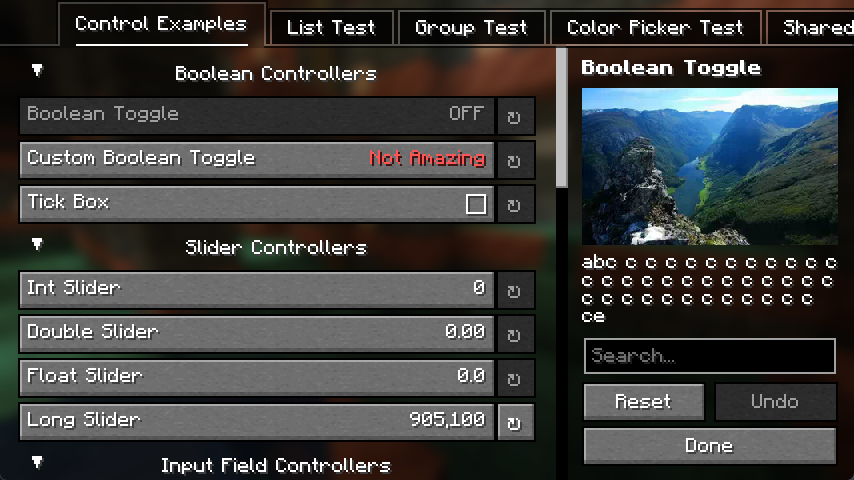
The preview illustrates YACL's interface for Minecraft 1.20.5 and later. Your installed mod can use different labels, categories and layouts. In particular, the landscape in the description panel is an example image preview; it is not a graphical improvement supplied by YACL.
A practical example: making a zoom mod comfortable
Zoomify provides a useful example of configurable play. Its settings can be opened with the client command /zoomify or through its Mod Menu configuration button. You can adjust zoom transitions and relative mouse sensitivity: a gentler sensitivity can make it easier to inspect a distant build without swinging past it, while a different transition changes how quickly the view moves into the zoom.
Change one option, return to the same view and try it. If the new movement feels worse, restore that option before experimenting with another. The zoom itself belongs to Zoomify; YACL supplies the interface used to configure it. Installing YACL alone will not create a zoom key.
Other useful ways to approach a settings screen
- Reduce visual distractions: if the dependent mod offers animation or display toggles, read their descriptions and disable only the effect you find distracting.
- Make information easier to read: when a mod provides a colour control, choose a colour that stands out against the backgrounds you actually play on. YACL supports colour controls, but the mod must expose that option.
- Find one setting in a large mod: start with the relevant category or the screen's search field, where available. Read the explanation before changing an unfamiliar value.
- Recover from an experiment: prefer an individual option's reset control when available. A whole-screen reset can undo other settings you wanted to keep.
Where do I open the menu?
Open the settings for the mod you want to change, not YACL itself. The route might be a mod-list configuration button, a dedicated command, a keybind or a button supplied by that mod. On Fabric, Mod Menu can provide access when the mod supports its integration. It is an optional convenience, not a replacement for YACL or a guarantee that every installed mod has a configuration screen.
Once inside, choose the relevant category, select an option and read its description. Adjust the control, then use the screen's Done, Save or Apply action as provided. Reopen the screen to check that the value stayed. If an option says it needs a restart, restart the game before judging its effect. A server-controlled setting may not change just because you changed a local client preference.
YACL downloads for Minecraft Java 26.2
These files are YACL 3.9.6 for Java 26.2. Choose the build for your existing loader. Fabric and NeoForge files are alternatives, so do not install both. If your modpack uses a different Minecraft version, keep that pack's matching YACL release instead of dropping a 26.2 file into it.
| Your profile | Choose | What else is needed? |
|---|---|---|
| Java 26.2, Fabric | YACL 3.9.6 Fabric | Fabric Loader 0.18.0 or later, plus matching Fabric API |
| Java 26.2, NeoForge | YACL 3.9.6 NeoForge | NeoForge for 26.2; this YACL build does not require Fabric API |
Fabric
NeoForge
Fabric API companion for the Fabric route
The existing 0.158.0 download supplies YACL's required Fabric resource-loader component for 26.2. If your modpack already contains a compatible Fabric API, keep one copy; another mod may require a newer release. Do not downgrade the whole pack just to match this companion.
The author's version list also includes other Minecraft releases. The 3.9.6 changelog describes its 26.3 work as a snapshot port; the 26.2 files above remain a separate choice. Match the individual file to your actual game rather than assuming every version on the project page shares the same compatibility.
Install it in the profile you actually use
- Check the dependent mod first. Confirm its Minecraft version, loader and required YACL version. In a ready-made modpack, check whether the launcher has already installed YACL.
- Close Minecraft and open that instance's folder. Use the launcher's folder action where available. Different profiles can have separate
modsfolders. - Place one matching YACL JAR in
mods. Keep the JAR intact. It is not a resource pack and does not belong inresourcepacks. - On Fabric, add the matching Fabric API if missing. Install the complete API rather than searching for a separate resource-loader component. On NeoForge, use the NeoForge YACL file.
- Launch the same profile and open the dependent mod's settings. Confirm that the screen opens, change a harmless preference, save it and reopen it.
When replacing an older copy, move that copy out of the active mods folder. Keep a backup elsewhere. A renamed duplicate is still a duplicate mod, and extracting the JAR's bundled components is unnecessary.
Does a multiplayer server need YACL?
Follow the mod that depends on it. A client-only settings mod normally needs YACL on your client, not on the server you join. YACL also supports configuration use by mods that run on both sides, so a server may need it when one of its installed mods declares that dependency.
There is no reason to add it to every server just because players use a YACL-powered menu. It does not turn a client preference into a server-wide rule. On a dedicated server, there is no graphical settings screen; use the configuration method documented by the server mod. Keep client and server changes separate unless that mod explicitly connects them.
When something does not work
Minecraft says YACL is missing
The error may name yet_another_config_lib_v3. Check that the file is in the launched instance, that its loader matches, and that its version satisfies the dependent mod's requirement. Installing a NeoForge build in Fabric will not satisfy a Fabric dependency.
The error mentions fabric-resource-loader-v1
Install or update the complete Fabric API for the same Minecraft version. This component is part of Fabric API; YACL does not replace it. Check the rest of the pack's API requirements before selecting a version.
YACL loads, but there is no settings button
Look for the dependent mod's documented access route. Installing a configuration library does not automatically create a menu for unrelated mods. In Mod Menu, select the mod you want to configure; a missing configuration button can mean it does not offer that integration.
The screen opens, but changes disappear
Use its normal save or completion action and reopen it before closing Minecraft. Check whether the option requires a restart or is controlled by the server. If values still revert, check that you launched the same instance and that its configuration folder is writable. Back up a configuration file before resetting it; do not delete the entire config folder to fix one preference.
Opening one mod's options crashes the game
Check for duplicate YACL versions and confirm that the dependent mod supports the installed release. Reproduce the problem in a copy of the instance with the affected mod and its required dependencies. If it persists, include the game version, loader, YACL version, affected mod and crash report when reporting the issue. A launcher exit code by itself usually does not identify the cause.
Keep a working configuration when updating
Update YACL together with the requirements of the mods that use it. In a managed modpack, prefer the pack's tested combination rather than upgrading one library independently. Before changing an established setup, back up the modded instance and its worlds, including the settings you want to preserve.
Only remove YACL after checking that no remaining mod needs it. Cloth Config, Architectury and YACL serve different dependencies; one is not a drop-in replacement for another. YACL is developed by isXander; the official project is linked in the author panel, and its source code and LGPL license are available from the developer.
More for your Java setup.

Zoomify
2.16.1Look closely at distant builds, adjust zoom with your scroll wheel and create smooth scenic shots. Download Zoomify for Fabric 26.2 with required libraries, controls and spyglass settings.
- Minecraft
- Java 26.2
- Loader
- Fabric
- Runtime
- Client
Client only · this release is for Fabric 26.2
Java · Mod
Zoomify
Look closely at distant builds, adjust zoom with your scroll wheel and create smooth scenic shots. Download Zoomify for Fabric 26.2 with required libraries, controls and spyglass settings.
Client only · this release is for Fabric 26.2
- Minecraft version
- Java 26.2
- Game edition
- Java Edition
- Loader / platform
- Fabric
- License
- LGPL-3.0; see original project license notices
- Platform family
- Bedrock & Mobile
- Supported devices
- Windows · macOS · Linux
- Install format
- Four matching JAR components in the instance mods folder
- Touch readiness
- Not required
- Resource type
- Mod
- Project version
- 2.16.1
- Last verified at
- Sep 13, 2026
- Secondary guide action
- Setup & fixes
- Compatibility confidence
- Source claimed
- Java mod loader
- Fabric
- Java runtime side
- Client
- Card evidence statement
- Inspect distant builds and customize smooth zoom controls
- Required dependency
- Fabric API, Fabric Language Kotlin, YACL; Loader 0.19.5+ for supplied libraries
- Card delivery statement
- Zoomify and three required libraries hosted on MineBrush
- Card limitation note
- Client only · this release is for Fabric 26.2
- Edition applicability
- Java
- Delivery state
- Direct download
- Lifecycle state
- Current
Keep your builds, inventory and modpack progress before an update. Find the right profile, back up the complete world and setup, restore a separate copy and know how to roll back if something breaks.
- Edition
- Java Edition
- Difficulty
- Intermediate
- Time
- Copy time depends on world size
Do not test an update on the only good copy
MineBrush · Guide
Back Up a Modded World
Keep your builds, inventory and modpack progress before an update. Find the right profile, back up the complete world and setup, restore a separate copy and know how to roll back if something breaks.
Do not test an update on the only good copy
- Game edition
- Java Edition
- Platform family
- Java & PC
- Supported devices
- Windows · macOS · Linux
- Install format
- Manual backup and restore; no extra mod needed
- Touch readiness
- Not required
- Resource type
- Guide
- Compatibility confidence
- Source claimed
- Card evidence statement
- Official storage and launcher docs reviewed · restore not run
- Card delivery statement
- Step-by-step backup and restore guide
- Card limitation note
- Do not test an update on the only good copy
- Edition applicability
- Java
- Estimated time
- Copy time depends on world size
- Guide difficulty
- Intermediate
- Delivery state
- No file
- Lifecycle state
- Current
Player discussion 0
Questions, discoveries and help from other players.