
MineBrush publication
Minecraft Server Rules: Build, Share and Play Without Trouble
Can you take items from an unlocked chest, use a minimap or harvest a public farm? Learn how to check server rules, protect your build, share resources and handle mistakes—with examples for Java and Bedrock players.

You find an unlocked chest beside an unfinished house. Nobody is online, and the area has no visible claim. Can you take the spare iron? On a cooperative survival server, that can still be theft. On a raiding server, taking loot may be part of the game. The difference is the server’s rules—not whether Minecraft lets you open the chest.
Before settling in, check what the server allows around property, PvP, client mods and shared resources. This guide turns those rules into decisions you can use while playing. It applies to Java and Bedrock communities, but claim tools, commands and permissions depend on the server.
Jump to: First visit · Builds and belongings · Claims and trust · Shared farms · PvP and pranks · Mods and automation · Mistakes and reports
Five things to check before your first build
Open the rules linked from the server’s official website, welcome message or information channel. A command such as /rules only works where the server provides it; it is not a universal Minecraft command. Look for separate rules for the world or game mode you joined.
- Property: are stealing, raiding and altering another player’s build allowed? Does an unclaimed build still count as someone’s property?
- Space: how far should you build or mine from a neighbor? Is there a separate resource world for gathering materials?
- Combat: is PvP opt-in, limited to arenas, or active throughout the world? What happens to dropped gear?
- Your client: which mods, resource packs, overlays and automated actions are permitted?
- Help: where do you ask a rules question or report damage privately?
Do not carry a rule from one server into another. Mojang’s community standards cover behavior such as harassment and threats, while individual servers also define their own gameplay boundaries. A server advertising raiding is not giving permission for real-world threats or sharing someone’s private details.
If a rule is unclear, ask about the action you intend to take: “Can I harvest this public wheat field if I replant it?” is easier to answer than “What counts as griefing?” Wait for clarification before doing something difficult to undo.
An open chest is not an invitation
On a server that prohibits stealing, treat a player-built chest, farm, animal pen or unfinished house as owned unless the server or owner explicitly says otherwise. A missing lock, broken fence or inactive owner does not establish permission.
These everyday situations are worth checking before you act:
- A house looks abandoned. Ask staff about the abandonment policy. Do not decide that a few days offline makes its materials free.
- A chest says “free food.” Take what the sign offers. It does not make the nearby tool chest or breeding animals public.
- A road crosses your planned base. Find out whether it is a community route before moving it or enclosing the access.
- A neighbor’s beacon reaches your land. Receiving its effect is different from taking the beacon or dismantling its pyramid.
- You need building materials. Use the designated resource area where one exists, rather than hollowing out the hillside supporting somebody’s house.
Distance limits are local rules too. For example, Dogcraft’s published rules specify a 100-block separation from other builds or claims without explicit permission. That is a rule for Dogcraft, not a standard distance built into Minecraft. Check your own server before choosing a plot.
Protect your build, then choose who can do what
A claim is a server feature that can restrict changes inside an area. A rule says what players should do; protection tools limit what they can do. Use both when your server provides them, and check the boundaries after expanding your house, storage or farm.
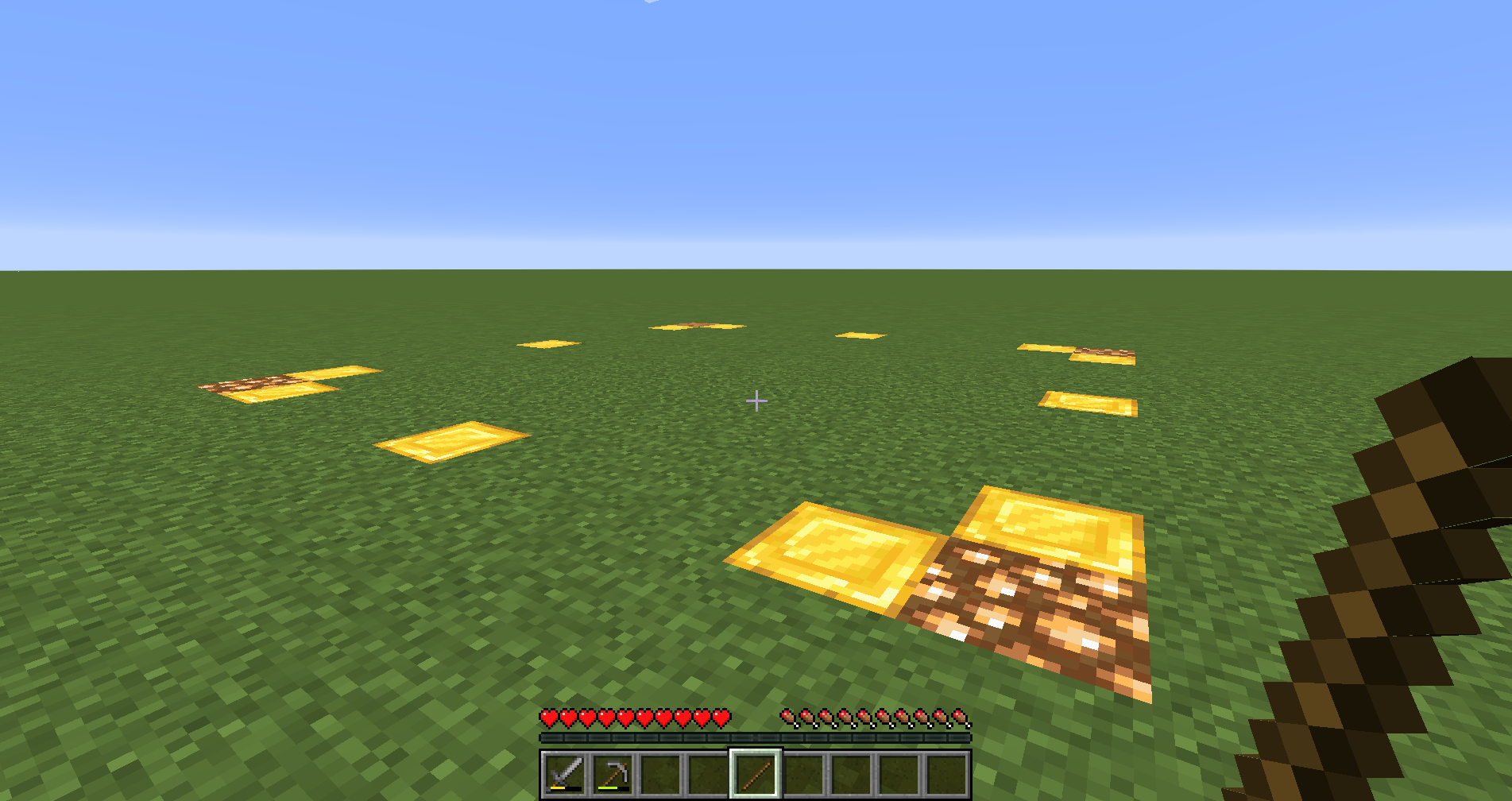
In Dogcraft’s documented GriefPrevention setup, a golden shovel selects claim corners and a stick displays existing boundaries. Its trust levels distinguish using doors, opening containers, building and granting permissions. These are useful examples of what to look for in your server’s guide; do not assume that holding a shovel protects land everywhere.
Give a visitor the access needed for the job. Someone touring your house may need doors, but not storage. A friend helping decorate may need building access, but not permission to invite more builders. Read the scope before confirming: some systems can apply a permission to several claims.
After setting up protection, ask a trusted friend who has no special permissions to check whether they can open a test chest or place a harmless block where you expect access to be denied. Agree on the test first. If the result is wrong, fix the permissions before moving valuables in. Being able to enter a claim does not necessarily mean a player can edit it.
Leave a shared farm ready for the next player
A public farm is useful because everyone can use it repeatedly. Read its signs before harvesting: a wheat field, an iron farm and a villager trading hall can each have different instructions.
At a replanting crop farm, harvest the mature crop, replant the empty farmland with the appropriate seeds or crop, and avoid trampling the soil. If you accidentally break part of the setup, tell the owner instead of leaving the next player to discover it.
At a trading hall, do not move villagers, break workstations or alter the transport system simply because you can reach them. A trade you want being unavailable is a reason to ask about restocking, not a reason to remodel someone else’s hall.
At an automated farm, follow its operating instructions, collection limits and queue. Do not change redstone or storage routes to direct the output to yourself. If a machine stops, report what you did just before it stopped; avoid experimenting on a shared build you do not understand.
For shared storage, agree on what “shared” means. One group may pool every resource; another may share food while keeping diamonds and enchanted gear private. Clear labels and an agreed borrowing rule prevent arguments that no chest lock can solve.
PvP, pranks and dropped items need clear boundaries
A server’s combat rules can change between worlds or events. A duel invitation does not automatically extend to the other player’s base, pets or possessions. Before a friendly fight, agree on the location, when it ends and whether gear will be returned.
On a server requiring consent for PvP, do not assume that someone wearing armor wants to fight. Avoid trying to bypass the rule with lava, traps, pushing or hostile mobs. The relevant question is what you are doing to the player, not just whether you used a sword.
Pranks need the same care. A friend enjoying a joke once does not grant permanent permission to change their build. If you cannot explain how to restore it without losing items or progress, choose something else—and check whether the server permits pranks at all.
If another player dies beside you, follow the local loot rules. In a cooperative setting where you agree to help, keep their items separate and arrange a return. Do not describe taking the best equipment as “protecting it” while keeping it for yourself.
“Client-side” does not mean “allowed here”
A mod running only on your device can still reveal information or automate actions the server prohibits. Check the features you actually use, not just the client’s name or the fact that it is popular.
Useful questions include whether a minimap can show players or caves, whether a building aid only displays a plan or places blocks, and whether an inventory tool sorts on request or performs repeated actions. Ask staff about the precise feature and setting rather than requesting approval for an entire modpack.
For a concrete example, Hypixel’s modification policy distinguishes limited cosmetic or performance changes from unfair advantages and gameplay automation. It also says that using modifications is at the player’s risk. Approval on another server does not transfer to Hypixel, or vice versa.
Check again when an update adds a feature or changes a default. If a tool is prohibited or its status is unclear, use a profile without it until you have an answer. Keep any dependencies required by an approved server modpack intact; ask its team for the supported setup.
AFK play, automatic farms and duplication are also separate questions. Permission to build a farm is not permission to use an autoclicker, evade an idle limit or exploit a duplication bug. If you discover an exploit, stop using it and report it privately instead of distributing the method in public chat.
If something goes wrong, make the next step useful
If you caused accidental damage, stop the action, note the location and tell the owner or staff what happened. Offer to restore it, but ask before rebuilding anything complicated. Guessing how a redstone circuit worked can make recovery harder.
If you find damage or missing items, preserve what you can see and report it through the server’s support route. Include the location, approximate time and a clear description. Do not retaliate or publicly accuse a player just because they were nearby. Our server report guide provides a copyable template and practical examples.
If you receive a warning or ban, read the stated reason and use that server’s appeal process. Give accurate context and relevant evidence; do not invent a story or assume that deleting a mod reverses the decision. A local server appeal and a Minecraft account enforcement review are different processes.
You can disagree with a rule respectfully or choose another community. The best fit is a server whose everyday play you actually enjoy: building together, competing, trading or raiding under clear expectations. Knowing those expectations early protects your time—and makes you a better neighbor.
More from MineBrush.
Get useful help with a Minecraft server problem. Copy a clear report template, see practical examples, capture the right screenshot and find Java logs when support needs them.
- Edition
- Cross-edition
- Difficulty
- Beginner
- Time
- 7 min read
Java log instructions are separate from Bedrock
MineBrush · Guide
Report a Server Problem
Get useful help with a Minecraft server problem. Copy a clear report template, see practical examples, capture the right screenshot and find Java logs when support needs them.
Java log instructions are separate from Bedrock
- Minecraft version
- Java and Bedrock
- Game edition
- Cross-edition
- Platform family
- Cross-edition
- Supported devices
- Java and Bedrock players
- Install format
- No installation required
- Touch readiness
- Not required
- Resource type
- Guide
- Compatibility confidence
- Not applicable
- Card delivery statement
- Report template and practical examples
- Card limitation note
- Java log instructions are separate from Bedrock
- Edition applicability
- Java + Bedrock
- Estimated time
- 7 min read
- Guide difficulty
- Beginner
- Delivery state
- No file
- Lifecycle state
- Current
Player discussion 0
Questions, discoveries and help from other players.