 MineBrush
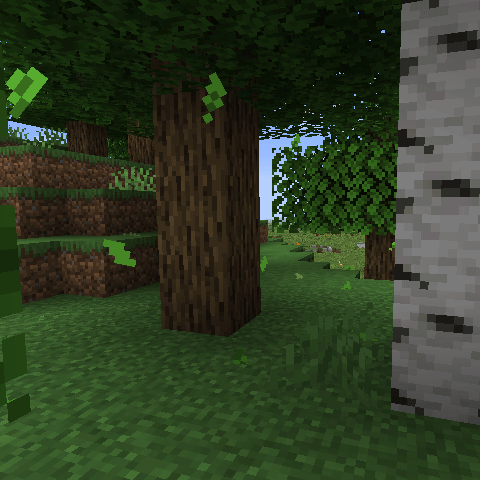
Vanilla Minecraft now has its own falling-leaf effects, but Falling Leaves still earns a mod slot when you want control. Version 2.0.7 lets you change how often particles spawn, how big they are, how long they live, whether wind pushes them, which trees stay quiet, what happens when you hit or break leaves, and whether a specific block uses Vanilla, Regular, Conifer or Cherry behavior.
Download Falling Leaves 2.0.7
Main file: fallingleaves-2.0.7+26.1.jar · 182,516 bytes · Fabric · Minecraft 26.1–26.2 · client only.
SHA-256: db941c6c53a0353d8b7d07f1755315d8fe39d08a75cbd3b1516b258c130d0177. MineBrush stores the unmodified creator file. You still need the required 26.2 libraries listed next.
What you need for Minecraft 26.2
| Piece | Exact 26.2 choice checked | Required? |
|---|---|---|
| Minecraft Java | 26.2 using Java 25 | Yes |
| Fabric Loader | 0.18.5 or newer, per the mod manifest | Yes |
| Download Fabric API · official release | fabric-api-0.158.0+26.2.jar |
Yes |
| Download Cloth Config API · official release | cloth-config-26.2.155.jar |
Yes |
| Mod Menu | modmenu-20.0.1.jar |
Optional, but recommended for the config button |
These are the current exact 26.2 dependency releases checked on August 27, 2026, not a promise that their projects will never publish a newer build. Keep all four required JARs for the same game line. A 1.21.x library with a similar name is not a substitute.
Why install it when vanilla already drops leaves?
The creator actively calls out vanilla’s implementation and suggests trying the base game first. That is good advice. Keep Falling Leaves when one or more of these controls matter to you:
- Different global rates for ordinary leaves, cherry petals, pale oak particles, conifers and snowy trees.
- Particle size, life span and minimum open space below a leaf block.
- Wind, windless dimensions and particles when a leaf block is hit or decays.
- A choice between vanilla-provided particles and the mod’s Regular, Conifer or Cherry implementations.
- Vanilla textures with the mod’s own particle physics.
- Per-block rates and custom particle textures from a resource pack.
- Extra block states that should emit leaves even when the block is not detected normally.
This remains a visual client mod. It does not add a collectible leaf item, change tree drops, rewrite world generation or require a new world.
Install Falling Leaves step by step
- Make a separate 26.2 instance. Confirm it launches vanilla Minecraft Java 26.2 with Java 25 before adding a loader.
- Install Fabric Loader. Choose the same 26.2 game version and Loader 0.18.5 or newer. Launch that empty Fabric profile once.
- Open the active instance folder. Do this from the launcher you actually use. A Prism or Modrinth instance does not necessarily share the default launcher’s global
.minecraft. - Put three required JARs in
mods. Add Falling Leaves 2.0.7, Fabric API 0.158.0+26.2 and Cloth Config 26.2.155. Fabric Loader belongs to the profile, not as another JAR inmods. - Add Mod Menu if you want easy settings access. It is optional to the mod but useful for the workflow in this guide.
- Remove old duplicates. Keep one Falling Leaves JAR, one Fabric API build and one Cloth Config build for the active game line.
- Launch and check the title screen. If Fabric reports a missing dependency, read the first exact requirement instead of swapping random files.
- Open a disposable world. Stand under an oak or birch canopy with open air beneath its leaves and watch for particles.
The full loader workflow, default folders and error meanings are covered in the MineBrush Fabric mod installation guide. This file is for Minecraft Java Edition, not a Bedrock resource pack or add-on.
Two-minute acceptance test
- Confirm the mods list shows Falling Leaves 2.0.7, Fabric API and Cloth Config.
- Open a clean single-player world and find oak or birch leaves with several blocks of air below them.
- Wait long enough to see repeated particles rather than judging one quiet second.
- Open the Falling Leaves config through Mod Menu.
- Raise Leaf Spawn Rate temporarily and confirm the visible rate changes.
- Raise Conifer Leaf Spawn Rate, move to spruce and confirm that a tree which was quiet now emits particles.
- Hit a leaf block after enabling Drop some leaves when hitting a block?
- Save, close the client completely, relaunch and confirm the settings persist in
fallingleaves2.json.
That test proves the main JAR, both required libraries, the config screen, particles and saved settings. It does not prove every shader, tree mod or resource pack is compatible.
Config guide: what every useful option does
Enabled
The global off switch. Check it before deeper troubleshooting; a perfectly installed mod can be intentionally disabled.
Always Use “Vanilla” Particle Implementation
This delegates leaf particles to Minecraft’s vanilla method or a tree mod’s own implementation. The creator’s tooltip warns that vanilla particles ignore Falling Leaves controls for leaf size, life span, needed vertical space and wind. Turn it on for a closer-to-vanilla result, not when you want maximum tuning.
Use Vanilla Textures
This applies vanilla textures to the mod’s Regular implementation. It keeps more of Falling Leaves’ custom behavior than the always-vanilla implementation does.
Leaf Size and Leaf Life Span
Size changes the visual scale. Life span uses ticks; the current tooltip says roughly 20 ticks equal one second. Huge particles with a very long life can turn a busy forest into visual soup, so move one slider at a time.
Leaf, cherry, pale oak, conifer and snow rates
Leaf Spawn Rate is the general control. Cherry and pale oak use factor-style controls where 10 means the original 100% rate, 5 means half and 20 means double. Conifers and snowy trees have their own rates. Conifers start quiet by design.
Player-placed leaves, block-hit leaves and free space
You can choose whether placed decorative leaf blocks emit particles and whether hitting a leaf produces a burst. Needed vertical space prevents particles where there is too little room beneath the block; it is measured in half-blocks.
Wind and windless dimensions
The mod always has some subtle movement, while Enable Wind? allows stronger wind. Use Windless Dimensions when an enclosed or otherworldly dimension should stay visually still.
Decay settings
The decay multiplier changes particles from leaves about to decay. The maximum decay-leaf count controls the burst when a block disappears and is documented as single-player only.
Leaf Block Settings
These per-block entries are the precision tool. Each leaf type can use a Vanilla, Regular, Conifer or Cherry particle implementation, a spawn-rate multiplier, a conifer flag and a hit/decay-particle choice. Zero percent disables that block’s normal particle spawning; 100% keeps its base rate.
Vanilla, Regular, Conifer or Cherry?
| Implementation | Best use | Main tradeoff |
|---|---|---|
| Vanilla | Let Minecraft or a compatible tree mod provide its intended particle | Ignores Falling Leaves size, life-span, clearance and wind controls |
| Regular | Most broad leaves where you want the mod’s full controls | Uses the mod’s particle behavior rather than a tree mod’s custom implementation |
| Conifer | Needle-like trees such as spruce and pine | Conifer rates default to zero until you opt in |
| Cherry | Vanilla-texture-style particles with Falling Leaves wind support | Currently not the general default; apply it deliberately per block |
Why no leaves are falling
The quiet tree is often intentional. The creator says conifers, large-leaved trees such as jungle trees and palms, and shrubs can default to no particles. Work through this order:
- Confirm Enabled is on.
- Try ordinary oak or birch before testing a modded tree.
- Stand where the canopy has enough empty space underneath.
- Raise the global Leaf Spawn Rate temporarily.
- For spruce or pine, raise Conifer Leaf Spawn Rate.
- Open Leaf Block Settings and check that the specific block’s multiplier is not 0%.
- Disable shaders and visual particle mods for one test.
- Confirm the world is using the same launcher instance whose
modsfolder you edited.
Modded trees, resource packs and custom spawners
The project says Falling Leaves should work with modded trees and resource packs that replace leaf textures. Version 2 also tries to detect a mod’s vanilla-style particle implementation and use it by default. “Should” is still the right word: a tree with a custom model, overlay or unusual block state needs a real test.
Resource-pack authors can override the mod’s particle definitions and textures or add a block-specific definition under the Falling Leaves namespace. The official README documents this structure:
assets/fallingleaves/textures/particle/your_pack/leaf_1.png
assets/fallingleaves/particles/block/mod_id/leaf_block.json
If a leafy-looking block is not detected at all, add its exact block state under Additional block states that drop leaves. The current tooltip gives examples such as minecraft:pink_wool and minecraft:bamboo[leaves=large] and requires a restart after changing the list.
Multiplayer and LAN
Falling Leaves is client-only. Install it on your own client and join a normal server; other players do not need it and do not see your particles. Do not put the JAR on a dedicated server “just in case”—Modrinth marks server use unsupported.
One experimental switch deserves care: Register Leaf Particles enables use through the /particle command in single-player. Its current tooltip warns that this can cause issues when hosting LAN sessions, including through Essential, if another client does not have Falling Leaves. Leave it off unless you specifically need registered particles and can test every joining client.
Updating from a pre-2.0 config
Version 2 is a major config rework. The creator says it migrates from fallingleaves.json to fallingleaves2.json, copying the old configuration except spawn rates. The old file remains intact so you can recover or compare values.
- Close Minecraft and copy both the instance and old config.
- Replace the old Falling Leaves JAR; do not leave both versions active.
- Update the required libraries for the same game line.
- Launch once and confirm
fallingleaves2.jsonappears. - Re-enter preferred spawn rates manually after testing the new defaults.
- Keep the old JSON until several clean launches have passed.
Troubleshooting
| Symptom | Likely cause | Fix |
|---|---|---|
| Fabric says Fabric API is missing | Required 26.2 library absent or in the wrong instance | Install Fabric API 0.158.0+26.2 in the same mods folder. |
| Fabric says Cloth Config is missing | Required config library absent | Install Cloth Config 26.2.155+fabric; do not use its Forge build. |
| Mod Menu has no config button | Mod Menu absent, incompatible or the mod failed to load | Use Mod Menu 20.0.1, then confirm Falling Leaves and Cloth Config appear in the same 26.2 instance. |
| Oak works but spruce does not | Conifers default to no particles | Raise Conifer Leaf Spawn Rate or edit the spruce entry under Leaf Block Settings. |
| Dense canopy stays quiet | Not enough vertical clearance | Lower Needed vertical space or test a canopy with open air below. |
| Size, life span or wind sliders do nothing | Always-use-Vanilla implementation is active | Switch the affected block to Regular, Conifer or Cherry for those controls. |
| Game crashes with an older 2.0 build and Bloom | Fixed compatibility bug | Use 2.0.7, whose release note specifically fixes the Bloom crash. |
| Decaying particles look gray | Older bug | Confirm 2.0.7 is loaded; 2.0.6 fixed gray decaying leaves. |
| Old spawn rates disappeared after updating | 2.0 migration intentionally resets rates | Compare the preserved fallingleaves.json and set new rates in fallingleaves2.json. |
| LAN client has particle-related trouble | Register Leaf Particles enabled without the mod on every client | Disable that experimental option and restart before retesting the LAN session. |
Removing the mod
Close the client, remove fallingleaves-2.0.7+26.1.jar from the active instance and relaunch. Because the project is client-only and adds no saved blocks or items, a world should not need content conversion. Keep fallingleaves2.json if you may reinstall. Fabric API or Cloth Config can stay if other mods require them; remove a shared library only after checking the whole instance.
Frequently asked questions
What is the current Falling Leaves version?
The current Modrinth release checked August 27, 2026 is 2.0.7+26.1, published June 1, 2026. Its file page lists Minecraft 26.1, 26.1.1, 26.1.2 and 26.2.
Does a file named +26.1 really work on Minecraft 26.2?
The filename keeps the +26.1 suffix, but the exact Modrinth release metadata explicitly lists 26.2. The embedded manifest accepts Minecraft 26.1 or newer. MineBrush still requires a 26.2 runtime test before publication.
Which mod loader does Falling Leaves use?
The official current project is Fabric-only. The 2.0.7 manifest requires Fabric Loader 0.18.5 or newer. Do not put this JAR into Forge or NeoForge.
Which dependencies are required for Minecraft 26.2?
Falling Leaves requires Fabric API and Cloth Config. The current 26.2 releases checked for this package are Fabric API 0.158.0+26.2 and Cloth Config 26.2.155+fabric. Mod Menu 20.0.1 is optional.
Does Falling Leaves need to be installed on a server?
No. Modrinth and the embedded manifest mark it client-side, with server use unsupported. You can use it while joining an ordinary server without adding it to that server.
Why use this mod when vanilla Minecraft has falling leaves?
The creator specifically keeps the mod for players who want control over spawn rates, conifer behavior, wind, hit and decay particles, per-block settings, custom textures or different particle implementations.
Why do spruce or pine trees have no falling leaves?
Conifers default to no falling leaves. Raise Conifer Leaf Spawn Rate or change the matching entries under Leaf Block Settings. Large-leaved trees and shrubs can also default to zero.
How do I open the Falling Leaves settings?
Install Mod Menu and use its Falling Leaves config button. Cloth Config is required for the screen itself. Without the correct dependencies the game should report a missing mod instead of opening the menu.
What happened to my old fallingleaves.json settings?
Version 2.0 migrates to fallingleaves2.json. The creator says it copies the old configuration except spawn rates and leaves the old file intact so you can compare values.
Does Falling Leaves work with modded trees and resource packs?
The creator says it should be compatible with modded trees and resource packs that change leaves. Per-block custom textures and additional leaf-spawner block states are also documented, but each pack should still be tested.
What did Falling Leaves 2.0.7 fix?
The 2.0.7 release fixes a crash involving Bloom. The immediately preceding releases fixed gray decaying leaves and a crash when vanilla textures were used.
Can I remove Falling Leaves without damaging a world?
It is a client-only visual mod and adds no saved world blocks or items. Remove its JAR after closing the client; keep a copy of fallingleaves2.json if you may reinstall. Always test the cleaned instance before deleting the working backup.
Creator, source and license
Falling Leaves is maintained by Fourmisain with BrekiTomasson and original author RandomMcSomethin credited by the project. The exact 2.0.7 JAR and source are MIT licensed. The binary includes its MIT notice, and the icon, particle textures, definitions and translations are present in the same licensed source tag.
- Official Modrinth project
- Official 2.0.7 release
- Official 2.0.7 source tag
- Official issue tracker
- Official Fabric installation documentation
MineBrush redistributes the unmodified creator file under MIT and is not affiliated with the developers, Mojang or Microsoft.
Continue on MineBrush
Browse more Minecraft Java mods, check the Fabric install and dependency guide, or return to the Java & PC hub.
PLAYER QUESTIONS
Discussion
Include the exact edition, version and step when asking for help.