 MineBrush
Cubes Without Borders adds a real Borderless choice to Minecraft Java's Fullscreen setting. The game can stay visible when you click another monitor, open an overlay or put another window on top—without pretending that every operating system handles fullscreen the same way.
Current release checked August 27, 2026: Cubes Without Borders 4.1.0+26.2, published June 21, 2026 for Minecraft Java 26.2. The same cwb-4.1.0+26.2.jar is listed for Fabric, Quilt, Forge and NeoForge. It is a client-side mod, has no required library mod and requires Java 25.
MineBrush verification: the file identity, manifest, source tag and license were audited offline. Gameplay/runtime testing has not yet been completed, so the package must pass the live-QA checklist before publication.
What Cubes Without Borders changes
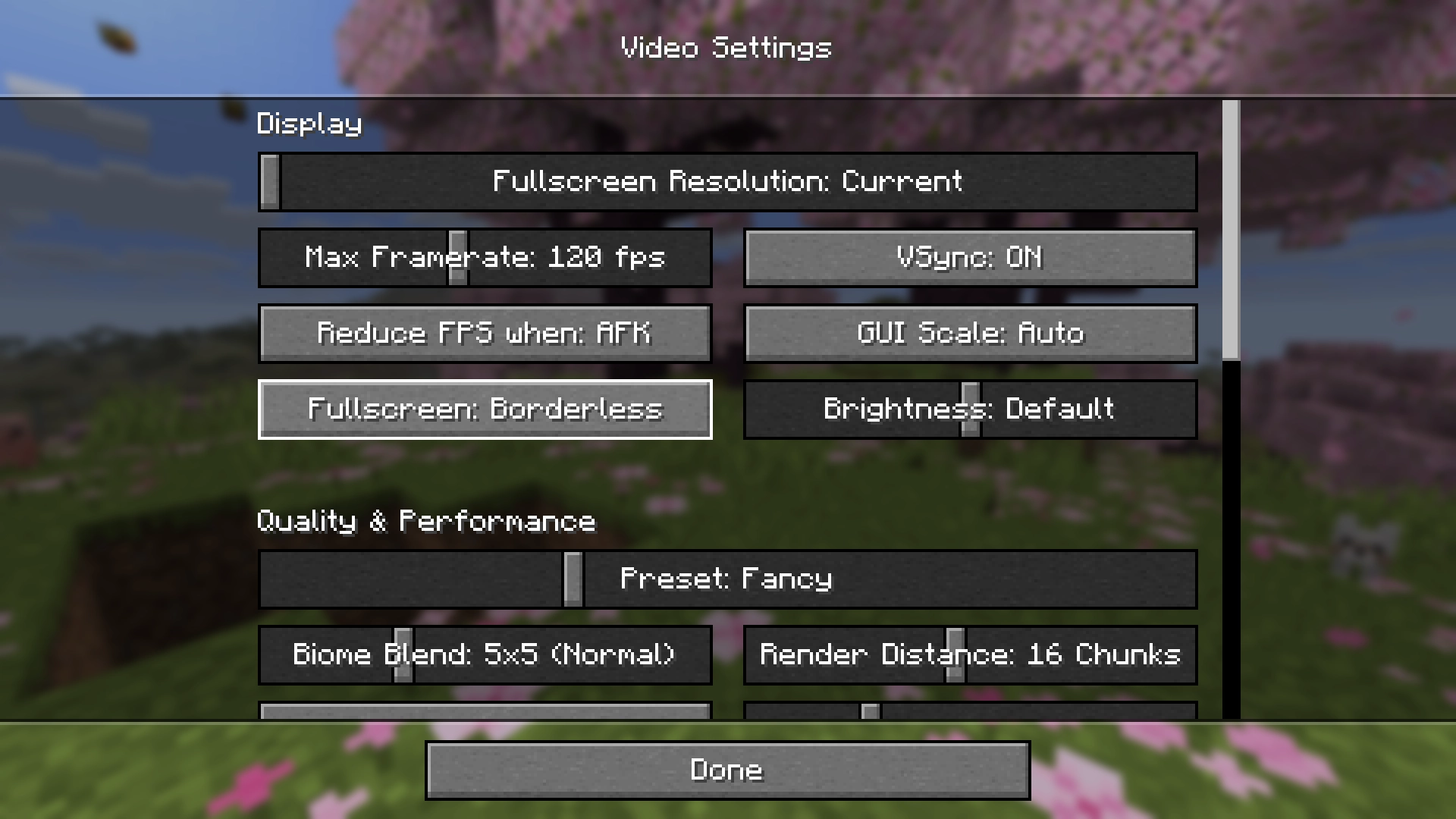
Vanilla Minecraft normally offers fullscreen as an on/off switch. CWB adds a third state—Borderless—and lets you choose which implementation should provide that state on Windows, Linux or macOS. It also makes Borderless the default preferred mode for the F11 shortcut.
This is most useful on a multi-monitor setup, while streaming, when checking a browser or Discord between actions, or when an overlay needs to sit above the game. Borderless behavior is not identical on every desktop. That is why CWB exposes several fullscreen types instead of marketing one magic setting.
- Client only: do not install it on a dedicated server. Each player can choose it independently.
- One universal player JAR: the exact 4.1.0 file is tagged for Fabric, Quilt, Forge and NeoForge.
- No required library: YACL or Cloth Config is optional and only adds a graphical configuration screen.
- Not a performance mod: platform types have different latency, focus, capture and compatibility tradeoffs.
- Use one borderless mod: CWB explicitly declares alternative borderless/window implementations incompatible.
Download Cubes Without Borders 4.1.0
Player file: cwb-4.1.0+26.2.jar
File size: 91,405 bytes
SHA-256: 3123c15a5840e2bc5f44a5cc1b4785f75e96bdb903fd5dc901d10e08e53faaaa
License: MIT, copyright 2024–2026 Kira NT
Download the universal 4.1.0 JAR
Also available for license/source compliance: MIT license, official source JAR, and complete v4.1.0 source tag ZIP.
The player download is a Java .jar, not a ZIP to extract and not a file to run by double-clicking. A launcher instance using the matching game version and loader loads it from the mods folder.
Exact compatibility matrix
| Loader | Exact declared line | Player file |
|---|---|---|
| Fabric | Minecraft 26.2, Fabric Loader 0.17.0 or newer, Java 25+ | cwb-4.1.0+26.2.jar |
| Quilt | Minecraft 26.2; the release is tagged Quilt, but the JAR does not declare a Quilt minimum | Same universal JAR |
| Forge | Minecraft 26.2, Forge 65.0.0 or newer, Java 25+ | Same universal JAR |
| NeoForge | Minecraft 26.2, NeoForge 26.2.0.0-beta or newer, Java 25+ | Same universal JAR |
Do not mix loaders in one instance. “Universal” means this CWB build contains metadata for all four supported loader families; it does not make Fabric mods load on Forge or vice versa.
How to install it
- Back up the instance. Copy anything irreplaceable, especially if this is an existing modpack.
- Create or select a Minecraft Java 26.2 instance with one supported loader. Confirm that the launcher runs it once before adding mods.
- Confirm the Java runtime. The exact manifest requires Java 25 or newer.
- Open that instance's folder. Use the launcher's “open folder” command so you do not accidentally edit a different profile.
- Put
cwb-4.1.0+26.2.jarinmods. Create that folder only if the loader expects it and has not made it yet. Do not extract the JAR. - Remove other borderless-window mods. The exact release marks a long list of alternatives incompatible.
- Launch and open Video Settings. The Fullscreen control should now have Off, On and Borderless values.
Fabric players who want a loader walkthrough can use the MineBrush Fabric mod installation guide. That guide is not a Forge, NeoForge or Quilt tutorial.
Optional configuration helpers
CWB itself needs no dependency. A settings library is only needed if you want its graphical config screen:
- Mod Menu 20.0.1 is a convenient config entry on Fabric/Quilt.
- YACL 3.9.6+26.2 has separate Fabric and NeoForge files.
- Cloth Config 26.2.155 likewise has loader-specific Fabric and NeoForge files.
These helpers are optional external downloads. Match the helper's Minecraft version and loader to your instance. Without YACL or Cloth Config, close the game and edit config/cwb.json directly.
How to enable Borderless
- Open Options → Video Settings.
- Find the setting named Fullscreen.
- Cycle it to Borderless.
- Click away to your second display or place another window above Minecraft to test focus behavior.
F11 uses preferredFullscreenMode. Its default is BORDERLESS, so pressing F11 from windowed play should enter borderless mode. To request borderless immediately at startup, add the documented --borderless argument to the game instance.
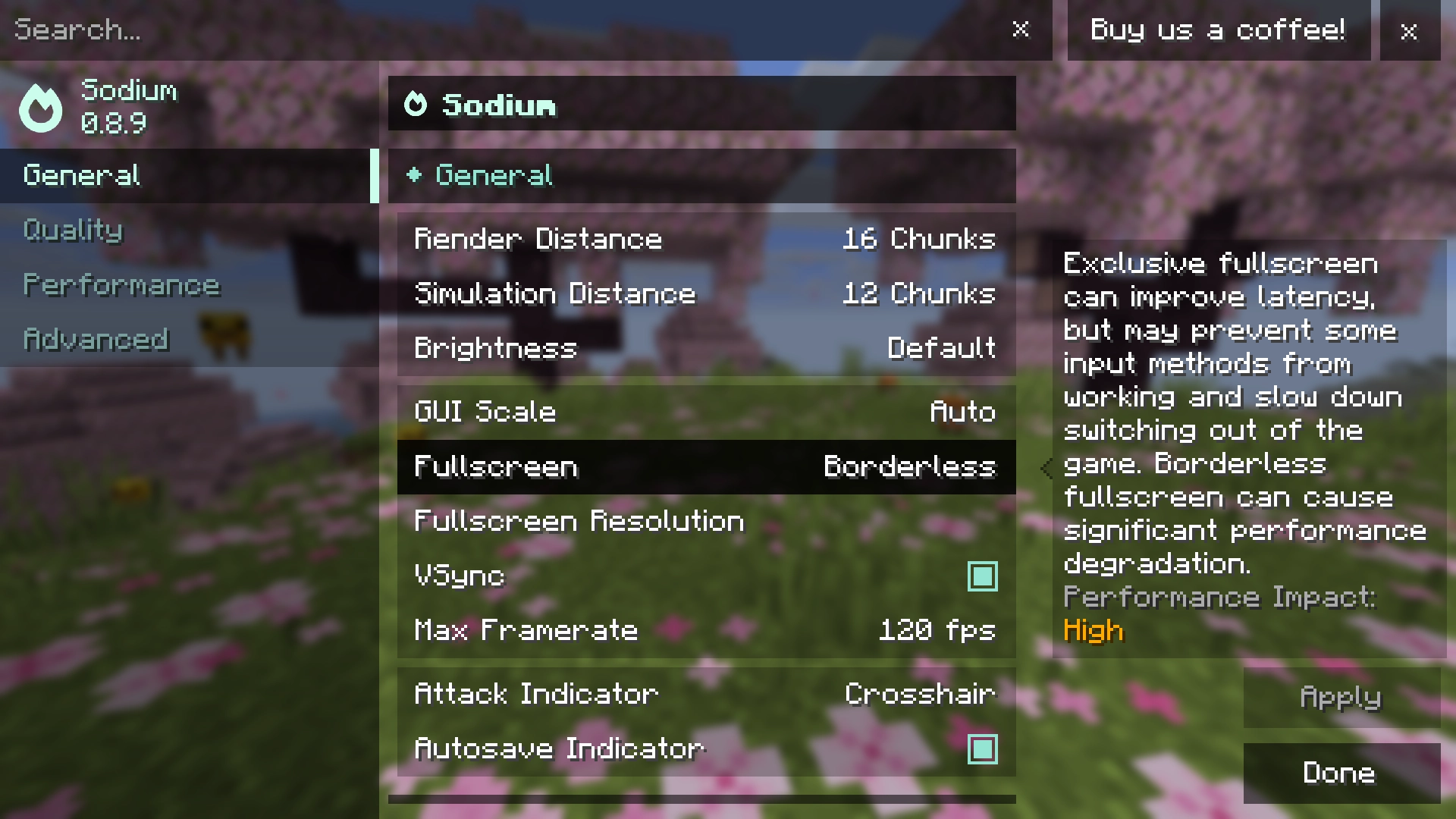
Using Sodium? Sodium's option called “Fullscreen Mode” is not CWB's Off/On/Borderless control. Press Ctrl+Shift+P from Sodium's screen to open vanilla Video Settings, then change the setting named Fullscreen there. The creator documents that shortcut for unsupported Sodium or forks.
Choose the right fullscreen type
The visible mode and its underlying implementation are separate settings. Start with the platform default. Change the type only when you have a concrete problem such as a disappearing cursor, a blinking monitor, an overlay that will not stack, or unacceptable latency.
| Type | Best use | Creator-documented tradeoff |
|---|---|---|
minecraft:default |
Exclusive fullscreen baseline | Minimal latency, but Minecraft minimizes when focus is lost. |
minecraft:hybrid |
Middle ground | Better overlay/input-method compatibility than exclusive behavior. |
minecraft:windowed |
Recommended Windows borderless route | Little or no penalty on supported Windows systems, but may blink. The creator warns it performs badly on other platforms. |
windows:windowed |
Windows fallback for blinking or invisible cursor | True windowed fullscreen; can add latency/performance cost and may cause severe performance degradation on some setups. |
linux:borderless |
Default Linux borderless route | The creator lists no known inherent downside, though desktop window rules still affect stacking. |
macos:borderless |
macOS borderless route | Decent compatibility, with higher latency from implicit VSync. |
The defaults select minecraft:windowed on Windows, linux:borderless on Linux and macos:borderless on macOS. There is no honest one-number latency promise here: monitor mode, desktop compositor, capture software and drivers all matter.
Configuration reference
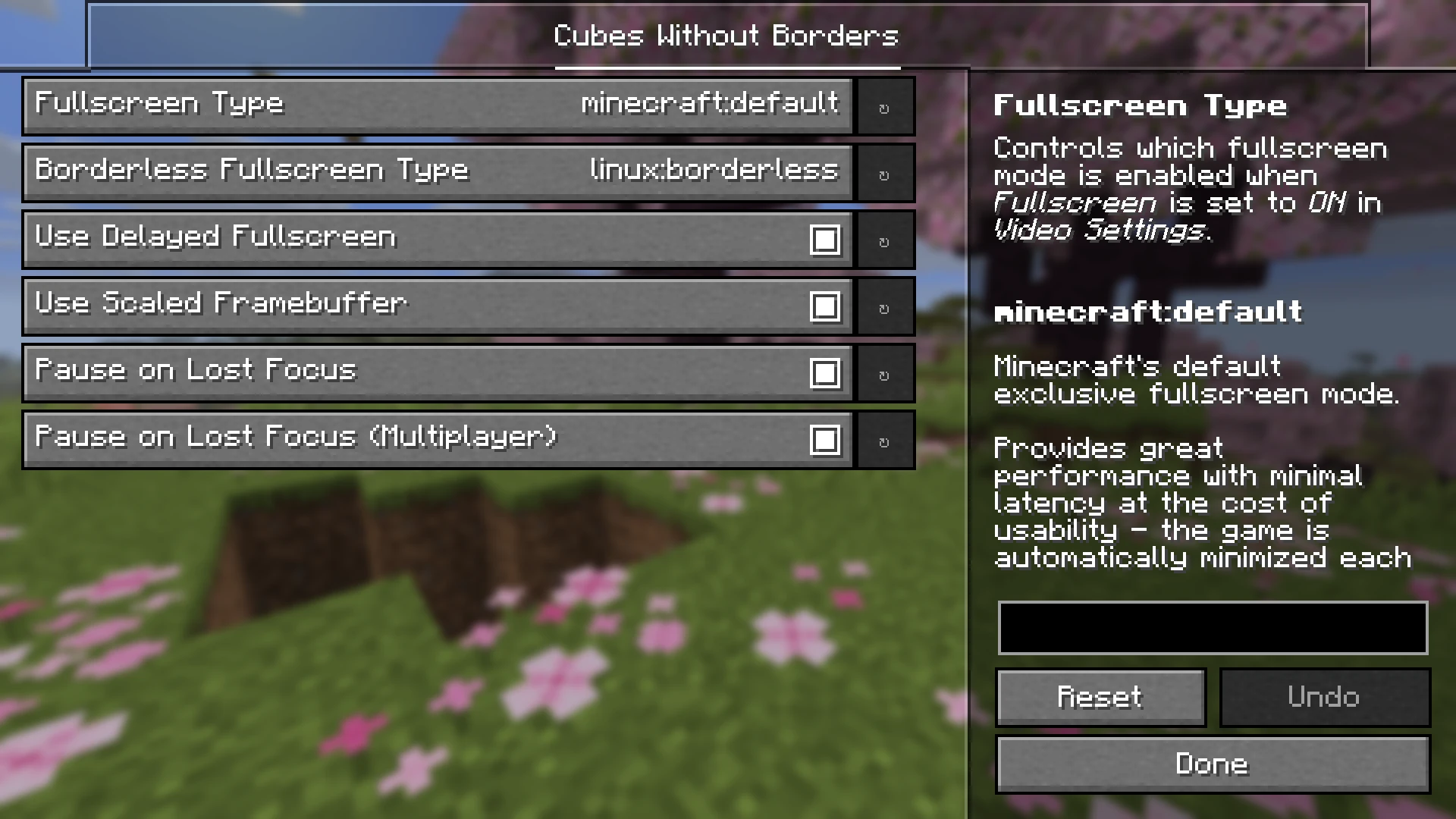
config/cwb.json. Screenshot: Kira-NT, MIT.Close Minecraft before hand-editing config/cwb.json. Keep valid JSON punctuation and use the exact uppercase enum values shown below.
| Key | Default | What it controls |
|---|---|---|
fullscreenMode |
OFF |
Startup mode: OFF, ON or BORDERLESS. |
preferredFullscreenMode |
BORDERLESS |
Mode selected by the F11 fullscreen shortcut. |
useDelayedFullscreen |
true |
Delays initial fullscreen activation. New in 4.1.0 as the default startup path. |
useScaledFramebuffer |
true |
Uses a framebuffer scaled to the active window/display behavior. |
pauseOnLostFocusDuringMultiplayer |
true |
Controls pause-on-focus-loss behavior during multiplayer alongside vanilla pauseOnLostFocus in options.txt. |
fullscreenType |
minecraft:default |
Implementation for regular fullscreen. |
borderlessFullscreenType |
minecraft:hybrid |
General borderless implementation before an OS-specific override. |
| Linux override | linux:borderless |
Borderless implementation selected on Linux. |
| macOS override | macos:borderless |
Borderless implementation selected on macOS. |
| Windows override | minecraft:windowed |
Borderless implementation selected on Windows. |
Version 4.1.0 enables delayed initial fullscreen by default. The creator says this makes startup smoother and helps some Windows systems avoid a “Recovering from unsupported resolution” popup. It is not a universal graphics-driver fix; keep it enabled first, then troubleshoot the driver and fullscreen type if the popup remains.
Mods you should not combine with CWB
The exact 4.1.0 release declares these alternative window/fullscreen projects incompatible: Fullscreen Borderless; Borderless Mining; Borderless Mining Reworked; Borderless Mining Revived; FrameVoid; SimpleQoL; Borderless Windowed; Borderless Mining Updated; Borderless Fullscreen; Perfect Presentation; WindowedFullscreen; Concentration; Borderless Windowed Vulkan; Windows Titlebar Delete; Borderless; Deborder; BorderlessFullscreen; Borderless Windows Fullscreen; Borderless Window; Gyo; and Fullscreen Windowed (mod ID fw).
This is an implementation conflict, not a load-order puzzle. Keep CWB or the alternative, not both. A modpack may rename the visible project, so search the mods folder and launcher list by both project name and mod ID.
Troubleshooting
Borderless is missing from Video Settings
- Confirm the title screen is Minecraft Java 26.2 and the instance uses a supported loader.
- Confirm the main JAR is directly inside that instance's
modsfolder, not extracted or nested inside another folder. - Check
latest.logfor mod IDcwband for loader/version errors. - If Sodium replaces the screen, press Ctrl+Shift+P and check vanilla Video Settings.
The game still minimizes when another monitor is clicked
First confirm the Fullscreen setting itself says Borderless. Do not confuse it with Sodium's separate “Fullscreen Mode” option. Remove alternative borderless mods, restart, and test again with CWB alone. Finally confirm that borderlessFullscreenType or the OS override has not been changed back to exclusive minecraft:default.
The cursor is invisible on Windows
The creator documents windows:windowed as a fallback. Also test without Medal, OBS game/window capture, Windows pointer trails and other cursor overlays, then update the graphics driver. That fallback may cost performance or latency, so compare it against the default minecraft:windowed after the cursor problem is isolated.
Picture-in-Picture will not stay above Minecraft on Linux
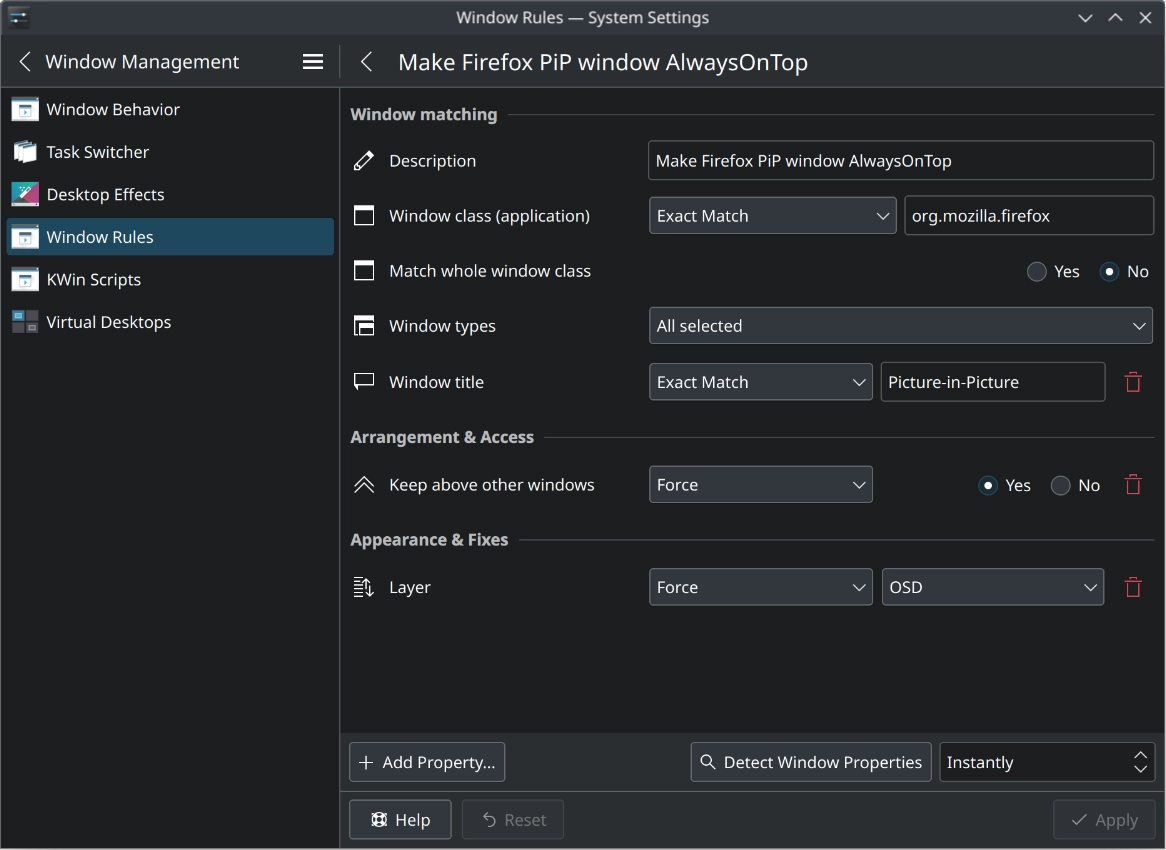
Window stacking belongs partly to the desktop environment. KDE Plasma users may need a window rule for the PiP window rather than another Minecraft mod.
Startup shows an unsupported-resolution recovery message
Keep useDelayedFullscreen set to true; that is the 4.1.0 default designed to help this case. If it persists, launch once in windowed mode, verify the selected Minecraft resolution/monitor, update the graphics driver and then enable Borderless again.
The game crashes during launch
Return to a minimal instance containing the supported loader and CWB only. Verify Minecraft 26.2, Java 25+, the loader minimum and the player JAR hash. Optional config libraries must match the instance's loader; a Fabric YACL or Cloth file does not belong in NeoForge. Add other client mods back in small batches only after the clean instance opens.
Five-minute acceptance test
- Launch the intended 26.2 profile and confirm CWB appears in the mod list or log.
- Set Video Settings → Fullscreen to Borderless.
- Press F11 twice and confirm it returns to Borderless as the preferred mode.
- Click another monitor, return to the game and check that the window stayed visible.
- Test the overlay, capture tool or PiP workflow you actually use.
- Restart once to validate delayed startup and config persistence.
For a real comparison, keep the same resolution, frame cap and VSync settings while switching types. A capture program or compositor can change the result, so test with the same background tools you normally run.
Updating or removing CWB
Before updating, compare the new release's Minecraft line, loaders, Java requirement and changelog. Back up config/cwb.json, remove the old CWB JAR, add exactly one new one and retest the Fullscreen control. Do not leave two CWB versions in mods.
To remove the mod, close Minecraft, delete only the CWB JAR from this instance and optionally remove config/cwb.json after saving a copy. The mod is client-side; removing it does not convert or damage worlds. Video/fullscreen preferences may still remain in vanilla options.txt.
Cubes Without Borders FAQ
What is the current Cubes Without Borders version?
The current Modrinth release checked August 27, 2026 is 4.1.0+26.2, published June 21, 2026 for Minecraft Java 26.2.
Which loaders does the 4.1.0 JAR support?
The same cwb-4.1.0+26.2.jar is listed for Fabric, Quilt, Forge and NeoForge. Do not look for four separate player files.
Does Cubes Without Borders need any library mods?
No library is required. YACL or Cloth Config adds a graphical config screen, and Mod Menu is useful on Fabric or Quilt. Without them, edit config/cwb.json.
Does it need to be installed on a server?
No. Modrinth and the Fabric manifest mark it client-side, with server use unsupported. Every player chooses independently whether to install it.
How do I enable borderless fullscreen?
Open Video Settings and change the setting named Fullscreen to Borderless. F11 then uses the preferred fullscreen mode, which defaults to Borderless.
Why does Minecraft still minimize when I click another monitor?
You may have changed Sodium's misleading Fullscreen Mode option instead of CWB's Fullscreen setting, or another borderless mod is conflicting. Open vanilla Video Settings with Ctrl+Shift+P from Sodium and select Borderless there.
Which fullscreen type should Windows users try?
The creator recommends minecraft:windowed as the default low-latency route. If it blinks or the cursor disappears, try windows:windowed, which is true windowed fullscreen but may have more latency or performance cost.
Which fullscreen type is intended for Linux?
linux:borderless is the creator's default Linux borderless type. Picture-in-Picture stacking can still depend on the desktop environment; KDE users may need a window rule.
Does borderless fullscreen reduce input latency?
The creator documents platform-specific tradeoffs, not a universal reduction. Exclusive mode is the minimal-latency baseline; Windows minecraft:windowed is designed to keep borderless benefits with little or no penalty on supported systems.
What changed in version 4.1.0?
Initial fullscreen activation is delayed by default through useDelayedFullscreen. The creator says this smooths startup and helps some Windows systems avoid an unsupported-resolution recovery popup.
Can I launch directly into borderless mode?
Yes. Add the documented --borderless startup flag to the game instance, or set fullscreenMode to BORDERLESS in cwb.json.
Can I use Cubes Without Borders with Borderless Mining or another borderless mod?
No. The release declares a long list of alternative borderless/window mods incompatible. Keep one implementation only; remove the alternative instead of trying to solve it with load order.
Creator, source and license
Cubes Without Borders is created by Kira-NT. The exact binary and locally included creator screenshots were traced to the official v4.1.0 repository and are covered by its MIT license. MineBrush preserves the license and supplies the exact source materials next to the player file.
Browse more tested download explainers in Minecraft mods, or return to the Minecraft Java & PC hub.
PLAYER QUESTIONS
Discussion
Include the exact edition, version and step when asking for help.